Close Menu
MyAppsPlus

    Subscribe to Updates

    Get the latest creative news from FooBar about art, design and business.

    What's Hot

    SolanaLabs Launches leapxyz Mobile App for Tokenized Trading

    November 7, 2026

    macOS 27.3 Golden Gate public beta 1 now available, here’s what’s new

    November 7, 2026

    Social security crisis looms as AI, automation transform Nigeria’s workplace

    November 7, 2026
    Facebook X (Twitter) Instagram
    Facebook X (Twitter) Instagram
    MyAppsPlusMyAppsPlus
    Saturday, November 7
    • Home
    • Breaking Tech
    • Apps & Software
    • AI & Automation
    • Android
    • iPhone & iOS
    • More
      • Reviews
      • How-To Guides
      • Deals & Discounts
      • Shop
    MyAppsPlus
    Home»Breaking Tech»How to use your old tablet to build a live streaming setup
    Breaking Tech

    How to use your old tablet to build a live streaming setup

    myappsplusBy myappsplusNovember 7, 2026004 Mins Read
    Share Facebook Twitter Pinterest Copy Link LinkedIn Tumblr Email Telegram WhatsApp
    Follow Us
    Google News Flipboard
    How to use your old tablet to build a live streaming setup
    Share
    Facebook Twitter LinkedIn Pinterest Email Copy Link

    Repurpose your old iPad or Android tablet by turning it into a virtual Stream Deck.

    As tablets age, people tend to leave them sitting in a drawer, especially after upgrading to a new one. But if you stream on Twitch or YouTube, the good news is that there’s a neat way to give your old tablet a new lease on life by turning it into a Stream Deck equivalent. Even better, it works with both iPads and Android tablets. 

    For those unfamiliar, Stream Deck is a popular physical controller for streaming with programmable buttons, each with a small screen. This opens up a world of possibilities for automating actions on PCs or Macs, such as opening a specific app, muting your mic or switching between cameras. This makes a Stream Deck one of the many game streaming essentials you’ll want for your setup.

    Elgato, the company behind Stream Deck, already offers a range of Stream Deck hardware and software, but it now offers a mobile app that essentially turns phones and tablets into controllers — no need to buy dedicated hardware. And what makes it particularly appealing is that the app runs on versions as old as iPadOS 15 and Android 9, so most tablets launched in the last few years should run it just fine.

    How to turn your old tablet into a Stream Deck
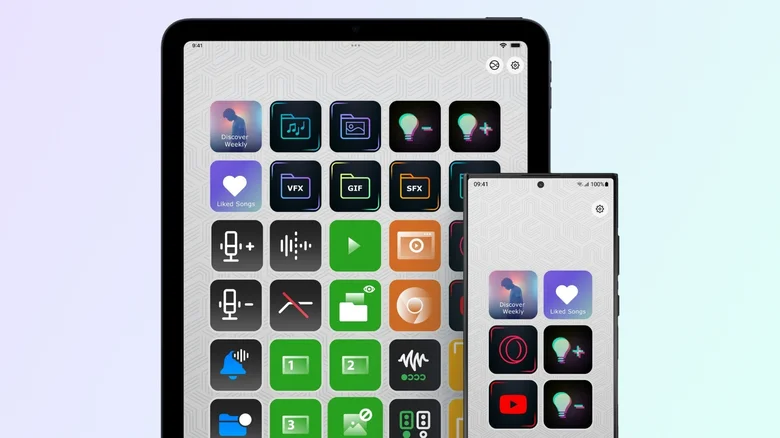
    The Stream Deck Mobile app running on a tablet and a phone.

    Turning your iPad or Android tablet into a Stream Deck device is quite easy: all you need to do is download the official app on your computer (it requires Windows 10 or macOS 10.15 and later) and on your tablet from the App Store or Google Play. Once the app is installed on your computer, open the device picker in the top-left corner and click “Add Mobile Device” to generate a QR code. Scan the code using the Stream Deck app on your tablet to finish pairing and setup. It usually takes no more than five minutes.

    One thing to keep in mind is that both devices must be on the same local network, so it won’t work if your tablet is connected to 4G or 5G, for example. If communication between your computer and tablet fails, make sure your computer’s firewall or antivirus software isn’t blocking the connection. On Windows, users may need to change their network profile from Public to Private. Apple users have an advantage here, since the Stream Deck apps for Mac and iPad can pair over USB instead of Wi-Fi. This not only makes the process a lot easier but also ensures a more stable connection with lower latency when you press a button.

    Once you’ve paired both your computer and tablet, you can customize the app with the controls you want. Everything works as it would on a Stream Deck hardware, except your tablet is now the dashboard, and you can drag actions from the panel directly onto the empty keys. For streamers,  Elgato has plugins for essentials like OBS Studio, Twitch, YouTube and even Spotify. You’ll also find support for smart lights from Philips Hue, Nanoleaf and Govee.

    Is Stream Deck Mobile Pro worth paying for?
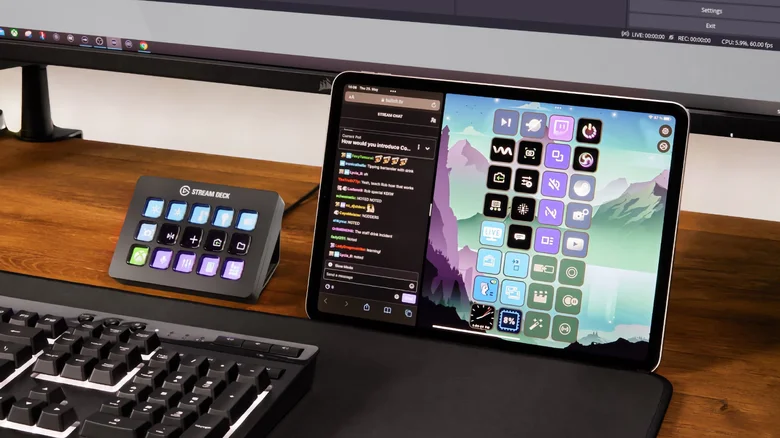
    A Stream Deck controller next to a tablet running the Stream Deck Mobile app.

    The free version of the Stream Deck mobile app gives you up to six buttons and unlimited access to actions with no trial period. That’s the same number of buttons you’ll find on the Stream Deck Mini, Elgato’s smallest controller, and it’s enough to cover basic actions like starting a livestream or muting your mic.

    If you need more controls — having only six buttons on a tablet can seem like a waste of space — you can pay for Stream Deck Mobile Pro. This increases the limit to 64 buttons, which is more than the Stream Deck + XL, and unlocks features like different grid options and custom backgrounds. On the iPad, you can even use Split View to open two different keypads side by side. Subscriptions are $2.99 per month or $24.99 yearly. Elgato also offers a lifetime license for $49.99, which might be worth it if you stream regularly.

    If you want to use your tablet as a Stream Deck, look for an inexpensive tablet stand so it’s always within sight, and keep it plugged in to prevent the battery from dying during a livestream. You’ll also want the screen to stay on so you don’t lose access to your buttons. On an iPad, you can set Auto-Lock to “Never” under Settings > Display & Brightness. Android tablets will also have a similar option in their display settings.

    build Computing live tablet Your
    Follow on Google News Follow on Flipboard
    Share. Facebook Twitter Pinterest LinkedIn Tumblr Email Copy Link
    myappsplus
    • Website

    Related Posts

    Windows PowerToys can automate some of your more tedious PC tasks

    November 7, 2026

    Adobe is giving start-ups 12 months of free access to its top AI tools, including Firefly and Acrobat

    November 7, 2026

    What’s the point of buying a touchscreen laptop when you could just get a tablet?

    November 7, 2026
    Add A Comment
    Leave A Reply Cancel Reply

    Top Posts

    Cathay Pacific tests Google AI that dramatically cuts airplane contrails — tiny altitude shifts slash environmental impact by 40% in early trials

    September 8, 2026138 Views

    Save on your groceries, gas, and holiday shopping with this $15 BJ’s membership (Reg. $60) 

    November 4, 202627 Views

    Apple is making Creator Studio an even better deal with new AI features and creative tools

    October 28, 202619 Views
    Latest Reviews

    iPhone Duo?

    myappsplusSeptember 5, 2026

    From eating the elderly to selling kids, Afterworld gives you the freedom to do terrible things in the post-apocalypse — ‘We shouldn’t judge the player’ says director

    myappsplusSeptember 5, 2026

    This Dell 16 laptop is ideal for university, especially at the lowest price we’ve seen

    myappsplusSeptember 5, 2026
    Stay In Touch
    • Facebook
    • YouTube
    • TikTok
    • WhatsApp
    • Twitter
    • Instagram

    Subscribe to Updates

    Get the latest tech news from FooBar about tech, design and biz.

    Most Popular

    iPhone Duo?

    September 5, 20260 Views

    From eating the elderly to selling kids, Afterworld gives you the freedom to do terrible things in the post-apocalypse — ‘We shouldn’t judge the player’ says director

    September 5, 20260 Views

    I just went hands-on with the Odyss N1 — a sleek AI necklace that automatically tracks everything you eat

    September 5, 20260 Views
    Our Picks

    SolanaLabs Launches leapxyz Mobile App for Tokenized Trading

    November 7, 2026

    macOS 27.3 Golden Gate public beta 1 now available, here’s what’s new

    November 7, 2026

    Social security crisis looms as AI, automation transform Nigeria’s workplace

    November 7, 2026

    Subscribe to Updates

    Subscribe to our newsletter and get the latest tech news, app updates, AI trends, smartphone reviews, and exclusive deals delivered straight to your inbox.

    Facebook X (Twitter) Instagram Pinterest
    • About Us
    • Get In Touch
    • Disclaimer
    • Privacy Policy
    • Terms & Conditions
    © 2026 MyAppsPlus. All Rights Reserved.

    Type above and press Enter to search. Press Esc to cancel.