Close Menu
MyAppsPlus

    Subscribe to Updates

    Get the latest creative news from FooBar about art, design and business.

    What's Hot

    How to watch Melbourne Cup 2026: FREE streams, TV channels for Flemington horse racing

    November 3, 2026

    The reason why some iPhone calls don’t have a decline option, and others do

    November 3, 2026

    A large book-style foldable with room for improvement

    November 3, 2026
    Facebook X (Twitter) Instagram
    Facebook X (Twitter) Instagram
    MyAppsPlusMyAppsPlus
    Tuesday, November 3
    • Home
    • Breaking Tech
    • Apps & Software
    • AI & Automation
    • Android
    • iPhone & iOS
    • More
      • Reviews
      • How-To Guides
      • Deals & Discounts
      • Shop
    MyAppsPlus
    Home»Apps & Software»Here’s everything new in Android 17 QPR2 Beta 5 [Gallery]
    Apps & Software

    Here’s everything new in Android 17 QPR2 Beta 5 [Gallery]

    myappsplusBy myappsplusSeptember 16, 2026013 Mins Read
    Share Facebook Twitter Pinterest Copy Link LinkedIn Tumblr Email Telegram WhatsApp
    Follow Us
    Google News Flipboard
    Here’s everything new in Android 17 QPR2 Beta 5 [Gallery]
    Share
    Facebook Twitter LinkedIn Pinterest Email Copy Link

    Android 17 QPR2 Beta 5 is rolling out today to continue the development cycle ahead of the stable December launch.

    Over the coming hours, we’ll dive into all of Android 17 QPR2 Beta 5’s new features and every single change. (The newest updates will be at the top of this list. Be sure to check back often and tell us what you find in the comments below.) Android 17 QPR2 Beta 4 screenshots appear on the left and Android 17 QPR2 Beta 5 on the right.

    If you want to quickly install Android 17 QPR2 Beta 5 on your compatible Pixel 6a, Pixel 7, Pixel 7 Pro, Pixel 7a, Pixel Tablet, Pixel Fold, Pixel 8, Pixel 8 Pro, Pixel 8a, Pixel 9, Pixel 9 Pro, Pixel 9 Pro XL, Pixel 9 Pro Fold, Pixel 9a, Pixel 10, Pixel 10 Pro, Pixel 10 Pro XL, Pixel 10 Pro Fold, Pixel 10a, Pixel 11, Pixel 11 Pro, Pixel 11 Pro XL, and Pixel 11 Pro Fold be sure to check out our step-by-step guide.

    2x Proactive Assistance

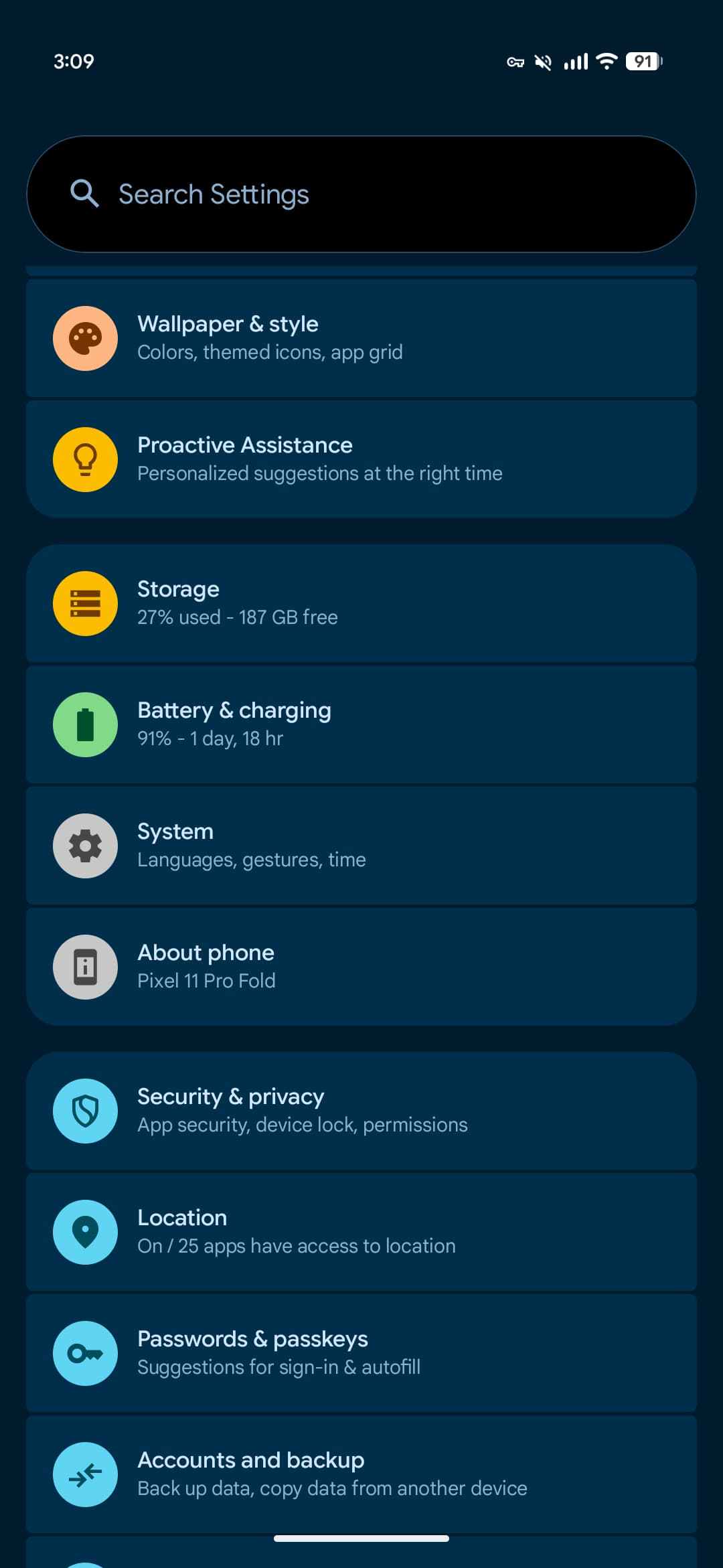
    On the Pixel 10 and 11 series, we’re seeing a second “Proactive Assistance” menu appear in Settings. The original (as debuted on the Pixel 11) is near the bottom of the list with a blue icon, while the second appears higher with a yellow light bulb icon. Their descriptions are similar, but not identical. The explicit mention of Gemini is the difference.

    • Blue: “Get personalized suggestions from Gemini at the right time”
    • Yellow: “Personalized suggestions at the right time”
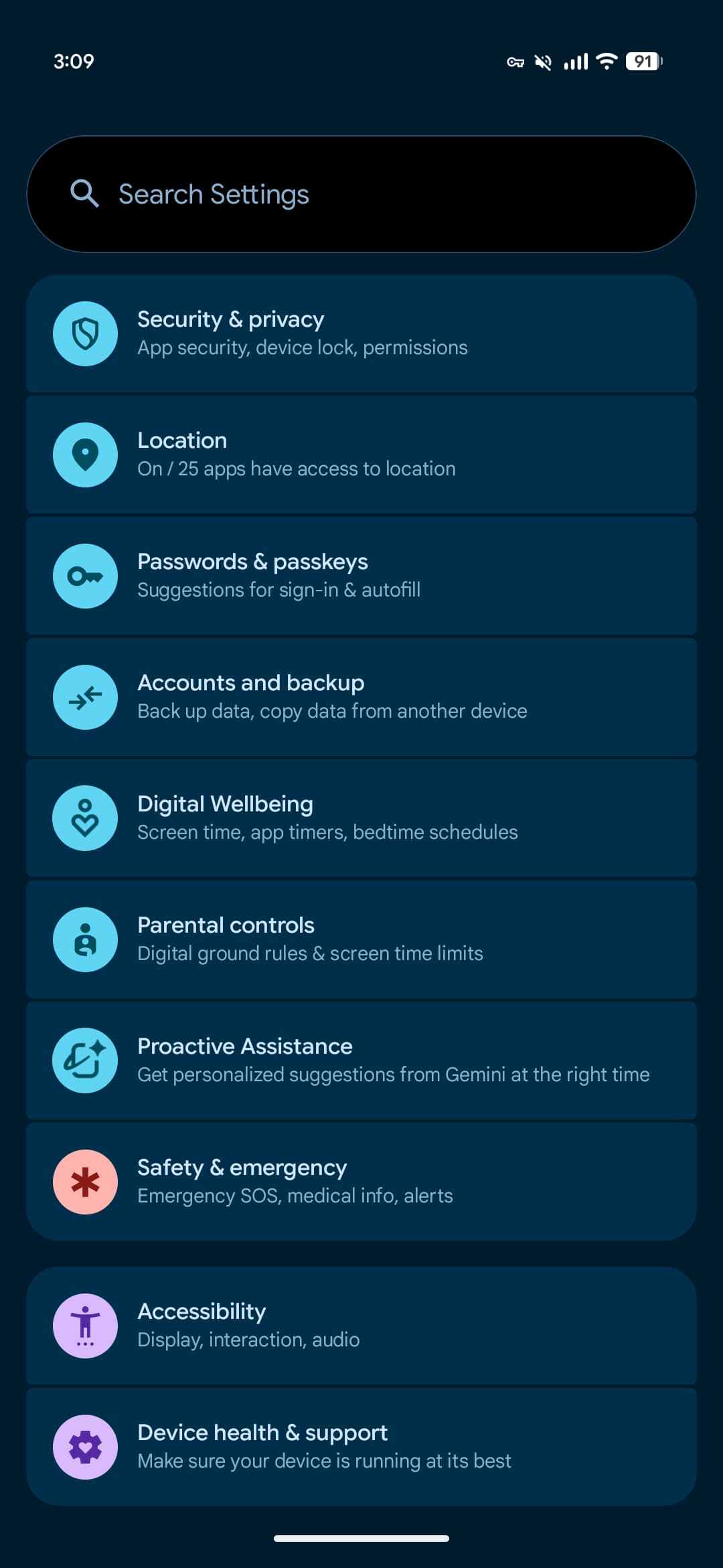

    Blue (original) vs. yellow (QPR2)

    From the explanations, both settings pages appear to reference the same capability. Toggling off the original (blue) menu also disables the new switch (yellow).
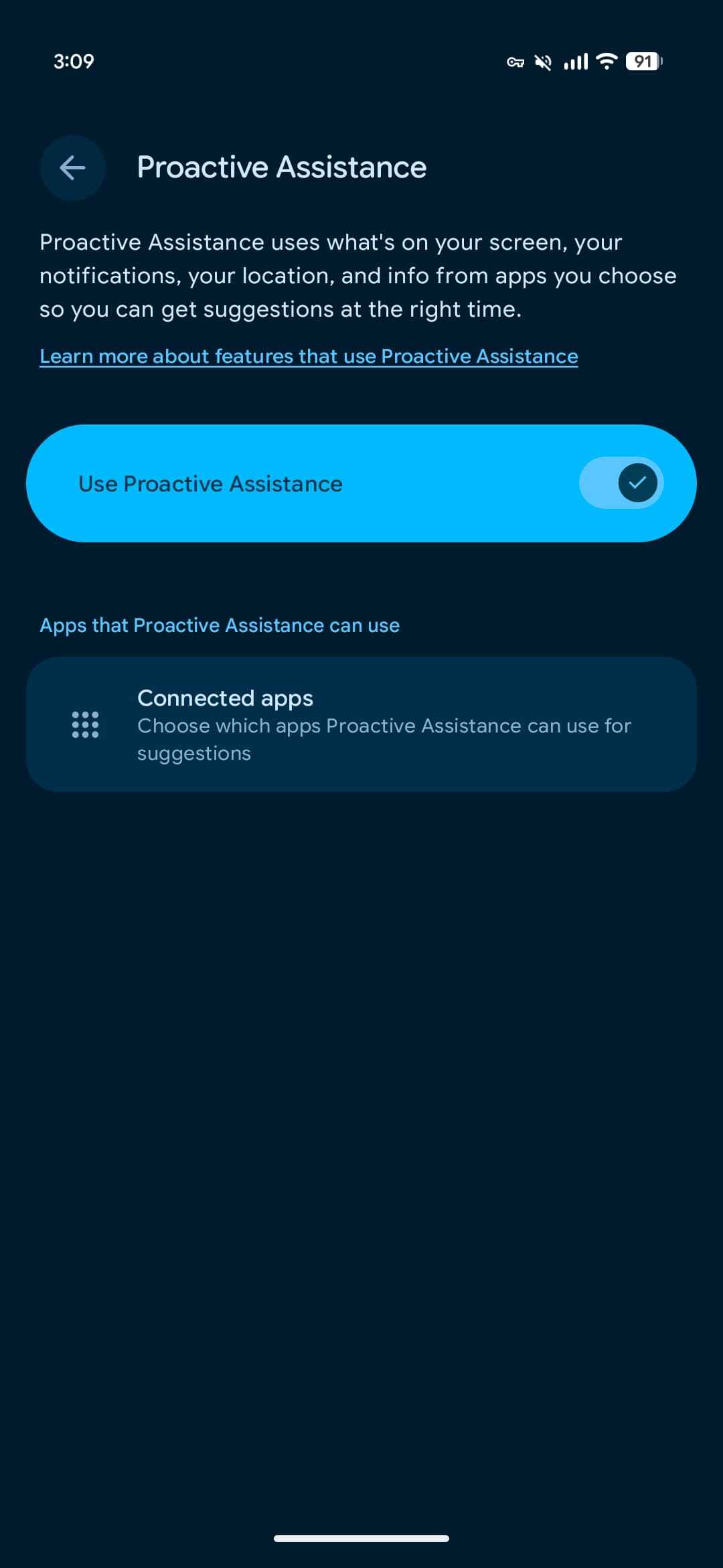
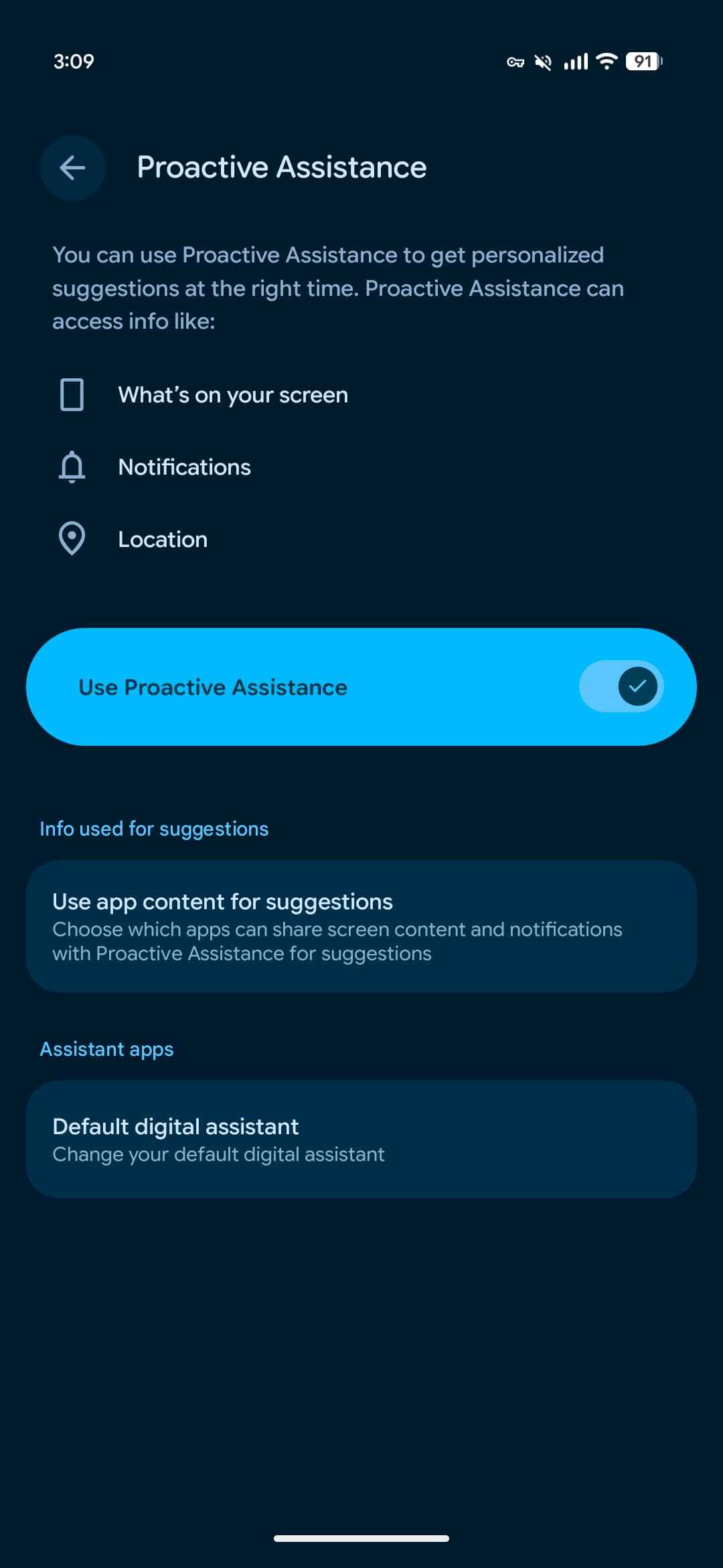

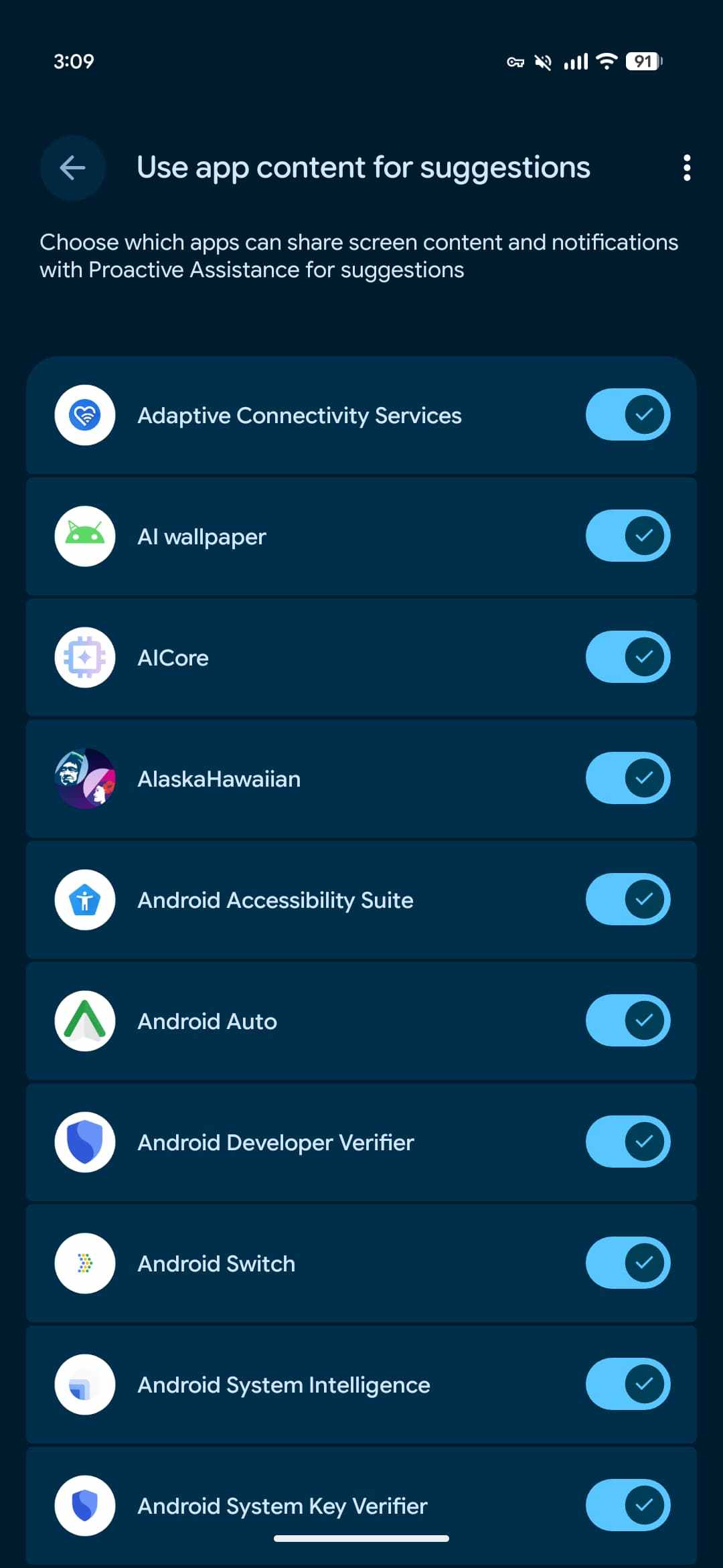
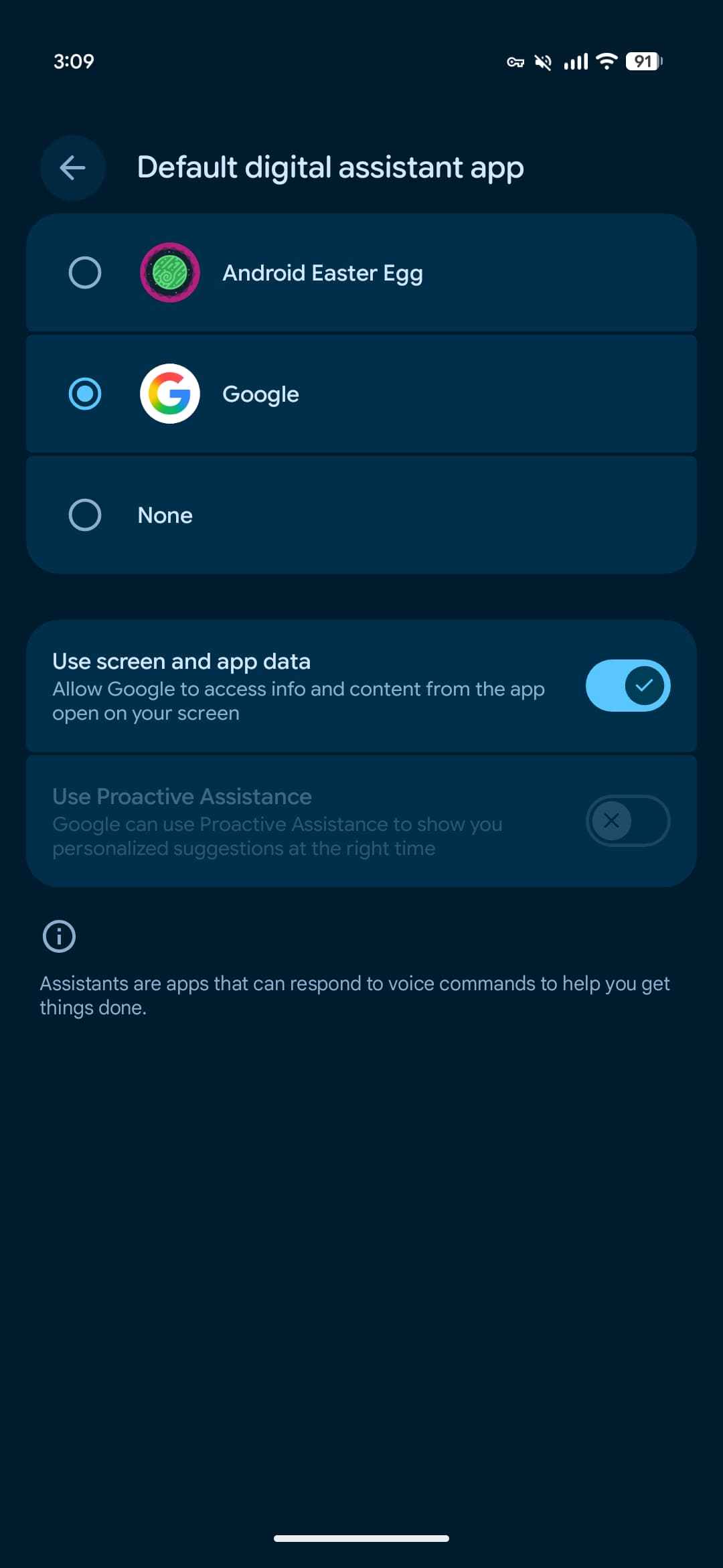
    However, the new menu has a “Use app content for suggestions” page that lets you enable/disable “which apps can share screen content and notifications with Proactive Assistance for suggestions.” There’s also a shortcut to the “Default digital assistant app” page.

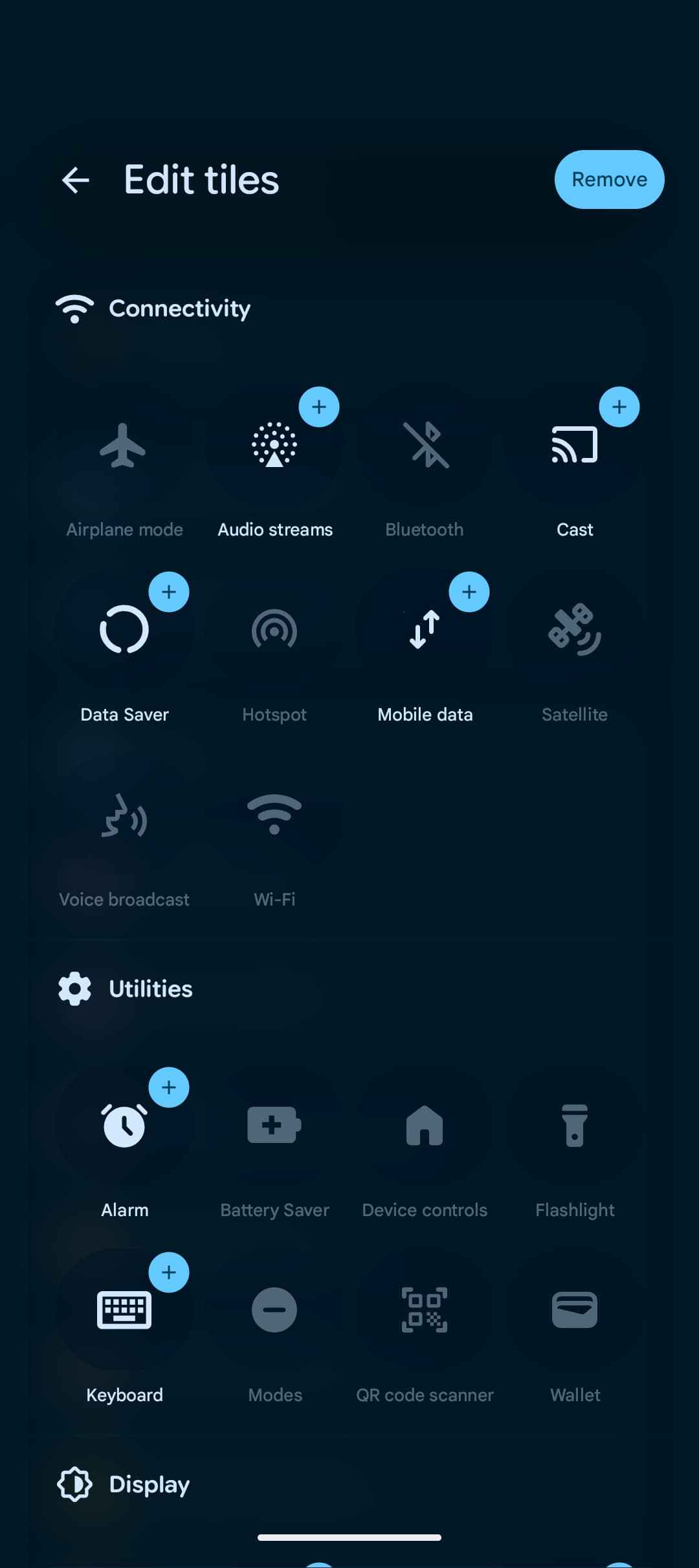
    Quick Settings: New Audio streams Tile + Layout customization removed

    • Unclear if layout customization will return before the final QPR2 release, or if Google decided to not proceed with the capability
    • Additionally, Voice broadcast Tile now under Connectivity instead of system apps
    Fixes

    • Changing a Bluetooth device type in settings failed to update its icon visually. (Issue #516071134)
    • A system stability issue that caused unexpected device reboots during continuous UI scrolling in media-heavy applications. (Issue #544291113)
    • Pressing hardware volume buttons while casting media prevented the system volume slider UI from displaying. (Issue #548145018)
    • Fixed a text-rendering issue that caused unexpected background highlights to appear when typing in search fields, and resolved a navigation routing issue that prevented Private Space from unlocking correctly. (Issue #548285596)
    • Enhanced HDR mode remained enabled despite being turned off in user settings. (Issue #547457910)
    • Launching Google Wallet via the power button shortcut caused the touchscreen to become unresponsive. (Issue #549758084)
    • Camera crashes during panorama processing. (Issue #551069625)
    • Bluetooth audio experiences noise and distortion after completing or answering a call. (Issue #541684282)

    You’re reading 9to5Google — experts who break news about Google and its surrounding ecosystem, day after day. Be sure to check out our homepage for all the latest news, and follow 9to5Google on Twitter, Facebook, and LinkedIn to stay in the loop. Don’t know where to start? Check out our exclusive stories, reviews, how-tos, and subscribe to our YouTube channel

    Android everything Heres News QPR2
    Follow on Google News Follow on Flipboard
    Share. Facebook Twitter Pinterest LinkedIn Tumblr Email Copy Link
    myappsplus
    • Website

    Related Posts

    Tesla Adds Grok Files to Intel Cars in Update 2026.38: Will It Be Enabled?

    November 3, 2026

    If you’re a true Android enthusiast, there’s only one phone worth buying in 2026

    November 3, 2026

    Google takes Dreambeans to India in bid to bring AI-generated personal stories to the masses

    November 3, 2026
    Add A Comment
    Leave A Reply Cancel Reply

    Top Posts

    Cathay Pacific tests Google AI that dramatically cuts airplane contrails — tiny altitude shifts slash environmental impact by 40% in early trials

    September 8, 2026137 Views

    What was the PSX? The souped-up PS2 rarely sold outside of Japan

    September 14, 202617 Views

    Apple is making Creator Studio an even better deal with new AI features and creative tools

    October 28, 202616 Views
    Latest Reviews

    OpenAI warns about how good Astra model is at cracking cybersecurity, releases it anyway because it took ‘years of research and big bets’

    myappsplusSeptember 4, 2026

    Hands-on with Baseus’ tiny PicoGo Pro – a sleek 100W smart display charger for your new Dark Cherry iPhone 18 Pro [Deal]

    myappsplusSeptember 4, 2026

    Judge blocks X rival from using Twitter name, but allows ‘Tweet’ for now

    myappsplusSeptember 4, 2026
    Stay In Touch
    • Facebook
    • YouTube
    • TikTok
    • WhatsApp
    • Twitter
    • Instagram

    Subscribe to Updates

    Get the latest tech news from FooBar about tech, design and biz.

    Most Popular

    This week’s Apple deals for Labor Day: AirPods Pro 3, Studio Display, AirTag 2, Mac mini, more from $5.50

    September 4, 20260 Views

    Beatbot’s Labor Day Sale drops 2026 Sora 70 5-in-1 robotic pool cleaner to $1,099 ($400 off), more from $339

    September 4, 20260 Views

    iPhone Ultra, iPhone 18 Pro, and More: Apple’s September 9 Event Preview

    September 4, 20260 Views
    Our Picks

    How to watch Melbourne Cup 2026: FREE streams, TV channels for Flemington horse racing

    November 3, 2026

    The reason why some iPhone calls don’t have a decline option, and others do

    November 3, 2026

    A large book-style foldable with room for improvement

    November 3, 2026

    Subscribe to Updates

    Subscribe to our newsletter and get the latest tech news, app updates, AI trends, smartphone reviews, and exclusive deals delivered straight to your inbox.

    Facebook X (Twitter) Instagram Pinterest
    • About Us
    • Get In Touch
    • Disclaimer
    • Privacy Policy
    • Terms & Conditions
    © 2026 MyAppsPlus. All Rights Reserved.

    Type above and press Enter to search. Press Esc to cancel.