
Close Menu
MyAppsPlus

    Subscribe to Updates

    Get the latest creative news from FooBar about art, design and business.

    What's Hot

    Google takes Dreambeans to India in bid to bring AI-generated personal stories to the masses

    November 3, 2026

    Google shuts down massive botnet running on 1.3 million Android TV boxes

    November 3, 2026

    How to use your phone’s camera to translate anything

    November 3, 2026
    Facebook X (Twitter) Instagram
    Facebook X (Twitter) Instagram
    MyAppsPlusMyAppsPlus
    Tuesday, November 3
    • Home
    • Breaking Tech
    • Apps & Software
    • AI & Automation
    • Android
    • iPhone & iOS
    • More
      • Reviews
      • How-To Guides
      • Deals & Discounts
      • Shop
    MyAppsPlus
    Home»Android»Google Play Now Takes Apps for Audio Glasses, on the Phone Track, With Samsung’s Pair Reportedly Due in Mid-December
    Android

    Google Play Now Takes Apps for Audio Glasses, on the Phone Track, With Samsung’s Pair Reportedly Due in Mid-December

    myappsplusBy myappsplusNovember 3, 2026003 Mins Read
    Share Facebook Twitter Pinterest Copy Link LinkedIn Tumblr Email Telegram WhatsApp
    Follow Us
    Google News Flipboard
    Google Play Now Takes Apps for Audio Glasses, on the Phone Track, With Samsung’s Pair Reportedly Due in Mid-December
    Share
    Facebook Twitter LinkedIn Pinterest Email Copy Link
    Model in a dark red leather jacket wearing Samsung's Android XR audio glasses in a black Gentle Monster frame, with Gentle Monster, Google and Samsung logos along the bottom
    Gentle Monster’s frame for the Samsung-built audio glasses, which carry a camera, microphones and speakers but no display. Image: Samsung Newsroom

    When VR.org quoted that page on September 28, it said Google Play distribution was “only available for immersive app experiences on XR headsets and wired XR glasses devices,” which left audio glasses with a line about staying tuned and no route to a customer. The same page now says distribution is available for those immersive experiences “and for augmented experiences on audio glasses.” Display glasses inherit the stay-tuned line. Google’s October 28 Android Dev Summit post, which moved several XR libraries to stable, does not mention the change, but the page’s footer dates its last edit to October 20, so the new wording went in sometime in the three weeks after VR.org quoted the old one.
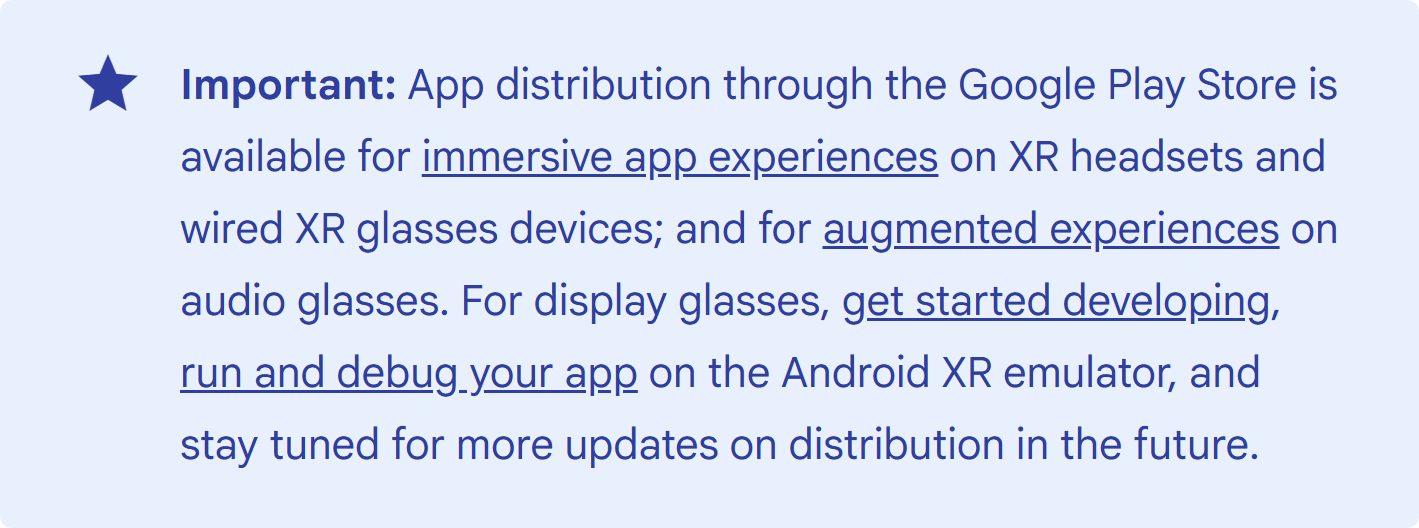
    Screenshot of a blue Important note on Google's Android XR packaging page, saying Google Play distribution is available for immersive app experiences on XR headsets and wired XR glasses, and for augmented experiences on audio glasses, while display glasses should stay tuned
    The note as it reads today. On September 28 it said Play distribution was “only available” for headsets and wired glasses. Screenshot: VR.org, from Android Developers, November 2

    No new track, no new APK

    The mechanics will feel familiar to anyone who has shipped on Android, which is presumably the point. “Play Console doesn’t have a dedicated release track for audio glasses,” the guide says, so glasses features go into your existing phone APK on the mobile track without any specific publishing changes, and the user downloads to a phone that then connects to the glasses. A headset runs a full APK on the device, while audio glasses run a projected activity, an Activity inside your phone app that the system pushes out to the eyewear. You declare it with a requiredDisplayCategory of XR_PROJECTED, and the XR_PROJECTED_LAUNCHER category is what lets Gemini find it when someone says “open” followed by your app’s name.

    The phone side moved in the same window. Google’s Play services release notes for v26.42, dated October 26, carry one line under Device Connectivity: “[Phone] You can now connect Android XR glasses to your phone.”

    Two tiers, and you may already be in the first

    The quality guidelines split apps into Compatible and Differentiated. Compatible takes “zero additional developer effort”: an unmodified Android app qualifies automatically so long as it does not rely on unsupported hardware, and the platform carries its standard notifications and Live Updates to the glasses, read aloud on a pair with no display. That makes the first consequence of this change a slightly strange one, because if you have an Android app on Play that posts notifications, someone may soon hear your copy spoken into their ear by a pair of glasses you never tested against, and nobody on your team will have listened to it.

    Differentiated is the tier that earns a “Differentiated for Glasses” badge, which Google says comes from implementing a projected activity. It leans on three libraries, and their version numbers are where a plan for December gets uncomfortable. ARCore for Jetpack XR reached 1.0.0 on October 21. Jetpack Projected is at 1.0.0-alpha14 and Compose Glimmer at 1.0.0-alpha22, both from that same day, and Google’s own first-activity sample still opts in with @OptIn(ExperimentalProjectedApi::class). Glimmer’s latest release renamed three AlertDialog parameters. An audio-only app can skip Glimmer, since a runtime check on CAPABILITY_VISUAL_UI tells you there is nothing to draw on, but it cannot skip Projected, so a badged listing on Play can now rest on an API surface that is still free to change under you.

    apps Audio Google Play takes
    Follow on Google News Follow on Flipboard
    Share. Facebook Twitter Pinterest LinkedIn Tumblr Email Copy Link
    myappsplus
    • Website

    Related Posts

    Google takes Dreambeans to India in bid to bring AI-generated personal stories to the masses

    November 3, 2026

    Google shuts down massive botnet running on 1.3 million Android TV boxes

    November 3, 2026

    Galaxy S27 Ultra goes head-to-head with Pixel 11 Pro, iPhone 18 Pro, and S26 Ultra in new leak

    November 3, 2026
    Add A Comment
    Leave A Reply Cancel Reply

    Top Posts

    Cathay Pacific tests Google AI that dramatically cuts airplane contrails — tiny altitude shifts slash environmental impact by 40% in early trials

    September 8, 2026137 Views

    What was the PSX? The souped-up PS2 rarely sold outside of Japan

    September 14, 202617 Views

    Apple is making Creator Studio an even better deal with new AI features and creative tools

    October 28, 202616 Views
    Latest Reviews

    OpenAI warns about how good Astra model is at cracking cybersecurity, releases it anyway because it took ‘years of research and big bets’

    myappsplusSeptember 4, 2026

    Hands-on with Baseus’ tiny PicoGo Pro – a sleek 100W smart display charger for your new Dark Cherry iPhone 18 Pro [Deal]

    myappsplusSeptember 4, 2026

    Judge blocks X rival from using Twitter name, but allows ‘Tweet’ for now

    myappsplusSeptember 4, 2026
    Stay In Touch
    • Facebook
    • YouTube
    • TikTok
    • WhatsApp
    • Twitter
    • Instagram

    Subscribe to Updates

    Get the latest tech news from FooBar about tech, design and biz.

    Most Popular

    This week’s Apple deals for Labor Day: AirPods Pro 3, Studio Display, AirTag 2, Mac mini, more from $5.50

    September 4, 20260 Views

    Beatbot’s Labor Day Sale drops 2026 Sora 70 5-in-1 robotic pool cleaner to $1,099 ($400 off), more from $339

    September 4, 20260 Views

    iPhone Ultra, iPhone 18 Pro, and More: Apple’s September 9 Event Preview

    September 4, 20260 Views
    Our Picks

    Google takes Dreambeans to India in bid to bring AI-generated personal stories to the masses

    November 3, 2026

    Google shuts down massive botnet running on 1.3 million Android TV boxes

    November 3, 2026

    How to use your phone’s camera to translate anything

    November 3, 2026

    Subscribe to Updates

    Subscribe to our newsletter and get the latest tech news, app updates, AI trends, smartphone reviews, and exclusive deals delivered straight to your inbox.

    Facebook X (Twitter) Instagram Pinterest
    • About Us
    • Get In Touch
    • Disclaimer
    • Privacy Policy
    • Terms & Conditions
    © 2026 MyAppsPlus. All Rights Reserved.

    Type above and press Enter to search. Press Esc to cancel.