Close Menu
MyAppsPlus

    Subscribe to Updates

    Get the latest creative news from FooBar about art, design and business.

    What's Hot

    Apple responds to iPhone Duo cracked inner screens — what to do if your phone is affected

    October 26, 2026

    This tiny 45W 10,000mAh power bank just got a rare drop below $32

    October 26, 2026

    Amazon cuts 35% off the ELEPHAS Roku TV smart projector

    October 26, 2026
    Facebook X (Twitter) Instagram
    Facebook X (Twitter) Instagram
    MyAppsPlusMyAppsPlus
    Monday, October 26
    • Home
    • Breaking Tech
    • Apps & Software
    • AI & Automation
    • Android
    • iPhone & iOS
    • More
      • Reviews
      • How-To Guides
      • Deals & Discounts
      • Shop
    MyAppsPlus
    Home»Breaking Tech»How to track prices with Safari’s Notify Me tool on iPhone, iPad and Mac
    Breaking Tech

    How to track prices with Safari’s Notify Me tool on iPhone, iPad and Mac

    myappsplusBy myappsplusSeptember 5, 2026032 Mins Read
    Share Facebook Twitter Pinterest Copy Link LinkedIn Tumblr Email Telegram WhatsApp
    Follow Us
    Google News Flipboard
    How to track prices with Safari’s Notify Me tool on iPhone, iPad and Mac
    Share
    Facebook Twitter LinkedIn Pinterest Email Copy Link

    Get an update every time a price drops or a product comes back in stock.

    One of the features in Apple’s iOS 27 update that you may have missed is Safari’s new Notify Me tool. Designed for things like product restocks and price drops, it can send you a notification when it detects a particular change on any website. 

    As well as the iPhone, Notify Me is available in iPadOS 27 and macOS 27 Golden Gate, too. It works directly inside Safari, so there’s no need to install any third-party apps or browser extensions. It also isn’t limited to product changes or price fluctuations, allowing you to use it for things like concert ticket availability, tour dates, news stories on a particular topic or anything else you can imagine. 

    Tell the tool, using a simple description, what you want it to watch for and choose how often you’d like it to check the page. Notify Me should be able to handle the rest without you lifting a finger. 

    How to set up Notify Me
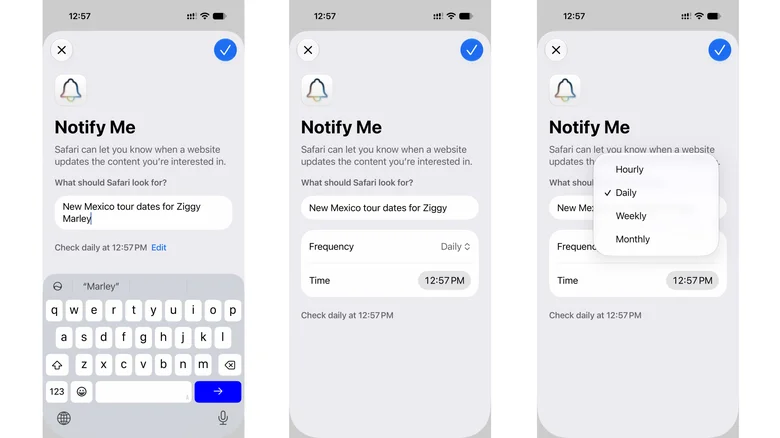
    Three iPhone screenshots, showing the setup process for Apple's Notify Me feature with Ziggy Marley tour dates

    Screenshots by Will Shanklin for Engadget

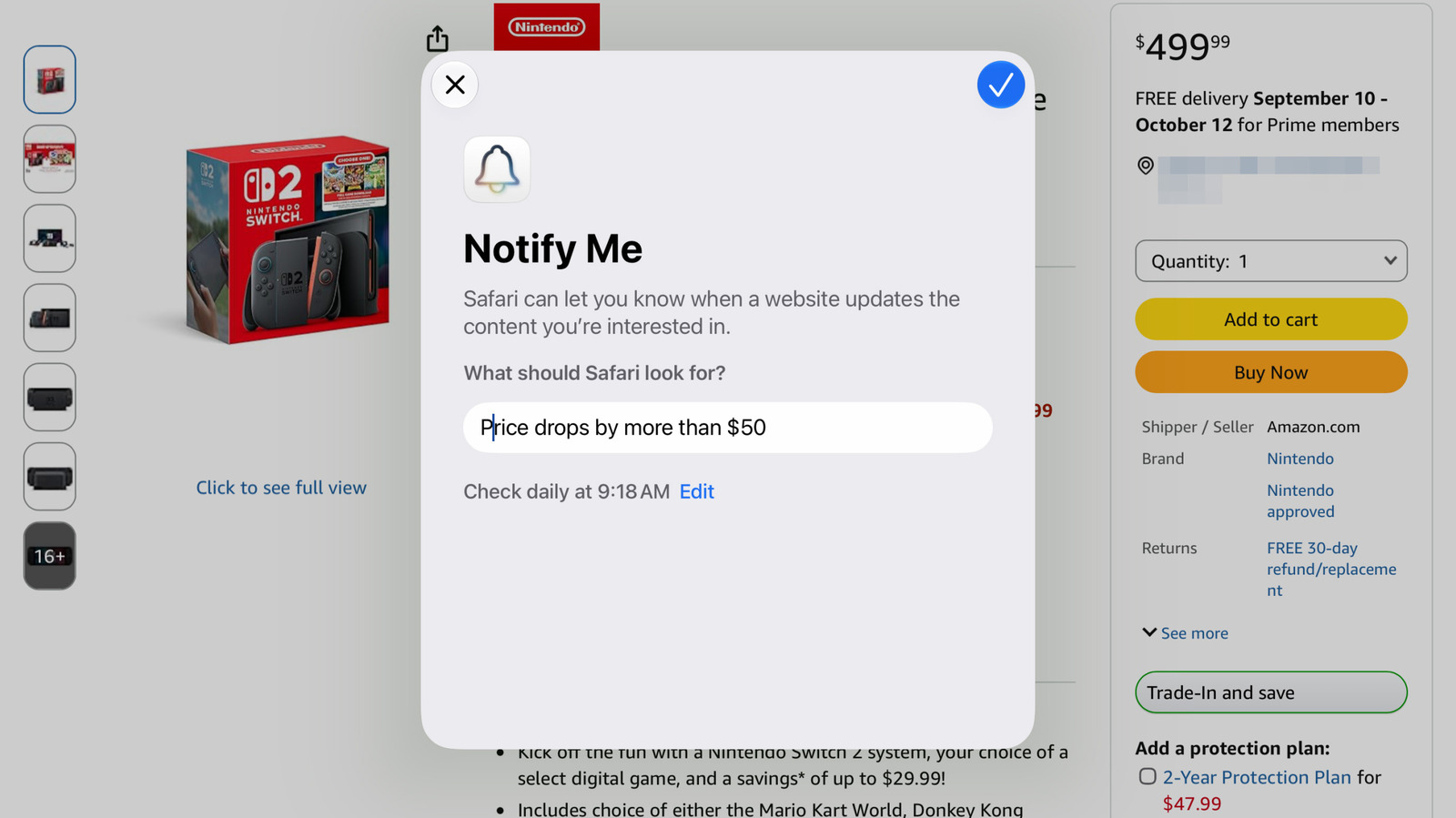
    Setting it up is easy. Tap or click the three horizontal lines on the left side of Safari’s address bar. Select Notify Me and a pop-up will appear, asking you to describe the changes you want it to monitor. 

    • “If the price drops below $100” 
    • “The gray and blue option comes back in stock” 
    • “The stick of RAM falls under $500”

    After that, select the blue edit button to set the exact time it polls for changes and whether you’d like it to check in hourly, daily, weekly or monthly intervals. Once the blue checkmark appears in the upper right, you can confirm the Notify Me alert.

    If you haven’t set up notifications for Safari, you’ll be prompted to do so. Since the feature runs on the device, not in the cloud, make sure you’re setting it up on the device where you’ll most likely see the alert. If you have an iPhone that always travels with you, it would make sense to set it up on that.

    What if you want to delete it or make changes? You can do so by visiting the same page and selecting Edit in the banner at the top. Alternatively, go to Settings > Safari and scroll down to Notify Me near the bottom.

    Apple Notify prices Safaris track
    Follow on Google News Follow on Flipboard
    Share. Facebook Twitter Pinterest LinkedIn Tumblr Email Copy Link
    myappsplus
    • Website

    Related Posts

    Apple responds to iPhone Duo cracked inner screens — what to do if your phone is affected

    October 26, 2026

    Github competitor Entire is live now – how the agent-first platform works

    October 26, 2026

    Apple adds more Siri AI tools in its 27.2 system updates, out today

    October 26, 2026
    Add A Comment
    Leave A Reply Cancel Reply

    Top Posts

    Cathay Pacific tests Google AI that dramatically cuts airplane contrails — tiny altitude shifts slash environmental impact by 40% in early trials

    September 8, 2026137 Views

    Keep running out of mobile data? This new unlimited plan gets you up to 80Mbps 5G speeds for just AU$50/m

    October 8, 202615 Views

    Drone swarm tech valued by both defense and civilian sectors, industry platform says

    September 8, 202615 Views
    Latest Reviews

    Anthropic’s new Fable release is cheaper, less restrictive

    myappsplusSeptember 2, 2026

    iPhone 18 Pro vs. iPhone 17 Pro: Should you upgrade this year?

    myappsplusSeptember 2, 2026

    Enjoy low-and-slow BBQ with East Oak’s 30-inch electric smokers starting from $207

    myappsplusSeptember 2, 2026
    Stay In Touch
    • Facebook
    • YouTube
    • TikTok
    • WhatsApp
    • Twitter
    • Instagram

    Subscribe to Updates

    Get the latest tech news from FooBar about tech, design and biz.

    Most Popular

    Anthropic’s new Fable release is cheaper, less restrictive

    September 2, 20260 Views

    Enjoy low-and-slow BBQ with East Oak’s 30-inch electric smokers starting from $207

    September 2, 20260 Views

    NYC schools announce major classroom technology overhaul

    September 2, 20260 Views
    Our Picks

    Apple responds to iPhone Duo cracked inner screens — what to do if your phone is affected

    October 26, 2026

    This tiny 45W 10,000mAh power bank just got a rare drop below $32

    October 26, 2026

    Amazon cuts 35% off the ELEPHAS Roku TV smart projector

    October 26, 2026

    Subscribe to Updates

    Subscribe to our newsletter and get the latest tech news, app updates, AI trends, smartphone reviews, and exclusive deals delivered straight to your inbox.

    Facebook X (Twitter) Instagram Pinterest
    • About Us
    • Get In Touch
    • Disclaimer
    • Privacy Policy
    • Terms & Conditions
    © 2026 MyAppsPlus. All Rights Reserved.

    Type above and press Enter to search. Press Esc to cancel.