

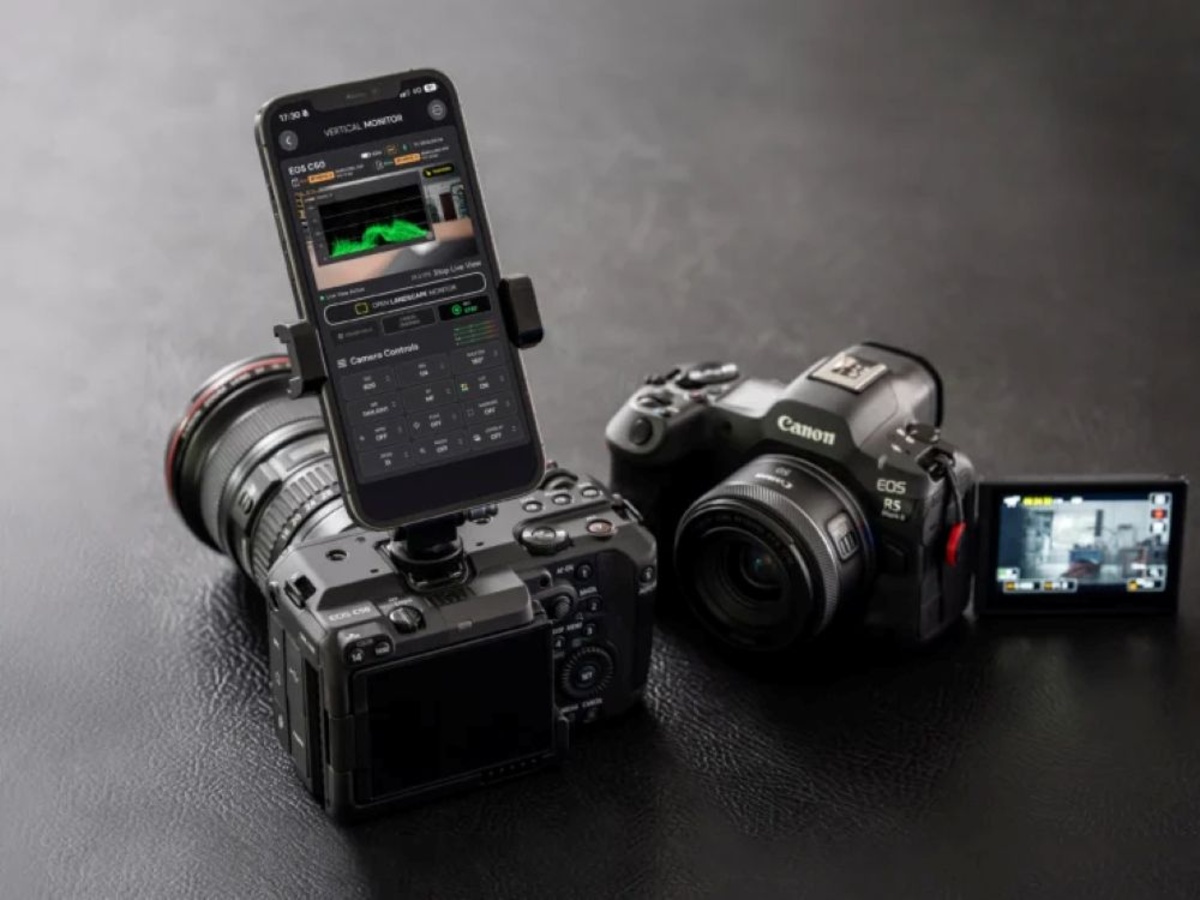
A new iOS app called Director Mode landed on the Apple App Store today with an unusual pitch for filmmakers: for a one-time $29.99, an iPhone or iPad can replace a dedicated multiview monitor and serve as a unified control console for up to four Canon and Sony cameras at once — across both brands simultaneously, in a single interface.
The app was built by Claudio Ripalti, an independent filmmaker and lighting engineer based in Florence, Italy. It launched today as v1.0 following a TestFlight beta that opened in early October. The timing lands squarely in a gap that Canon’s and Sony’s own control apps have never bridged: a small production running a Canon Cinema EOS C-series camera alongside Sony Alpha or FX bodies — a common configuration in documentary and corporate video — has until now had no single iOS tool to operate both.
The core reason that gap exists is not technical impossibility. Both Canon and Sony publish official, documented programming interfaces for camera control. Director Mode is built entirely on those interfaces — which is what makes the cross-brand capability possible without workarounds, reverse engineering, or manufacturer cooperation.
What Makes Cross-Brand Control Technically Possible
The reason a third-party developer can build an app that controls both Canon and Sony cameras comes down to two vendor-published, open APIs — not workarounds or reverse engineering.
For Canon cameras, Director Mode communicates via CCAPI (Canon Camera Control API) — an HTTP REST-based interface that Canon builds directly into its cameras. The camera itself runs as an HTTP server on the local network; the iPhone running Director Mode sends HTTP requests to documented endpoints to query camera state, change exposure settings, start recording, and pull a live view stream. Canon publishes the CCAPI specification and has made it available to third-party developers since the late 2010s. The Canon EOS R6 Mark III, R5 Mark II, and Cinema EOS C-series bodies all expose CCAPI — which is exactly why Director Mode can operate them.
For Sony cameras, the connection runs through Sony’s Camera Remote SDK, which implements a proprietary extension to the ISO-standard PTP (Picture Transfer Protocol). PTP was originally designed for still image transfer between cameras and computers; Sony’s extension layers real-time control commands — live view streaming, exposure adjustments, recording triggers, focus commands — on top of that base protocol. Sony opened this SDK to outside developers in 2022, publishing it as the Camera Remote Command package. Director Mode uses the same interface that Sony’s own Monitor & Control app does.
That means both Canon’s CCAPI and Sony’s Camera Remote SDK are officially supported communication paths, not exploits. Director Mode sits at the intersection of two manufacturer-sanctioned ecosystems — which is precisely what Canon’s own Multi-Camera Control app and Sony’s own Monitor & Control app cannot do, since each is locked to its own brand.
Two Connection Types, Two Very Different Latency Profiles
Director Mode supports three connection methods. Wi-Fi works when both the iPhone and camera are on the same network; LAN allows Canon Cinema EOS cameras to connect through a wired local network. The third option — direct USB-C — changes the performance equation.
Over Wi-Fi, latency measured by the developer ranges from roughly 110 ms (Canon EOS R6 Mark III) to 130 ms (Sony a7V). That’s adequate for monitoring, but not ideal for fast-moving set work where a half-second mental adjustment lag per glance adds up. Over a direct USB-C connection, those figures drop to approximately 30 ms for the Canon R6 Mark III and 40 ms for the Sony a7V.
The difference is architectural. Wi-Fi introduces two RF hops — from the camera’s internal radio to the access point, and from the access point to the iPhone — each with variable overhead from buffering, channel contention, and encryption processing. A USB-C connection is point-to-point with deterministic timing and no shared radio medium. The ~80–90 ms gap between connection types reflects that difference directly.
USB-C connectivity for Canon EOS R bodies (specifically the R6 Mark III, R5 Mark II, R6V, and R1) requires Director Mode Pro on a USB-C iPhone or iPad. Sony Alpha and FX cameras connect
| Camera | Connection | Approx. Latency |
|---|---|---|
Figures from developer testing; actual results vary by camera, device, network, and connection.
For RF-crowded environments — a live event space, a news studio running multiple wireless systems — USB-C also eliminates interference risk entirely.
26 Cameras, Two Ecosystems, One Interface
Director Mode v1.0 lists 26 compatible camera models across Canon and Sony. The Canon side covers Cinema EOS bodies (C50, C80, C400) over Wi-Fi or LAN, and the EOS R mirrorless line (R5 Mark II, R6 Mark III, R6V, R6 Mark II, R1, R50V) over both Wi-Fi and USB-C. Some older Cinema EOS bodies — the C70, C300 Mark III, and C500 Mark II — require a network adapter for LAN connectivity. The Sony side includes Alpha stills/video hybrids (a7S III, a7V, a7R VI, a1, a1 II) and FX cinema bodies (FX3, FX3A, FX5, FX30) over both Wi-Fi and USB-C.
Feature availability varies by specific camera model. Focus hold, half-press, AF controls, recording format and frame-rate settings, and live audio meters are model-dependent. The developer’s compatibility page lists per-model capabilities; the App Store listing recommends checking it before purchase.
The Pro Feature Set: Waveform, LUTs, and Shutter Angle Automation
The free Basic tier covers single-camera monitoring and USB-C connectivity for Sony cameras. The $29.99 Pro tier (at launch; the developer describes this as a “special launch price” without specifying a future standard price) unlocks the multicamera workflow.
With Pro, an operator can monitor up to four simultaneous feeds in two-, three-, or four-camera layouts and trigger REC ALL to start and stop recording on all connected cameras at once. The layout is modeled after hardware multiview monitors — the kind of display setup that in a hardware-based video village would run on a dedicated rack-mounted unit costing several thousand dollars.
Professional monitoring tools in Pro include:
- Waveform monitor — an oscilloscope-style luminance plot for precise, frame-accurate exposure evaluation across all feeds, more reliable than a histogram when checking graduated scenes
- Focus peaking — highlights in-focus edges in the live view with a color overlay, essential for manual focus work
- Custom LUT support — using the industry-standard
.cubeformat, applied across all feeds simultaneously, enabling live grade previsualization without a separate DIT station or hardware monitor - Picture overlay — framing or composition reference
- Anamorphic de-squeeze — corrects the horizontally compressed image from anamorphic lens adapters in the live view
- Shutter angle mode (Sony FX/Alpha) — automatically recalculates and adjusts shutter speed when recording frame rate changes, to maintain a specified shutter angle
That last item — shutter angle automation — addresses a friction point that’s easy to describe and harder to solve live. Shutter angle is a cinematographic measure inherited from the mechanical rotary disc shutters of film cameras, expressing exposure time as an angular fraction of a 360° rotation. At the standard 180° angle, shutter speed equals half the frame rate’s reciprocal (1/48s at 24p; 1/60s at 30p; 1/240s at 120p for slow motion). When a director of photography changes frame rate mid-production — switching from 24p to 120p for a slow-motion insert — the correct shutter speed shifts by a factor of five. Making that calculation manually under time pressure on a fast-moving set introduces real error risk. Director Mode handles it automatically for supported Sony bodies.
Custom LUT support deserves equal attention. When a production is shooting log-gamma footage (Canon Log 3, S-Log3) for maximum post-production flexibility, the camera’s native live view looks flat and desaturated. Loaded with a show LUT, Director Mode applies the intended color grade in real time across all four feeds, letting a DP or director evaluate exposure, lighting, and composition as the finished image will look — not as the raw log capture looks. Previously this either required a dedicated hardware monitor with LUT capability (SmallHD 702 Touch: around $1,000; Atomos Sumo19M: around $1,995) or a laptop running DIT software. Director Mode delivers it on a device already in the crew’s pocket.
The Price in Context
Director Mode Pro is priced at $29.99 for lifetime access at launch. That price point requires a comparison to understand its value: Canon’s Multi-Camera Control app is free, but supports only Canon Cinema EOS cameras, operates only over Wi-Fi, and offers no waveform, no LUT support, and no USB-C. Sony’s Monitor & Control app (updated to v2.6.0 in March 2026 with improved multicam stability) is also free, but supports only Sony cameras and cannot cross into Canon territory.
Filmic Remote, the most established third-party competitor in the iOS filmmaker remote-control space, works iPhone-to-iPhone — it controls another iOS device running Filmic Pro, not a hardware camera. It’s a different category of tool.
Director Mode is the only iOS app that handles both Canon and Sony hardware simultaneously, with professional monitoring tools and USB-C wired connectivity. The $29.99 price is competing not with other apps but with the hardware it makes less necessary: a dedicated multiview monitor that covers the same monitoring functions starts in the low hundreds for entry-level units and rises rapidly toward the thousands with the display specs and color accuracy the iPad Pro’s Liquid Retina XDR panel delivers natively.
The latest iPad Pro models offer 1,000 nits of full-screen sustained brightness with P3 wide color — specs that hold up to purpose-built production monitors in most conditions and exceed them in one key practical dimension: the iPad is already in the crew’s kit.
Who This Is For
Director Mode does not replace a fully configured video village with a dedicated operator, a hardware router, and a rack-mounted multiview display. What it replaces, or meaningfully supplements, is what small productions do instead of that — which is usually one camera operator walking between angles with a wired follow-focus, or a director watching a single feed while two other cameras run unmanned.
For a two-person documentary crew, a corporate video team running a multi-angle panel shoot, or an independent narrative production on a skeleton crew, Director Mode covers a substantial portion of what a dedicated monitor operator would handle, at a price that removes the hardware acquisition calculus from the conversation entirely.
The app requires iOS or iPadOS 17.6 or later and weighs 18.3 MB. It also supports visionOS 1.3, making it compatible with Apple Vision Pro. The developer states the app collects no data; Apple has not independently verified this, per standard App Store disclosure.
Director Mode is available now on the Apple App Store. Full compatibility details and connection guides are on the Director Mode official website.
ⓒ 2026 TECHTIMES.com All rights reserved. Do not reproduce without permission.
