Close Menu
MyAppsPlus

    Subscribe to Updates

    Get the latest creative news from FooBar about art, design and business.

    What's Hot

    The KitchenAid KF8 proves that ‘great quality coffee doesn’t get much easier than this’ — and it’s now 46% off

    November 25, 2026

    Add Holiday Lights and Snow to Your Mac With Festivitas

    November 25, 2026

    The Verge’s 2026 gift guide for dads

    November 25, 2026
    Facebook X (Twitter) Instagram
    Facebook X (Twitter) Instagram
    MyAppsPlusMyAppsPlus
    Wednesday, November 25
    • Home
    • Breaking Tech
    • Apps & Software
    • AI & Automation
    • Android
    • iPhone & iOS
    • More
      • Reviews
      • How-To Guides
      • Deals & Discounts
      • Shop
    MyAppsPlus
    Home»iPhone & iOS»Add Holiday Lights and Snow to Your Mac With Festivitas
    iPhone & iOS

    Add Holiday Lights and Snow to Your Mac With Festivitas

    myappsplusBy myappsplusNovember 25, 2026002 Mins Read
    Share Facebook Twitter Pinterest Copy Link LinkedIn Tumblr Email Telegram WhatsApp
    Follow Us
    Google News Flipboard
    Add Holiday Lights and Snow to Your Mac With Festivitas
    Share
    Facebook Twitter LinkedIn Pinterest Email Copy Link

    Festivitas is a fun little holiday-themed Mac app that developer Simon Støvring introduced two years ago and has been updating since. Its main purpose is to add lights to the Mac’s Dock and menu bar, but there’s also a version for the iPhone and iPad.

    The holiday 2026 Festivitas update adds new customizations. For the first time, you can upload custom bulb shapes. There’s an option to import an image and convert it to a bulb in a string of lights. Simple PNGs on a transparent background produce the best results, and for more complex images, bulbs can use the original colors.

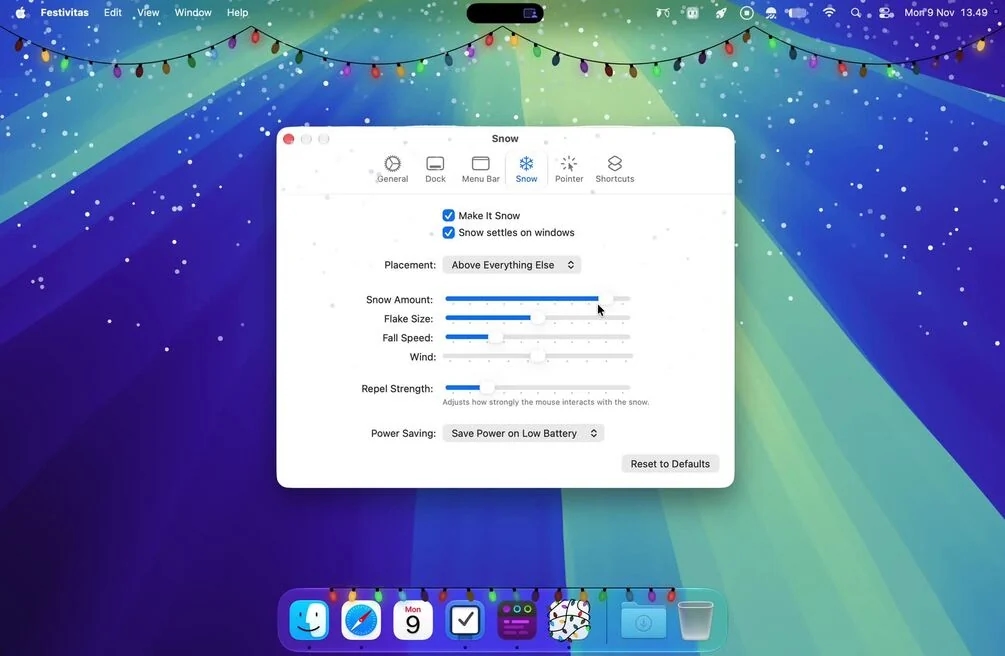
    You can customize light shapes, color, size, opacity, drop height, cable thickness, and more in the Settings. Lights can animate with different patterns, like pulse, twinkle, chase, and wave.

    There are pointer decorations like sparkles, bubbles, falling leaves, confetti, a Christmas tree, a wreath, and more. Falling snow will now pile up on top of app windows for an added holiday effect. You can adjust snow rate, density, and flake size.

    Snow and lights can be displayed above app windows or just on the desktop, with lights also visible on the Dock. Shortcuts can be used to play music and turn on lights, activate the snow effect if the weather forecast includes snow, and start a snowstorm.

    Along with custom bulb shapes and falling snow, Festivitas for the iPhone and ‌iPad‌ now fully transparent animated widgets on the without a screenshot workaround.

    Festivitas for Mac requires some accessibility access to work. I asked Støvring about Apple’s planned permission changes in macOS 27.3, and how they will affect the Festivitas app. He said Festivitas gets far more access than it needs because Apple’s options aren’t granular enough, and he’d prefer to ask for less access.

    Menu bar lights, snow, and pointer effects work without the System & App Protection Override permission, while lights in the Dock and snow landing on windows require access.

    Festivitas for the Mac offers customer-chosen fair pricing starting at 4.39 euros, and it can be downloaded from the Festivitas website. The iPhone and ‌iPad‌ app is available for free from the App Store, and it too offers customer-selected fair pricing between $3.99 and $9.99. The updates are free for existing users. [Direct Link]
    This article, “Add Holiday Lights and Snow to Your Mac With Festivitas” first appeared on MacRumors.com

    Discuss this article in our forums

    Apple iOS iPad iPhone Mac rumors
    Follow on Google News Follow on Flipboard
    Share. Facebook Twitter Pinterest LinkedIn Tumblr Email Copy Link
    myappsplus
    • Website

    Related Posts

    Tidal Bans AI Music, While Apple Music Sticks to Labels

    November 25, 2026

    Missed That $149 AirPods Pro 3 Deal? Amazon Just Brought It Back

    November 24, 2026

    Day 6 Apple Black Friday deals are flying! AirPods Pro 3 $100 off, M6 MacBook $220 off, M5 Air $300 off, more from $18

    November 24, 2026
    Add A Comment
    Leave A Reply Cancel Reply

    Top Posts

    The pros and cons of using your phone as a mobile hotspot

    November 16, 202648 Views

    UiPath Launches AI Coding Agent, Integrates Claude Code and Codex to Target Development Automation

    November 16, 202646 Views

    Save on your groceries, gas, and holiday shopping with this $15 BJ’s membership (Reg. $60) 

    November 4, 202634 Views
    Latest Reviews

    iPhone price hike ‘better than feared,’ Duo to drive cycle demand

    myappsplusSeptember 11, 2026

    Fairbuds 2 leak gives us an early look at a very different design

    myappsplusSeptember 11, 2026

    Intel says it has already passed a million High-NA EUV wafers – more than the rest of the industry combined

    myappsplusSeptember 11, 2026
    Stay In Touch
    • Facebook
    • YouTube
    • TikTok
    • WhatsApp
    • Twitter
    • Instagram

    Subscribe to Updates

    Get the latest tech news from FooBar about tech, design and biz.

    Most Popular

    Ford CEO hits back at government ‘mistruths’ about China —as its $28K electric truck prepares to take on Slate and Chinese rivals

    September 12, 20260 Views

    Monitoring production agent lifecycle with AWS DevOps Agent and AgentCore Evaluations

    September 12, 20260 Views

    You can still shop these robot vacuums

    September 12, 20260 Views
    Our Picks

    The KitchenAid KF8 proves that ‘great quality coffee doesn’t get much easier than this’ — and it’s now 46% off

    November 25, 2026

    Add Holiday Lights and Snow to Your Mac With Festivitas

    November 25, 2026

    The Verge’s 2026 gift guide for dads

    November 25, 2026

    Subscribe to Updates

    Subscribe to our newsletter and get the latest tech news, app updates, AI trends, smartphone reviews, and exclusive deals delivered straight to your inbox.

    Facebook X (Twitter) Instagram Pinterest
    • About Us
    • Get In Touch
    • Disclaimer
    • Privacy Policy
    • Terms & Conditions
    © 2026 MyAppsPlus. All Rights Reserved.

    Type above and press Enter to search. Press Esc to cancel.