

A new system update has been made available to select Xbox Insiders, with the plan being to expand the testing pool very soon before the update ultimately ends up on all consoles.
The update introduces three new features, one of which has been highly requested by Xbox users for several months now, ever since the introduction of Xbox’s Disc to Digital programme.
Separate your digital licenses from your owned games
In August, Xbox introduced its Disc to Digital programme, allowing for gamers to claim digital licenses for – you guessed it – games they own physically.
Ever since then users have been asking for “more control over how those games appear in your library”
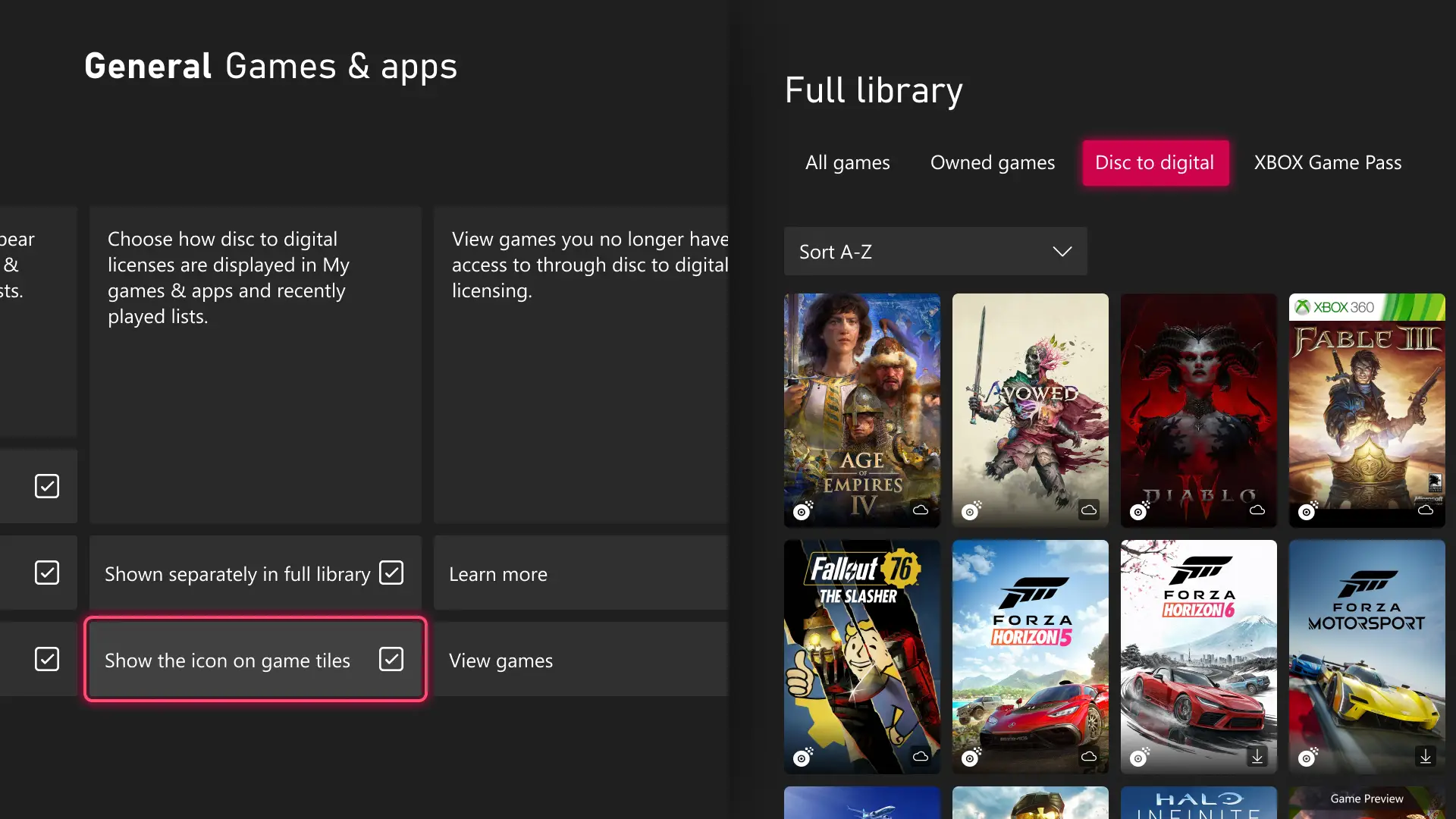
Well, navigating to your digital licenses has been made much easier as a result, as Xbox users can now store digital licenses separately to your fully owned games.
When you enter your game library, you’ll be met with the filter tabs of ‘all games’, ‘owned games’, ‘disc to digital’, and ‘Xbox Game Pass’.
To turn this setting on, as you don’t have to allow for this option, head to ‘General’ in settings and then select ‘Personalisation’.
Next, press ‘Games & apps’ and there’s a tick box that reads ‘Shown separately in full library’ under a box explaining that you can choose how to display your licenses.
Shift the guide to your preferred side
The guide is the pop-up menu that appears when you press the Xbox button on your controller, allowing you to navigate to all of your console’s key locations and perform important functions.
It’s typically displayed on the right hand side of the screen but now, users can customise their settings and have the guide display on the left-hand side of the screen instead.
To do this, enter settings, and then press ‘General’. From here, go to ‘Personalisation’ and ‘Guide’, and then you’ll be able to choose from left or right.
You can now enjoy rotating home backgrounds
Rounding out this update, Xbox users can now enjoy rotating home backgrounds – and we don’t mean your background constantly doing a 360 spin.
If you can’t settle on just one background, you can shuffle through the various options – including shuffling through a library of favourites, so you’re still getting backgrounds you truly love.
To save a background as a favourite, select ‘Settings’, ‘General’, ‘Personalisation’, ‘My background’, ‘Dynamic backgrounds’, and ‘Dynamic backgrounds’.
Press X on any background and you’ll notice a new Favourites category. Within any background category, you’ll also find the ‘Shuffle’ option.
The shuffle can be set to change every time you sign in, hourly, daily, or weekly.
“Pro tip: If you have a controller with an exclusive background, like the XBOX Wireless Controller X25 Special Edition, saving that background as a favorite lets you use it even when the controller isn’t connected,” reads the Xbox Wire blog.
Again, the update is available for Xbox Insiders and specifically, for now, those on the invite-only Alpha Skip Ahead tier.
That being said, the update is due to rollout to additional Xbox Insiders users soon before it arrives on all consoles – and anyone can sign up to be an Xbox Insider, so if you want to get ahead, sign up now.
Featured Image Credit: Microsoft
