Close Menu
MyAppsPlus

    Subscribe to Updates

    Get the latest creative news from FooBar about art, design and business.

    What's Hot

    Your next desktop PC for the price of a Ferrari? HP ZGX Fury packs in 748GB RAM and Nvidia GB300 — but prices start at $132,000

    November 15, 2026

    You can now generate and edit GIFs with ChatGPT – here’s how

    November 15, 2026

    iPhone Duo Vs Oppo Find N6: How these foldables compare

    November 15, 2026
    Facebook X (Twitter) Instagram
    Facebook X (Twitter) Instagram
    MyAppsPlusMyAppsPlus
    Sunday, November 15
    • Home
    • Breaking Tech
    • Apps & Software
    • AI & Automation
    • Android
    • iPhone & iOS
    • More
      • Reviews
      • How-To Guides
      • Deals & Discounts
      • Shop
    MyAppsPlus
    Home»Breaking Tech»You can now generate and edit GIFs with ChatGPT – here’s how
    Breaking Tech

    You can now generate and edit GIFs with ChatGPT – here’s how

    myappsplusBy myappsplusNovember 15, 2026003 Mins Read
    Share Facebook Twitter Pinterest Copy Link LinkedIn Tumblr Email Telegram WhatsApp
    Follow Us
    Google News Flipboard
    You can now generate and edit GIFs with ChatGPT – here’s how
    Share
    Facebook Twitter LinkedIn Pinterest Email Copy Link

    If you feel like Homer Simpson backing into the hedges has been overdone, OpenAI offers a new option for creating the right GIF for the moment.

    There‘s an art to selecting the perfect GIF. And by now, you likely know all the old reliables, from Elmo amid flames, to Michael Scott from The Office screaming, “Noooooo!” But if years of GIFs clipped from TV shows and movies isn’t cutting it, OpenAI will now let you make and edit your own.

    OpenAI rolled out Images 2.6 for ChatGPT, Codex and the API on Nov. 4, 2026. The update introduces the ability to create GIFs using a prompt or photo. Once you’ve created the GIF, you can also edit the image before saving or downloading.

    OpenAI claims people generate more than 500 million images each day, on average. How many of those end up being GIFs remains to be seen. In any case, if you’re interested in turning the weirdest ideas floating around in your head into animated images you can inflict on your group chat, here’s how to do it using Images 2.6 and ChatGPT.

    How to create a GIF with ChatGPT

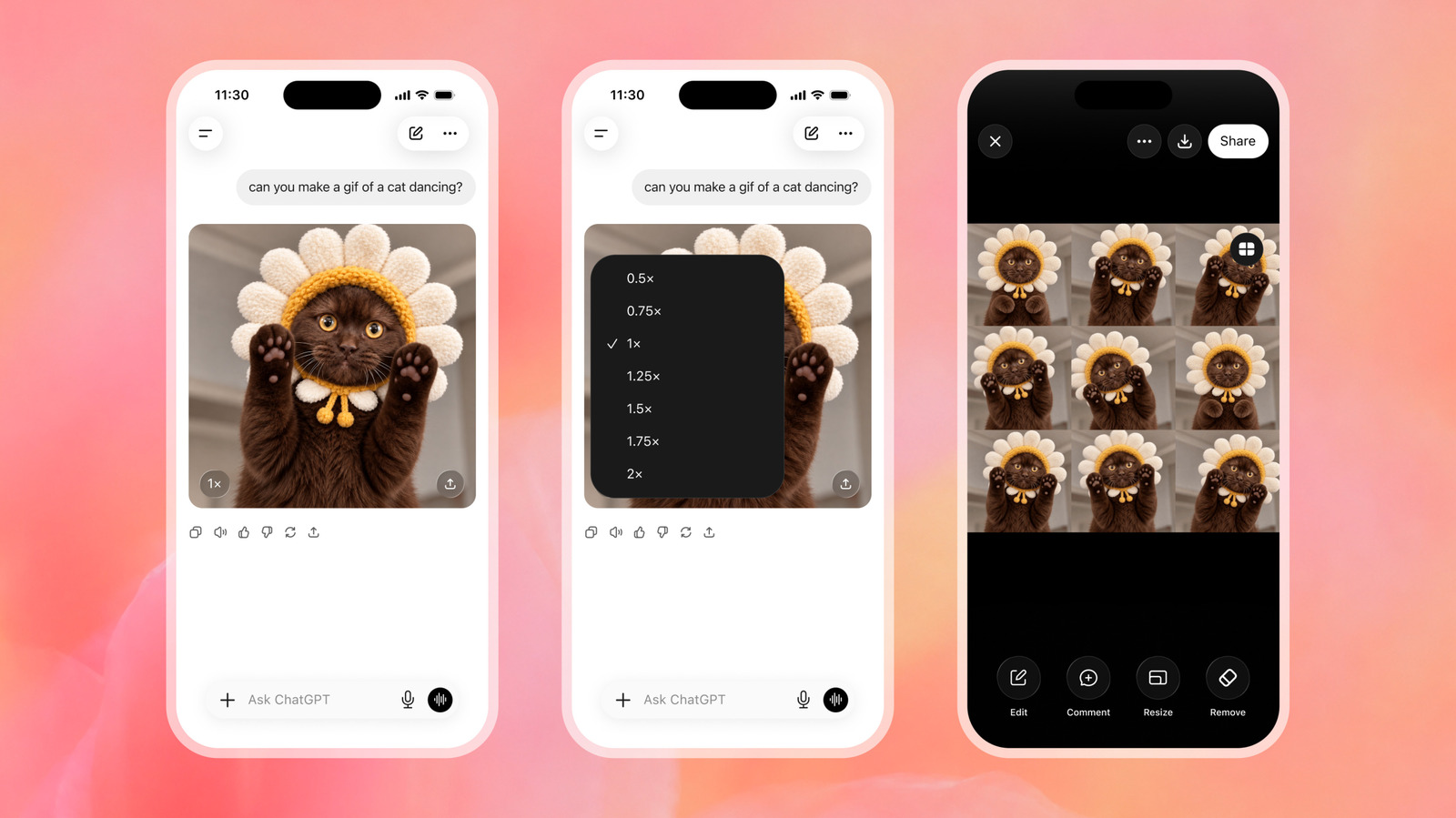
    Log in to ChatGPT, and type your prompt into the box at the bottom. Remember: A good prompt goes a long way. For example, you could ask for a a GIF of a tortoiseshell cat yawning. According to OpenAI’s blog post, Images 2.6 should generate images about 50 percent faster than the previous iteration.

    Once you have your GIF, there are a few ways you can tweak it. For one, you can change the speed so that it loops faster or slower. In the bottom left of the image, you’ll see a number like “1x.” Click that to modify the speed. You can also click or tap the image itself and tap Edit. A box will appear that says “Describe edits,” and you can prompt ChatGPT to make changes. You can also click or tap “Sheet,” which will show you the individual frames of the GIF and make comments and markups.

    When you’re happy with your GIF, you can download it or share it using the Download and Share buttons.

    What else is new in Images 2.6

    GIFs aren’t the only update to Images 2.6. Aside from typing in a prompt, you can upload a photo and use it to make a GIF. OpenAI’s blogpost explained that you can even upload a minimal sketch of something, like an owl, and use that as a basis for creating a GIF. You can also save and tag it as a reference image to use again in the future. This applies to people, pets and characters.

    Images 2.6 is available to everyone through ChatGPT and Codex, so you don’t need a subscription to access it. However, your subscription, or lack thereof, will determine how many images you’ll be able to generate.

    AI ChatGPT edit generate GIFs
    Follow on Google News Follow on Flipboard
    Share. Facebook Twitter Pinterest LinkedIn Tumblr Email Copy Link
    myappsplus
    • Website

    Related Posts

    Flaming Hydra’s new Kickstarter campaign rethinks e-book ownership and digital lending

    November 15, 2026

    Don’t throw away your old TV – Here’s what to do instead

    November 15, 2026

    Italy orders Meta to pay $887M for not obtaining specific consent over user photos

    November 15, 2026
    Add A Comment
    Leave A Reply Cancel Reply

    Top Posts

    Save on your groceries, gas, and holiday shopping with this $15 BJ’s membership (Reg. $60) 

    November 4, 202629 Views

    Google’s new AI shopping cart tracks deals across stores

    October 25, 202628 Views

    5 Best Smartphone Deals Under Rs 30,000 On Amazon And Flipkart

    October 30, 202624 Views
    Latest Reviews

    Apple faces new UK rules over nude images on children’s iPhones

    myappsplusSeptember 8, 2026

    Everything revealed at Zelda Direct: Ocarina of Time pre-order deal, release date, new Switch 2, more

    myappsplusSeptember 8, 2026

    Google has deployed a fix for YouTube’s blank screen problems

    myappsplusSeptember 8, 2026
    Stay In Touch
    • Facebook
    • YouTube
    • TikTok
    • WhatsApp
    • Twitter
    • Instagram

    Subscribe to Updates

    Get the latest tech news from FooBar about tech, design and biz.

    Most Popular

    Apple faces new UK rules over nude images on children’s iPhones

    September 8, 20260 Views

    GL.iNet Beryl 7 review: This Wi-Fi 7 travel router saved my holiday connecting 5 iPads, a laptop, and a couple of phones

    September 8, 20260 Views

    69% of Americans oppose local AI data centers in 2026 poll — Trump blasts blocking communities on Truth Social for choosing poverty over server farms, throwing off ‘tremendous amounts of money’

    September 8, 20260 Views
    Our Picks

    Your next desktop PC for the price of a Ferrari? HP ZGX Fury packs in 748GB RAM and Nvidia GB300 — but prices start at $132,000

    November 15, 2026

    You can now generate and edit GIFs with ChatGPT – here’s how

    November 15, 2026

    iPhone Duo Vs Oppo Find N6: How these foldables compare

    November 15, 2026

    Subscribe to Updates

    Subscribe to our newsletter and get the latest tech news, app updates, AI trends, smartphone reviews, and exclusive deals delivered straight to your inbox.

    Facebook X (Twitter) Instagram Pinterest
    • About Us
    • Get In Touch
    • Disclaimer
    • Privacy Policy
    • Terms & Conditions
    © 2026 MyAppsPlus. All Rights Reserved.

    Type above and press Enter to search. Press Esc to cancel.