Close Menu
MyAppsPlus

    Subscribe to Updates

    Get the latest creative news from FooBar about art, design and business.

    What's Hot

    Silicon Valley superstar engulfed by personal scandal

    November 9, 2026

    Apple’s $2,899 MacBook PROLED hides a massive unified memory bottleneck — why I think power users should abandon macOS for Nvidia RTX Spark and AMD Strix Halo

    November 9, 2026

    Don’t like Google Health’s AI Coach? Here’s how to turn it off

    November 9, 2026
    Facebook X (Twitter) Instagram
    Facebook X (Twitter) Instagram
    MyAppsPlusMyAppsPlus
    Monday, November 9
    • Home
    • Breaking Tech
    • Apps & Software
    • AI & Automation
    • Android
    • iPhone & iOS
    • More
      • Reviews
      • How-To Guides
      • Deals & Discounts
      • Shop
    MyAppsPlus
    Home»Breaking Tech»How long should a PC processor actually last?
    Breaking Tech

    How long should a PC processor actually last?

    myappsplusBy myappsplusNovember 8, 2026004 Mins Read
    Share Facebook Twitter Pinterest Copy Link LinkedIn Tumblr Email Telegram WhatsApp
    Follow Us
    Google News Flipboard
    How long should a PC processor actually last?
    Share
    Facebook Twitter LinkedIn Pinterest Email Copy Link

    If you treat it right, it should last until it’s obsolete.

    Building a new PC is a major investment, especially with prices of some components skyrocketing recently. Given the expense, it’s natural to wonder not just if you can afford it now, but how long a PC should last if you do fork over the cash to build one. The central processing unit (CPU) is one of the biggest expenses in building a PC, but you likely won’t need to buy a new one too often.

    Under most conditions, you don’t need to worry about your processor wearing out from regular use. Manufacturers don’t list specific expected lifespans for their processors, but it’s not uncommon for a CPU to remain functional for a decade or more after it’s installed. Rather than your CPU failing, it’s much more likely that you’ll eventually want to replace it when it can’t keep up with the new games or programs you use your PC for.

    How to tell if you should replace your CPU

    The most common time for a processor to fail is when it’s still new. The manufacturing process can produce faulty CPUs from time to time, and when that happens, they’ll likely give you trouble from the start. If you’ve had your CPU for a while, some of the signs that it’s failing are your computer freezing for no clear reason, failing to boot or randomly restarting. All of these problems can be caused by other hardware, though, and pinning the problem to the CPU is as difficult as it is rare.

    If your computer isn’t performing as you’d like it to, it’s worth checking if your CPU is just outdated. First, pull up your PC’s Task Manager and check the Performance tab. Keep an eye on the CPU screen to see how much of the processor’s power is being used. Under normal conditions, it should almost always stay below 20 percent. Some spikes are normal, but if it’s constantly approaching its upper limits, you might want to consider an upgrade. Your CPU will be much more active during intensive tasks like gaming, but if it stays at 90 percent or more, especially if your GPU usage stays low at the same time, that could be cause for concern.

    How to extend your CPU’s life
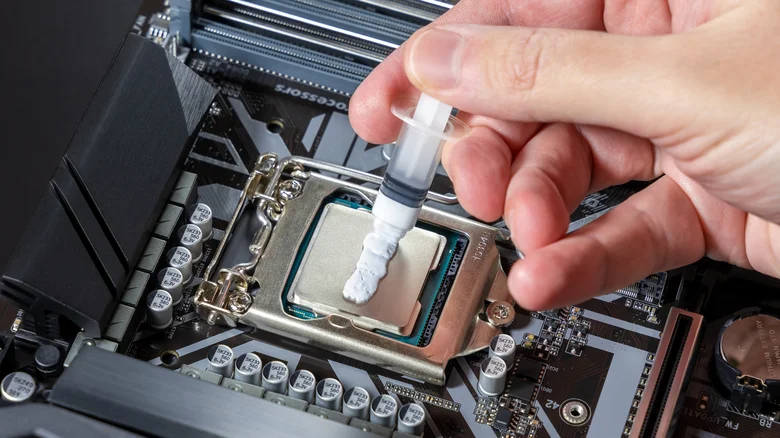
    Person applying thermal paste to CPU.

    The biggest stressor to your PC is heat, which degrades performance of every component over time. The best thing you can do for your PC’s longevity is to make sure it has adequate airflow by properly installing fans and regularly cleaning dust out of the case. Programs like HWiNFO let you monitor your system’s temperature — if your CPU rises above 60 degrees Celsius under normal load or above 80 degrees during intensive tasks, it’s worth looking into what improvements you can make. These numbers can vary based on the particular CPU, though, so it’s best to follow manufacturer recommendations if they’re available. If temperatures are high, you should also consider replacing the thermal paste on your CPU, which can last five years or more but eventually becomes less effective at regulating heat.

    Overclocking your CPU — increasing its speed beyond the manufacturer’s recomendations — can also reduce its lifespan, though usually it will still last until it’s obsolete if you’ve overclocked safely. Other than time and heat, the most likely threat to your CPU is damage from a power surge or a faulty power supply. While rare, these are still more likely than a CPU simply “going bad” with age. It can be difficult to pinpoint exactly which component is failing without going to a professional technician, but with even minimal care, your CPU should keep ticking well past the point when it’s time for an upgrade.

    actually Computing long processor should
    Follow on Google News Follow on Flipboard
    Share. Facebook Twitter Pinterest LinkedIn Tumblr Email Copy Link
    myappsplus
    • Website

    Related Posts

    Apple’s $2,899 MacBook PROLED hides a massive unified memory bottleneck — why I think power users should abandon macOS for Nvidia RTX Spark and AMD Strix Halo

    November 9, 2026

    Don’t like Google Health’s AI Coach? Here’s how to turn it off

    November 9, 2026

    NVIDIA is investigating reports that CEO Jensen Huang was the target of Chinese spy efforts

    November 9, 2026
    Add A Comment
    Leave A Reply Cancel Reply

    Top Posts

    Cathay Pacific tests Google AI that dramatically cuts airplane contrails — tiny altitude shifts slash environmental impact by 40% in early trials

    September 8, 2026138 Views

    Save on your groceries, gas, and holiday shopping with this $15 BJ’s membership (Reg. $60) 

    November 4, 202627 Views

    Apple is making Creator Studio an even better deal with new AI features and creative tools

    October 28, 202620 Views
    Latest Reviews

    OpenAI says it reached its goal of creating an automated research intern

    myappsplusSeptember 6, 2026

    Will the iPhone Ultra really be ‘Ultra’? 5 features the foldable could surprisingly ditch, from Face ID to MagSafe

    myappsplusSeptember 6, 2026

    Best TVs of 2026: Expert Tested, Compared and Reviewed

    myappsplusSeptember 6, 2026
    Stay In Touch
    • Facebook
    • YouTube
    • TikTok
    • WhatsApp
    • Twitter
    • Instagram

    Subscribe to Updates

    Get the latest tech news from FooBar about tech, design and biz.

    Most Popular

    Microsoft is ending Windows 11’s web app slop era, and AI now writes native apps in 30 minutes

    September 6, 20260 Views

    Is it safe to buy a refurbished iPhone from Walmart?

    September 7, 20260 Views

    Amazon cargo plane crashes at Miami International Airport, kills 5: Here’s the latest update shared by the company

    September 7, 20260 Views
    Our Picks

    Silicon Valley superstar engulfed by personal scandal

    November 9, 2026

    Apple’s $2,899 MacBook PROLED hides a massive unified memory bottleneck — why I think power users should abandon macOS for Nvidia RTX Spark and AMD Strix Halo

    November 9, 2026

    Don’t like Google Health’s AI Coach? Here’s how to turn it off

    November 9, 2026

    Subscribe to Updates

    Subscribe to our newsletter and get the latest tech news, app updates, AI trends, smartphone reviews, and exclusive deals delivered straight to your inbox.

    Facebook X (Twitter) Instagram Pinterest
    • About Us
    • Get In Touch
    • Disclaimer
    • Privacy Policy
    • Terms & Conditions
    © 2026 MyAppsPlus. All Rights Reserved.

    Type above and press Enter to search. Press Esc to cancel.