


Game-changing tricks to optimize your Netflix streaming.
If you’re looking for ways to get the most out of your Netflix experience, you might want to try these settings out, as they all fall into the “wow, I wish I knew about that sooner” category. Once you know about them, you’ll be impressing friends and family with your insider knowledge of these secret menu options.
See everything you have ever watched
Christine Persaud for Engadget
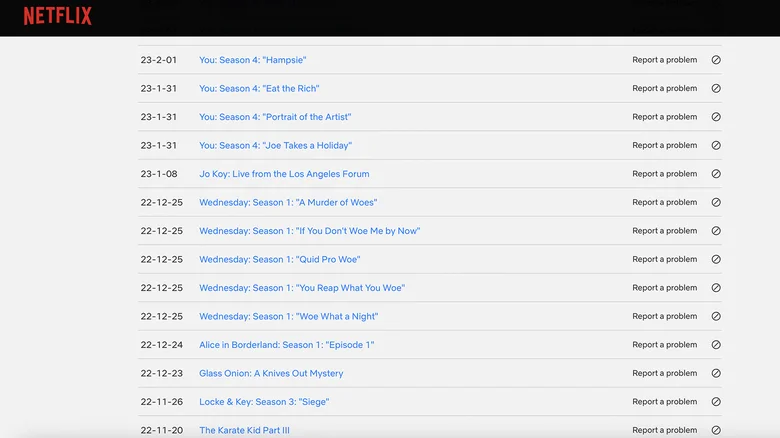
You probably have a good idea of what you have watched on Netflix through the years, but do you really know? Especially if you’ve been a subscriber for years, it can be hard to remember every movie and TV episode you’ve viewed. Thankfully, there’s an easy way to see your personal viewing history and everything you’ve ever watched on Netflix. Go to your Netflix account on a web browser, sign in to your profile, then select the down arrow beside your profile icon at the top right, and select ‘Manage Profiles.’ Select your profile from the list, then scroll down to ‘Viewing Activity.’ Here, you’ll find a list of everything you have watched and the date you watched it.
However, going through it all can take some time; there’s no search feature, so you need to endlessly click ‘Show More’ for pages and pages of viewing history. If you really want to go deep, select ‘Download All’ and review your entire viewing history. This is also a good way to make sure your child isn’t watching content they’re not supposed to under a non-restricted account. There’s also a ‘hide’ icon, in case you don’t want your partner to know that you snuck in a few episodes of a jointly watched show without them!
Micro-genre codes
Sometimes you’re in the mood for a specific genre, but it isn’t one that Netflix highlights through its standard categories, like anime, comedies or action. There are Netflix codes you can input to drill things down more specifically and find exactly what type of show or movie you want to watch. The Netflix-Codes website provides a comprehensive list of these codes that can help you find everything from action comedies to martial arts movies and westerns. Once you know the four-, five-, six- or seven-digit code, it’s easy to call up the corresponding content.
Open your browser and type in: http://netflix.com/browse/genre/, followed by the genre code you’re interested in. For example, to search for Christmas children and family films from the 1990s (yes, you can get that specific), type http://netflix.com/browse/genre/1476024. I tried the code 8985 for martial arts films, and it worked, instantly bringing up movies like 60 Minutes and Kill Bill (in Canada, where I am based). With the film noir code 7687, I can see that The Game, Zodiac and The Departed are all available to stream in my country. Even if you aren’t going to watch now, you can bookmark titles for later viewing so you don’t forget about them.
Clean up your Continue Watching category
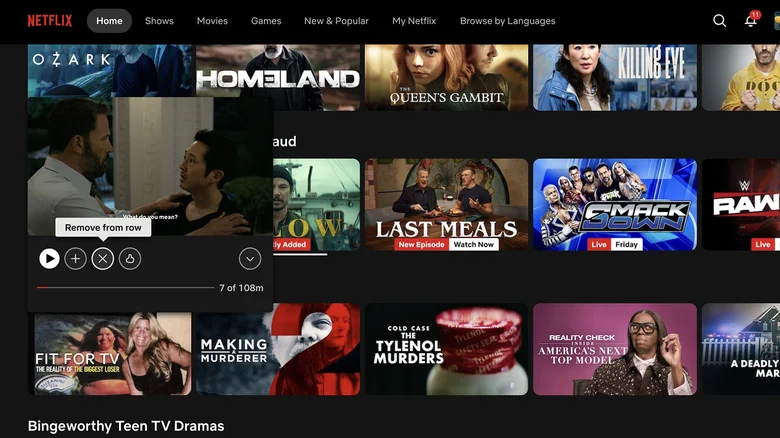
You might choose a movie or TV show, then realize 15 minutes in that you don’t like it, and switch to something else. Maybe it was something you were watching with a former partner and no longer plan to finish, or perhaps you’re just not a fan. That title stays in your ‘Continue Watching’ row seemingly forever, a reminder that you abandoned it ages ago. Did you know you can manually remove it instead of waiting until you watch enough for it to disappear?
There are three ways to fix this depending on how you’re watching. From a mobile device, find the title in question under ‘Continue Watching,’ tap the three dots under it, and select ‘Remove from row.’ On the big screen, go to the title in the ‘Continue Watching’ row, press and hold the select button on your remote, and choose ‘Remove.’ In a web browser, go to the title on this strip, hover your cursor over it, and tap the ‘X.’ Yes, it’s that easy. You can then let out a sigh of relief that you no longer have a constant reminder of the show or movie you didn’t finish and have no intention of ever going back to.
Disable autoplay previews
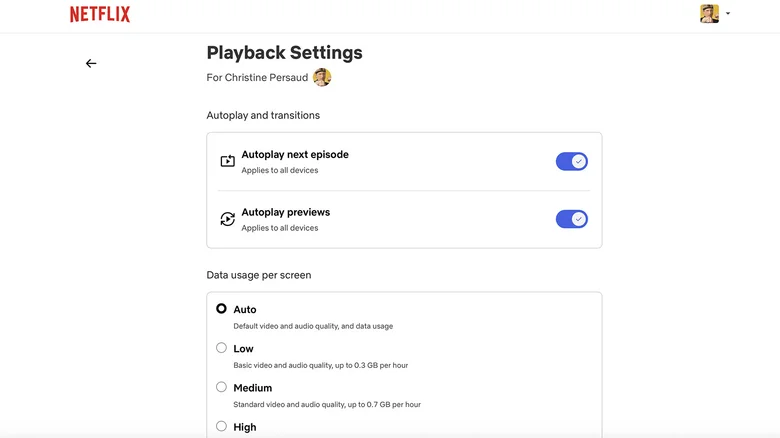
This is a tip you might wish you knew sooner. When you open Netflix and scroll through titles, if you linger too long on one, a preview plays. This can be jarring if the volume is loud or annoying if you just want to read the description or scan the rest of the page. What if your child is in the next room and it’s a preview for a steamy show? You’ll end up red in the face because your little one can hear it and think you’re actually watching. Or what if you’re someone who prefers to avoid trailers of new shows so you can enjoy the element of total surprise?
Thankfully, no matter the reason why auto-previews drive you nuts, it’s something you can disable. Under ‘Account,’ go to ‘Playback Settings’ and uncheck ‘Autoplay next episode’ and ‘Autoplay previews.’ If you’re like me and these annoy you to no end, adjusting this simple setting will be game-changing.
Customizing subtitles and captions
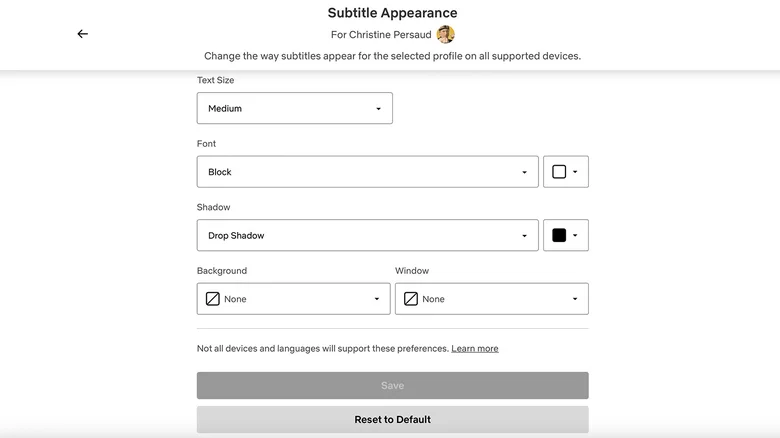
I’m a night owl, and to avoid disturbing the family, I have become used to watching TV with subtitles or captions on and the volume low. As anyone else in this situation knows, after relying on subtitles for so long, it can be hard to watch TV without them. But sometimes, they can be annoying when the text is too big or horribly placed, blocking crucial parts of the screen. While you can’t change the positioning (Netflix is pretty good about keeping them at the bottom, center of view), you can customize other ways subtitles appear. Go to your account icon and click ‘Manage Profiles,’ select your profile, and then click on ‘Subtitle Appearance.’ From there, you can change font size, shadows, and backgrounds.
You can also adjust captions to only show dialogue and not descriptive text or sounds. While those descriptors are necessary for the hearing impaired (as are new ASL interpretations that are available for dozens of shows and movies for kids), they aren’t necessary for someone who just wants captions because they keep the volume low. When your TV show or movie is playing, open the Subtitles menu and select English instead of English [CC]. It’s that simple!
Whether you’re one of the streaming service’s millions of premium subscribers or count among Netflix’s 250 million monthly ad tier subscribers, you can try any or all of these tips and tricks to improve the experience.
