

Xgimi Elfin Flip 4K: One-minute review
The Xgimi Elfin Flip 4K brings a host of upgrades to the Elfin family. Its stand makes it all the easier to set up in different places, as does its modicum of optical zoom and quick automatic digital adjustment. It even has a lot more connection options than its predecessor, not to mention a more capable Google TV operating system.
The real prize is under the hood, where the Elfin Flip 4K upgrades to an RGB laser lightnning color. That all channels into a 4K picture or a 1080p/120Hz VRR picture for gaming. This gives the Elfin Flip 4K some great chops for setups in dark and dim rooms, though it’s not enough to hold up in bright conditions
Packing all of this into a product that costs just $999 makes it a strong value option for the best projectors. Just plan on pairing it with some sort of speakers, as the built-in 7-watt speaker is just there for basic utility. Even a pair of cheaper Bluetooth speakers will be a huge upgrade to the sound quality.
While the Xgimi Elfin Flip 4K may not be a top-tier projector, it stands out as a great option for money.
Xgimi Elfin Flip 4K Review: Price and release date
- Release date: mid-2026
- MSRP: $999 / £869 / $1,995
The Xgimi Elfin Flip 4K launched in the middle 2026. It came alongside the Elfin Flip Laser, which offers many similar qualities but comes with a 1080p resolution instead. Though the Elfin Flip 4K doesn’t make it clear in the name, it also uses RGB laser projection.
The Elfin Flip 4K launched with a $999 / £869 / $1,995 price tag. It will likely see modest discounts during major sales events, and has even been $100 / £220 off during the course of testing.
Xgimi Elfin Flip 4K Review: Specs
|
2x USB-A, 1x 3.5mm audio out, 2x HDMI 2.0 (1x eARC) |
|
|
10 x 9.65 x 3.07 inches / 254 x 245 x 78mm |
|
Xgimi Elfin Flip 4K review: Design and features
- Integrated stand is good for vertical adjustments, but not rotation
- Optics offer minor zoom and quick digital correction
- More ports than before and Google TV built in
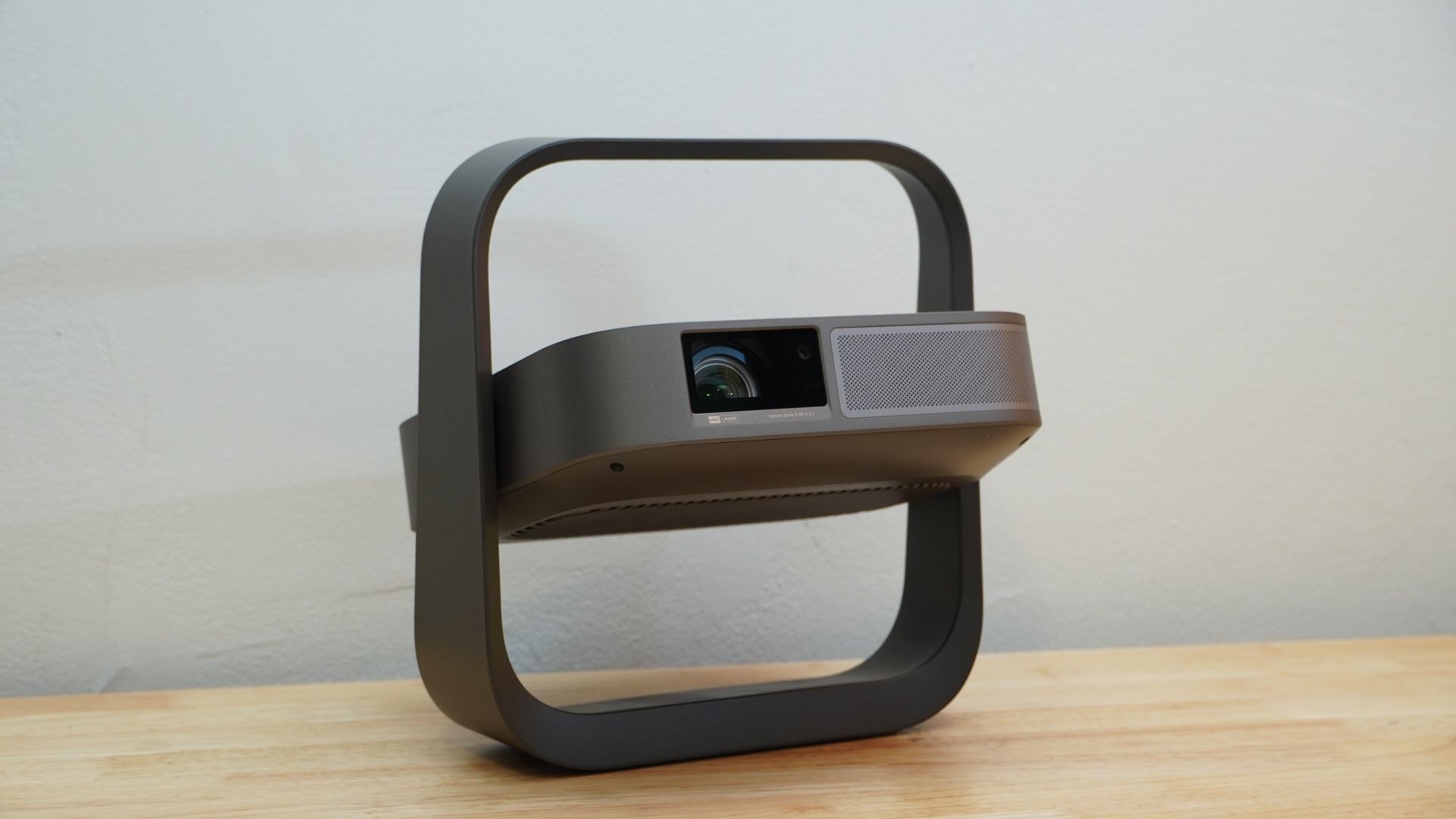
The original Elfin has received some considerable upgrades with the Elfin Flip 4K. The new design keeps a similar look for the actual projection hardware, situating everything into a flat box about the size you’d get a personal pan pizza in (10 x 9.65 x 3.07 inches / 254 x 245 x 78 mm). But this time, the projector is held captive in the middle of a square ring-shaped mount.
This mount is akin to the gimbal stands we’ve seen on many other mainstream projectors of late, except that it goes up above the projector as well, letting it protect the hardware but also preventing it from pointing directly up. The stand otherwise makes it easy to angle the projector as needed, though there’s no feet for rotation correction. (You can mount the stand on a tripod, but that may start to look really awkward.)
With the new stand and some extra internal hardware, the Elfin Flip 4K ends up a bit beefier than its predecessor, standing at 3.42 pounds / 1.55kg, but that’s still exceptionally light for a projector that’s doing what it does.
The Elfin Flip 4K fits in a 4K DLP chip and RGB laser projection system. It also squeezes in adjustable optics. They’re not the most flexible, offering no lens shift or a very wide zoom range, but they let you shift from a 0.98:1 throw ratio to as far as 1.3:1. This makes the Elfin Flip 4K better suited to shorter throw distances, such as from a coffee table in the middle of a room or from the ceiling, rather than a shelf or mantle at the back of the room. That consideration does make it a little awkward that the speaker fires out the front of the projector while the exhaust shoots out the back.
You’ll get more ports out of the Elfin Flip 4K as well. On the back, it has two HDMI ports (including one with eARC support), a 3.5mm audio connector, and two USB-A 2.0 ports. There’s a barrel jack as well for the 120W input to power the projector. Populating all of these ports does make the Elfin Flip 4K a little precarious, as it already can teeter a bit on its stand, and a bunch of cables coming out the back present new opportunities to tug and twist it.
You can get by with just the power cable, though, since the projector has Google TV built in with a healthy 64GB of storage for apps. This time around, Netflix is supported, which wasn’t the case on the original Elfin or many projectors at that time. The Elfin Flip 4K can connect over Wi-Fi 6 for fast and stable internet connections.
You probably will want to at least take advantage of the 3.5mm jack if not the eARC port, as the Elfin Flip 4K features a single 7W speaker that doesn’t even come close to matching the projection chops.
Initial setup of the projector is a little tedious, especially as it will only do basic focus and keystone calibration at first. The Google TV setup also requires scrolling through a list of seemingly every country in existence to find yours (Lucky for you, Australia). After Google TV is all set up, the projector offers a bit more capable automatic adaption, quickly focusing, zooming, keystoning, and cropping to fit the projection to a screen or available wall space. I found it quite accurate in testing, too.
While the projector is designed for 4K/60Hz video for home theater uses, it also supports gaming with the option to drop down to 1080p/120Hz with VRR. There are a few settings at play for enabling this, and it proved a small headache to get them right.
Certain setting toggles simply ignored me, others told me I needed to enable another setting first. Trying to get the display to run at 120Hz even after sending it a 120Hz signal required me to enable PC Mode and then Projector Super Frame. Trying to enable the latter without first doing the former would appearto enable the toggle, but actually wouldn’t, and returning to the menu later would show it still disabled. Without Projector Super Frame enabled, the projector will skip every other frame from a 120Hz source.
Xgimi Elfin Flip 4K review: Picture quality and performance
- Colorful 4K picture looks great in the dark
- Not bright enough for modestly lit room
- Single speaker is just serviceable
The Elfin Flip 4K has enough brightness to look great in a dark, home theater environment. In my testing, I measured it at just about 1,100 lumens. Xgimi’s higher rating is based on a performance mode that’s both noisy and hideous and clearly not intended for typical viewing. Even at 1,100 lumens, the Elfin Flip 4K is far too dim for a bright room, and can struggle in a dim room. It won’t look its best if there’s ambient light, but you’ll be able to see content just fine.
The projector has a feature called AIPQ, and combining that with a brighter gamma curve helps in brighter conditions, but it over-saturates colors and can make for some awkward color shifting. Some HDR details don’t sizzle as much as they should, such as the bright thrusters of the humans approaching and landing on Pandora in the opening of Avatar 2: Way of Water.
In dark scenes, the Elfin Flip 4K can struggle. The hedge maze fight scene near the end of The Gray Man is a dim sequence with a lot of shadow, and the projector doesn’t get its black levels very deep, leaving some areas appearing a hazy dark gray, and that makes fine detail in dark areas harder to make out. Dialing up the local contrast feature improved matters a bit, dropping black levels in some dark scenes enough to not look so washed out, although dark details weren’t any easier to make out.
With a bit more light in scenes, the Elfin Flip 4K hits its stride. The projector is wonderfully colorful, hitting 97% of the DCI-P3 color space and 92% of the BT.2020 color space by my measurements. For cartoons like X-Men ‘97, this looks marvelous. It offers surprisingly fair contrast as well. By measuring the white levels of two white boxes in each corner of an otherwise all black image and then blocking all but the middle of the middle of the projection with black velvet to see what the true black level is without any light reflected back onto the screen, I recorded a best-case contrast of 3,247:1.

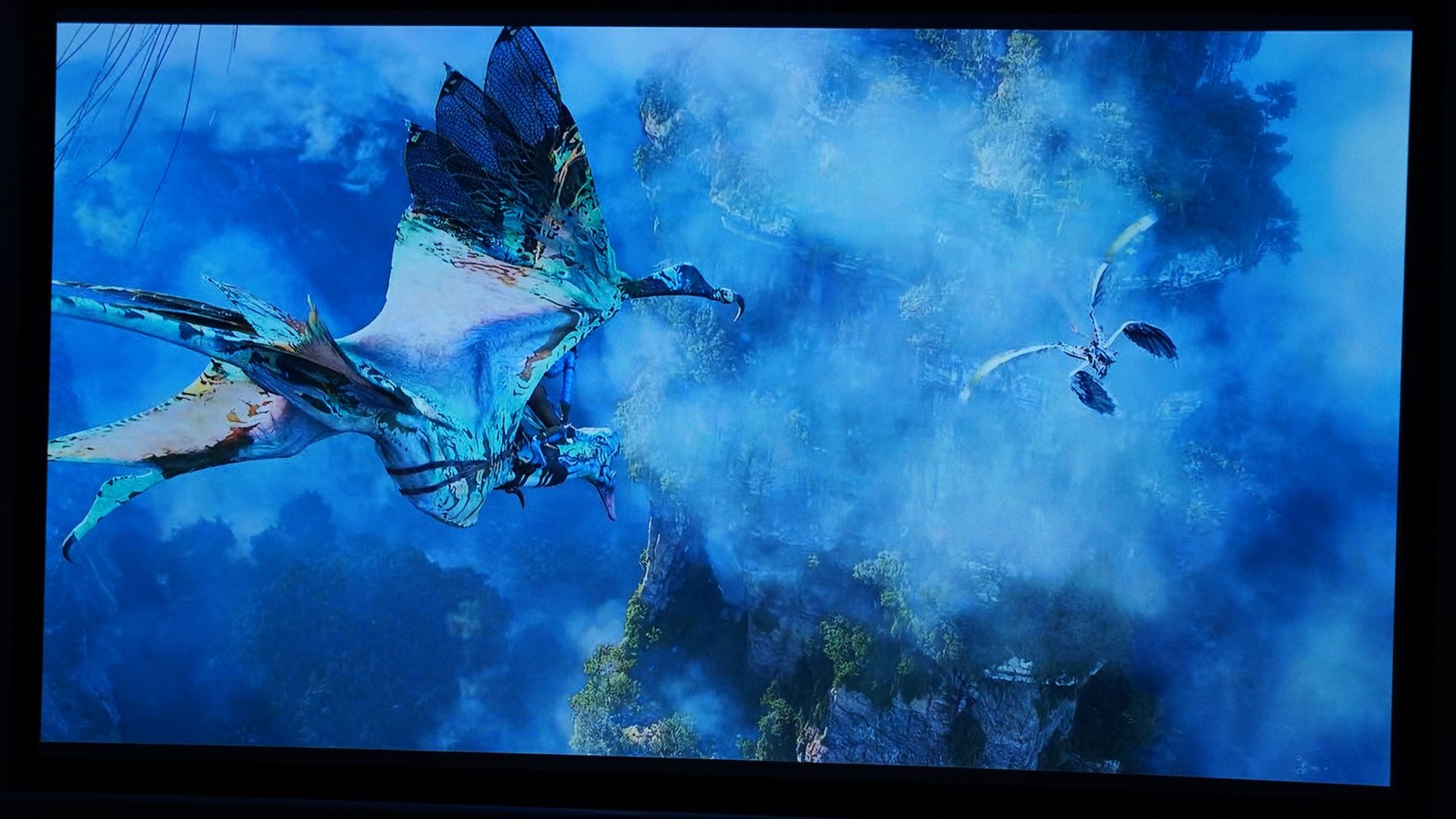


Motion is generally decent on the Elfin Flip 4K. It uses a lot of smoothing by default, but it didn’t look awful for live action video. In Dark Winds, it smoothed out pans without introducing distracting artifacts. But in Ghost in the Shell, an animated show, it created unusual pacing in the animation that stilted it. Xgimi also has a Real Cinema settings for MEMC that can keep up with even dramatically panning drone shots without the unsightly artifacting.
The Elfin Flip 4K uses DLP projection, and one artifact this can result in is the DLP rainbow effect. Its effect here is not the most egregious I’ve seen, but I spot it from time to time in white areas of the screen, particularly subtitles.
You can also enjoy gaming fairly well on the Elfin Flip 4K. By default there’s enough latency coming from the system to be a little annoying while trying to game. Even mousing around a PC desktop feels laggy. That drops to a more tolerable level with the projector’s gaming mode enabled, though the response still isn’t quite instantaneous. To get it really feeling locked in, the projector needs to switch over to its Boost mode, which disables all keystone and digital image adjustments. That may work out if you don’t need keystone adjustments, but it could be trouble if you do. However, at least in that boost mode, I didn’t feel the latency anymore.
Alternatively, the projector can drop down to 1080p/120Hz using its Projector Super Frame setting, which actually hurts clarity more than simply dropping to 1080p alone does. But with it, the projector feels very responsive and visuals are fluid in action. With those settings, I found I was readily able to plow through Hades 2 levels, handling Cerberus on my second attempt and taking Chronos within an inch of his first health bar on my first encounter with him. Eventually, I was even able to defeat him while playing in 4K.
The single 7-watt speaker on the Elfin Flip 4K is just good enough to get by. For an action movie like The Gray Man, it pushes decent volume for the explosions and gun shots while keeping clear mids that help ensure voices are clear. Of course, you’ll entirely miss out on stereo and surround sound as well as any real bass. But for casual viewing and a focus on dialogue, it’s not awful.
Xgimi Elfin Flip 4K review: Value
The Elfin Flip 4K is not without its shortcomings, but its value is remarkable. For $999 / £869 / $1,995, it provides smashing visuals that look lovely in the dark of a home theater. And it holds up modestly in lighter conditions for more casual content. The simple portability, ease of setting up in new locations, and extra flexibility with some optical zoom are really great to see at such a price.
Sure, you won’t get world-class sound, but even $4,000 projectors call for extra speakers to match their visuals. There’s more I’d love to see, like Dolby Vision support, optical lens shift, and an even faster 1080p mode, but the Elfin Flip 4K is already packing in an impressive array of capabilities for its $999 / £869 / $1,995 price tag. Looking at what it competes with, it’s a strong value.
If you need more brightness, you can still do better, but it will come with trade-offs. We were fans of the JMGO N1S Pro, and though you can find that model anymore, the higher-tier N1S Ultra was on sale for $1,149 (around £860 / AU$1,660) at the time of writing. You’d miss out on VRR, the 120Hz mode, and optical zoom, but you’d get much brighter visuals, better speakers, a better stand, and a carrying case (albeit alongside a less-portable design).
Should I buy the Xgimi Elfin Flip 4K?
|
The Elfin Flip 4K packs in a lot. It offers RGB laser projection with modest optical zoom and a bunch of quick digital adjustments for setup. It has an integrated stand that doubles as a carrying handle, even if it’s not wonderfully steady. It offers decent ports and Wi-Fi 6 to keep Google TV running smooth. The audio system is very weak and will likely be pointing the wrong direction in a lot of setups. The base could also have benefited from leveling feet. |
||
|
Picture quality and performance |
The Elfin Flip 4K offers modest brightness that’s plenty for dark rooms and can sometimes work in dim spaces, but it’s not a match for bright spaces. The RGB laser color is wonderful, though, and pairs well with strong contrast. Add in the decent game mode, and it’s solid all around. Dolby Vision support would have helped. |
|
|
The Elfin Flip 4K isn’t a top-tier projector, but it brings some solid conveniences and overall impressive visual performance to the table at a compelling $999 price. |
Buy it if…
You want a brilliant projector for impromptu movie nights
Your friends want to hang out but don’t have plans? Grabbing the Elfin Flip 4K lets you plop down for a big-screen movie night at their place or yours, and the quick adjustments and optical zoom make it easy to get set up. Pair that with the quality visuals, and you’ve got a nifty little projector indeed.
You need a projector that’s easy to move
One of the big advantages of the Elfin Flip 4K is how easy it is to move around. Sure, you have to find power, but the projector otherwise is light and small enough that even a young child could move it around. And the stand doubles as a carrying handle.
You like to do a bit of gaming
The addition of a 1080p/120Hz gaming mode and VRR make the Elfin Flip 4K unusually capable for a $999 projector. Very few projectors even have VRR so far, so it’s a wonder to see it in a cheaper model like this, and the Elfin Flip 4K has proved itself capable of a good time while playing.
Don’t buy it if…
You’ll only watch in bright spaces
Aside from watching the news or some very bright cartoons and sports, the Elfin Flip 4K doesn’t have the brightness to handle bright spaces. At best, it’ll look bad, and at worst it’ll be nigh unwatchable.
You want capable audio and video from onehing for better sound once you see how it looks. Even a couple Bluetooth speakers will be a massive upgrade, but if you want an all-in-one solution, this isn’t it
You want a TV and think a projector might be better
For $999, you can actually get a great TV, and it’ll probably serve you more effectively in different contexts. The advantage the Elfin Flip 4K has is the size of image matched with its portability. If you’re planning on a largely permanent installation, its advantages dwindle.
Xgimi Elfin Flip 4K review: Also consider
|
$799 / £399 (around AU$1,160) |
||||
|
2x HDMI 2. (1 with eARC, 1x 3.5mm |
1x HDMI 2.1 ( with eARC), 1x USB-A , 1x 3.5mm |
2x HDMI 2.1 (1 with eARC), 1x USB-C (PD Out, DP In, 2x USB-A 1x 3.5mm |
Samsung The Freestyle 2nd Gen
Samsung’s little projector is a popular option for portability and easy setup, but it shows how far ahead Xgimi is with substantially greater brightness levels, extra color ,and better connectivity all for a price that’s not far off. Read our full Samsung The Freestyle 2nd Gen review.
Soundcore Nebula P1
The Soundcore Nebula P1 is no match for the Elfin Flip 4K in picture quality, but it has detachable wireless speakers that give it a leg up in the audio department. For fun, quick setups, it has benefits, though the Elfin Flip 4K paired with a couple Bluetooth speakers would be superior. Read our full Soundcore Nebula P1 review.
BenQ GP520
The BenQ GP520 had been a strong pick for its brightness and gaming chops. It still has the edge in brightness, but the wondrous color of the Eflin Flip 4K and the gaming capabilities it brings make it a better option if you can tamp down ambient light. Read our full BenQ GP520 review.
How I tested the Xgimi Elfin Flip 4K
- Tested at home in multiple, real-world viewing conditions
- Presented the display with a variety of media and formats
- I have tested numerous projectors and displays over the last half-decade
I tested the Xgimi Elfin Flip 4K at home, in real-world conditions. This saw it faced with ambient light coming in from numerous windows, in-room lighting, as well as ambient noise that both the projector and speaker systems had to overcome. The projector was tested both against a bare, white wall and an Akia Screens CineWhite screen. It was presented with streamed content, HDR and non-HDR, and console gameplay.
My testing evaluates the projector’s performance with respect to its price and competition from other models I and colleagues at TechRadar have tested.
I have been testing projectors since 2021 and displays for even longer.
- First reviewed: November 2026
- Read TechRadar’s review guarantee
