
Close Menu
MyAppsPlus

    Subscribe to Updates

    Get the latest creative news from FooBar about art, design and business.

    What's Hot

    KitchenAid vs. Ooni: I tested both stand mixers — here is what I’m keeping

    November 14, 2026

    These long-sleeve button-down shirts are priced from $13.50 right now (46% off)

    November 14, 2026

    Why some USB ports are yellow (and less common than others)

    November 14, 2026
    Facebook X (Twitter) Instagram
    Facebook X (Twitter) Instagram
    MyAppsPlusMyAppsPlus
    Saturday, November 14
    • Home
    • Breaking Tech
    • Apps & Software
    • AI & Automation
    • Android
    • iPhone & iOS
    • More
      • Reviews
      • How-To Guides
      • Deals & Discounts
      • Shop
    MyAppsPlus
    Home»Breaking Tech»Why some USB ports are yellow (and less common than others)
    Breaking Tech

    Why some USB ports are yellow (and less common than others)

    myappsplusBy myappsplusNovember 14, 2026003 Mins Read
    Share Facebook Twitter Pinterest Copy Link LinkedIn Tumblr Email Telegram WhatsApp
    Follow Us
    Google News Flipboard
    Why some USB ports are yellow (and less common than others)
    Share
    Facebook Twitter LinkedIn Pinterest Email Copy Link

    Yellow USB-A ports usually mean Always On charging, but the particulars are up to the manufacturer.

    A yellow USB port usually marks an “Always On” port, meaning it will continue to charge your device once you turn the computer off. It’s one of several colors on USB-A ports, but none are an industry standard. 

    For example, the USB Implementers Forum (USB-IF) recommends one insert color, a specific blue, to help people tell the difference between USB 2.0 and USB 3.0 ports. However, this is just a suggestion, not a mandate. Every other color, yellow included, is a convention manufacturers can follow or not.

    Lenovo, for example, jumps around with colors. The older IdeaPad Y400 and Y500 feature yellow USB-A ports that are specifically for Always On charging. Later Lenovo models dropped the yellow entirely and replaced it with battery icons.

    Always On still needs power, and sometimes a setting

    Close-up of USB 2.0 and USB 3.0 ports on computer motherboard.

    Yellow USB-A ports are not a common sight because they’re a specialty feature that manufacturers only include on specific enterprise or business laptops. Manufacturers are also shifting toward symbols instead of a variety of colors. 

    A battery symbol next to a USB port indicates a port that’s good for charging. A trident symbol also indicates the USB implementation, like USB 3.0 or USB4. On top of that, USB-C ports on many PCs and laptops are skipping the color coding entirely, since one connector shape tends to cover a wide range of capabilities.

    If you come across a yellow port, don’t assume it’s ready to roll right out of the box. Depending on the PC or laptop, you may have to enable the Always On setting in the BIOS. Some laptops also ship with the “Charge in Battery Mode” disabled, so you can only charge devices when the laptop is plugged into AC power.

    Which USB port color is faster?
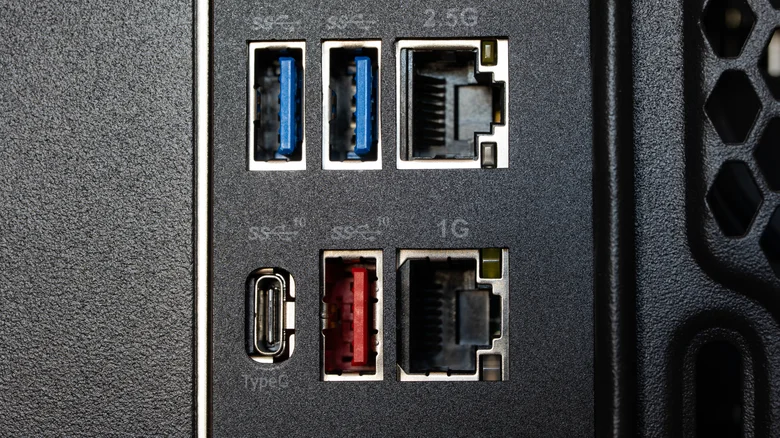
    Motherboard rear panel with two blue and one red USB-A ports, two Ethernet jacks and a USB-C port.

    Red is generally the fastest of the color-coded USB-A ports and is commonly used for 10 Gbps to 20 Gbps connections. Yellow doesn’t really have a spot on the speed ladder, and color charts can’t even agree on its place. Corsair lists yellow ports as either USB 2.0 or USB 3.0, and USB Memory Direct’s color guide places yellow on a level playing field with red.

    If you see a teal USB-A port, you’re probably looking at a USB 3.1 Gen 2 or USB 3.2 Gen 2 connection, with speeds up to 10 Gbps. Black and white USB-A ports sit on the lower end, while blue is typically 5 Gbps USB 3.0. Everything you just read is subject to manufacturers’ discretion.

    Charts just aren’t a safe bet for confirming data transfer speeds. If a yellow port turns out to be USB 2.0, it’ll work fine for a keyboard, mouse or basic accessories. An external SSD, on the other hand, needs to be plugged into a port with a 5 Gbps rating or higher. 

    While yellow may indicate Always On charging, the only way to know for certain is to check for a label or icon, then confirm it in the user manual or on the manufacturer’s spec page.

    Accessories less ports Some yellow
    Follow on Google News Follow on Flipboard
    Share. Facebook Twitter Pinterest LinkedIn Tumblr Email Copy Link
    myappsplus
    • Website

    Related Posts

    Watch SpaceX attempt to catch the Starship upper stage for the first time

    November 14, 2026

    Tesla opens Cybercab pre-orders ‘for personal use,’ with geo restrictions and a $299 monthly fee

    November 14, 2026

    How much did home internet cost in 2001 vs 2026?

    November 14, 2026
    Add A Comment
    Leave A Reply Cancel Reply

    Top Posts

    Save on your groceries, gas, and holiday shopping with this $15 BJ’s membership (Reg. $60) 

    November 4, 202629 Views

    Google’s new AI shopping cart tracks deals across stores

    October 25, 202627 Views

    Apple is making Creator Studio an even better deal with new AI features and creative tools

    October 28, 202623 Views
    Latest Reviews

    Grab the compact Anker 13-in-1 Nano laptop dock for just $112

    myappsplusSeptember 8, 2026

    How to watch Porto vs Man City: Live Streams & TV Channels for Champions League 2026/27

    myappsplusSeptember 8, 2026

    Logitech Releases the Developer-Focused MX Keypad for AI Automation

    myappsplusSeptember 8, 2026
    Stay In Touch
    • Facebook
    • YouTube
    • TikTok
    • WhatsApp
    • Twitter
    • Instagram

    Subscribe to Updates

    Get the latest tech news from FooBar about tech, design and biz.

    Most Popular

    Eight Microsoft Office apps are yours for just $30 with this lifetime deal (Reg. $220)

    September 8, 20260 Views

    What is Roku’s secret menu and how do you unlock it?

    September 8, 20260 Views

    TrendForce: Apple produced 52 million iPhones in Q2

    September 8, 20260 Views
    Our Picks

    KitchenAid vs. Ooni: I tested both stand mixers — here is what I’m keeping

    November 14, 2026

    These long-sleeve button-down shirts are priced from $13.50 right now (46% off)

    November 14, 2026

    Why some USB ports are yellow (and less common than others)

    November 14, 2026

    Subscribe to Updates

    Subscribe to our newsletter and get the latest tech news, app updates, AI trends, smartphone reviews, and exclusive deals delivered straight to your inbox.

    Facebook X (Twitter) Instagram Pinterest
    • About Us
    • Get In Touch
    • Disclaimer
    • Privacy Policy
    • Terms & Conditions
    © 2026 MyAppsPlus. All Rights Reserved.

    Type above and press Enter to search. Press Esc to cancel.