Close Menu
MyAppsPlus

    Subscribe to Updates

    Get the latest creative news from FooBar about art, design and business.

    What's Hot

    I ditched my other tracking cards for this one that looks incognito in my wallet — here’s why

    November 9, 2026

    Five Phone Apps Offer Alternatives to Doomscrolling, From Ebooks to Drawing

    November 9, 2026

    Apple opens the door to foldables with the iPhone Duo and its 5.2 mm display

    November 9, 2026
    Facebook X (Twitter) Instagram
    Facebook X (Twitter) Instagram
    MyAppsPlusMyAppsPlus
    Monday, November 9
    • Home
    • Breaking Tech
    • Apps & Software
    • AI & Automation
    • Android
    • iPhone & iOS
    • More
      • Reviews
      • How-To Guides
      • Deals & Discounts
      • Shop
    MyAppsPlus
    Home»Breaking Tech»Samsung One UI removed the all apps button, but you can easily get it back
    Breaking Tech

    Samsung One UI removed the all apps button, but you can easily get it back

    myappsplusBy myappsplusNovember 9, 2026003 Mins Read
    Share Facebook Twitter Pinterest Copy Link LinkedIn Tumblr Email Telegram WhatsApp
    Follow Us
    Google News Flipboard
    Samsung One UI removed the all apps button, but you can easily get it back
    Share
    Facebook Twitter LinkedIn Pinterest Email Copy Link

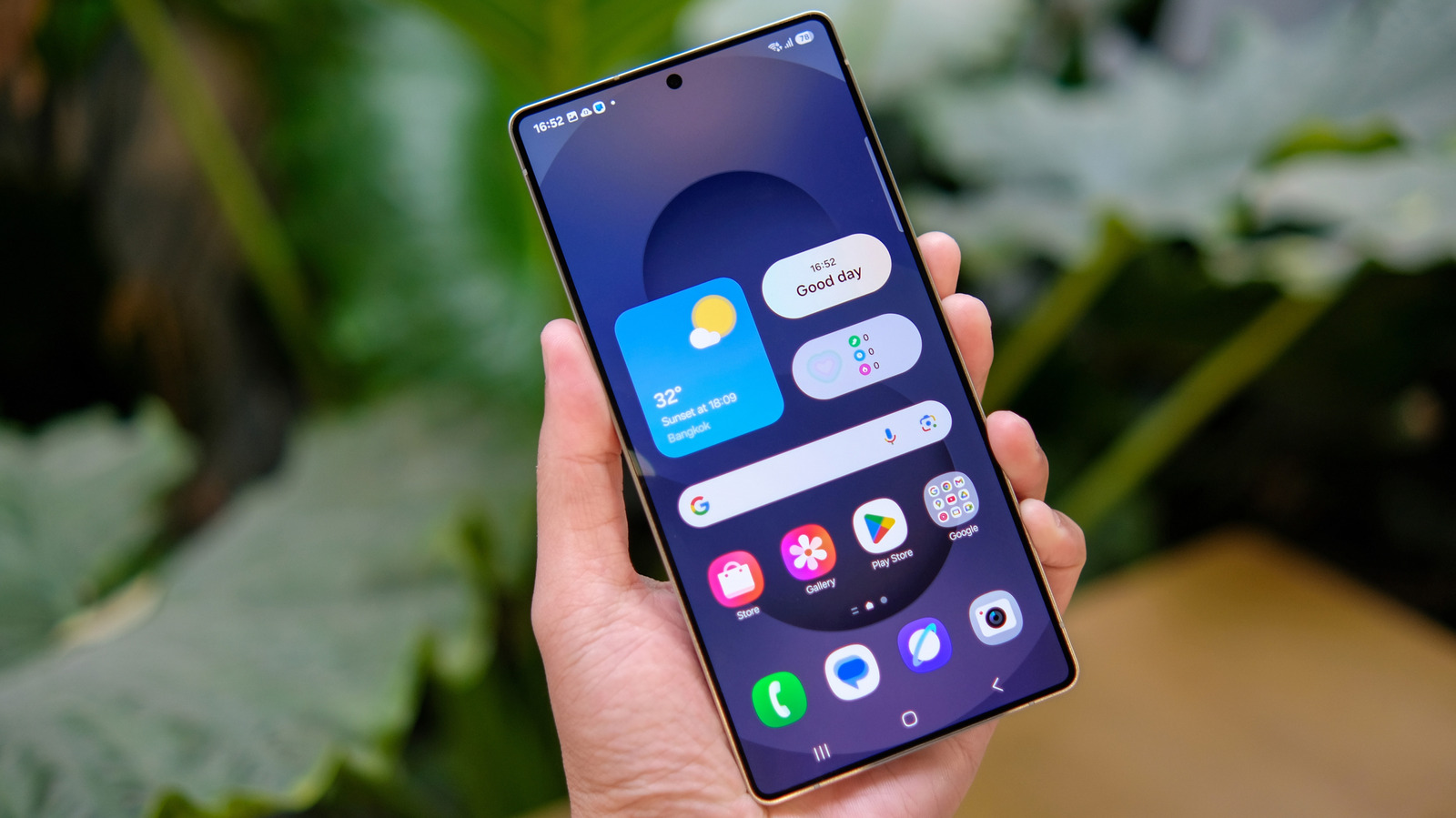
    If you really don’t like swiping to bring up the app drawer, don’t worry. Samsung’s got your back.

    One of Android‘s biggest learning curves is the way Google’s operating system organizes apps. Unlike the iPhone, which puts all your apps on the home screen by default, Android tucks them into a dedicated window called an app drawer. This lets you customize your home screen without hundreds of app icons cluttering it up.

    On modern versions of Android, including Samsung’s feature-packed One UI skin, you slide up on the home screen to bring up the app drawer, but that wasn’t always the case. For years, many Android versions had an “all apps” button on the home screen. That button is essentially now redundant, replaced by the aforementioned swiping motion, and Samsung has stopped showing it on the home screen by default in recent One UI updates.

    The only problem is that some users rely on the Apps button, either because they aren’t aware of the new swipe-up gesture or because they’re simply too used to having it around and don’t want to adapt. Thankfully, Samsung left the “all apps” button as an option for users who want it back. You’ll just need to dive into a settings menu to enable it.

    How to put the Apps shortcut back on your Samsung Galaxy home screen
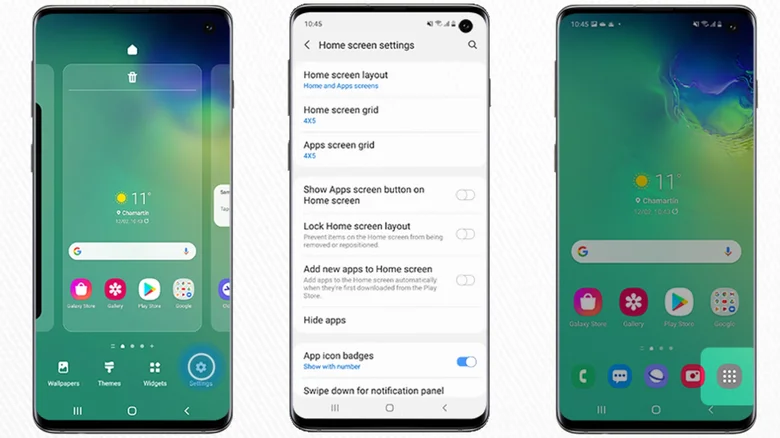
    Steps to add all apps button to One UI home screen shown in screenshots.

    To add the “all apps” button back to your Samsung Galaxy’s home screen in One UI 9, you’ll need to access the contextual options menu. Find a space on your home screen and long-press it or pinch as if zooming out on a photo. Either input will bring up several options. Tap the Settings button (the gear icon) in the bottom right of the screen, then scroll down to find and toggle on the option labeled Show Apps screen button on Home screen. 

    Return to your phone’s home screen, and you should now see the “all apps” button on the right side of the favorite apps dock at the bottom of the page. Note that the button takes up space you could use for an extra app in your favorites dock, so it’s only worth turning back on if you really don’t want to start swiping up to access the app drawer instead.

    Samsung is traditionally pretty good about retaining features that longtime users may have come to rely on, and offering the option to enable the “all apps” button is a good example. In some cases, though, the Korean giant might be too good. Samsung is the last major manufacturer still using Android 3.0 Honeycomb’s three-button on-screen navigation by default, even though stock Android introduced gesture-based navigation with Android 9.0 Pie in 2018. Users who prefer the latter can switch between the two in Settings, though.

    apps button removed Samsung Smartphones
    Follow on Google News Follow on Flipboard
    Share. Facebook Twitter Pinterest LinkedIn Tumblr Email Copy Link
    myappsplus
    • Website

    Related Posts

    Five Phone Apps Offer Alternatives to Doomscrolling, From Ebooks to Drawing

    November 9, 2026

    The one Starlink perk that gives it an edge over traditional internet

    November 9, 2026

    Is Jensen Huang’s job on the line? Yale’s Jeffrey Sonnenfeld estimates it’s “about a 50-50”

    November 9, 2026
    Add A Comment
    Leave A Reply Cancel Reply

    Top Posts

    Cathay Pacific tests Google AI that dramatically cuts airplane contrails — tiny altitude shifts slash environmental impact by 40% in early trials

    September 8, 2026138 Views

    Save on your groceries, gas, and holiday shopping with this $15 BJ’s membership (Reg. $60) 

    November 4, 202627 Views

    Apple is making Creator Studio an even better deal with new AI features and creative tools

    October 28, 202620 Views
    Latest Reviews

    OpenAI says it reached its goal of creating an automated research intern

    myappsplusSeptember 6, 2026

    Will the iPhone Ultra really be ‘Ultra’? 5 features the foldable could surprisingly ditch, from Face ID to MagSafe

    myappsplusSeptember 6, 2026

    Best TVs of 2026: Expert Tested, Compared and Reviewed

    myappsplusSeptember 6, 2026
    Stay In Touch
    • Facebook
    • YouTube
    • TikTok
    • WhatsApp
    • Twitter
    • Instagram

    Subscribe to Updates

    Get the latest tech news from FooBar about tech, design and biz.

    Most Popular

    Microsoft is ending Windows 11’s web app slop era, and AI now writes native apps in 30 minutes

    September 6, 20260 Views

    Is it safe to buy a refurbished iPhone from Walmart?

    September 7, 20260 Views

    Amazon cargo plane crashes at Miami International Airport, kills 5: Here’s the latest update shared by the company

    September 7, 20260 Views
    Our Picks

    I ditched my other tracking cards for this one that looks incognito in my wallet — here’s why

    November 9, 2026

    Five Phone Apps Offer Alternatives to Doomscrolling, From Ebooks to Drawing

    November 9, 2026

    Apple opens the door to foldables with the iPhone Duo and its 5.2 mm display

    November 9, 2026

    Subscribe to Updates

    Subscribe to our newsletter and get the latest tech news, app updates, AI trends, smartphone reviews, and exclusive deals delivered straight to your inbox.

    Facebook X (Twitter) Instagram Pinterest
    • About Us
    • Get In Touch
    • Disclaimer
    • Privacy Policy
    • Terms & Conditions
    © 2026 MyAppsPlus. All Rights Reserved.

    Type above and press Enter to search. Press Esc to cancel.