

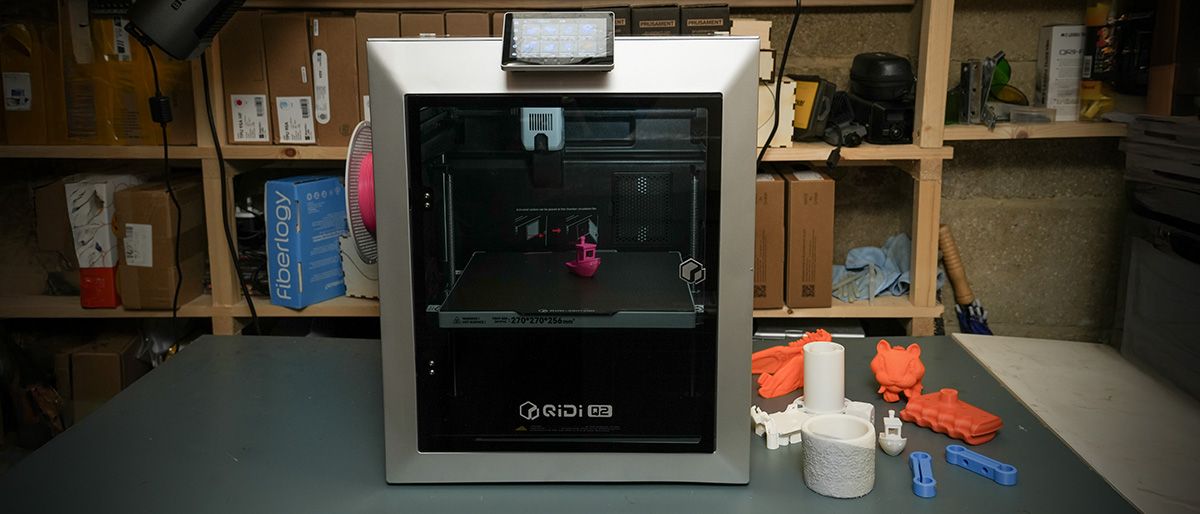
Removing the Qidi Q2 from the box, I was instantly pleased to see that this new machine reflected everything that I have liked about the Qidi Plus4 machine that I looked at a couple of years ago. However, this is a smaller version with a footprint that is better suited to smaller workshops and studios.
Once again, it’s easy to write off these machines. Qidi , while in the business for as long as many of the big-name brands, just isn’t as well-known, and their machines just don’t have that spark of innovation that we see from the likes of Prusa Research, Bambu Lab, Creality, Elegoo or AnyCubic; however, above all, bar possibly Prusa, Qidi have reliability.
It’s been a busy few months, and the Q2 review has been a long time coming. It’s essentially been sitting, printing for 6 months without issue or fuss: switch on, print, whichever material I need for any given job, usually PLA but ASA, ABS and PETG-CF, same reliability, same print quality.
The main issue is that when a machine starts to blend in, just works as part of the workshop and now classroom you don’t tend to think of it as anything other than having always been there, and that really sums up the Qidi , while it may not have the cutting edge features, what it does have is absolute refinement and reliability.
As I have found in both a business and an educational environment, reliability is far more important than any headline speed figures, multitool changers, or other cutting-edge features when all you need to do is print.
QIDI Q2 3D Printer: Design
Positioning the 402 x 438 x 494mm frame of the Qidi Q2 onto the workbench was something of a relief; the past three printers and laser engravers have all recently gone for scale, so to have something smaller and quite as neat and robust as the Q2 to move around is a welcome break. While it is smaller, it still offers a decent print area of 270x270x256; this will enable you to print most objects you’ll need for prototyping, although cosplay props and helmets will require the models to be split and produced in parts.
One of the key points for me was that the Q2 comes in at 18.1kg, so while that is still quite weighty, it’s not up to the backbreaking weight of many of the other new machines, which in smaller workshops means that it’s easy to move and store when needed.
The construction is all good and solid, and with the CoreXY mechanics and the full-metal frame it all feels a little more robust than some of the other printers that I have tested recently. I also like the fact that it, which has been product-designed, is more in line with workshop machinery, so slips into that environment neatly.
In the print workroom, which is where the Qidi machines tend to end up, the Q2 has sat alongside the larger Plus4 handling the smaller props prints and artworks that we’re required for the run-up to summer. The quality, speed and ultimately reliability have made this, alongside the other Qidi machine, a valuable addition.
All the features that are essential for education, especially, are here, with the fully enclosed construction which keeps students’ fingers away from the heated internal chamber and, more importantly, the hot end.
The interface is also extremely straightforward, with the 4.3-inch touchscreen making it easy to navigate. What I liked was that the calibration is automatic, so once the machine is set, you can just leave it.
The auto bed levelling with the standard dual-sided textured PEI build plate meant that there were few, if any, misprints, and once prints cool, they’re easy to remove.
When it comes to the build, the Qidi has been designed as a solid and reliable part of the studio, and a printer that blends in rather than standing out and demanding constant attention.
QIDI Q2 3D Printer: Features
Taking a look at the Q2’s features, while impressive, it positions this fully enclosed printer at entry level these days, which, compared with printers just a couple of years ago, shows just how far the technology has progressed.
The fully enclosed design gives the machine its premium look and feel and houses the CoreXY motion system using heavier-weight 1.5GT belts, with linear guide rail used rather than rods on the X-axis and dual independent lead-screw motors controlling the Z-axis. These are all features that ensured Bambu Lab’s position when they launched, and now even in this entry-level machine they’re a standard.
Toolhead speed is 600mm/s, fast but not unusual at this level, with acceleration of up to 20,000mm/s². Compared with the old Cartesian machines, this is impressive, but with many machines now reaching 1000mm/s, it puts this machine’s print speeds at a reliable and steady pace.
The machine is shipped with QidiSlicer, which, as with most slicers these days, is a derivative of Prusa Slicer, although here it has been heavily adapted to enable ease of use. What I liked through the test is that the default profiles are solid and well tested. If you’re new to 3D printing, then it’s just a case of selecting your filament type and the software then the machine sorts the rest. Through this test, I stuck to these default profiles, and the consistency with the QIDI and other manufacturer filaments was superb.
The print volume is 270 x 270 x 256mm, which is a decent size, with most standard 3D printers offering around the 250 x 250 x 250 mm volume. The platform itself is an aluminium-substrate heated bed topped by a removable dual-sided textured PEI plate with a bed temperature that can reach 120°C.
The standard hotend nozzle impressively reaches a temperature of 370°C, meaning that out of the box the bimetal 0.4mm nozzle is equipped to deal with engineering materials. As one feature point that really highlights the direction of the QIDI 3D printers, it uses a direct-drive extrusion system with hardened-steel gears, again built for durability and maximum filament support.
As I mentioned, the 0.4mm bimetal nozzle is fitted as standard; however, if you want to swap it out for something else, then there are 0.2, 0.6 and 0.8mm alternatives available. While you can print with abrasive materials as I did through the test, there is a Tungsten Carbide nozzle available which will last far longer.
The material compatibility list is extensive, with the usual PLA, PETG and TPU, and support for ABS, ASA, PA and PC. The BiMetal nozzle will also print carbon- and glass-fibre reinforced polymers, although this is where I would invest the additional £60/$60 for the Tungsten Carbide hotend.
The Q2 is a fully enclosed machine with active PTC chamber heating system that can push the internal temperature up to 65°C; this is ideal for materials such as ABS, ASA and engineering polymers. The heat around the print enables better control over warping and other print problems for these more advanced material types.
There are several points around the engineering materials that are worth knowing before you start using them on this printer. While it can print with them out of the box, if you’re going to be using carbon-fibre or nylon on a regular basis, I would invest in a filament dryer and that hardened hotend.
Looking at a few of the features that have been introduced that actually make this machine an interesting option for small studios and education are additions such as the G3 pre-filter, H12 HEPA filter and coconut-shell activated-carbon filter. These essentially take out some of the fumes and smaller particles that some of the more advanced materials can make.
The Q2 uses hands-free automatic levelling with a load-cell sensor integrated directly into the hotend. The nozzle itself can therefore be used during the levelling process, removing the need for a separate offset probe.
Print Technology: Fused Deposition Modelling (FDM), CoreXY
Build Area: 270 x 270 x 256mm
Minimum Layer Resolution: Dependent on nozzle/profile
Maximum Layer Resolution: Dependent on nozzle/profile
Dimensions: 402 x 438 x 494mm
Weight: 18.1kg
Bed: Aluminium heated bed, up to 120°C
Print Surface: Dual-sided textured PEI plate
Software: QIDI Studio; compatible with third-party slicers including OrcaSlicer and PrusaSlicer
Materials: PLA, ABS, ASA, PETG, TPU, PA, PC and carbon/glass-fibre reinforced polymers
Print Speed: Up to 600mm/s; acceleration up to 20,000mm/s²
In everyday use, the important point is that calibration is straightforward and, once complete, I’ve found little reason to start making manual fine adjustments.
That’s exactly what I want from a machine being used in education.
The purpose of the printer is to make things. If you’re continually adjusting the printer itself, something has gone wrong with that relationship.
Other advanced features include the 1080p resolution camera that enables you to monitor prints and create time-lapse sequences; this camera is now AI-enhanced, so it will spot defects automatically.
More standard features, including WiFi across a 2.4GHz connection, Ethernet and USB, are all available, and the 4.3-inch, 480 x 272 touchscreen enables you to easily switch through settings.
QIDI Q2 3D Printer: Performance
After having the relative complexity of the multi-filament machines over the last year, it’s actually quite nice to go back to the simplicity of a single filament. There is the option to go multifilament, but in this review I’m just looking at the base machine, and as the first few prints finished, I was instantly impressed by the quality of the PLA prints.
As I ran through the stock models that had been provided and then the additional test prints, the quality and speed were consistent. This is a mid-speed printer, and while it’s not as fast as some of the machines I’ve looked at recently, at this price the speed and quality are well balanced.
What is apparent is that, consistently and unusually due to the volume of printers and engravers that have been coming through the workshop, this machine has been printing consistently for six months without issue. This is part of the reason that I’ve delayed the review: firstly, waiting for the Qidi Box, and secondly, it just became a part of the workshop that was in constant use.
This reliability has been seen with the other QIDI printers that I’ve used, with the Plus4 now having been run for almost two years in the college; it’s the one printer of many that has consistently worked and meets the safety requirements.
Checking the quality of the prints and the first layer after the auto calibration is always slow and precise, and at no point have I had to make any adjustments to that initial calibration height.
The prints also hold firm during printing, and if printing multiple prints across the heated bed, they all stick firmly through the process, releasing easily when the platform cools.
What was also apparent was that after a six-week break at the college, where the machine has sat mostly unused, all it took to get it back into action was to power it on. A quick bench test, and the machine was printing perfectly.
Taking a look at the benchmark tests, the results were impressive.
QIDI Q2 3D Printer: Print quality
Dimensional accuracy – score of 4
Target 25 = X: 24.90mm / 0.10mm Error | Y: 24.87mm / 0.13mm Error
Target 20 = X: 19.88mm / 0.12mm Error | Y: 19.80mm / 0.20mm Error
Target 15 = X: 14.90mm / 0.10mm Error | Y: 14.93mm / 0.07mm Error
Target 10 = X: 9.89mm / 0.11mm Error | Y: 9.78mm / 0.22mm Error
Target 5 = X: 4.88mm / 0.12mm Error | Y: 4.89mm / 0.11mm Error
X Error Average = 0.11
Y Error Average = 0.146
X&Y Error Average = 0.128
Fine Flow Control – score of 5
Fine Negative Features – score of 5
Z-axis alignment – score of 2.5
Adding up the totals gives a final score of 29 out of 30.
QIDI Q2 3D Printer: Final verdict
The review of this 3D printer has stretched over a far longer period than most, with the machine being set up and used for the last six months. While the pricing places this at the entry level, the build quality and reliability make it clear that this machine strikes a careful balance.
It gives you a standard out-of-the-box machine that is a reliable tool in the workshop, and if you work in education or have a small business or design studio, then that is exactly what it provides.
The Q2, used as a single-filament machine as I have looked at it in this review, offers a solid, no-fuss approach and huge support for a good range of materials. Key features include the CoreXY design, cooling system, filter and fully enclosed design that enable everyone from a complete beginner through to professionals to have a machine that will be reliable and easy to use.
The Qidi software is again well thought out, and the stripped-down approach again makes it an ideal option for those who are new to 3D printing; the machine connection and the slicing workflow are all well thought through.
This might not be a machine that shouts. out with the latest features and cutting-edge additions, but instead it refines this style of machine perfectly. If you want more, then there are the other hotend options, and there’s the QIDI box for multifilament printing.
Essentially if you need a no fuss, solid and reliable 3D printer then the Qidi Q2 is a great option, while there is the multifilament option at present as a single filament machine it’s a great price and close to perfect for what it is.
Should You Buy the Qidi Q2 3D printer?
|
Excellent value with a fully enclosed design and robust build that should last for years |
||
|
Relatively compact design, with expansion options and built-in filters |
||
|
Heated chamber, filtration and multi-material expansion future-proof the machine |
||
|
Six months of reliable printing highlighted just how refined this machine is |
||
|
Compact, capable and exceptionally reliable all make this a great choice for education. |
If you’re using a 3D printer in the classroom, workshop or busy home setup, the Q2’s headline feature is its consistency and reliability. Once calibrated, it simply gets on with printing, with little maintenance or recalibration needed.
The Q2 is perfect for PLA printing for everyday tasks, but then with the fully enclosed chamber it’s also a great option for more advanced materials, especially with the upgrade options.
The 270 x 270 x 256mm build area is pretty decent for an everyday printer, but large prototypes and single-piece models will need something bigger.
The 600mm/s maximum is good rather than exceptional, especially against the competition. There are competing printers with faster, higher speeds, although the Q2’s real strength is the consistency.
See what I rate as thebest 3D printersyou can buy based on my workshop tests
