Close Menu
MyAppsPlus

    Subscribe to Updates

    Get the latest creative news from FooBar about art, design and business.

    What's Hot

    Govee’s magnetic 4-probe meat thermometer with Wi-Fi connectivity strikes $32 (Reg. $50)

    September 20, 2026

    Even With the $1,999 Price Tag, Apple’s Foldable iPhone Duo Will Be a Hit and Apple Will Join Nvidia in the $5 Trillion Club.

    September 20, 2026

    DBrand knocked it out of the park with its Nintendo Switch 2 Killswitch protective gear, and after testing it, I might just keep it on my console forever

    September 20, 2026
    Facebook X (Twitter) Instagram
    Facebook X (Twitter) Instagram
    MyAppsPlusMyAppsPlus
    Sunday, September 20
    • Home
    • Breaking Tech
    • Apps & Software
    • AI & Automation
    • Android
    • iPhone & iOS
    • More
      • Reviews
      • How-To Guides
      • Deals & Discounts
      • Shop
    MyAppsPlus
    Home»Android»MapQuest Now Works With Android Auto – Here’s How To Use It
    Android

    MapQuest Now Works With Android Auto – Here’s How To Use It

    myappsplusBy myappsplusSeptember 20, 2026004 Mins Read
    Share Facebook Twitter Pinterest Copy Link LinkedIn Tumblr Email Telegram WhatsApp
    Follow Us
    Google News Flipboard
    MapQuest Now Works With Android Auto – Here’s How To Use It
    Share
    Facebook Twitter LinkedIn Pinterest Email Copy Link

    When it comes to software services, there is often a healthy variety no matter which platform you use. Certain products, however, enjoy a monopoly of sorts and become the default option for many. Google Maps is a good example of a service that has become synonymous with navigation, despite the presence of worthy alternatives like Apple Maps and Waze. One possibly underappreciated navigation service is MapQuest, which has a long history and predates Google Maps by over a decade.

    MapQuest launched in 1996 and was the first commercially available web mapping service. Its September 2026 decision to retain Lake Ontario’s name put it back in the spotlight, with a surge of popularity pushing it to number one on the App Store. The app is also available on Android, but it’s only started supporting Android Auto in the wake of its viral popularity. If the lack of Android Auto support has kept you from using it for navigation, this might be just what you’ve been waiting for.

    The Android Auto build is still in beta, so expect some bugs and visual glitches. Incident reporting is also present, and the feature lets you report and view alerts for road closures, crashes, and other incidents. All you really need to do is download MapQuest from the Google Play Store. If you already have it installed, make sure you’re on the latest version, and you should be good to go.

    Using MapQuest on Android Auto
    Android Auto app on the Google Play Store.

    If you have Android Auto already set up and running, you don’t need to do anything extra to get the MapQuest app to show up on your car’s infotainment screen. If you’ve not used Android Auto before, setting it up is pretty simple. It’s a great way to use navigation and music apps on the road without glancing at your phone and potentially putting yourself and other road users at risk.

    You can connect to Android Auto using a USB cable or wirelessly if your car supports it. If you’re using a cable, plug in your phone, and you should see instructions to set up Android Auto. For wireless Android Auto, you will have to first pair your phone to your car car’s infotainment screen. As long as you have updated MapQuest, you should see its app icon appear on Android Auto

    With a destination set, you should see turn-by-turn navigation, live traffic data, and other useful information on your car’s display. If you can’t find MapQuest on Android Auto, it might be hidden. On your Android phone, navigate to Settings > Connected devices > Android Auto > Customize launcher. Here, make sure the MapQuest app is checked.

    Other navigation apps on Android Auto
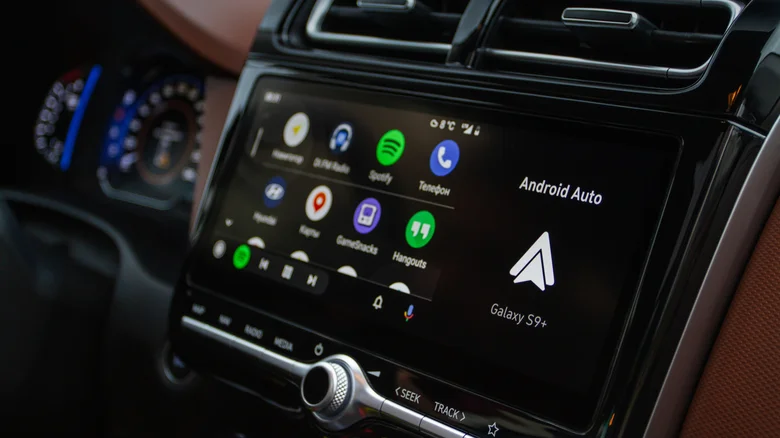
    Android Auto running on a car's infotainment screen.

    MapQuest’s feature set isn’t as rich as Google Maps, but it does have a pretty modern user interface. Early adopters of the Android Auto version have noted that the experience still needs a bit of polishing; most notably, the interface occasionally mentions “CarPlay,” suggesting that MapQuest may have rushed the Android Auto release to capitalize on its surge in popularity. 

    Interface bugs should be ironed out eventually, but the biggest issue is that MapQuest’s navigational services are currently limited to the United States and Canada, so it isn’t really an option for overseas drivers. Android users who want an alternative to Google Maps will likely have to turn to Waze, which is often considered the best alternative to Google Maps. It has a range of useful features that make its navigation experience superior in some ways: You can customize your avatar, choose different navigation voices, and even benefit from crowdsourced data that warns you about hazards, speed bumps, and red lights.

    Other popular Android Auto map apps include Sygic and TomTom Go. While you can use Apple Maps on an Android phone by using the web version in a browser, that sadly doesn’t extend to the Android Auto experience.

    Android Auto Heres Mapquest works
    Follow on Google News Follow on Flipboard
    Share. Facebook Twitter Pinterest LinkedIn Tumblr Email Copy Link
    myappsplus
    • Website

    Related Posts

    MuMu Player vs GameLoop vs KOPLAYER: Android 15 Gap

    September 20, 2026

    Linux receives additional support for Android gaming thanks to Valve

    September 20, 2026

    Say Hello to RatHat, a New AI-Powered Malware Invading the Android Ecosystem

    September 20, 2026
    Add A Comment
    Leave A Reply Cancel Reply

    Top Posts

    This tiny AI box could save me from upgrading my perfectly good laptop

    September 6, 20263 Views

    New Target ad delivers look at upcoming deals in one of Nintendo’s ‘largest promotions ever’

    September 13, 20262 Views

    Top 10 Best React Native App Development Companies in 2026

    September 12, 20262 Views
    Latest Reviews

    JBL Xtreme 5 drops back to its best price with $100 off at Amazon

    myappsplusAugust 20, 2026

    The best website builders of 2026: 80+ platforms tested to find the easiest ways to build a site.

    myappsplusAugust 20, 2026

    Someone targeted security researchers using a fake crypto conference as a lure

    myappsplusAugust 20, 2026
    Stay In Touch
    • Facebook
    • YouTube
    • TikTok
    • WhatsApp
    • Twitter
    • Instagram

    Subscribe to Updates

    Get the latest tech news from FooBar about tech, design and biz.

    Most Popular

    JBL Xtreme 5 drops back to its best price with $100 off at Amazon

    August 20, 20260 Views

    The best website builders of 2026: 80+ platforms tested to find the easiest ways to build a site.

    August 20, 20260 Views

    Someone targeted security researchers using a fake crypto conference as a lure

    August 20, 20260 Views
    Our Picks

    Govee’s magnetic 4-probe meat thermometer with Wi-Fi connectivity strikes $32 (Reg. $50)

    September 20, 2026

    Even With the $1,999 Price Tag, Apple’s Foldable iPhone Duo Will Be a Hit and Apple Will Join Nvidia in the $5 Trillion Club.

    September 20, 2026

    DBrand knocked it out of the park with its Nintendo Switch 2 Killswitch protective gear, and after testing it, I might just keep it on my console forever

    September 20, 2026

    Subscribe to Updates

    Subscribe to our newsletter and get the latest tech news, app updates, AI trends, smartphone reviews, and exclusive deals delivered straight to your inbox.

    Facebook X (Twitter) Instagram Pinterest
    • About Us
    • Get In Touch
    • Disclaimer
    • Privacy Policy
    • Terms & Conditions
    © 2026 MyAppsPlus. All Rights Reserved.

    Type above and press Enter to search. Press Esc to cancel.