

Affiliate links on Android Authority may earn us a commission. Learn more.
General technologyVR and AR
C. Scott Brown / Android Authority
XREAL AURA review: Is Android XR really worth it?
The XREAL AURA is easily the best Android XR system you can buy today — if you actually need Android XR.
•
XREAL AURA
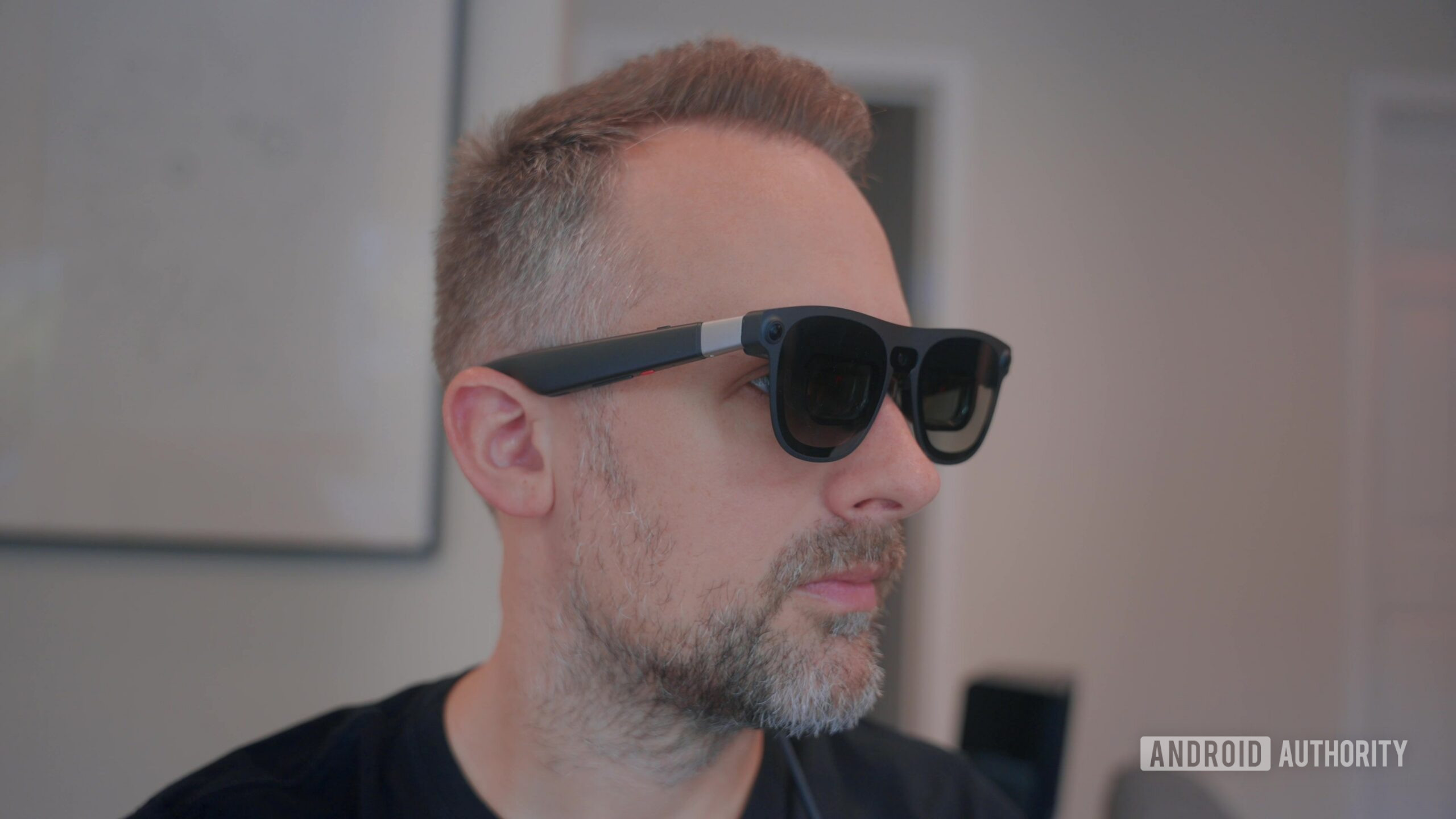
It’s a pricey investment and Google’s operating system hasn’t reach its full potential yet, but the XREAL AURA arguably offers the best Android XR experience to date by shrinking nearly everything impressive about the Samsung Galaxy XR into a comfortable pair of tethered glasses and a pocket-sized compute puck.
MSRP: $1,279.00
What we like
Slims down Galaxy XR-like experience into more portable package
Comfortable for long sessions
Flexible control options
Full Google Play Store access plus wired USB-C display
Surprisingly loud, clear, Bose-tuned speakers
Generous carrying case and belt clip included
What we don’t like
Very expensive once introductory pricing ends
Android XR still lacks must-have use cases
Compute puck gets noticeably warm under heavy load
Modest 2-3 hours of battery life per charge
No power brick or display-mirroring cable in box
XREAL AURA
It’s a pricey investment and Google’s operating system hasn’t reach its full potential yet, but the XREAL AURA arguably offers the best Android XR experience to date by shrinking nearly everything impressive about the Samsung Galaxy XR into a comfortable pair of tethered glasses and a pocket-sized compute puck.
Add Android Authority on Google:
Preferred SourceGoogle Discover

Notable for being among the first AR glasses to run Google’s relatively new Android XR operating system, the XREAL AURA aim to solve the biggest problem with mixed-reality headsets: bulk. The easiest way to describe the XREAL AURA is as a slimmed-down version of last year’s Samsung Galaxy XR headset — split into a pair of glasses, a cable, and a compute puck.
After spending real time with the XREAL AURA (provided to me by XREAL for review), I came away genuinely impressed by the hardware. In fact, I struggled to find much wrong with the glasses themselves. The problem isn’t what XREAL built — it’s figuring out whether Android XR is actually worth paying a premium for.
A shrunk-down Galaxy XR
C. Scott Brown / Android Authority
To keep the eyewear light on your face, XREAL offloads all the Android XR compute and battery hardware into a separate tethered puck. The puck is roughly the same footprint as my Google Pixel 11 Pro, though it’s noticeably heavier at 265g.
Inside that puck is serious silicon: the Qualcomm Snapdragon Reality Elite chipset (which debuted in June 2026 and is currently Qualcomm’s most powerful XR chip), paired with 12GB or 16GB of RAM, up to 512GB of UFS 4.0 storage, and a 4,455mAh battery. The glasses themselves weigh 95g, and house XREAL’s X1S spatial coprocessor alongside dual Sony Micro-OLED displays (1,920 x 1,200 per eye, up to 120Hz) using X Prism optics with a 70-degree field of view.
Because the puck packs flagship XR horsepower into a small chassis, it has an active cooling fan built in. It needs it, too: under heavy load, the puck can get pretty toasty. Thankfully, XREAL anticipates this and includes a belt clip right in the retail box. Snapping the clip onto the puck and hanging it from your belt is far more comfortable than keeping a tiny furnace in your pants pocket.
In fact, XREAL gives you a generous bundle out of the box. You get a terrific hard carrying case that neatly holds both the glasses and the puck, complete with an upper pouch for cables. The whole case is about the same size as the one I use for my Sony WH-1000XM4 headphones, which puts into perspective just how portable this setup is compared to a full headset like the Galaxy XR. You also get comfort and fit accessories (including interchangeable nose pads), plus a charging cable for the puck. Unfortunately, XREAL doesn’t include a wall power brick in the box.
Getting started is refreshingly simple. First, hold down the puck’s power button (which thoughtfully doubles as a fingerprint scanner for unlocking Android XR and securely signing into apps), plug the included cable into the glasses-labeled USB-C port, and connect the other end to the stem of the glasses. On the glasses themselves, you’ll find a home button that jumps back to the Android app launcher, volume buttons, and a red button that cycles through five electrochromic dimming levels — letting you either see the real world clearly or block out as much ambient light as possible. There’s also an outward-facing camera with a flashing privacy LED indicator whenever you’re recording, though being tethered to a puck with thick prism lenses isn’t exactly the most discreet way to shoot casual video.
Controls, software, and surprisingly loud Bose audio
One of the best aspects of the XREAL AURA is that you don’t need physical controllers to get around Android XR. The glasses support hand gestures out of the box: pinch your fingers to click, turn your hand over and pinch to bring up Android’s navigation menu, or use two hands to pinch and zoom.
If you get tired of waving your hands in the air, XREAL gives you great alternatives. The top surface of the compute puck doubles as a responsive trackpad for familiar mouse-style navigation. And if you want tactile controls for gaming, you can pair a Bluetooth controller. XREAL sent along its official controller (which is very nice and even includes a charging stand), but because this is Android, pretty much any Bluetooth controller you already own will work just fine.
One of the best aspects of the XREAL AURA is that you don’t need physical controllers to get around Android XR.
Running Android XR also means full access to the Google Play Store. Certain apps are tailored specifically for spatial computing and are highlighted in the store when you visit. Google Maps, for example, elevates Street View by letting you virtually walk around cities and step inside specific restaurants, museums, and landmarks. There are also some games to play, but not as many as one would think for an operating system that’s been around for a year and is relatively easy to develop for. Even when an app isn’t built specifically for XR, you can still run standard 2D Android apps and games without a hitch. I had a blast playing Chrono Trigger on a floating screen that felt roughly 100 inches wide.
You aren’t limited to what’s installed on the puck, either. The puck’s second USB-C port (the charging port) also supports DisplayPort-in. As long as you buy your own high-speed USB-C video cable separately, you can plug almost anything into the puck and mirror its display inside the glasses. I used it to get real work done on my Windows laptop and to waste plenty of time playing my Nintendo Switch 2 on a massive virtual screen.
Audio is another bright spot. Built into the stems are downward-firing speakers tuned in partnership with Bose, so you don’t need to wear earbuds. While I haven’t tested them on a noisy airplane yet, sitting at home everything came through loudly and clearly. If you do want privacy or noise isolation in public, you can easily pair standard Bluetooth earbuds just like on any Android phone.
Comfort and battery life hold up better than expected
Normally, this is the part of a review where I start listing all the hardware compromises. With the XREAL AURA, I honestly struggled to find many.
Because the heavy battery and processor sit on your belt or desk instead of your nose, the glasses are genuinely comfortable to wear for long stretches. If the default nose pad doesn’t sit right, XREAL includes additional pads in the box, and you can tilt the glasses slightly upward or downward to dial in both comfort and optical clarity. The 70-degree field of view also feels impressively wide considering these are glasses rather than a full enclosed headset.
Battery life is the most obvious hardware limitation: expect roughly two to three hours on a single charge from the puck’s 4,455mAh cell. That isn’t stellar on its own, especially for long flights, though you can plug the puck into a wall outlet or power bank and keep using the glasses indefinitely, assuming you’re OK with it becoming a small toaster. XREAL rates charging speeds at up to 57W. The highest I measured in testing was around 54W, which is plenty quick as long as you bring your own compatible charger.
The biggest problem with the XREAL AURA is XREAL itself
If the hardware is this polished, what’s the catch? Ironically, the biggest obstacle to recommending the XREAL AURA is XREAL’s own product lineup.
Remember how I connected my Windows laptop to the puck to mirror its screen? Here’s the thing: you don’t actually need the puck to do that. You can take a high-speed USB-C cable and plug the glasses directly into a laptop, tablet, smartphone, or anything else that supports DisplayPort out, turning them into a giant portable monitor with full access to your phone’s Play Store apps and games.
The biggest obstacle to recommending the XREAL AURA is XREAL’s own product lineup.
However, bypassing the puck means you lose Android XR’s spatial features and dedicated XR apps. The thing is, though, that unless you specifically want to play an XR game or dive into an XR-native experience, that’s hardly a deal-breaker for watching movies, working on a laptop, or playing handheld games (just not on a Switch or Switch 2, as they require the puck as an intermediary).
And that’s the exact experience XREAL has been perfecting for years at a fraction of the cost. For example, take the XREAL XBX A01 Plus (yes, that’s the real name). Those standard display glasses retail around $359 and have already dropped to $299 during sales. Compare that to the XREAL AURA, which start at $1,099 during their introductory launch window and will rise to $1,279 for the base 12GB/256GB model and $1,499 for the 16GB/512GB variant once launch pricing ends. That’s roughly $300 for just the glasses versus up to $1,300+ for the glasses and an Android XR puck.
XREAL AURA review verdict: Should you buy it?
Before you drop over a grand on the XREAL AURA, you need to think long and hard, not about the glasses themselves, which are fantastic, but about Android XR.
Ask yourself one simple question: is there something you genuinely need that only Android XR can provide? If your answer is yes, then the XREAL AURA are hands-down the best Android XR product you can buy right now. They’re lighter, vastly more portable, and significantly cheaper than the Samsung Galaxy XR$1799.99 at Amazon while delivering roughly 95% of the same functionality.
If you don’t have a specific use case for Android XR and just want a giant private screen for your laptop or smartphone, save yourself the cash. Standard tethered display glasses will give you virtually the same day-to-day utility for a fraction of the price.
If you don’t have a specific use case for Android XR and just want a giant private screen for your laptop or smartphone, save yourself the cash.
I genuinely love using the XREAL AURA, and I feel fortunate that XREAL sent a review unit my way. Still, if I had to spend $1,300 of my own money on them, I’m not convinced I’d use Android XR enough to justify it. Just look at the Galaxy XR that launched a year ago — how often do you see anyone using it or even talking about it today? Not much. Buy the XREAL AURA if you know you want the best Android XR experience on the market, but go in with your eyes wide open about what you’re actually paying that premium for.
What would make you buy an Android XR device?
556 votes
large”/]
Reviews
Android XRXREAL
