Close Menu
MyAppsPlus

    Subscribe to Updates

    Get the latest creative news from FooBar about art, design and business.

    What's Hot

    Sony Issues Yet Another PS5 Firmware Update as Jailbreak Whac-a-Mole Continues Ahead of GTA 6 Release

    November 2, 2026

    You’ll lose this critical cross-device feature if you root your Googlebook

    November 2, 2026

    Apple’s iPhone Duo Skeptics Are Missing the Entire Point of Foldables

    November 2, 2026
    Facebook X (Twitter) Instagram
    Facebook X (Twitter) Instagram
    MyAppsPlusMyAppsPlus
    Monday, November 2
    • Home
    • Breaking Tech
    • Apps & Software
    • AI & Automation
    • Android
    • iPhone & iOS
    • More
      • Reviews
      • How-To Guides
      • Deals & Discounts
      • Shop
    MyAppsPlus
    Home»iPhone & iOS»iOS 27 gives Apple’s Calendar app new feature I’ve wanted for years
    iPhone & iOS

    iOS 27 gives Apple’s Calendar app new feature I’ve wanted for years

    myappsplusBy myappsplusSeptember 15, 2026002 Mins Read
    Share Facebook Twitter Pinterest Copy Link LinkedIn Tumblr Email Telegram WhatsApp
    Follow Us
    Google News Flipboard
    iOS 27 gives Apple’s Calendar app new feature I’ve wanted for years
    Share
    Facebook Twitter LinkedIn Pinterest Email Copy Link

    iOS 27 is here, and it adds a new Apple Calendar feature I’ve wanted for years: natural language support when creating events.

    Natural language now supported for Apple Calendar event creation in iOS 27
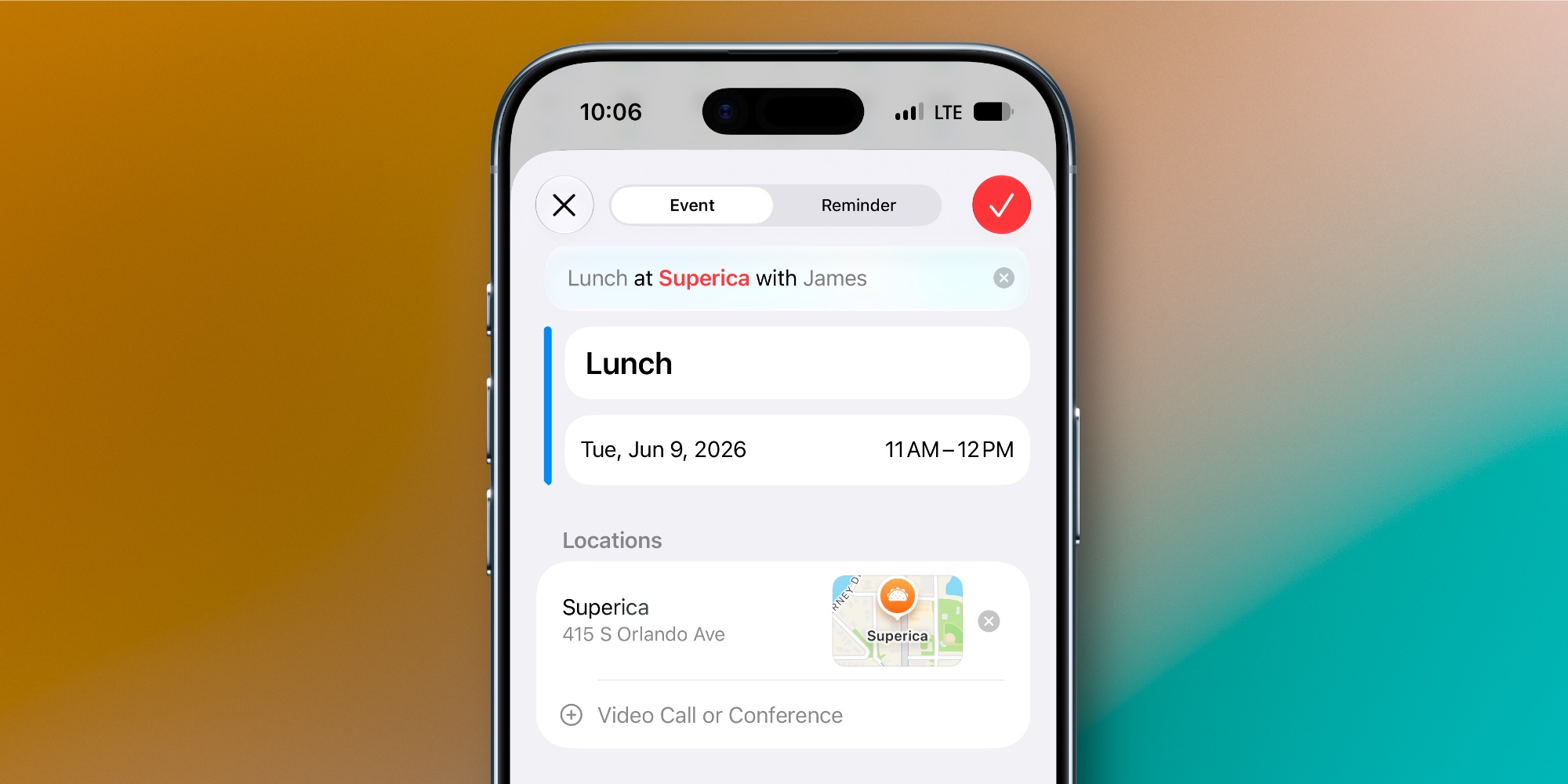

    I’ve used Apple’s Calendar app for years, but there’s one feature that’s been at the top of my wishlist for as long as I can remember: natural language support.

    The excellent third-party app Fantastical has had a robust natural language feature for years.

    Fantastical lets you type all the details about a new event in a single line, just the way you might talk. The app then imports key info like time, location, and invitees without you needing to manually add those separately.

    Now with iOS 27, Apple’s Calendar app has finally added a similar feature.

    Here are the details per Apple’s website:

    Describe an event, add to Calendar. Add and edit events on your calendar with just a description. Easily edit the description to change a lunch meeting to a coffee chat and the Calendar app adjusts the details.

    I’ve been using the new feature all summer in the iOS 27 beta, and it’s worked great for me.

    If you type in “Work meeting at 3pm,” the event will automatically change the event time to 3. And for other parameters that you may or may not want to add, you’ll see suggestions appear at the top of the keyboard.

    So if you write, “Coffee with Mark at Starbucks,” you can tap the suggestion to add the invitee and/or location to your event, or keep them in the event title instead.

    A nice bonus: since the Calendar app also lets you create new reminders, the natural language system extends to any reminders you make.

    How much does natural language input matter to you in your calendar app? Let us know in the comments.

    Best <a href="https://myappsplus.com/how-to-improve-the-audio-quality-on-your-iphone/” title=”How to improve the audio quality on your iPhone”>iPhone accessories

    You’re reading 9to5Mac — experts who break news about Apple and its surrounding ecosystem, day after day. Be sure to check out our homepage for all the latest news, and follow 9to5Mac on Twitter, Facebook, and LinkedIn to stay in the loop. Don’t know where to start? Check out our exclusive stories, reviews, how-tos, and subscribe to our YouTube channel

    Apples Calendar feature gives News
    Follow on Google News Follow on Flipboard
    Share. Facebook Twitter Pinterest LinkedIn Tumblr Email Copy Link
    myappsplus
    • Website

    Related Posts

    You’ll lose this critical cross-device feature if you root your Googlebook

    November 2, 2026

    Apple’s iPhone Duo Skeptics Are Missing the Entire Point of Foldables

    November 2, 2026

    Google Home Speaker hits all-time low in early Black Friday sale at 20% off, more Nest smart home deals

    November 2, 2026
    Add A Comment
    Leave A Reply Cancel Reply

    Top Posts

    Cathay Pacific tests Google AI that dramatically cuts airplane contrails — tiny altitude shifts slash environmental impact by 40% in early trials

    September 8, 2026137 Views

    What was the PSX? The souped-up PS2 rarely sold outside of Japan

    September 14, 202617 Views

    Apple is making Creator Studio an even better deal with new AI features and creative tools

    October 28, 202616 Views
    Latest Reviews

    How to watch Italian Grand Prix 2026: Live stream F1 race from anywhere

    myappsplusSeptember 4, 2026

    TCL is suing Samsung for false advertising on its Mini-LED TVs — here’s how to tell if your TV is included

    myappsplusSeptember 4, 2026

    AI data centres are booming in Australia

    myappsplusSeptember 4, 2026
    Stay In Touch
    • Facebook
    • YouTube
    • TikTok
    • WhatsApp
    • Twitter
    • Instagram

    Subscribe to Updates

    Get the latest tech news from FooBar about tech, design and biz.

    Most Popular

    TCL is suing Samsung for false advertising on its Mini-LED TVs — here’s how to tell if your TV is included

    September 4, 20260 Views

    AI data centres are booming in Australia

    September 4, 20260 Views

    Why industrial AI is adopting faster than it’s working

    September 4, 20260 Views
    Our Picks

    Sony Issues Yet Another PS5 Firmware Update as Jailbreak Whac-a-Mole Continues Ahead of GTA 6 Release

    November 2, 2026

    You’ll lose this critical cross-device feature if you root your Googlebook

    November 2, 2026

    Apple’s iPhone Duo Skeptics Are Missing the Entire Point of Foldables

    November 2, 2026

    Subscribe to Updates

    Subscribe to our newsletter and get the latest tech news, app updates, AI trends, smartphone reviews, and exclusive deals delivered straight to your inbox.

    Facebook X (Twitter) Instagram Pinterest
    • About Us
    • Get In Touch
    • Disclaimer
    • Privacy Policy
    • Terms & Conditions
    © 2026 MyAppsPlus. All Rights Reserved.

    Type above and press Enter to search. Press Esc to cancel.