

Today, we’re excited to announce the availability of Claude Haiku 5.5 on Amazon Bedrock and Claude Platform on AWS. According to Anthropic, Claude Haiku 5.5 is the fastest and most efficient model in the Claude 5.5 family, built for subagents and high-volume, cost-sensitive work. It also costs around 75 percent less than Claude Haiku 4.5 for most tasks.
Amazon Bedrock gives you Haiku 5.5 capabilities while keeping your data within AWS infrastructure with Regional data residency. It works with the AWS controls your team already uses, including AWS Identity and Access Management (IAM) for access, AWS CloudTrail for audit, Amazon CloudWatch for monitoring, and Amazon Bedrock Guardrails. Usage appears on your AWS bill.
Claude Platform on AWS gives you direct access to Anthropic’s native platform experience and capabilities through the AWS Management Console. Build, test, and deploy with the same APIs, features, and console experience you’d get working with Anthropic directly, unified with AWS billing and authentication.
This post covers Claude Haiku 5.5’s improvements, practical guidance on when to choose Haiku 5.5, and how to get started on Amazon Bedrock.
What makes Claude Haiku 5.5 different
Claude Haiku 5.5 is Anthropic’s most capable Haiku model, across coding, tool use, computer use, and agentic tasks. It’s also the first Haiku model with effort controls, so you can tune cost against intelligence for each task instead of picking one setting for an entire workload.
The improvements stand out on quick and repeatable work at scale. For coding tasks, it acts as a subagent routing requests, reviewing code and classifying long documents. For knowledge work, Haiku 5.5 pulls key information from small-to-medium documents, does initial scans, and answers quick questions over a knowledge base. For interactive applications, it responds fast enough for simple conversations to have quick and helpful answers. It also handles traditional natural language processing (NLP) tasks such as classification, summarization, and text generation at the volume and cost that production features require.
Haiku 5.5 handles agentic coding and multi-step tool use, and supports high-resolution images. Haiku 5.5 can be used as a strong computer use subagent for repetitive browser and desktop tasks, at a cost that holds up at scale. In development workflows, it’s a good fit for iterating quickly on UI and UX changes and for small, specific code base changes across multiple files.
Pairing Claude Haiku 5.5 with Opus 5.5
Haiku 5.5 pairs with the recently announced Claude Opus 5.5. Together, they make a strong team: Opus 5.5 plans and makes the judgment calls, and Haiku 5.5 carries out well-defined tasks quickly and at scale. You get careful reasoning where it counts and lower cost and latency everywhere.
- Claude Opus 5.5 plans the work and makes the judgment calls. It breaks down complex problems, decides the approach, and takes on the hardest reasoning, such as release debugging, security review of large pull requests, and long analyses that end in a finished report.
- Claude Haiku 5.5 takes on the fast layer of subagents. It handles quick, high-volume tasks, such as routing requests, classifying and summarizing, rewriting long documents, and applying small, specific changes across many files. As a review subagent, it can quickly check the order of operations and high-level direction, so Opus 5.5 can spend its tokens on the hardest reasoning. Because it is fast and cost efficient, you can run many Haiku subagents in parallel.
Getting started with Claude Haiku 5.5 on Amazon Bedrock
To try Haiku 5.5, open the Amazon Bedrock console, choose Test, then Playground, and select Haiku 5.5 as the model. From there, you can run a prompt directly against it.
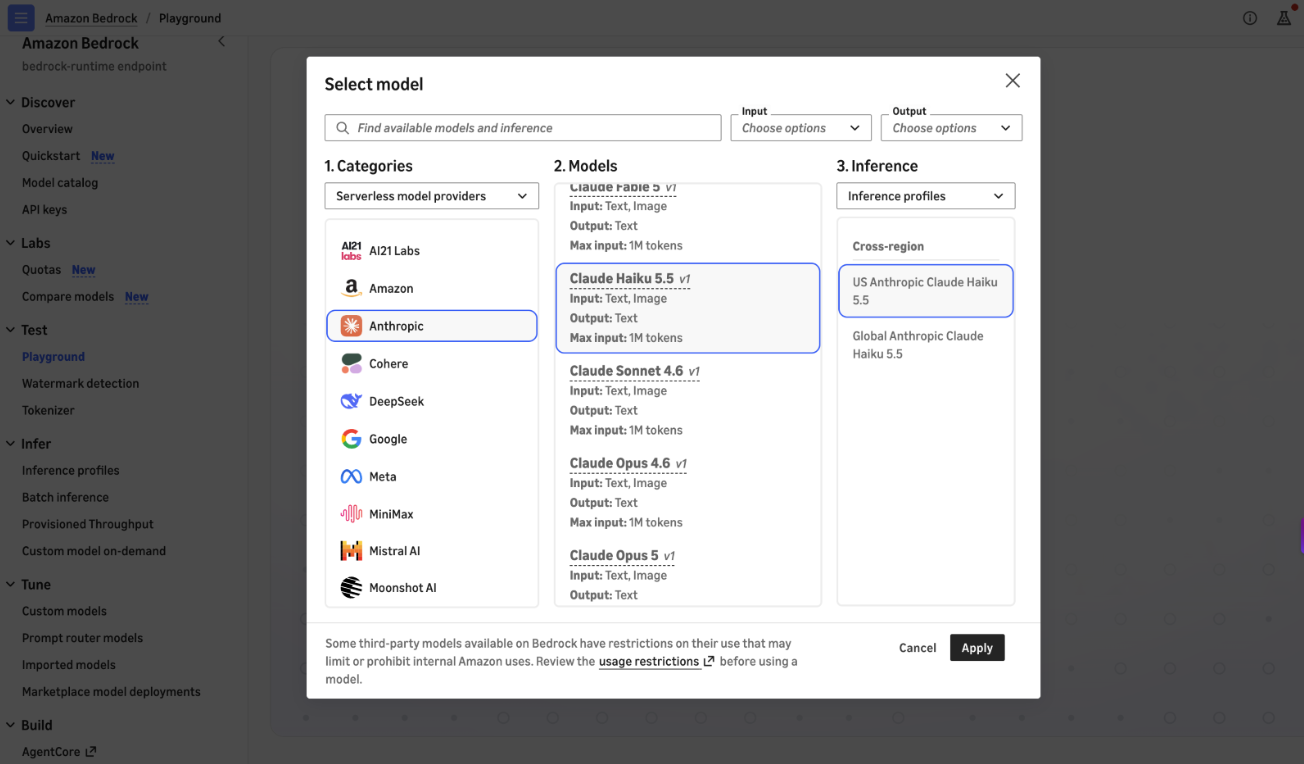
Figure 1: Selecting an Anthropic Claude model in the Amazon Bedrock console Playground
Programmatically, you can call the model with the Anthropic Messages API against bedrock-runtime through the Anthropic SDK. You can also use the Invoke and Converse APIs on bedrock-runtime through the AWS Command Line Interface (AWS CLI) and AWS SDK.
Prerequisites
You must have the following prerequisites:
- Active AWS account with Amazon Bedrock access.
- AWS Command Line Interface (AWS CLI) installed and configured.
- Python 3.10+.
- Boto3 installed:
pip install boto3. - Anthropic SDK installed:
pip install anthropic. - The Amazon Bedrock Token Generator for Amazon Bedrock authentication installed:
pip install aws_bedrock_token_generator. - AWS Identity and Access Management (IAM) permissions:
bedrock:InvokeModel,bedrock:InvokeModelWithResponseStream.
Here’s a quick example using the AWS SDK for Python (Boto3) with the InvokeModel API:
import boto3
import json

# Create a Bedrock Runtime client
bedrock_runtime = boto3.client(
    service_name="bedrock-runtime",
    region_name="us-east-1"
)

# Invoke Claude Haiku 5.5
response = bedrock_runtime.invoke_model(
    modelId="global.anthropic.claude-haiku-5-5",
    contentType="application/json",
    accept="application/json",
    body=json.dumps({
        "anthropic_version": "bedrock-2023-05-31",
        "max_tokens": 4096,
        "messages": [
            {
                "role": "user",
                "content": "Can you explain the features of Amazon Bedrock?"
            }
        ]
    })
)

result = json.loads(response["body"].read())
# Haiku 5.5 may return a thinking block before the text block,
# so select the text block rather than a fixed index.
print(next(b["text"] for b in result["content"] if b["type"] == "text"))
You can also use the Amazon Bedrock Converse API for a unified multi-model experience:
import boto3

# Create a Bedrock Runtime client
bedrock_runtime = boto3.client(
    service_name="bedrock-runtime",
    region_name="us-east-1"
)

# Invoke Claude Haiku 5.5
response = bedrock_runtime.converse(
    modelId="global.anthropic.claude-haiku-5-5",
    messages=[
        {
            "role": "user",
            "content": [
                {
                    "text": "Can you explain the features of Amazon Bedrock?"
                }
            ]
        }
    ],
    inferenceConfig={
        "maxTokens": 4096
    }
)

if 'output' in response:
    blocks = response['output']['message']['content']
    print('n'.join(b.get('text', '') for b in blocks if 'text' in b))
You can also use the Anthropic Messages API through the anthropic SDK package for a streamlined experience:
from anthropic import Anthropic
from aws_bedrock_token_generator import provide_token

token = provide_token(region="us-east-1")

client = Anthropic(
    base_url="https://bedrock-runtime.us-east-1.amazonaws.com/anthropic",
    api_key=token,
)

# Invoke Claude Haiku 5.5
response = client.messages.create(
    model="global.anthropic.claude-haiku-5-5",
    max_tokens=1024,
    messages=[{"role": "user", "content": "Can you explain the features of Amazon Bedrock?"}],
)
print(response)
You can explore the Getting Started notebook for more examples. You can monitor usage, performance, and costs through Amazon CloudWatch and AWS Cost Explorer to scale your applications as demand grows.
Availability
Claude Haiku 5.5 is available today on Amazon Bedrock through the US Geo CRIS (us.), EU Geo CRIS (eu.), AU Geo CRIS (au.), JP Geo CRIS (jp.) and Global CRIS (global.) inference profiles on bedrock-runtime. In AWS GovCloud (US), it’s available on both the bedrock-runtime and bedrock-mantle endpoints.
See the Amazon Bedrock documentation for the full list of supported AWS Regions. For pricing information, see Amazon Bedrock pricing. It’s also available through Claude Platform on AWS in North America
Give Claude Haiku 5.5 a try on the Amazon Bedrock console, in Claude Platform on AWS, or explore the Getting Started notebooks on GitHub.
