

Welcome to Indie App Spotlight. This is a weekly 9to5Mac series where we showcase the latest apps in the indie app world. If you’re a developer and would like your app featured, get in contact.
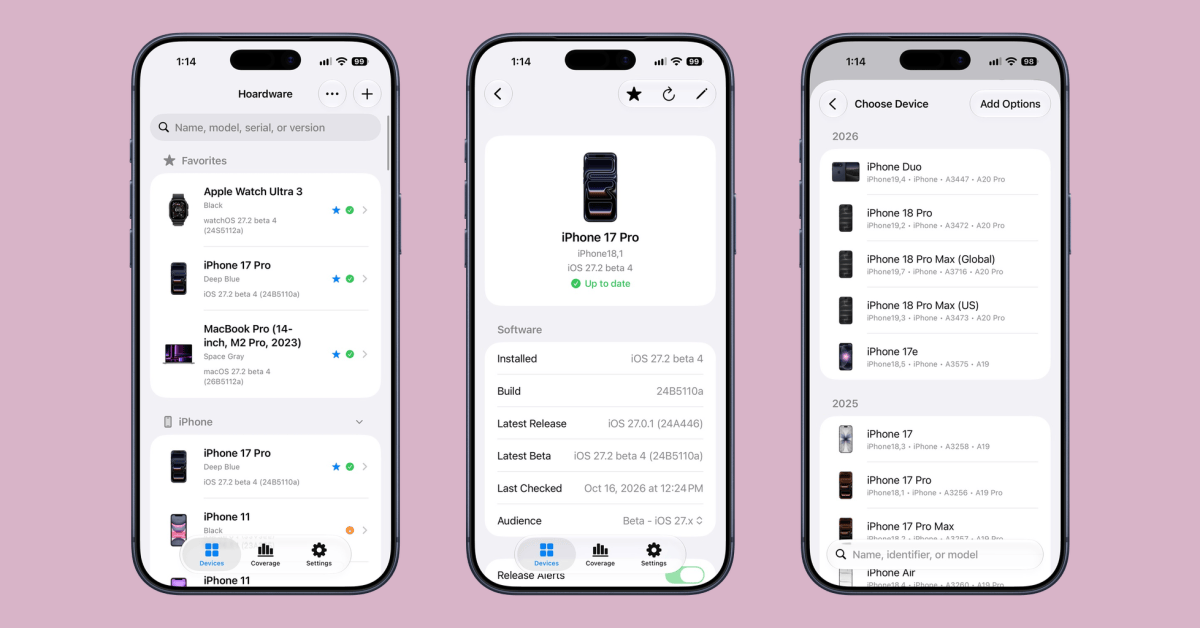
If you’re someone who collects tons of varying Apple products, Hoardware is your one-stop shop for keeping track of it all. Hoardware lets you track all of your hardware, as well as the software versions, model numbers, and anything else that might be relevant.
Highlights
Hoardware is mostly useful as a collector’s tool. Say you have a giant vintage iPhone collection. Hoardware will let you track every single iPhone, its iOS version, its serial number, and anything else that you want to note down. There’s also a coverage tab, where you can see how many devices you own on each iOS version.
Of course, it isn’t only useful for collectors. You can add new devices too, and Hoardware has a feature where it can notify you when new software updates are released for your device, so you can see it even quicker than Apple will tell you.
Adding a device to Hoardware is simple. There’s a list you can scroll through, then you select from there – and most of the details are automatically filled in. The app even automatically provides images of devices.
Lastly, you can even set devices as favorites so you can easily find them in a crowded list, if you’re an avid collector. Your library will sync across iCloud, too.
Hoardware is available for free on the App Store for devices running iOS 17 and later. There are no ads, in-app purchases, or subscriptions.
My favorite Apple accessory recommendations:
Follow Michael: X/Twitter, Bluesky, Instagram
You’re reading 9to5Mac — experts who break news about Apple and its surrounding ecosystem, day after day. Be sure to check out our homepage for all the latest news, and follow 9to5Mac on Twitter, Facebook, and LinkedIn to stay in the loop. Don’t know where to start? Check out our exclusive stories, reviews, how-tos, and subscribe to our YouTube channel
