

If you’re in the market for a new desktop computer or even your first Mac, you can’t go wrong with the new iMac M6.
Even though it’s the first all-in-one I’ve tested, how easy it is to set up and use left a major impression on me the second I unboxed it and its matching peripherals. In fact, getting it up and running was so seamless that I almost prefer it over the new Mac mini M6 — and that’s coming from someone who loves building desk setups and tweaking things exactly to my liking.
From its gorgeous 4.5K display to the power of Apple’s M6 chip inside, plus its impressive six-speaker array and 12MP Center Stage camera, the iMac M6 is really all most people could ever need. Even after finishing my review, I’ve kept using Apple’s best all-in-one computer yet as my daily driver.
While the iMac M6 is almost perfect, working on it late at night made me realize one thing was missing: light. The display itself gets plenty bright, hitting a peak brightness of 473 nits in our lab tests, but the rest of my workspace around it stayed dark.
With other desk setups, I’d throw a monitor light bar on top of my display and call it a day. On an all-in-one like this, though, I didn’t want to clutter things up with extra cables or risk blocking its built-in webcam. Fortunately, BenQ’s latest monitor light bar was designed specifically for Apple’s iMac.
Here’s everything you need to know about the new BenQ iScreenBar and why it’s the first — and so far only — accessory I’ve added to my iMac M6.
Made specifically for 24-inch iMacs (2021 and newer), BenQ’s iScreenBar attaches magnetically to the back of your display without blocking its webcam or three-mic array. Powered by a single braided USB-C cable, it lights your desk without glare on your screen, offers macOS menu bar controls, and includes an automatic video call mode that turns off the center LEDs whenever your camera is active.View Deal
Installs just like an Apple accessory
Unlike the BenQ ScreenBar Halo 2 I added to my desk setup last year, what I really like about the company’s new iScreenBar is that there aren’t any extra accessories like a puck controller or even a power adapter to worry about. Instead, everything you need to add this monitor light bar to your iMac is built right into the device itself.
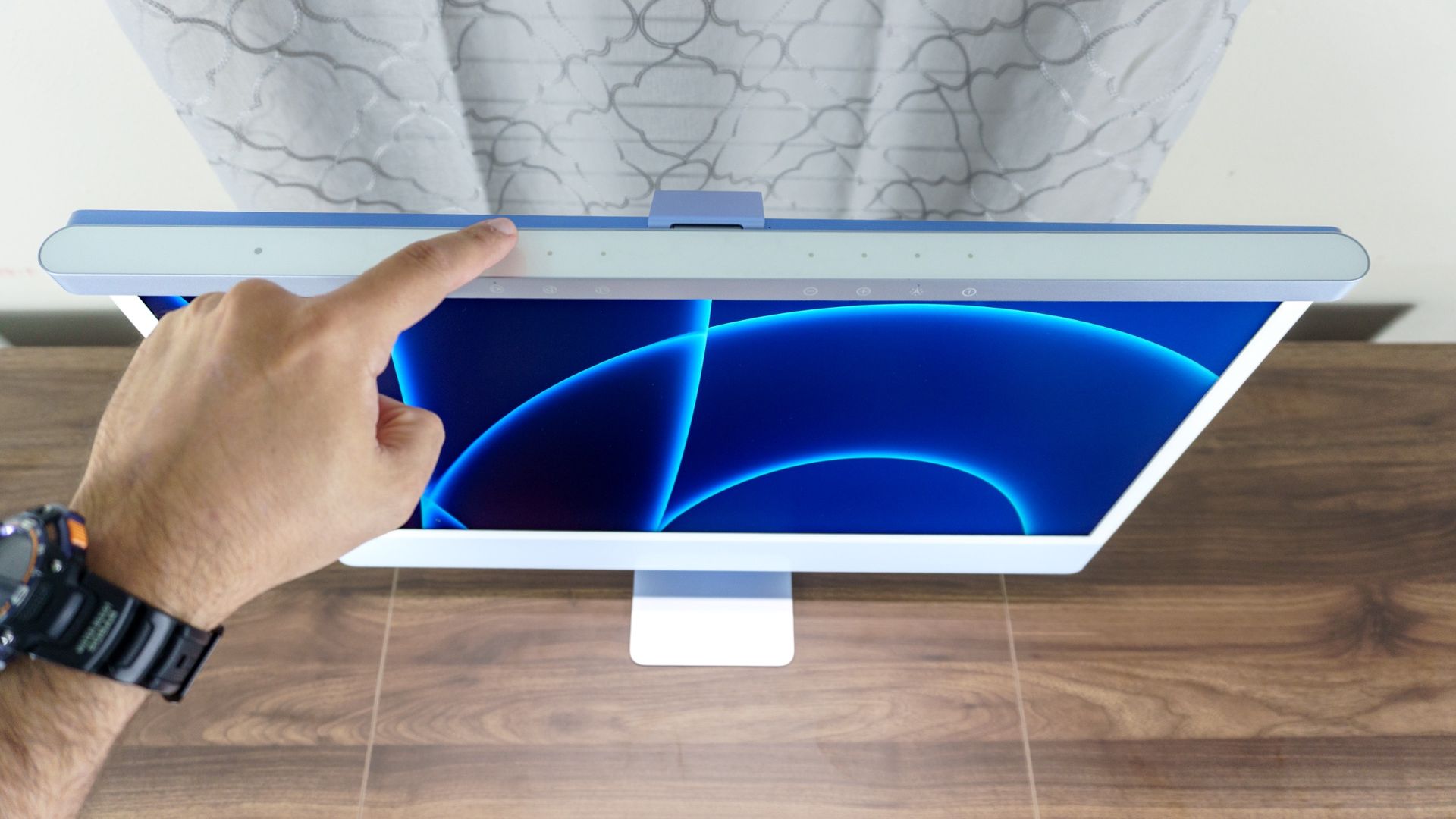
The iScreenBar is made entirely from aluminum to match Apple’s iMac. Unlike other monitor light bars that rely on weighted clamps, it uses a magnetic mount and a braided USB-C power cable just like the iMac’s own power cord.
At 19.7 inches wide, the iScreenBar also lines up cleanly with the iMac M6’s 24-inch screen, leaving just under an inch of space on either side. BenQ was kind enough to send over the blue version to match my blue iMac M6, though both the blue and green variants won’t arrive until later in the year.
Right now, you can pick up the iScreenBar in silver, which — while not color-matched — will still look great on any recent iMac since the M1, M3, M4 and M6 all share a nearly identical design.
To get it set up, I just magnetically attached it to the back of my iMac and plugged its power cable into one of the Thunderbolt 4 ports below. To keep things neat and tidy — and to avoid covering up the Apple logo on the back of the computer — there’s a magnetic cable clip pre-installed on the cord, too.
Installing BenQ’s iScreenBar on top of my iMac M6 was about as plug-and-play as you can get, so much so that I wouldn’t blame you for thinking it’s a first-party Apple accessory.
To that point, BenQ really took the iMac’s entire design into account when building the iScreenBar. For instance, its magnetic mount is narrow enough that it doesn’t block the two microphone holes along the top edge of the iMac, while a pill-shaped cutout at the center leaves the third rear microphone completely uncovered.
With the iScreenBar securely mounted on top of my iMac, it was time to take it for a spin and see just how well it could illuminate my workspace.
Light your workspace, not your camera
Like BenQ’s other monitor light bars, the iScreenBar lights the area of your desk under your iMac without shining onto the display itself. That makes it easier on your eyes to work on your computer at night, as well as during the day.
On top of the device, there are touch-sensitive buttons you can use to turn the iScreenBar on and off, adjust its brightness and change its color temperature from 2700K to 6500K, with icons along the front edge showing what each one does.
One neat feature it carries over from the ScreenBar Halo 2 is its presence sensor — the instant I approach my iMac M6, the light bar springs to life automatically. There’s also an Auto setting that adjusts the light bar’s brightness and color temperature based on the room’s ambient light.
Since the iScreenBar plugs directly into your iMac rather than a wall outlet, you can also control it right from macOS. After downloading the iScreenBar app, you can adjust everything straight from your Mac’s menu bar instead of reaching up to tap the controls. This is a first for one of BenQ’s monitor light bars, and I found the app genuinely handy whenever I wanted to tweak my lighting mid-task.
That isn’t the only new trick, either — BenQ has also added a dedicated video call mode. While you can toggle it on manually with a button press, having the iScreenBar app installed means it kicks on automatically the instant your iMac’s webcam activates.
So your iMac’s camera can deliver the cleanest possible picture, the LEDs right in the center switch off whenever video call mode is active. Not only is this really clever, it’s the first time I’ve ever seen it on a monitor light bar. With other light bars, you have to carefully perch one of the best webcams on top of the mount — and even then, results can be hit or miss. Trust me, I know from experience.
Overall, BenQ’s iScreenBar did an excellent job lighting my desk without casting any glare onto my iMac screen, and I don’t see myself taking it down anytime soon.
Now my iMac feels complete
At $189, BenQ’s iScreenBar is definitely a premium accessory. However, given that the iMac M6 now starts at $1,499, if you have the budget for Apple’s latest all-in-one, adding a purpose-built light bar like this isn’t much of a stretch.
Alternatively, BenQ’s ScreenBar Halo 2 should also work with your iMac without blocking its camera, since I used it the same way on the Apple Studio Display XDR. At $199, though, it’s even more expensive and wasn’t designed specifically to match your iMac. And while you could pick up a cheaper monitor light bar — like the Quntis RGB Pro+ — you’ll have to slide it off to the side whenever you want to use your iMac’s built-in webcam.
As for the iScreenBar itself, it’s an easy recommendation for any iMac owner. And for those of us running a Mac mini or one of the best mini PCs with a separate monitor, here’s hoping BenQ brings these new features to its inevitable ScreenBar Halo 3.
- I reviewed the new M6-powered Mac mini and iMac: Here’s how to pick the right Apple desktop for you
- I tested Apple’s new Mac mini with M6 — 5 reasons to buy and 2 reasons to skip
- I spent a week with dual Apple Studio Displays and realized I’ve been lying to myself about glossy screens for years
