Close Menu
MyAppsPlus

    Subscribe to Updates

    Get the latest creative news from FooBar about art, design and business.

    What's Hot

    Stocks crater as midterms spur investor exodus from tech and AI

    November 6, 2026

    This rumor about Apple’s ‘anniversary iPhone’? We tend to believe it.

    November 6, 2026

    ADCs, Degraders, Agonists: 4 Deals CMC Teams Should Track

    November 6, 2026
    Facebook X (Twitter) Instagram
    Facebook X (Twitter) Instagram
    MyAppsPlusMyAppsPlus
    Friday, November 6
    • Home
    • Breaking Tech
    • Apps & Software
    • AI & Automation
    • Android
    • iPhone & iOS
    • More
      • Reviews
      • How-To Guides
      • Deals & Discounts
      • Shop
    MyAppsPlus
    Home»iPhone & iOS»How to use vertical tabs in Safari on macOS and iPadOS 27
    iPhone & iOS

    How to use vertical tabs in Safari on macOS and iPadOS 27

    myappsplusBy myappsplusNovember 6, 2026004 Mins Read
    Share Facebook Twitter Pinterest Copy Link LinkedIn Tumblr Email Telegram WhatsApp
    Follow Us
    Google News Flipboard
    How to use vertical tabs in Safari on macOS and iPadOS 27
    Share
    Facebook Twitter LinkedIn Pinterest Email Copy Link

    Learn how to switch to vertical browser tabs instead of the horizontal top tab row on your iPhone, iPad, and Mac running the latest version of iOS 27, iPadOS 27, and macOS 27 Golden Gate.

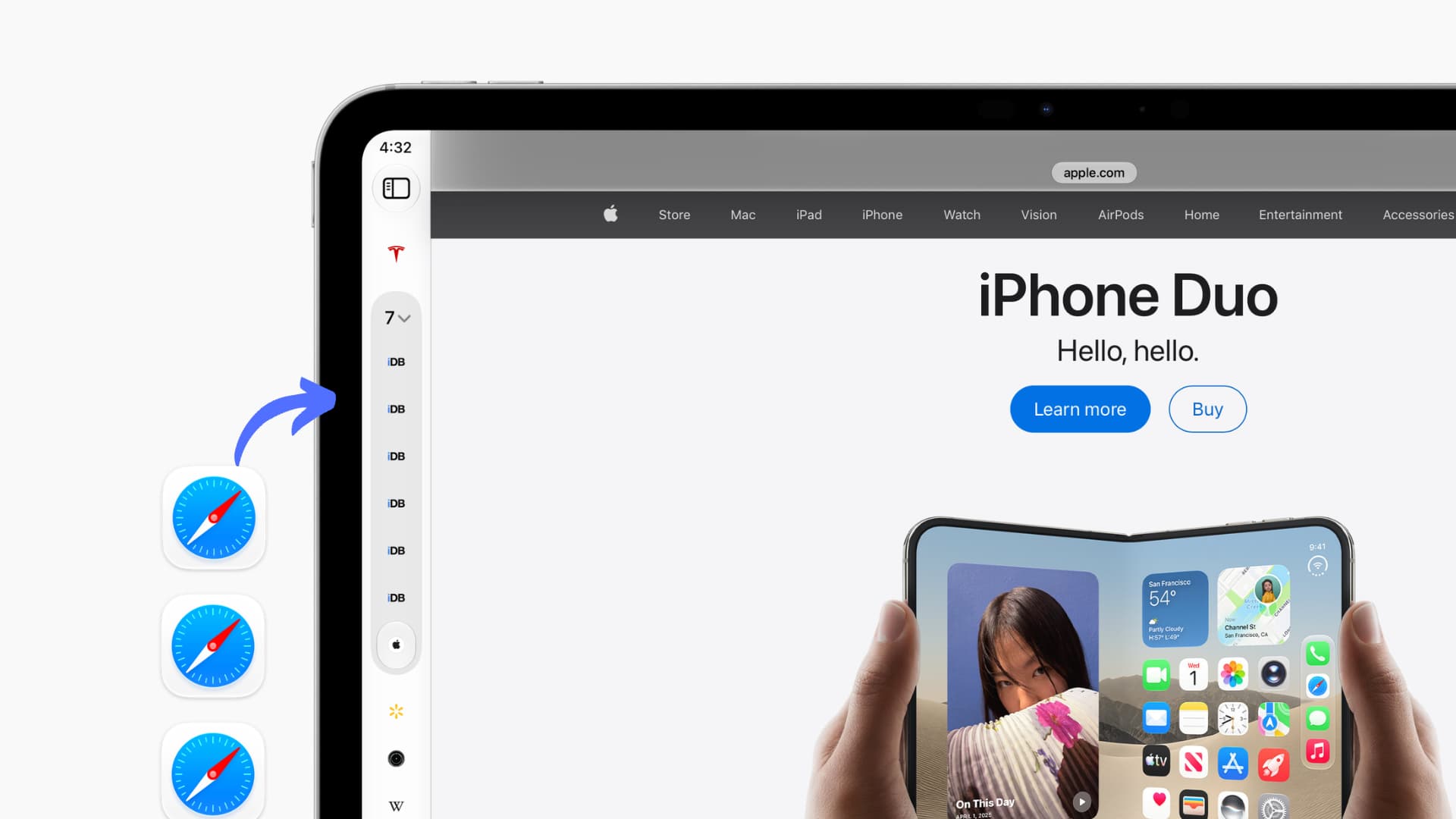
    If you have never heard of or used vertical tabs, it’s basically moving the horizontal row of open browser tabs from the top of the screen to a vertical layout on the left side. Unlike top tabs, which always show the tab name (or part of it if you have several tabs), vertical tabs show only the site icon (favicon) to take up minimal space.

    Vertical browser tabs aren’t new. Vivaldi added it back in 2016, and Microsoft Edge added it in 2021. But it was Arc that popularised it among a tech-savvy Twitter audience starting in 2022. Soon after, Brave, Firefox, and Google Chrome all added it in the coming years. Finally, with the latest update, Apple has joined the team by adding vertical tabs to Safari.

    Safari vertical tabs show all your open individual tabs and tab topics (a new OS 27 feature where Apple Intelligence groups your tabs into topics) on the left side of the screen. As a result, websites have a bit less left-to-right space to show actual content.

    Supported devices

    Vertical tabs in Safari are supported on the following devices:

    • iPhone Duo running iOS 27.3 or later
    • iPad running iPadOS 27.3 or later (both vertical and portrait orientations)
    • Mac running macOS 27.3 or later

    As of writing, all the above software versions are in beta, with a public release expected in the next few weeks.

    Given the small screen width, Safari doesn’t offer vertical tabs on bar iPhones (even when rotated to landscape).

    Enable vertical tabs in Safari

    You can turn it on in Safari settings on each device individually.

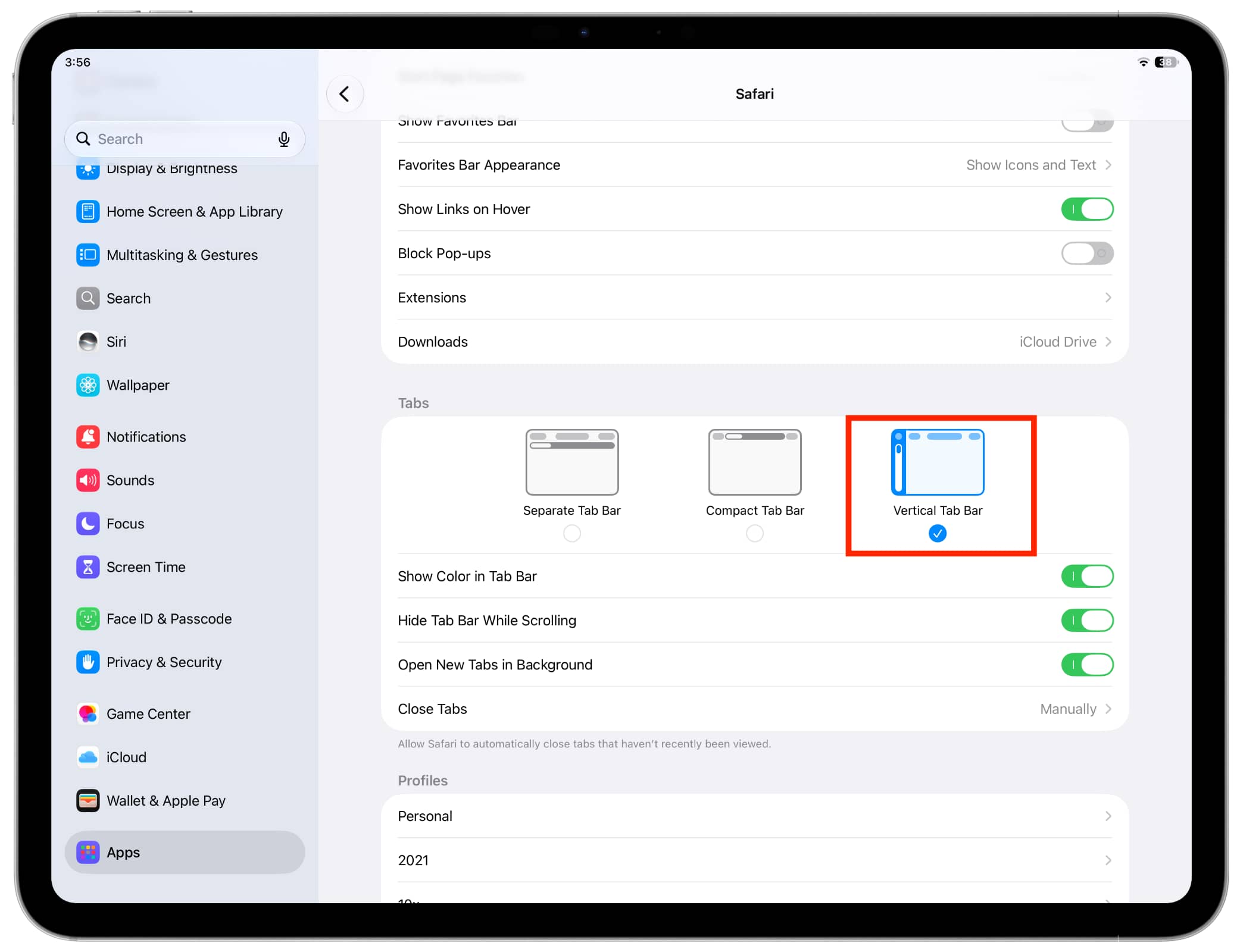
    1. Update your device to iPadOS 27.3 or later.
    2. Open the Settings app.
    3. Scroll to the bottom and tap Apps.
    4. Select Safari from the list of applications.
    5. Choose Vertical Tab Bar.

    Vertical Tab Bar selected in Safari settings on iPad

    Now, open Safari and visit a few websites. The tab bar will appear on the left edge of the screen instead of the top, where it was earlier. You’ll see your open tabs and tab topic groups here.

    Touch and hold a tab icon to take additional action.
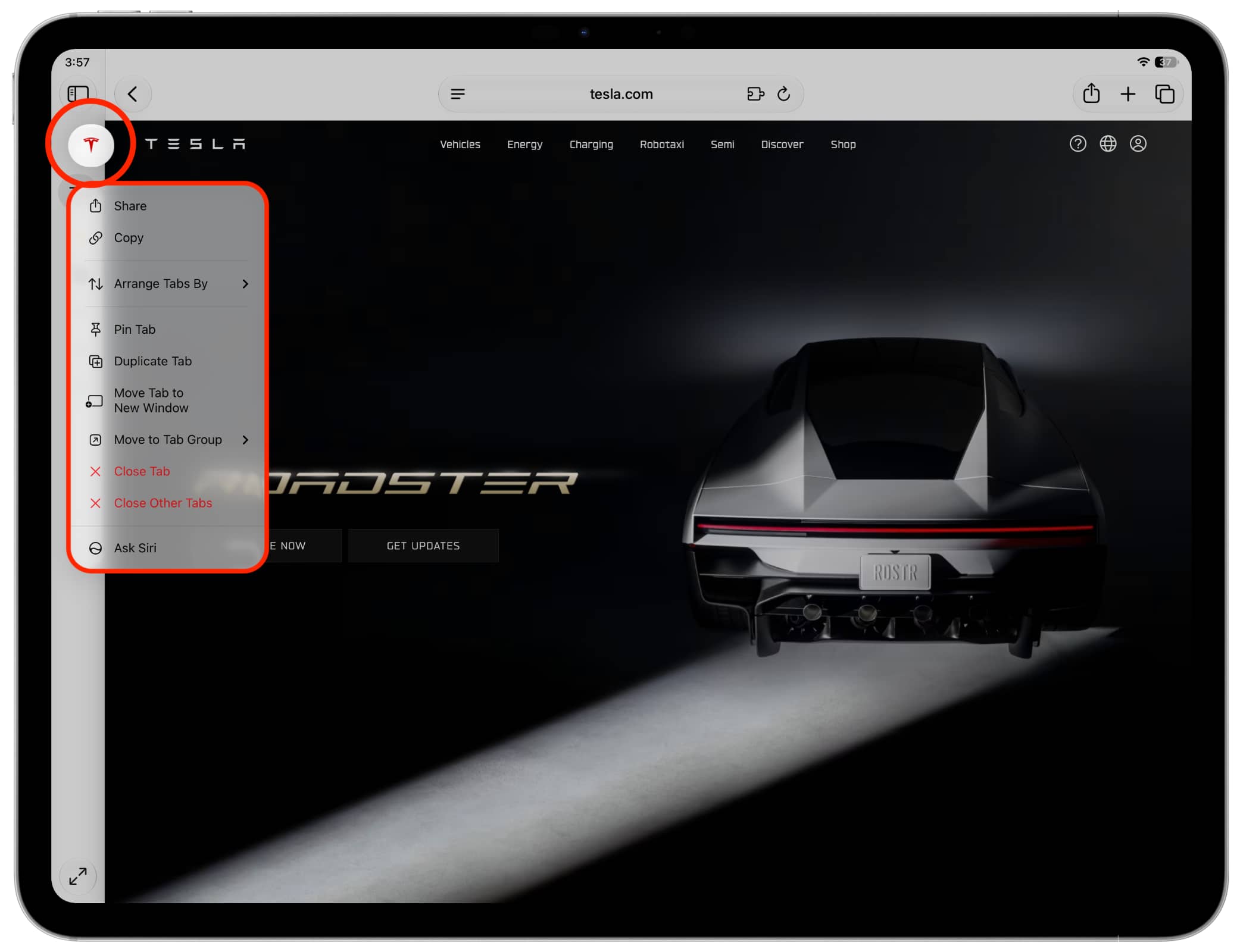
    Touch and hold an icon in vertical tab sidebar in Safari on iPad

    A dual-arrow button at the bottom lets you expand the tab column to see all tab names or switch to another Tab Group, Private window, browser profile, etc.

    You can also tap the dual-arrow icon, then drag the sidebar left or right to resize it. Once you do that, tapping the dual-arrow icon will open the sidebar at the size you set.

    1. Update your MacBook or Mac desktop to macOS Golden Gate 27.3 or later.
    2. Open Safari.
    3. Click View from the top menu bar and select Tab Layout > Vertical.
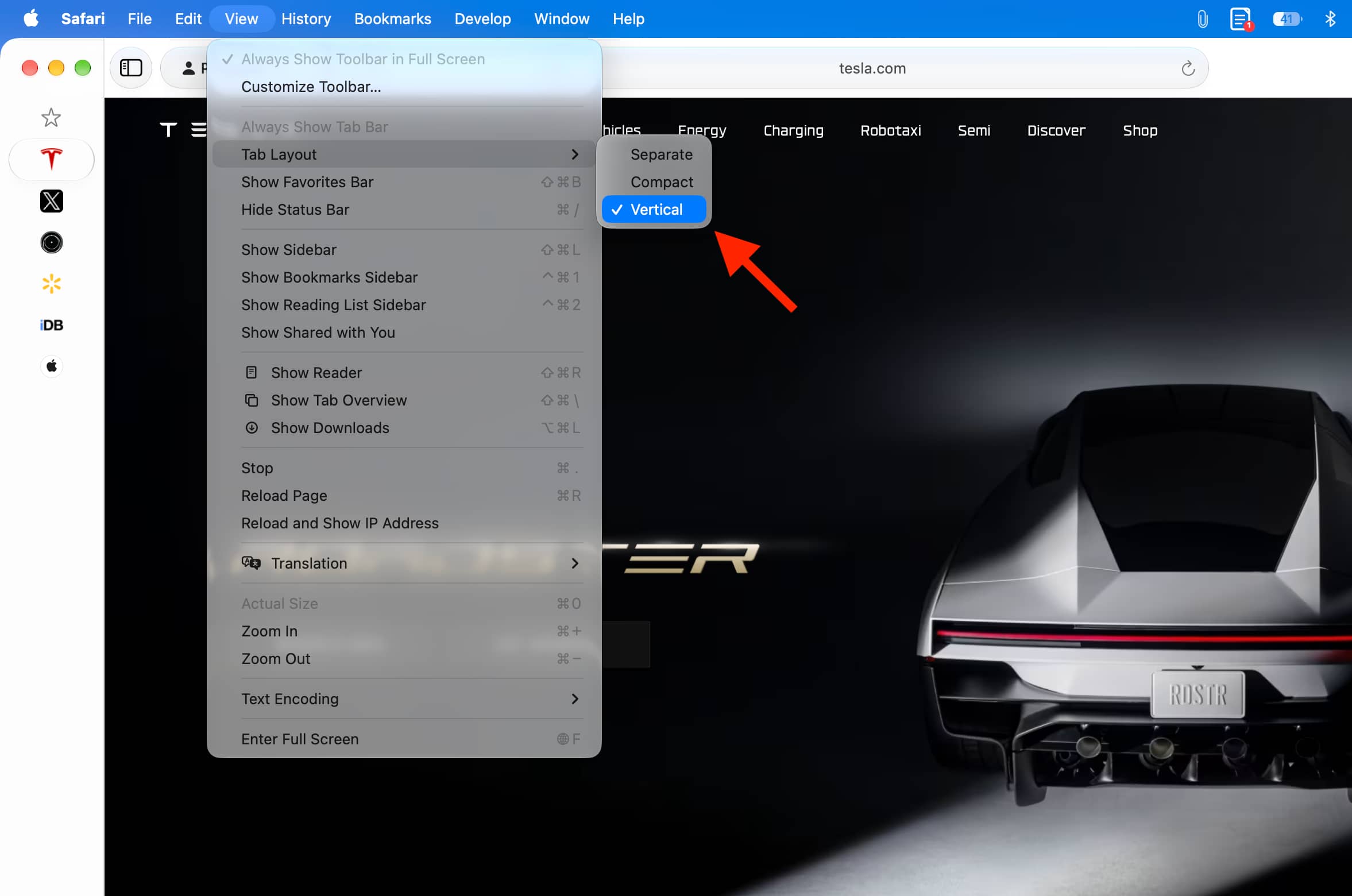
    Switching to Vertical Tab Layout in Safari on macOS 27 Golden Gate

    Or, go to Safari Settings > Tabs and select Vertical Tab Layout.

    Your open tabs will now show on the left side of the screen instead of the top. You can right-click a tab icon to do everything you normally could in horizontal view.

    Taking action for tab in vertical view in Safari on Mac

    While many people swear by vertical tabs, I don’t find it helpful for my work. This is because I often open multiple pages of the same website, like several WordPress or Wikipedia tabs. In normal top-tab mode, I can see part of the name and quickly switch to the one I want. But in vertical tabs mode, only the site icon is shown, which is the same for all tabs of a website, and I have to hover the pointer over an icon, see the name, and then click to switch.

    What are your thoughts on this? Will you switch to the vertical tab style in Safari?

    Also, check out:12 new features added to Safari in iOS and macOS 27

    Featured How to iPad iPhone Duo Mac News Push Safari Tips Tutorial Tutorials
    Follow on Google News Follow on Flipboard
    Share. Facebook Twitter Pinterest LinkedIn Tumblr Email Copy Link
    myappsplus
    • Website

    Related Posts

    This rumor about Apple’s ‘anniversary iPhone’? We tend to believe it.

    November 6, 2026

    This could change how you game on your phone [Video]

    November 6, 2026

    WhatsApp’s AI-powered photo expansion tool starts rolling out on iOS

    November 6, 2026
    Add A Comment
    Leave A Reply Cancel Reply

    Top Posts

    Cathay Pacific tests Google AI that dramatically cuts airplane contrails — tiny altitude shifts slash environmental impact by 40% in early trials

    September 8, 2026138 Views

    Save on your groceries, gas, and holiday shopping with this $15 BJ’s membership (Reg. $60) 

    November 4, 202620 Views

    Apple is making Creator Studio an even better deal with new AI features and creative tools

    October 28, 202619 Views
    Latest Reviews

    Plug-in solar shone at IFA 2026 —here are the 5 best products we saw, from Anker to DJI and EcoFlow

    myappsplusSeptember 5, 2026

    I rode in a self-driving powered wheelchair that avoids obstacles and people, and can be summoned when you need it — it’s like Tesla’s Autopilot for personal mobility

    myappsplusSeptember 5, 2026

    What is the release date for The Paper season 2 on Peacock?

    myappsplusSeptember 5, 2026
    Stay In Touch
    • Facebook
    • YouTube
    • TikTok
    • WhatsApp
    • Twitter
    • Instagram

    Subscribe to Updates

    Get the latest tech news from FooBar about tech, design and biz.

    Most Popular

    Plug-in solar shone at IFA 2026 —here are the 5 best products we saw, from Anker to DJI and EcoFlow

    September 5, 20260 Views

    What is the release date for The Paper season 2 on Peacock?

    September 5, 20260 Views

    I just tried Ecovacs’ robot vacuum of the future — and as a pet owner, I’m beyond floored

    September 5, 20260 Views
    Our Picks

    Stocks crater as midterms spur investor exodus from tech and AI

    November 6, 2026

    This rumor about Apple’s ‘anniversary iPhone’? We tend to believe it.

    November 6, 2026

    ADCs, Degraders, Agonists: 4 Deals CMC Teams Should Track

    November 6, 2026

    Subscribe to Updates

    Subscribe to our newsletter and get the latest tech news, app updates, AI trends, smartphone reviews, and exclusive deals delivered straight to your inbox.

    Facebook X (Twitter) Instagram Pinterest
    • About Us
    • Get In Touch
    • Disclaimer
    • Privacy Policy
    • Terms & Conditions
    © 2026 MyAppsPlus. All Rights Reserved.

    Type above and press Enter to search. Press Esc to cancel.