Close Menu
MyAppsPlus

    Subscribe to Updates

    Get the latest creative news from FooBar about art, design and business.

    What's Hot

    This could be the cheapest BE5000 Wi-Fi 7 access point, offering 2.5GbE, free lifetime cloud management, and an impressive five-year warranty

    November 7, 2026

    How to watch videos on Apple CarPlay while parked

    November 7, 2026

    I watched every movie in Netflix’s Top 10 right now — These are the only 3 actually worth streaming (Nov. 7–8)

    November 7, 2026
    Facebook X (Twitter) Instagram
    Facebook X (Twitter) Instagram
    MyAppsPlusMyAppsPlus
    Saturday, November 7
    • Home
    • Breaking Tech
    • Apps & Software
    • AI & Automation
    • Android
    • iPhone & iOS
    • More
      • Reviews
      • How-To Guides
      • Deals & Discounts
      • Shop
    MyAppsPlus
    Home»iPhone & iOS»How to use Adaptive Dark Mode in Safari on iOS & macOS 27.3
    iPhone & iOS

    How to use Adaptive Dark Mode in Safari on iOS & macOS 27.3

    myappsplusBy myappsplusNovember 6, 2026003 Mins Read
    Share Facebook Twitter Pinterest Copy Link LinkedIn Tumblr Email Telegram WhatsApp
    Follow Us
    Google News Flipboard
    How to use Adaptive Dark Mode in Safari on iOS & macOS 27.3
    Share
    Facebook Twitter LinkedIn Pinterest Email Copy Link

    Learn how to use the new Adaptive Dark Mode feature in Safari on iPhone, iPad, and Mac to force dark mode on websites that don’t support it natively.

    Many websites support system Dark Mode, meaning that if you enable Dark Mode on your device, the webpage mimics that. However, several sites don’t do this or offer their own on-page Dark Mode toggle.

    In this case, you can use third-party Safari app extensions like Dark Mode, or have Apple Intelligence build a Dark Mode extension just for you! Both methods are easy, but not everyone knows about them.

    Therefore, Apple has now gone a step further and added a forced Dark Mode option for Safari called Adaptive Dark Mode. It requires no app installations or extension building. You can enable or disable it right from your browser tab in a couple of taps.

    According to Apple and MacRumors, Adaptive Dark Mode darkens the webpage background, lowers the contrast of certain elements like text, may invert logo and graphics colors, recolor vector artwork, lift raised surfaces, and rebalance layered shadows. Importantly, it does this based on the site you’re on to make it readable, so not all tweaks apply to every website or page.

    Turn on Adaptive Dark Mode in Safari

    1) Update your iPhone, iPad, or Mac to iOS 27.3, iPadOS 27.3, or macOS 27.3 Golden Gate or later. As of writing, they are in beta, with general release expected in the coming weeks. We’re using an iPhone for these steps.

    2) Open Safari and visit the website that doesn’t support Dark Mode.

    3) Tap the three-line menu icon in the URL address bar and select Adaptive Dark Mode.

    4) If this is your first time using this new feature, you should see a full-screen explaining the feature. Tap Try. You should then see a banner at the top that says “Previewing Adaptive Dark Mode.” Tap the blue checkmark icon.

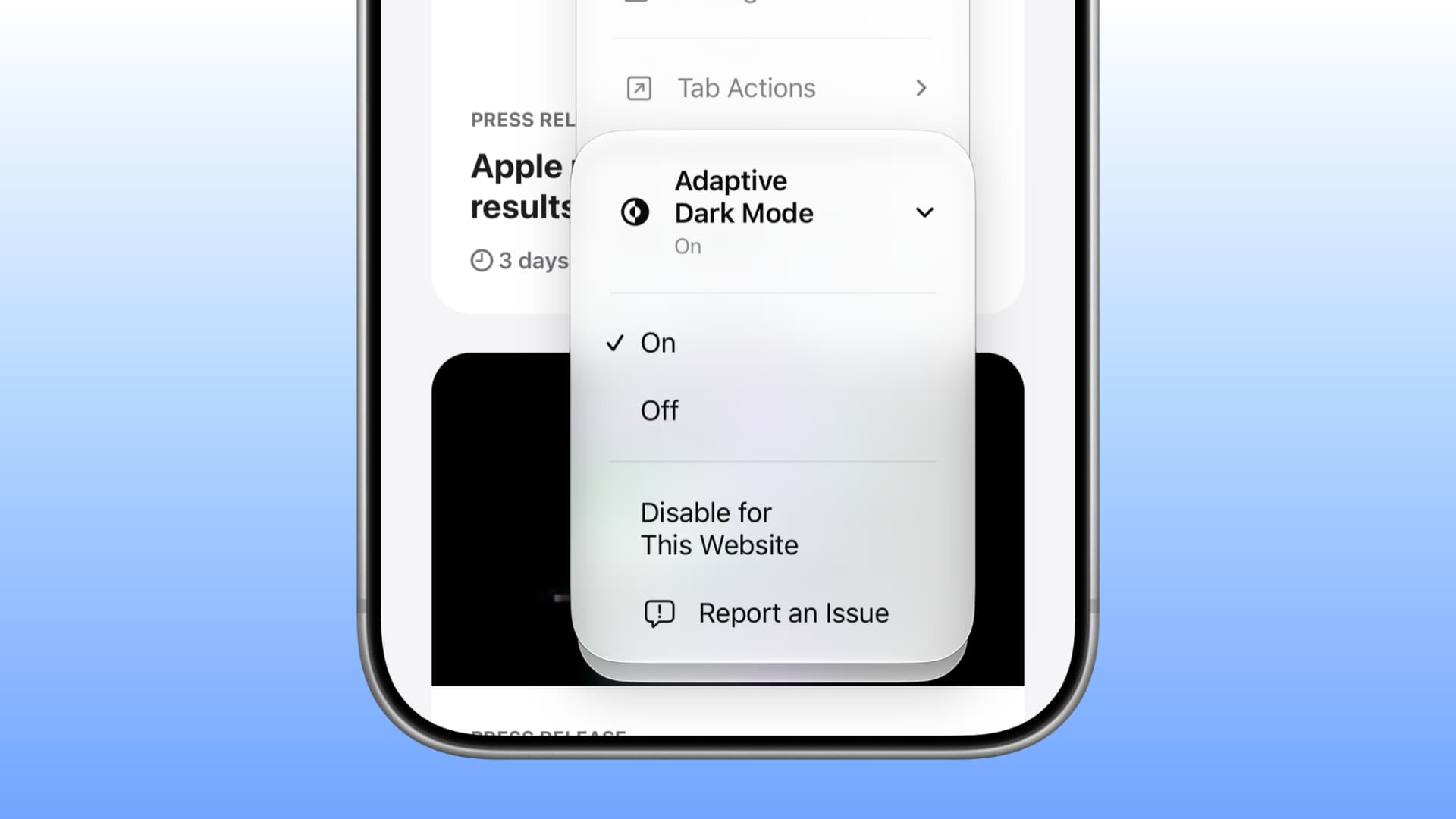
    5) In the future, just tap the three-line menu icon > Adaptive Dark Mode > On or Off.
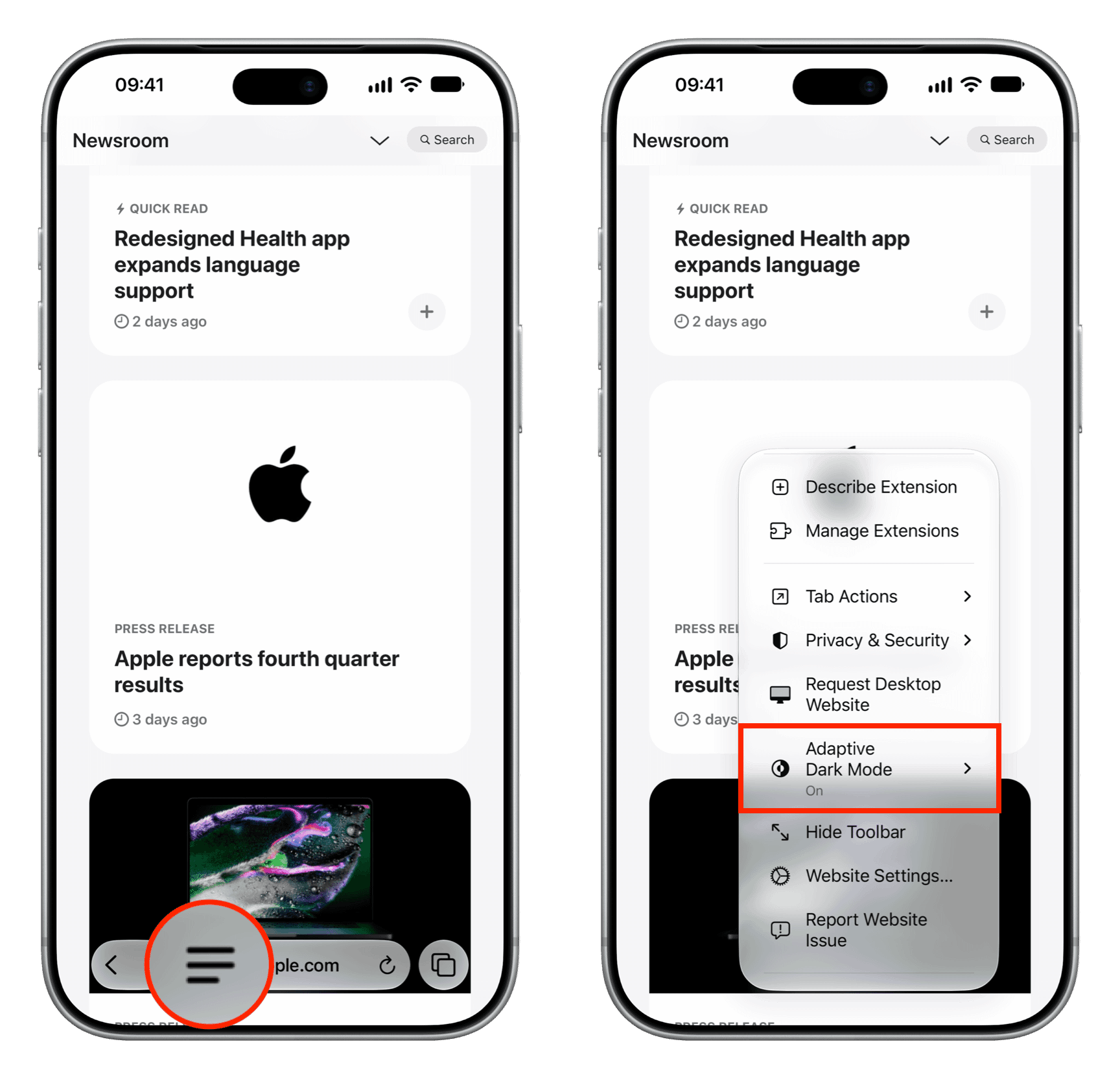
    Adaptive Dark Mode enabled for Safari on iPhone

    You can also go to Safari Settings to manage Adaptive Dark Mode for all sites or specific sites you configured when in Safari.

    On Mac, go to Safari Settings > Websites and select Adaptive Dark Mode to manage it for all or currently open sites.
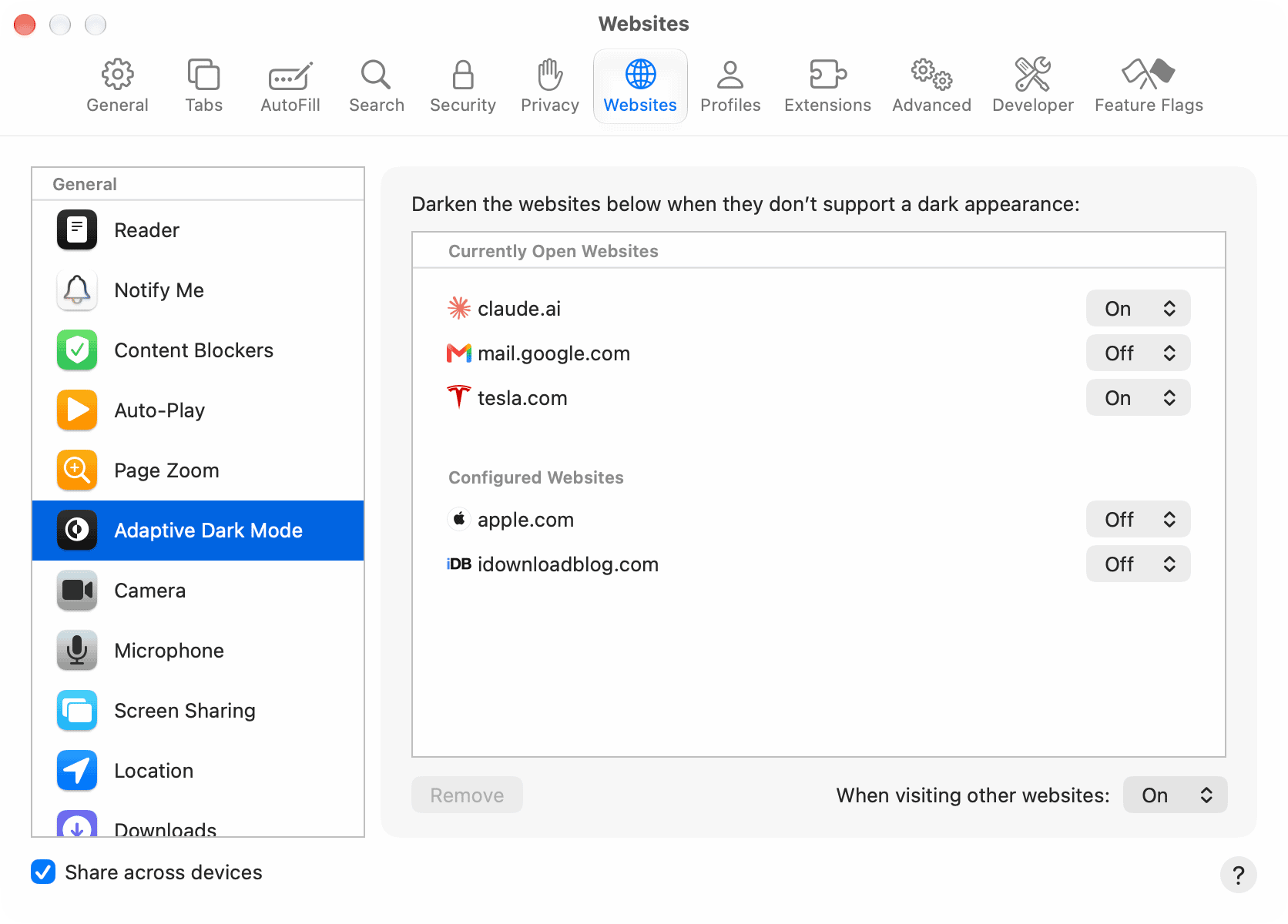
    Adaptive Dark Mode in Safari settings on macOS

    In my experience, Adaptive Dark Mode in iOS 27.3 beta is inconsistent and unreliable. For example, it doesn’t work on iDB’s site. Then I tried tesla.com, where it worked the first time and then refused the rest of the time. Similarly, many sites, including apple.com/iphone-duo/, don’t seem to support it.

    Secondly, even if it fails to enable Dark Mode, it won’t say so; it will simply show ‘Adaptive Dark Mode On’ while doing nothing. Restarting the device didn’t fix the problem.

    Overall, it’s unpredictable. So, make sure you have backup options like Dark Mode apps or extensions also installed if this is important to you.

    • How to force Dark Mode for any website on Mac or PC
    • New features added to Safari in iOS and macOS 27
    Dark Mode Featured How to iOS 27 macOS 27 News Push Safari Tips Tutorial Tutorials
    Follow on Google News Follow on Flipboard
    Share. Facebook Twitter Pinterest LinkedIn Tumblr Email Copy Link
    myappsplus
    • Website

    Related Posts

    I tested 10 iPhone Duo cases, these are my favorites

    November 7, 2026

    iPhone Air 2 is coming next year, here’s why it has more to prove than ever

    November 7, 2026

    Remove your personal info from the web (and stop it coming back)

    November 7, 2026
    Add A Comment
    Leave A Reply Cancel Reply

    Top Posts

    Cathay Pacific tests Google AI that dramatically cuts airplane contrails — tiny altitude shifts slash environmental impact by 40% in early trials

    September 8, 2026138 Views

    Save on your groceries, gas, and holiday shopping with this $15 BJ’s membership (Reg. $60) 

    November 4, 202627 Views

    Apple is making Creator Studio an even better deal with new AI features and creative tools

    October 28, 202619 Views
    Latest Reviews

    iPhone Duo?

    myappsplusSeptember 5, 2026

    From eating the elderly to selling kids, Afterworld gives you the freedom to do terrible things in the post-apocalypse — ‘We shouldn’t judge the player’ says director

    myappsplusSeptember 5, 2026

    This Dell 16 laptop is ideal for university, especially at the lowest price we’ve seen

    myappsplusSeptember 5, 2026
    Stay In Touch
    • Facebook
    • YouTube
    • TikTok
    • WhatsApp
    • Twitter
    • Instagram

    Subscribe to Updates

    Get the latest tech news from FooBar about tech, design and biz.

    Most Popular

    iPhone Duo?

    September 5, 20260 Views

    From eating the elderly to selling kids, Afterworld gives you the freedom to do terrible things in the post-apocalypse — ‘We shouldn’t judge the player’ says director

    September 5, 20260 Views

    I just went hands-on with the Odyss N1 — a sleek AI necklace that automatically tracks everything you eat

    September 5, 20260 Views
    Our Picks

    This could be the cheapest BE5000 Wi-Fi 7 access point, offering 2.5GbE, free lifetime cloud management, and an impressive five-year warranty

    November 7, 2026

    How to watch videos on Apple CarPlay while parked

    November 7, 2026

    I watched every movie in Netflix’s Top 10 right now — These are the only 3 actually worth streaming (Nov. 7–8)

    November 7, 2026

    Subscribe to Updates

    Subscribe to our newsletter and get the latest tech news, app updates, AI trends, smartphone reviews, and exclusive deals delivered straight to your inbox.

    Facebook X (Twitter) Instagram Pinterest
    • About Us
    • Get In Touch
    • Disclaimer
    • Privacy Policy
    • Terms & Conditions
    © 2026 MyAppsPlus. All Rights Reserved.

    Type above and press Enter to search. Press Esc to cancel.