
Close Menu
MyAppsPlus

    Subscribe to Updates

    Get the latest creative news from FooBar about art, design and business.

    What's Hot

    Best 7 private Insta acccount viewer apps to use to see Instagram profiles

    October 16, 2026

    Jackery’s HomePower 1000 V2 power station covers necessities with a 1,024Wh capacity down at $549 ($100 off), more

    October 16, 2026

    A Nvidia insider-turned-VC on why robotics hasn’t hit its ChatGPT moment, yet

    October 16, 2026
    Facebook X (Twitter) Instagram
    Facebook X (Twitter) Instagram
    MyAppsPlusMyAppsPlus
    Friday, October 16
    • Home
    • Breaking Tech
    • Apps & Software
    • AI & Automation
    • Android
    • iPhone & iOS
    • More
      • Reviews
      • How-To Guides
      • Deals & Discounts
      • Shop
    MyAppsPlus
    Home»iPhone & iOS»How to stop WhatsApp from saving files to Mac Downloads folder
    iPhone & iOS

    How to stop WhatsApp from saving files to Mac Downloads folder

    myappsplusBy myappsplusOctober 16, 2026012 Mins Read
    Share Facebook Twitter Pinterest Copy Link LinkedIn Tumblr Email Telegram WhatsApp
    Follow Us
    Google News Flipboard
    How to stop WhatsApp from saving files to Mac Downloads folder
    Share
    Facebook Twitter LinkedIn Pinterest Email Copy Link

    In this brief tutorial, we show you how to stop WhatsApp on your MacBook from automatically saving photos, videos, and files to the Downloads folder and cluttering it.

    If you have WhatsApp installed on your Mac, you may notice that every time you open it, the app automatically saves new media from your individual, business (read spam), and group chats to your Mac’s Downloads folder. You can easily identify them because their file names begin with ‘WhatsApp.’

    I find it intrusive when random WhatsApp photos and videos automatically clutter my Downloads folder and interfere with my personal file organization.

    Thankfully, it’s very easy to put an end to this.

    Stop WhatsApp from automatically saving media to Mac Downloads folder

    1. Open the WhatsApp app on your Mac.
    2. Click your profile icon in the lower-left corner or press the Command
      + ,
      (comma) keys.
    3. Select Chats.
    4. Uncheck the ‘Save to Downloads’ option to stop WhatsApp from saving media to your Mac.
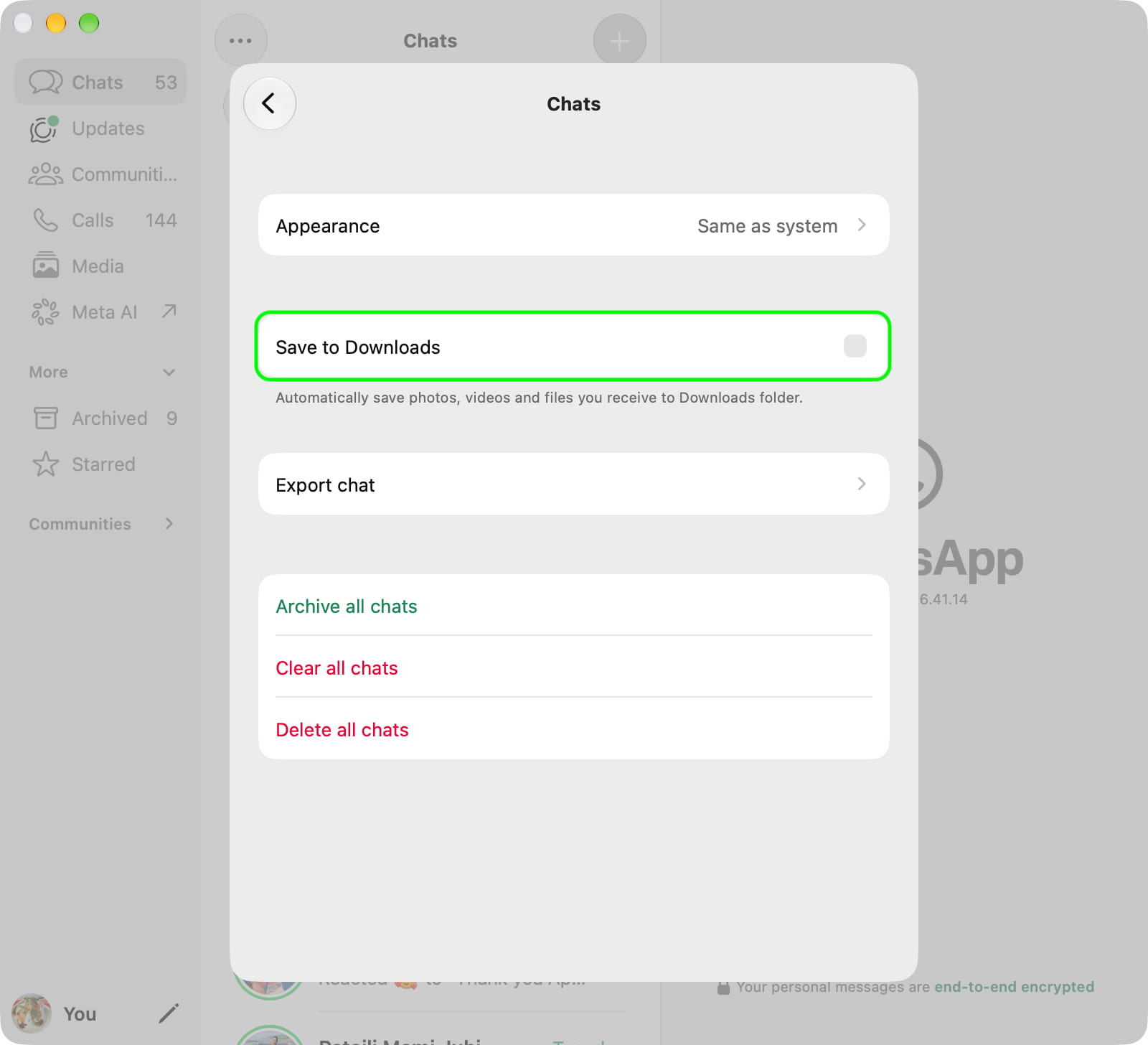
    Save to Downloads unchecked on Mac

    Additionally, you can go to WhatsApp Settings > Storage and data and turn off media auto-download for Photos, Audio, Video, and Documents.
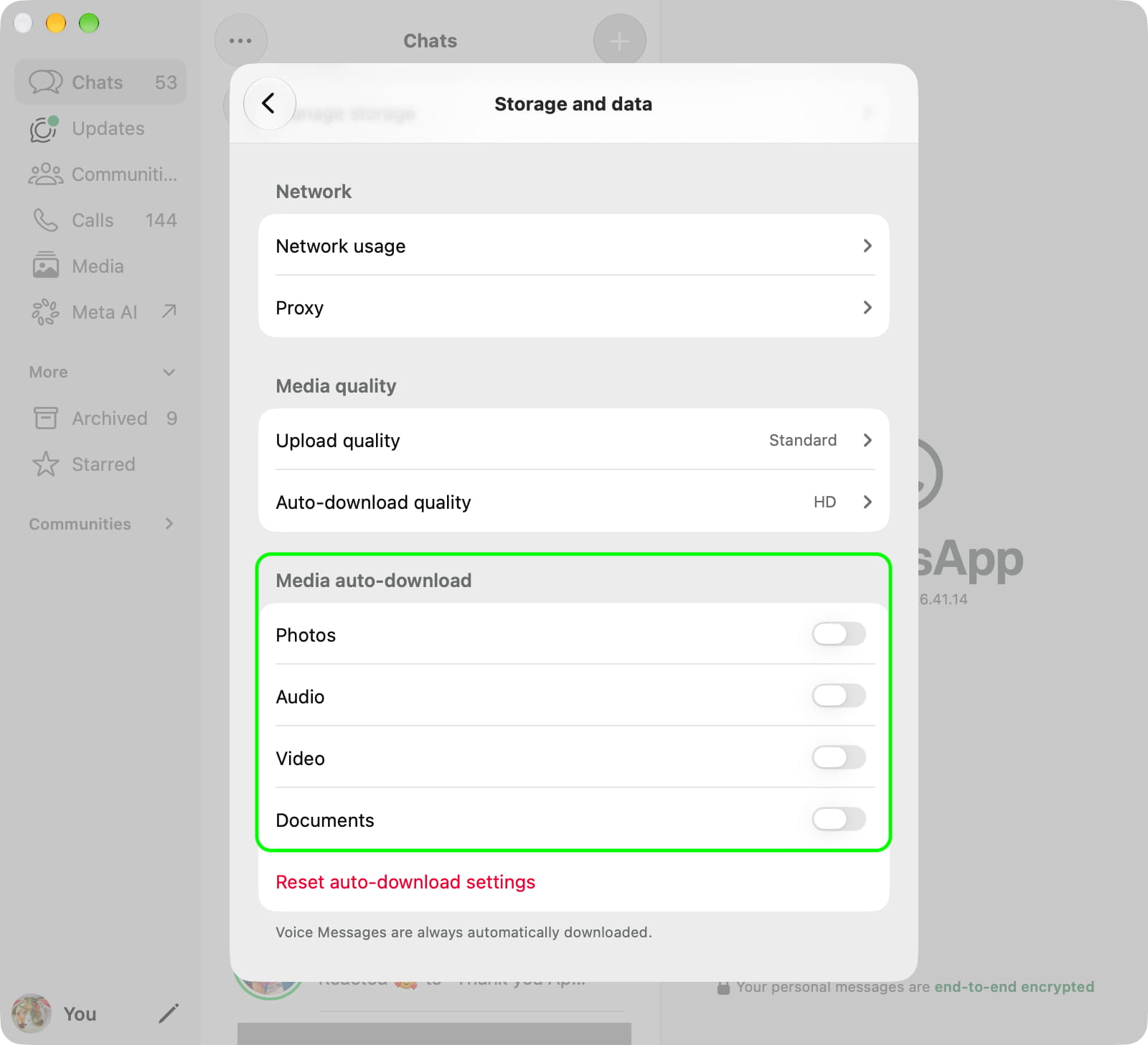
    Media auto-download turned off for WhatsApp on Mac

    From now on, WhatsApp won’t automatically save media to the Downloads folder.

    In case it still does, quit and reopen the app or restart your computer.

    • How to share your <a href="https://myappsplus.com/new-apple-tv-4k-homeview-iphone-duo-airpods-more-9to5mac/” title=”New Apple TV 4K, HomeView, iPhone Duo, AirPods, more 9to5Mac”>iPhone screen via WhatsApp
    • How to lock WhatsApp Web on your computer
    • How to share your live location with others from your iPhone
    Download Featured files How to Mac News Push Tips Tutorial Tutorials WhatsApp
    Follow on Google News Follow on Flipboard
    Share. Facebook Twitter Pinterest LinkedIn Tumblr Email Copy Link
    myappsplus
    • Website

    Related Posts

    iPhone Duo orders are delayed into 2027; here are the Android foldables you should try instead

    October 16, 2026

    Nest’s Halloween doorbell chimes are live now through November 1

    October 16, 2026

    Nothing Phone (3) up to $300 off, Lenovo Android Idea Tab $142, Best Buy 1-day laptop sale up to $500 off, more

    October 16, 2026
    Add A Comment
    Leave A Reply Cancel Reply

    Top Posts

    Cathay Pacific tests Google AI that dramatically cuts airplane contrails — tiny altitude shifts slash environmental impact by 40% in early trials

    September 8, 202631 Views

    Pricing, Benchmarks vs Claude 5.5

    October 12, 202612 Views

    What was the PSX? The souped-up PS2 rarely sold outside of Japan

    September 14, 202610 Views
    Latest Reviews

    Quote of the day by tech pioneer Claude Shannon: ‘I visualize a time when we will be to robots what dogs are to humans’ — a warning about superintelligent AI

    myappsplusAugust 29, 2026

    Netflix top 10 movies — here’s the 3 worth watching right now (August 29-30)

    myappsplusAugust 29, 2026

    Machine learning improves irradiance prediction in bifacial PV systems

    myappsplusAugust 29, 2026
    Stay In Touch
    • Facebook
    • YouTube
    • TikTok
    • WhatsApp
    • Twitter
    • Instagram

    Subscribe to Updates

    Get the latest tech news from FooBar about tech, design and biz.

    Most Popular

    Machine learning improves irradiance prediction in bifacial PV systems

    August 29, 20260 Views

    The Razer Naga V3 Pro is a jack-of-all-trades mouse — but is it a master of none?

    August 29, 20260 Views

    Android Auto not working? Here’s what to check first

    August 30, 20260 Views
    Our Picks

    Best 7 private Insta acccount viewer apps to use to see Instagram profiles

    October 16, 2026

    Jackery’s HomePower 1000 V2 power station covers necessities with a 1,024Wh capacity down at $549 ($100 off), more

    October 16, 2026

    A Nvidia insider-turned-VC on why robotics hasn’t hit its ChatGPT moment, yet

    October 16, 2026

    Subscribe to Updates

    Subscribe to our newsletter and get the latest tech news, app updates, AI trends, smartphone reviews, and exclusive deals delivered straight to your inbox.

    Facebook X (Twitter) Instagram Pinterest
    • About Us
    • Get In Touch
    • Disclaimer
    • Privacy Policy
    • Terms & Conditions
    © 2026 MyAppsPlus. All Rights Reserved.

    Type above and press Enter to search. Press Esc to cancel.