Close Menu
MyAppsPlus

    Subscribe to Updates

    Get the latest creative news from FooBar about art, design and business.

    What's Hot

    Wash your favorite space in celestial beauty with Govee’s Galaxy Light Star Projector 2 Pro down at $150

    September 25, 2026

    The hottest new hangout for middle schoolers is NPR’s comment section?

    September 25, 2026

    Searching for Googlebooks won’t give you the results you’re looking for

    September 25, 2026
    Facebook X (Twitter) Instagram
    Facebook X (Twitter) Instagram
    MyAppsPlusMyAppsPlus
    Friday, September 25
    • Home
    • Breaking Tech
    • Apps & Software
    • AI & Automation
    • Android
    • iPhone & iOS
    • More
      • Reviews
      • How-To Guides
      • Deals & Discounts
      • Shop
    MyAppsPlus
    Home»Breaking Tech»How to stop Meta training its AI models on your smart glasses’ visual data
    Breaking Tech

    How to stop Meta training its AI models on your smart glasses’ visual data

    myappsplusBy myappsplusSeptember 25, 2026002 Mins Read
    Share Facebook Twitter Pinterest Copy Link LinkedIn Tumblr Email Telegram WhatsApp
    Follow Us
    Google News Flipboard
    How to stop Meta training its AI models on your smart glasses’ visual data
    Share
    Facebook Twitter LinkedIn Pinterest Email Copy Link

    The setting affects whether workers can review photos and videos from your glasses.

    Meta has started to roll out the setting that allows people who use its smart glasses to opt out of allowing the company to use “visual data” collected by the device for AI training. The setting is now available within the Meta AI app.

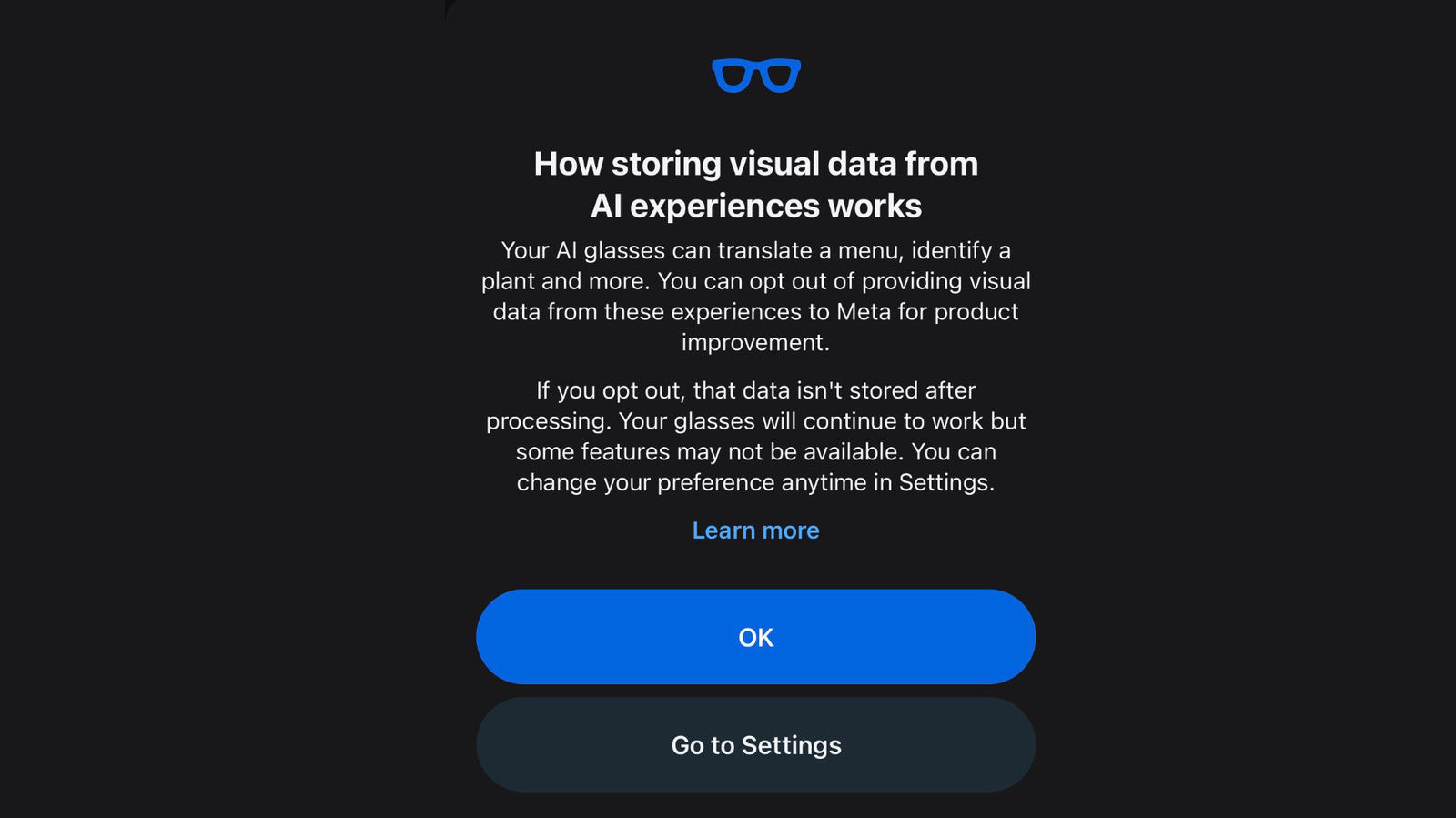
    The company has begun notifying glasses owners about the change with a pop-up in the Meta AI app. “Your Al glasses can translate a menu, identify a plant and more,” it says. “You can opt out of providing visual data from these experiences to Meta for product improvement. If you opt out, that data isn’t stored after processing.”

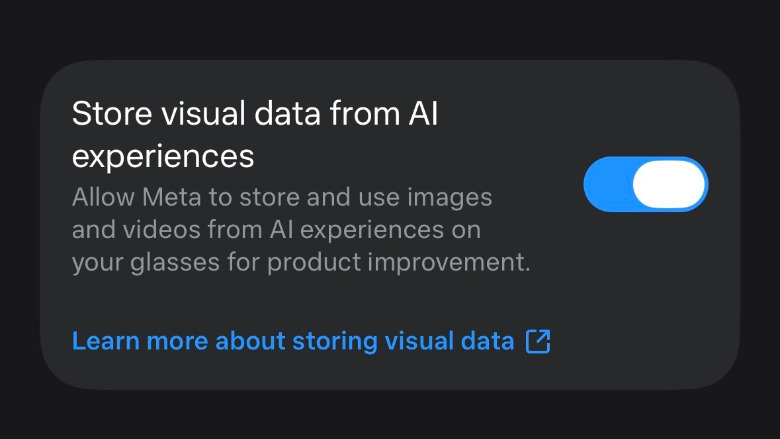
    The notification directs users to the relevant settings page, but you can also find it directly by navigating to the settings for your glasses, selecting “Meta AI” and scrolling down to “store visual data from AI experiences.” You’ll need to have your glasses out of their case and connected to your phone in order to change the setting. If you have multiple pairs of glasses, you’ll need to repeat this step for each pair.
    Opting out may prevent you from being able to use certain <a href="https://myappsplus.com/meta-opens-early-access-program-for-new-muse-features/” title=”Meta opens early access program for new Muse features”>features with the glasses, Meta says. This includes “visual reminders,” like looking at an object and asking Meta AI to remind you to buy it next week. It’s not clear if any other features are affected.

    Along with the new setting, Meta has also published a more detailed description of how it uses “visual data” in a help center article that explicitly mentions the possibility of human review. “When you use AI experiences on your Meta glasses – like asking about something you’re looking at or using live AI – Meta stores the resulting visual data and may use it to power glasses features and improve Meta products,” the company explains. “This includes the process of training and improving AI models, which may be automated or manual (human).”

    The company goes on to note that it only stores “visual data” collected while using certain AI features, including Live AI. Visual data, the company says, does not include “photos and videos you capture with your glasses when the capture LED is on.”

    Meta models Stop Training Wearables
    Follow on Google News Follow on Flipboard
    Share. Facebook Twitter Pinterest LinkedIn Tumblr Email Copy Link
    myappsplus
    • Website

    Related Posts

    The hottest new hangout for middle schoolers is NPR’s comment section?

    September 25, 2026

    What is Meta Muse? The AI agent explained

    September 25, 2026

    Meta opens early access program for new Muse features

    September 25, 2026
    Add A Comment
    Leave A Reply Cancel Reply

    Top Posts

    Can reviews settle disputes that marked first two seasons?

    September 21, 20263 Views

    Experts call for leveraging AI, breaking key tech bottlenecks to propel advanced manufacturing

    September 19, 20263 Views

    Top 10 Best React Native App Development Companies in 2026

    September 12, 20263 Views
    Latest Reviews

    Pixel 11 Pro XL review: Snappier cameras can’t hide an iterative upgrade

    myappsplusAugust 22, 2026

    ‘This is going to get AirPods banned’: we’ve got more leaked details of the camera-equipped AirPods that are on the way

    myappsplusAugust 22, 2026

    Here’s what you’ll need to watch Netflix in 4K on Chrome

    myappsplusAugust 22, 2026
    Stay In Touch
    • Facebook
    • YouTube
    • TikTok
    • WhatsApp
    • Twitter
    • Instagram

    Subscribe to Updates

    Get the latest tech news from FooBar about tech, design and biz.

    Most Popular

    Pixel 11 Pro XL review: Snappier cameras can’t hide an iterative upgrade

    August 22, 20260 Views

    ‘This is going to get AirPods banned’: we’ve got more leaked details of the camera-equipped AirPods that are on the way

    August 22, 20260 Views

    Here’s what you’ll need to watch Netflix in 4K on Chrome

    August 22, 20260 Views
    Our Picks

    Wash your favorite space in celestial beauty with Govee’s Galaxy Light Star Projector 2 Pro down at $150

    September 25, 2026

    The hottest new hangout for middle schoolers is NPR’s comment section?

    September 25, 2026

    Searching for Googlebooks won’t give you the results you’re looking for

    September 25, 2026

    Subscribe to Updates

    Subscribe to our newsletter and get the latest tech news, app updates, AI trends, smartphone reviews, and exclusive deals delivered straight to your inbox.

    Facebook X (Twitter) Instagram Pinterest
    • About Us
    • Get In Touch
    • Disclaimer
    • Privacy Policy
    • Terms & Conditions
    © 2026 MyAppsPlus. All Rights Reserved.

    Type above and press Enter to search. Press Esc to cancel.