Close Menu
MyAppsPlus

    Subscribe to Updates

    Get the latest creative news from FooBar about art, design and business.

    What's Hot

    Nintendo Switch 2 update 23.5.0: software exploit reportedly blocked

    November 13, 2026

    Essentials for Advanced Android Users Offers 30+ Features Not Found in the Settings App, Free of Charge

    November 13, 2026

    How to Save Video Frame as Still Photo on iPhone & iPad

    November 13, 2026
    Facebook X (Twitter) Instagram
    Facebook X (Twitter) Instagram
    MyAppsPlusMyAppsPlus
    Friday, November 13
    • Home
    • Breaking Tech
    • Apps & Software
    • AI & Automation
    • Android
    • iPhone & iOS
    • More
      • Reviews
      • How-To Guides
      • Deals & Discounts
      • Shop
    MyAppsPlus
    Home»iPhone & iOS»How to Save Video Frame as Still Photo on iPhone & iPad
    iPhone & iOS

    How to Save Video Frame as Still Photo on iPhone & iPad

    myappsplusBy myappsplusNovember 13, 2026002 Mins Read
    Share Facebook Twitter Pinterest Copy Link LinkedIn Tumblr Email Telegram WhatsApp
    Follow Us
    Google News Flipboard
    How to Save Video Frame as Still Photo on iPhone & iPad
    Share
    Facebook Twitter LinkedIn Pinterest Email Copy Link

    How to Save Video Frame as Still Photo on iPhone & iPad – OS X Daily

    How to Save Video Frame as Still Photo on iPhone & iPad

    Ever wished you could easily capture a single frame of a video as a still photo? That’s now much easier to do on iPhone and iPad with the latest versions of iOS and iPadOS.

    Longtime iPhone and iPad users have likely found themselves in this situation before; you recorded a video of something, maybe an event, or get together, and you decide you want to capture a still image from the video as a photo, so you then use the playback scrubbing tool to navigate to the frame of the video, then screenshot on <a href="https://myappsplus.com/why-are-your-ai-projects-failing/” title=”Why are your AI projects failing?”>your iPhone or iPad, to then crop the screenshot down to make the still photo. That has worked, but it’s cumbersome, and very much a workaround.

    But with iOS 27 onward, you don’t need to go through that rigmarole just to get a still image from a video, as there’s now a super easy to use feature to accomplish the same feat.

    How to Save a Video Frame as Photo on iPhone & iPad

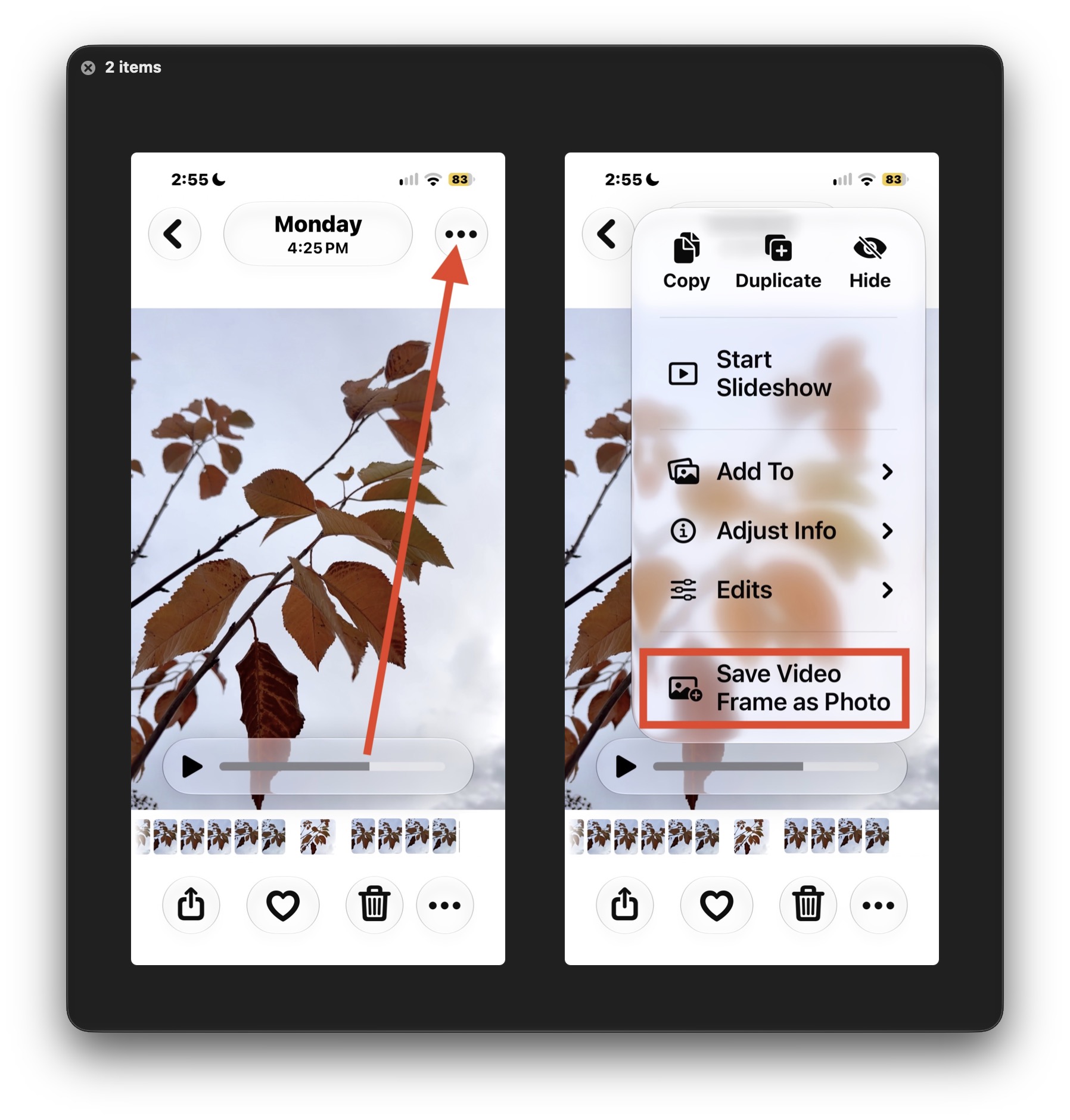
    Capturing a single video frame as a photo is now easier than ever, here’s how it works:

    1. Open the Photos app and then open the video that you’d like to capture a still photo from
    2. Pause the video if it’s playing, and use the scrub tool to find the exact frame you want to capture as a photo
    3. Tap the three dot button (…) in the top corner
    4. Now choose “Save Video Frame as Photo” from the dropdown menu options
    5. Return to your Photos camera roll to find the photo saved from the video

    Nice and direct, and no need to screenshot and then crop the image like was commonplace until this direct export feature existed.

    Obviously the higher resolution of your video, the higher resolution the resulting photo will be, so for best results you’ll want to be recording 4k video.

    This was introduced in iOS 27 and is a nice feature, and guess what? This trick works basically exactly the same on Photos app for Mac too, where the requirements are MacOS 27 or later to be able to perform the same action.

    Frame photo Save still Video
    Follow on Google News Follow on Flipboard
    Share. Facebook Twitter Pinterest LinkedIn Tumblr Email Copy Link
    myappsplus
    • Website

    Related Posts

    Apple Notes adds a powerful new advantage in iOS 27.3

    November 13, 2026

    Apple adjusts iPhone and Apple Watch trade-in values, adds Samsung foldables

    November 13, 2026

    X now lets you share 5x more photos and videos per post

    November 13, 2026
    Add A Comment
    Leave A Reply Cancel Reply

    Top Posts

    Save on your groceries, gas, and holiday shopping with this $15 BJ’s membership (Reg. $60) 

    November 4, 202628 Views

    Apple is making Creator Studio an even better deal with new AI features and creative tools

    October 28, 202623 Views

    Google’s new AI shopping cart tracks deals across stores

    October 25, 202622 Views
    Latest Reviews

    Renault is building its €17,900 Dacia Spring EV in Europe to qualify for local subsidies

    myappsplusSeptember 8, 2026

    How to watch Champions League 2026/27: Free Streams & TV Channels for Matchday 1

    myappsplusSeptember 8, 2026

    How to watch ‘The Drop: A Snowfall Saga’ online — stream the crime drama spinoff from anywhere

    myappsplusSeptember 8, 2026
    Stay In Touch
    • Facebook
    • YouTube
    • TikTok
    • WhatsApp
    • Twitter
    • Instagram

    Subscribe to Updates

    Get the latest tech news from FooBar about tech, design and biz.

    Most Popular

    How to watch ‘The Drop: A Snowfall Saga’ online — stream the crime drama spinoff from anywhere

    September 8, 20260 Views

    Xiaomi 18 Fold hands-on: An attractive ‘mid-size’ foldable with powerful specs

    September 8, 20260 Views

    Dyson just revived its Corrale straightener — and by shrinking it down and adding an ingenious cooling attachment, it’s turned it into a tool I’m actually excited about

    September 8, 20260 Views
    Our Picks

    Nintendo Switch 2 update 23.5.0: software exploit reportedly blocked

    November 13, 2026

    Essentials for Advanced Android Users Offers 30+ Features Not Found in the Settings App, Free of Charge

    November 13, 2026

    How to Save Video Frame as Still Photo on iPhone & iPad

    November 13, 2026

    Subscribe to Updates

    Subscribe to our newsletter and get the latest tech news, app updates, AI trends, smartphone reviews, and exclusive deals delivered straight to your inbox.

    Facebook X (Twitter) Instagram Pinterest
    • About Us
    • Get In Touch
    • Disclaimer
    • Privacy Policy
    • Terms & Conditions
    © 2026 MyAppsPlus. All Rights Reserved.

    Type above and press Enter to search. Press Esc to cancel.