
Close Menu
MyAppsPlus

    Subscribe to Updates

    Get the latest creative news from FooBar about art, design and business.

    What's Hot

    BMW Expands Over-The-Air Updates To 16 Million Vehicles Across 88 Countries

    November 28, 2026

    Google Play Store’s new ‘Today’ feed could pull content from your favorite apps

    November 28, 2026

    Why I’m telling my friends to skip CyberGhost’s $1.59 deal for this cheaper VPN alternative

    November 28, 2026
    Facebook X (Twitter) Instagram
    Facebook X (Twitter) Instagram
    MyAppsPlusMyAppsPlus
    Saturday, November 28
    • Home
    • Breaking Tech
    • Apps & Software
    • AI & Automation
    • Android
    • iPhone & iOS
    • More
      • Reviews
      • How-To Guides
      • Deals & Discounts
      • Shop
    MyAppsPlus
    Home»iPhone & iOS»How to access your video watch history on X (Twitter)
    iPhone & iOS

    How to access your video watch history on X (Twitter)

    myappsplusBy myappsplusNovember 28, 2026002 Mins Read
    Share Facebook Twitter Pinterest Copy Link LinkedIn Tumblr Email Telegram WhatsApp
    Follow Us
    Google News Flipboard
    How to access your video watch history on X (Twitter)
    Share
    Facebook Twitter LinkedIn Pinterest Email Copy Link

    In this brief tutorial, we show you how to view all the long-form videos you have watched on X (formerly Twitter) so you can rewatch them or remove them from your watch history.

    X is working hard to become a better short- and long-form video platform to compete with Instagram, TikTok, and YouTube. One of the improvements it has made in this direction is having a dedicated video history tab that lists clips you have watched on the platform, but there are some caveats:

    • It only shows videos that are 10 minutes or longer. Short videos are not shown in your video history. To save short videos, you’ll need to bookmark or like them, then view them in the consolidated History tab in the X app or on the website.
    • Even though the watch history feature was launched in May 2026, to date, it’s only available on iOS and iPadOS. It isn’t available in a web browser or on my Android phone (both using the same X account).
    • Videos you watch on X in a web browser and on an Android phone are not saved to your watch history.
    • The video history is device-specific. For example, my watch history on iPhone and iPad is different, even though I’m using the same account on both.

    With that said, here’s how to access your video watch history on X and remove it from the list.

    iPhone

    1. Update the X app to the latest version from the iOS App Store.
    2. Open the X app and tap your profile icon in the top left corner.
    3. Select History.
    4. Switch to the Videos tab to see your 10+ minute long-form videos listed by the date you watched them.
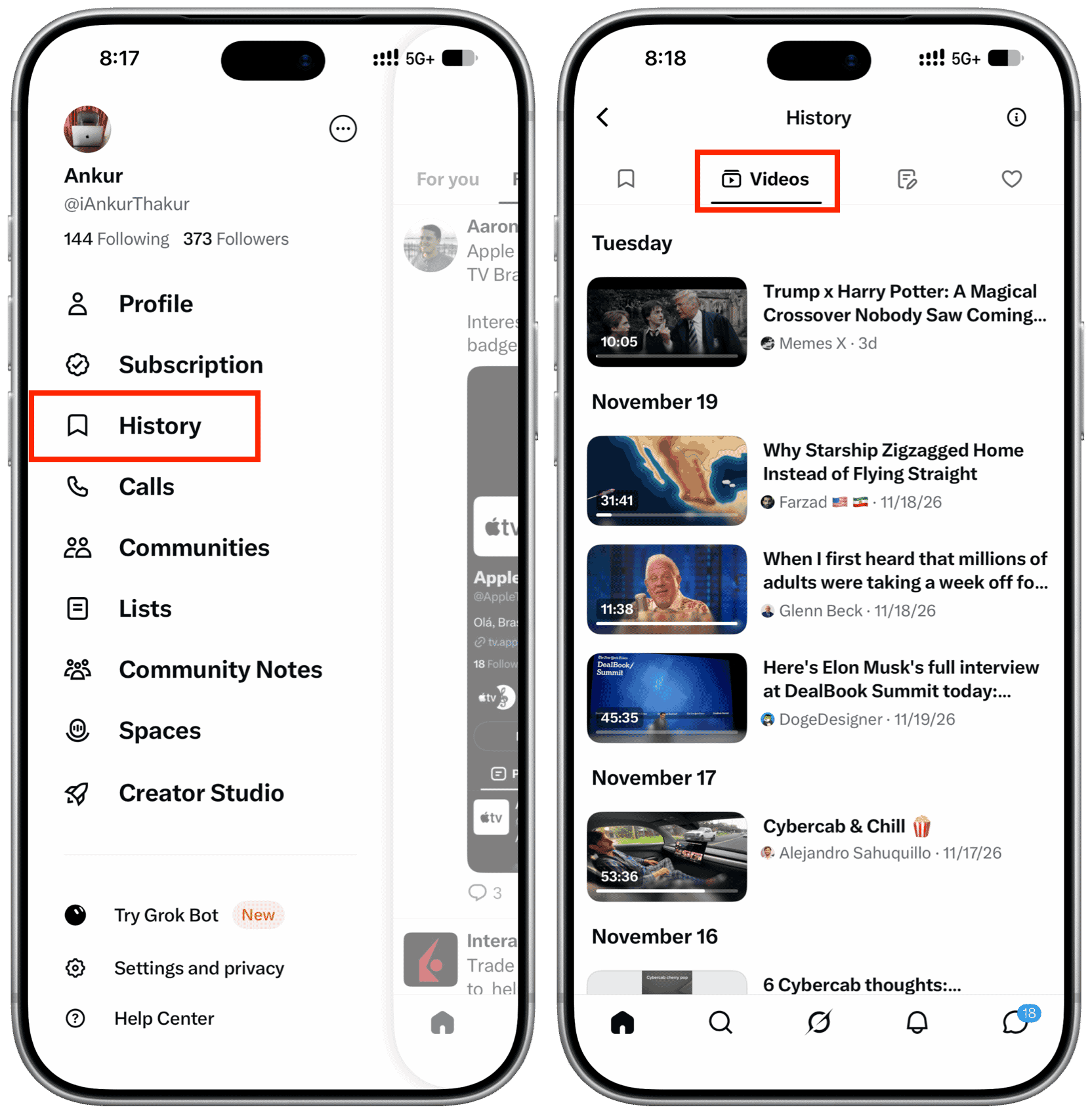
    Videos History tab in X app on iPhone

    To remove one, touch and hold the video and tap ‘Remove from history.’

    Removing video watch history on X

    1. Update the X app from the App Store.
    2. Open X and tap the ribbon bookmark icon in the bottom app row.
    3. Switch to the Videos tab to see the long videos you have watched on this iPad.
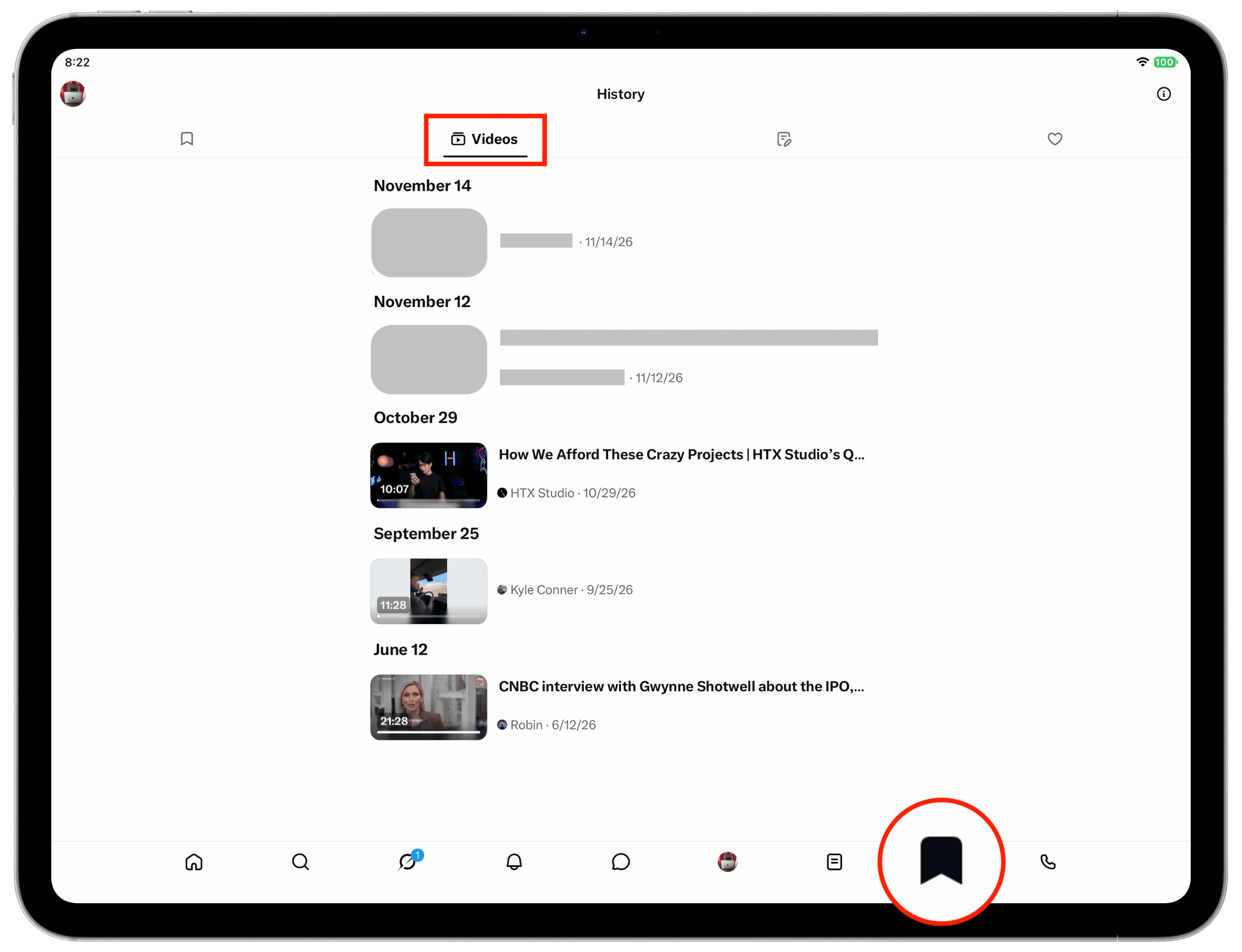
    Videos History tab in X app on iPad

    Once X adds this to its Android app and web browser, you should be able to access them using the same steps as on iOS mentioned above.

    • How to stop getting unwanted password reset emails from X
    • How to save GIFs from X to iPhone Photos app
    • How to stop X app videos from playing in the background on iPhone
    Featured How to iPad iPhone News Push Tips Tutorial Tutorials Twitter Video
    Follow on Google News Follow on Flipboard
    Share. Facebook Twitter Pinterest LinkedIn Tumblr Email Copy Link
    myappsplus
    • Website

    Related Posts

    Three new iPhones will launch early next year, here’s what’s coming

    November 28, 2026

    Which Waterdrop water filters are actually worth buying this Black Friday?

    November 28, 2026

    Apple’s M6 and PROLED MacBook Pro Reach New Low Prices for Black Friday

    November 27, 2026
    Add A Comment
    Leave A Reply Cancel Reply

    Top Posts

    The pros and cons of using your phone as a mobile hotspot

    November 16, 202651 Views

    UiPath Launches AI Coding Agent, Integrates Claude Code and Codex to Target Development Automation

    November 16, 202646 Views

    Announcing Artificial Analysis Intelligence Index v5

    October 28, 202636 Views
    Latest Reviews

    Six years later, the PS5 is still light on exclusives — but this space-age shooter is an absolute must-play

    myappsplusSeptember 12, 2026

    OpenAI agents hacked a software service before the Hugging Face incident

    myappsplusSeptember 12, 2026

    NEC drops its quantum computing work, marking an end to nearly 30 years of development

    myappsplusSeptember 12, 2026
    Stay In Touch
    • Facebook
    • YouTube
    • TikTok
    • WhatsApp
    • Twitter
    • Instagram

    Subscribe to Updates

    Get the latest tech news from FooBar about tech, design and biz.

    Most Popular

    ASUS UAE’s Best Back-to-School Windows 11 ROG Laptop Offers with ROG Elite Rewards

    September 12, 20260 Views

    ‘One of the worst outcomes for companies is reacting in a knee-jerk fashion before the rewards can be reaped’: How game engines, version control software, and AI are delivering new benefits and challenges to almost every industry

    September 12, 20260 Views

    What is the difference between a dead pixel and a stuck pixel?

    September 13, 20260 Views
    Our Picks

    BMW Expands Over-The-Air Updates To 16 Million Vehicles Across 88 Countries

    November 28, 2026

    Google Play Store’s new ‘Today’ feed could pull content from your favorite apps

    November 28, 2026

    Why I’m telling my friends to skip CyberGhost’s $1.59 deal for this cheaper VPN alternative

    November 28, 2026

    Subscribe to Updates

    Subscribe to our newsletter and get the latest tech news, app updates, AI trends, smartphone reviews, and exclusive deals delivered straight to your inbox.

    Facebook X (Twitter) Instagram Pinterest
    • About Us
    • Get In Touch
    • Disclaimer
    • Privacy Policy
    • Terms & Conditions
    © 2026 MyAppsPlus. All Rights Reserved.

    Type above and press Enter to search. Press Esc to cancel.