Close Menu
MyAppsPlus

    Subscribe to Updates

    Get the latest creative news from FooBar about art, design and business.

    What's Hot

    I’ve covered Black Friday for years — here are the 40+ early deals worth your cash today, including TVs, laptops, headphones, appliances, and more

    November 21, 2026

    5 clever things you can still do with an old DVD or CD player

    November 21, 2026

    Chance gives 1,500 University students a new way to connect

    November 21, 2026
    Facebook X (Twitter) Instagram
    Facebook X (Twitter) Instagram
    MyAppsPlusMyAppsPlus
    Saturday, November 21
    • Home
    • Breaking Tech
    • Apps & Software
    • AI & Automation
    • Android
    • iPhone & iOS
    • More
      • Reviews
      • How-To Guides
      • Deals & Discounts
      • Shop
    MyAppsPlus
    Home»Android»Google Docs and Drive now support markdown files natively
    Android

    Google Docs and Drive now support markdown files natively

    myappsplusBy myappsplusOctober 6, 2026022 Mins Read
    Share Facebook Twitter Pinterest Copy Link LinkedIn Tumblr Email Telegram WhatsApp
    Follow Us
    Google News Flipboard
    Google Docs and Drive now support markdown files natively
    Share
    Facebook Twitter LinkedIn Pinterest Email Copy Link

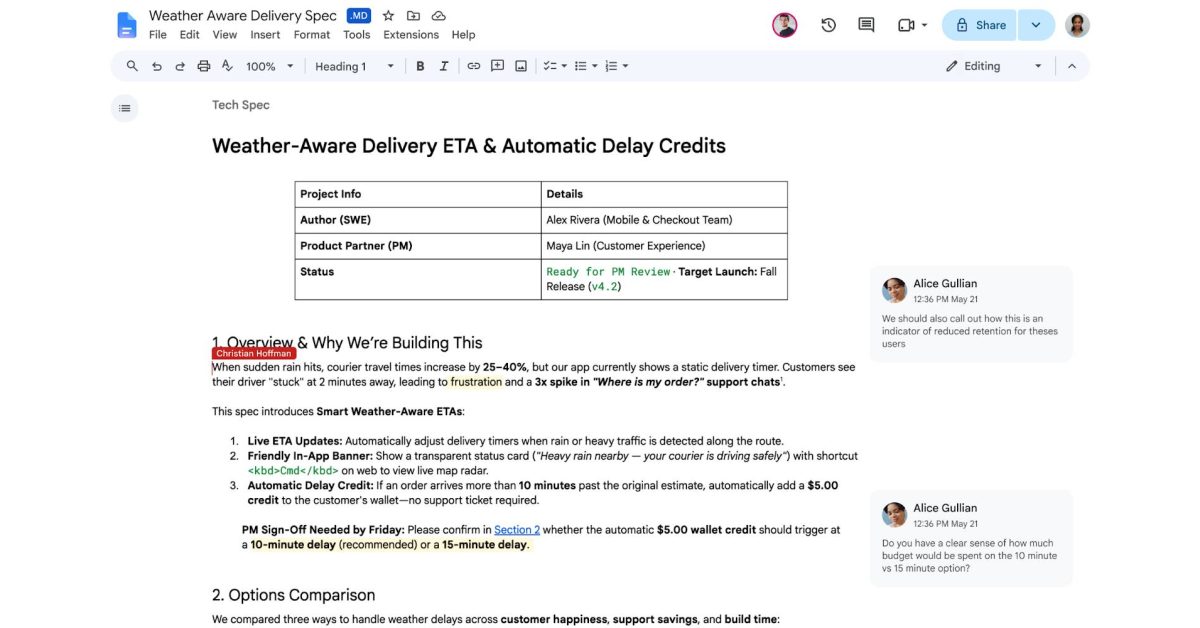
    Spurred by the use of markdown files in the AI age, Google Drive and Google Docs are adding full, native support for markdown (.md) files.

    Google has been building out markdown support in Drive for years now, but prior steps largely included converting markdown into a format that Docs could use.

    Now, Google Drive and its suite of apps can open, edit, and fully use markdown files throughout Docs and other apps. This includes real-time editing and comments with full rendering of the formatting of markdown documents. Google also points out that this benefits AI use cases such as having AI agents collaborate on documents and even syncing with Gemini Notebook.

    Now that users can handle markdown files natively in Google Docs, they can open, edit, and collaborate on markdown files without changing the file type. Editing Markdown files in Docs also enables both users and agents to collaborate without forcing anyone to write raw syntax, handle manual file conversions, or give up Docs’ real-time editing and commenting tools.

    Drive also now supports rendered markdown, so you can view fully formatted, beautiful documents with clickable links and structured tables right in Drive.

    Google’s Chandu Thota calls out that markdown “has become the common language between humans and AI agents.”

    Markdown support in Google Drive and Docs is rolling out starting today but may take up to 15 days to show up for everyone. It’s enabled by default, even on admin-controlled accounts.

    More on Google Workspace:

    • Google upgrades all Gemini side panels in Workspace to have the same features
    • Google rolling out Gmail Live, Docs Live, and Keep Live
    • Android rolls out local ‘Documents’ backup that syncs to Google Drive

    Follow Ben: Twitter/X, Threads, Bluesky, and Instagram

    You’re reading 9to5Google — experts who break news about Google and its surrounding ecosystem, day after day. Be sure to check out our homepage for all the latest news, and follow 9to5Google on Twitter, Facebook, and LinkedIn to stay in the loop. Don’t know where to start? Check out our exclusive stories, reviews, how-tos, and subscribe to our YouTube channel

    Docs drive Google News support
    Follow on Google News Follow on Flipboard
    Share. Facebook Twitter Pinterest LinkedIn Tumblr Email Copy Link
    myappsplus
    • Website

    Related Posts

    5 clever things you can still do with an old DVD or CD player

    November 21, 2026

    What you can do on a foldable

    November 21, 2026

    Official Motorola Android 17 Update List Surfaces

    November 21, 2026
    Add A Comment
    Leave A Reply Cancel Reply

    Top Posts

    UiPath Launches AI Coding Agent, Integrates Claude Code and Codex to Target Development Automation

    November 16, 202644 Views

    The pros and cons of using your phone as a mobile hotspot

    November 16, 202642 Views

    Save on your groceries, gas, and holiday shopping with this $15 BJ’s membership (Reg. $60) 

    November 4, 202633 Views
    Latest Reviews

    Create, edit, and humanize AI content for life with UmanWrite for $79 ($1,799 value)

    myappsplusSeptember 10, 2026

    FBI launches investigation after 153 million drivers licenses apparently leaked on Russian cybercrime forum

    myappsplusSeptember 10, 2026

    IDScan is offering free credit monitoring and ID protection after leaking driver’s licenses

    myappsplusSeptember 10, 2026
    Stay In Touch
    • Facebook
    • YouTube
    • TikTok
    • WhatsApp
    • Twitter
    • Instagram

    Subscribe to Updates

    Get the latest tech news from FooBar about tech, design and biz.

    Most Popular

    Leaving Online Reviews Could Make You a Phishing Target, According To Study

    September 10, 20260 Views

    ‘I love this place; it’s in my blood. Goosebumps’; John Ternus on how he felt when he learned he was becoming Apple CEO, and why AI may be the key to future Apple innovation

    September 10, 20260 Views

    Anthropic Says Claude AI Blocked Biological Weapons Attempts

    September 11, 20260 Views
    Our Picks

    I’ve covered Black Friday for years — here are the 40+ early deals worth your cash today, including TVs, laptops, headphones, appliances, and more

    November 21, 2026

    5 clever things you can still do with an old DVD or CD player

    November 21, 2026

    Chance gives 1,500 University students a new way to connect

    November 21, 2026

    Subscribe to Updates

    Subscribe to our newsletter and get the latest tech news, app updates, AI trends, smartphone reviews, and exclusive deals delivered straight to your inbox.

    Facebook X (Twitter) Instagram Pinterest
    • About Us
    • Get In Touch
    • Disclaimer
    • Privacy Policy
    • Terms & Conditions
    © 2026 MyAppsPlus. All Rights Reserved.

    Type above and press Enter to search. Press Esc to cancel.