Close Menu
MyAppsPlus

    Subscribe to Updates

    Get the latest creative news from FooBar about art, design and business.

    What's Hot

    Land a 2-pack of Beats 5-foot woven USB-C cables at the $14 Amazon low ($7 each)

    September 25, 2026

    Bill Gates says AI companies self-regulating isn’t enough and governments should be involved in monitoring

    September 25, 2026

    The Galaxy Watch 9 is a great watch with one problem you’ll notice every day

    September 25, 2026
    Facebook X (Twitter) Instagram
    Facebook X (Twitter) Instagram
    MyAppsPlusMyAppsPlus
    Friday, September 25
    • Home
    • Breaking Tech
    • Apps & Software
    • AI & Automation
    • Android
    • iPhone & iOS
    • More
      • Reviews
      • How-To Guides
      • Deals & Discounts
      • Shop
    MyAppsPlus
    Home»iPhone & iOS»Create a Custom Pass in the Wallet App on iPhone
    iPhone & iOS

    Create a Custom Pass in the Wallet App on iPhone

    myappsplusBy myappsplusSeptember 25, 2026002 Mins Read
    Share Facebook Twitter Pinterest Copy Link LinkedIn Tumblr Email Telegram WhatsApp
    Follow Us
    Google News Flipboard
    Create a Custom Pass in the Wallet App on iPhone
    Share
    Facebook Twitter LinkedIn Pinterest Email Copy Link

    In iOS 27, Apple’s Wallet app lets you create custom passes for things like event tickets, gift cards, loyalty cards, and more. Here’s how it works.

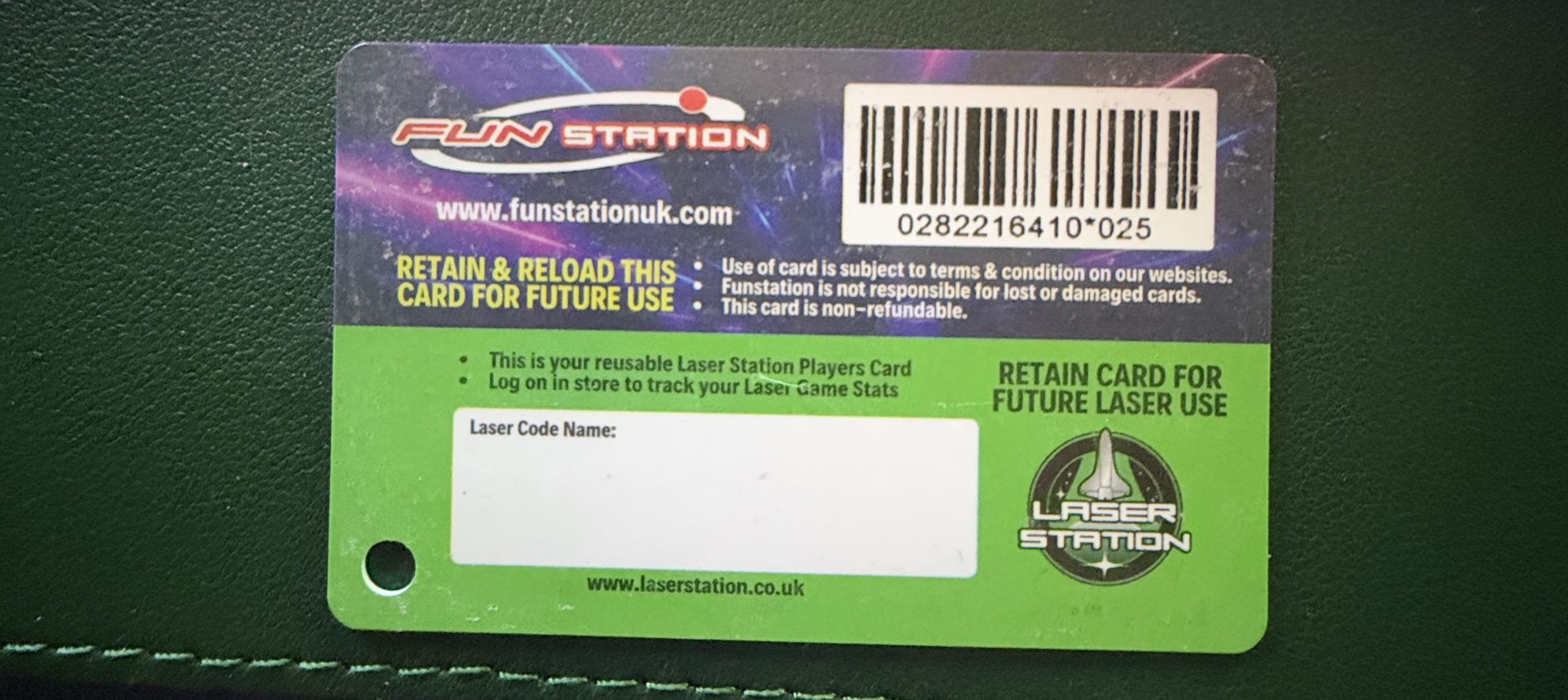
    If you have a ticket for an event and there’s not a digital version available for the Wallet app, you can create one using the physical pass you have. The same goes for other cards, like a membership card, for example.

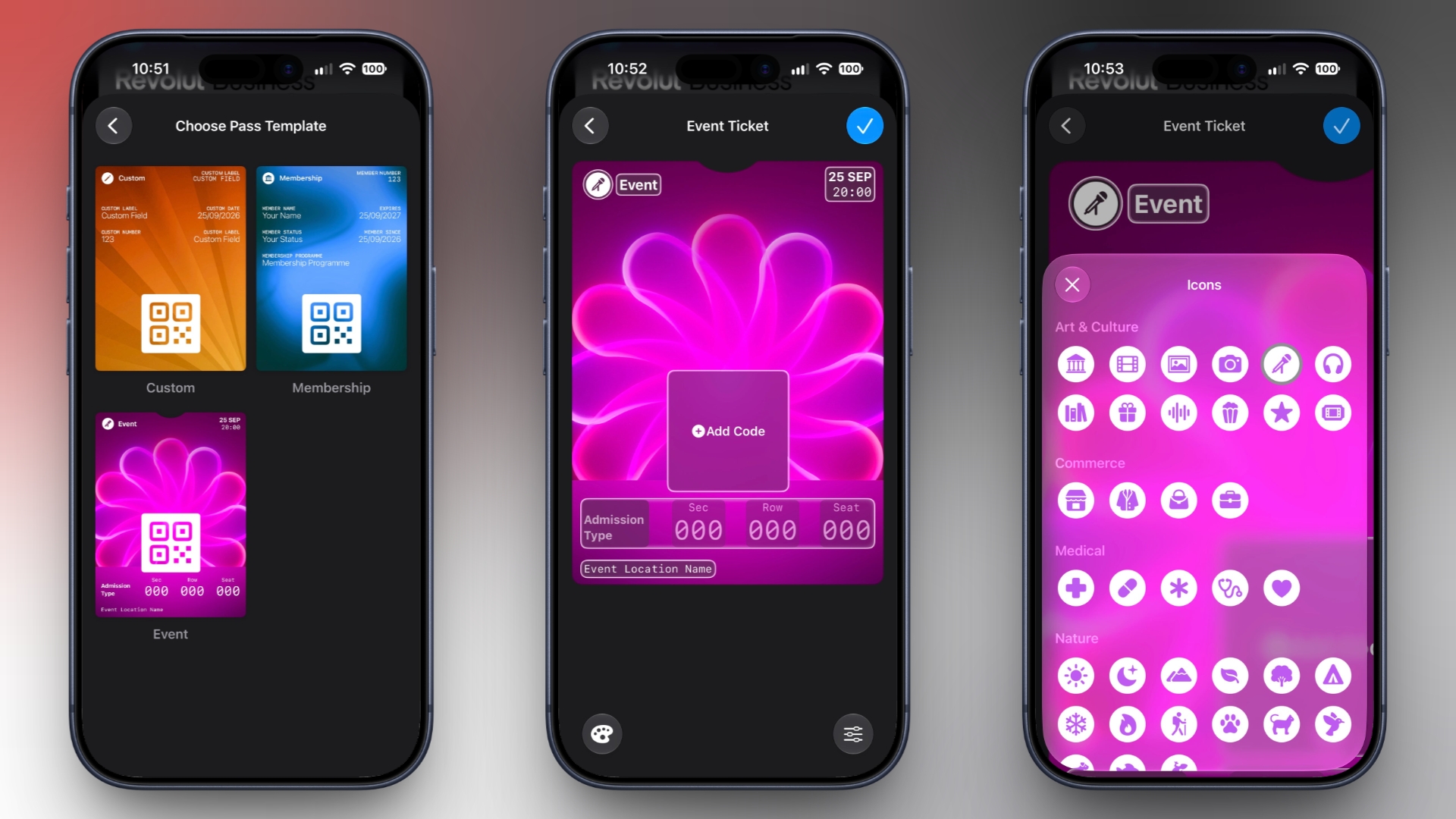
    The Wallet app can use ‌Visual Intelligence‌ to scan your card, and it will match it to a template with corresponding fields that you can tweak before adding it to your Wallet.

    Alternatively, you can create the pass manually, choose a template (“Membership,” “Event,” or “Custom”) and then adjust the color and other details. All you need to do then is scan the barcode or QR code from your physical pass.

    Each template includes relevant information like name, location, or admission type. There are 12 background colors to choose from, or seven custom backgrounds for categories like theater, music, sports, and movies.

    Fields can be added or removed when creating a custom pass, with options like label, date, membership, contact, coupon code, VIN, insurance, and more, so most physical cards should be able to be stored digitally.

    Here’s how you create a pass with ‌Visual Intelligence‌:

    1. Open the Wallet app on your iPhone and tap the + button at the top.
    2. Choose Create a Pass.
    3. To let Visual Intelligence scan the pass, tap Continue, then take a photo of it in the next screen.

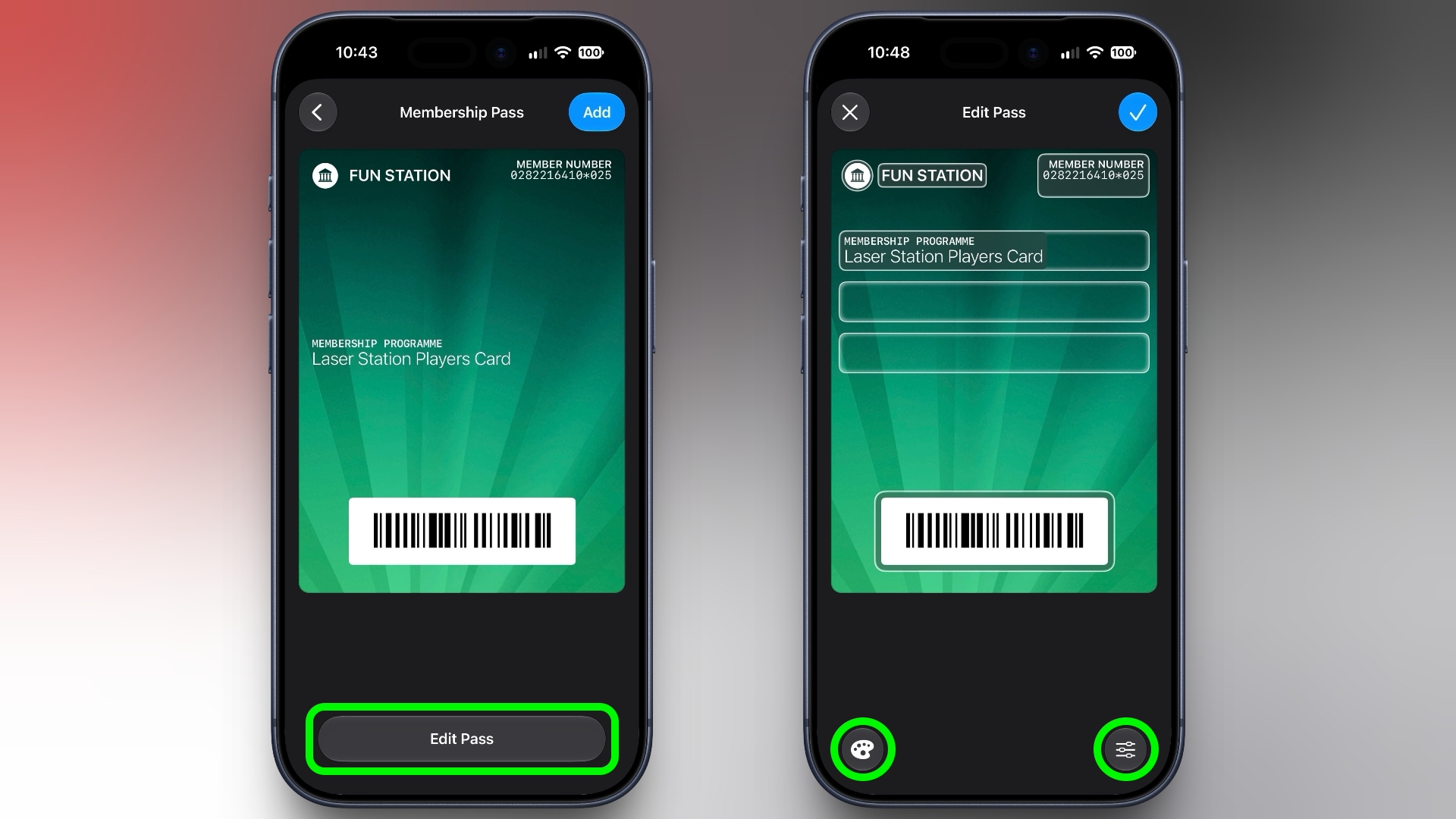
    4. After Visual Intelligence matches the pass to a template, tap Edit Pass.
    5. Use the palette icon in the bottom-left corner to change the look of the pass – you can the background colour, or use an image from your Photos library. Tap the icon in the bottom-right corner to add or remove fields.
      wallet
    6. Tap the blue checkmark at the top when you’re done.

    Your custom pass will now be added to your Wallet, ready for use. To edit it at any time, simply select it in Wallet, tap the three dots in the top-right corner of the screen, then tap Edit Pass.Tag: Apple Wallet

    This article, “Create a Custom Pass in the Wallet App on iPhone” first appeared on MacRumors.com

    Discuss this article in our forums

    Apple Wallet create custom pass Wallet
    Follow on Google News Follow on Flipboard
    Share. Facebook Twitter Pinterest LinkedIn Tumblr Email Copy Link
    myappsplus
    • Website

    Related Posts

    5 New CarPlay Features in iOS 27 That Will Upgrade Your Drive

    September 25, 2026

    Upgraded to an iPhone 18 Pro? Satechi’s Early Prime Day Sale Lops 50% Off Essential USB-C Cables

    September 25, 2026

    Rare ‘Antennagate’ press conference Q&A video surfaces online

    September 25, 2026
    Add A Comment
    Leave A Reply Cancel Reply

    Top Posts

    Experts call for leveraging AI, breaking key tech bottlenecks to propel advanced manufacturing

    September 19, 20263 Views

    Top 10 Best React Native App Development Companies in 2026

    September 12, 20263 Views

    This tiny AI box could save me from upgrading my perfectly good laptop

    September 6, 20263 Views
    Latest Reviews

    Pixel 11 Pro XL review: Snappier cameras can’t hide an iterative upgrade

    myappsplusAugust 22, 2026

    ‘This is going to get AirPods banned’: we’ve got more leaked details of the camera-equipped AirPods that are on the way

    myappsplusAugust 22, 2026

    Here’s what you’ll need to watch Netflix in 4K on Chrome

    myappsplusAugust 22, 2026
    Stay In Touch
    • Facebook
    • YouTube
    • TikTok
    • WhatsApp
    • Twitter
    • Instagram

    Subscribe to Updates

    Get the latest tech news from FooBar about tech, design and biz.

    Most Popular

    Pixel 11 Pro XL review: Snappier cameras can’t hide an iterative upgrade

    August 22, 20260 Views

    ‘This is going to get AirPods banned’: we’ve got more leaked details of the camera-equipped AirPods that are on the way

    August 22, 20260 Views

    Here’s what you’ll need to watch Netflix in 4K on Chrome

    August 22, 20260 Views
    Our Picks

    Land a 2-pack of Beats 5-foot woven USB-C cables at the $14 Amazon low ($7 each)

    September 25, 2026

    Bill Gates says AI companies self-regulating isn’t enough and governments should be involved in monitoring

    September 25, 2026

    The Galaxy Watch 9 is a great watch with one problem you’ll notice every day

    September 25, 2026

    Subscribe to Updates

    Subscribe to our newsletter and get the latest tech news, app updates, AI trends, smartphone reviews, and exclusive deals delivered straight to your inbox.

    Facebook X (Twitter) Instagram Pinterest
    • About Us
    • Get In Touch
    • Disclaimer
    • Privacy Policy
    • Terms & Conditions
    © 2026 MyAppsPlus. All Rights Reserved.

    Type above and press Enter to search. Press Esc to cancel.