

When you shop through retailer links on our site, we may earn affiliate commissions.
100% of the fees we collect are used to support our nonprofit mission.
Learn more.
There were rumors about Apple’s HomeView smart home display for more than two years before it was introduced this month, and I had been eagerly awaiting its arrival. That’s because for the last several years, the smart display category has languished.
Amazon continued to spit out largely iterative versions of its Echo Show displays without meaningful improvements. It was only with the arrival of Alexa+ in 2025 that I began using my Echo Show displays in earnest again. And Google hasn’t released a new version of its Nest Hub displays in years.
I’ve been living with the HomeView, and subjecting my family to it, for the past week. And while it’s easily the most powerful and slick smart display I’ve ever used, it also shackled me to my iPhone in frustrating ways (more on that below). My family’s verdict is mixed: The HomeView’s combination of Snoopy screensavers and FaceTime has easily won over my kids, but my wife still prefers our Amazon Echo Show 15.
Cramped Screen but Decent Sound
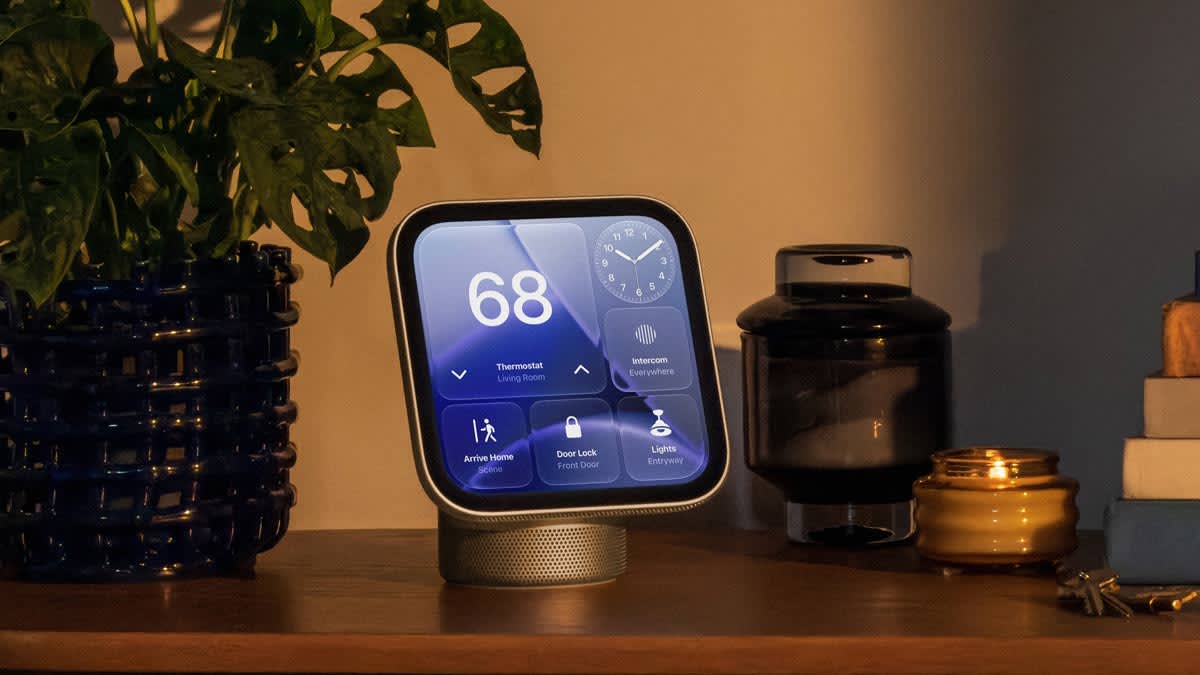
The Apple HomeView is small, with a square display that’s 7 inches and thick, black bezels that can make the screen seem cramped. I borrowed a press sample of the tabletop version, which has a small speaker base with an articulating arm that supports the touchscreen. (CR is also buying a HomeView at retail to verify our findings.) The whole design is reminiscent of the iMac G4 from the early 2000’s.
Straightforward but Slightly Buggy Setup
Setting up the HomeView was relatively easy, with just a few hiccups. The process requires an iPhone or iPad, which becomes a recurring theme. Either device will automatically see the display, prompting a setup card to pop up on your iPhone or iPad.
It will then have you assign the HomeView to a location and room in Apple Home, the company’s smart home system. The HomeView will connect to your home WiFi network and start syncing your Apple account and data
I then tried creating a photo “face”—similar to what’s offered on Apple Watches. The process stalled, and I ultimately had to back out and set it up later.
The HomeView then asks you to set up voice and face recognition, which it uses to silo off your personal content so that other users in your household can’t see your messages, calls, etc. The device supports up to six users, each with their own profile. (Switching profiles works, but not as quickly as Apple shows in its video ad.)
After a brief tour, the setup process was complete, but there were two lingering glitches. It asked me to authenticate my Apple account, but it kept failing to do so (which didn’t limit the device’s functionality at all). And even now, HomeView still displays a “Finish Setting Up Your HomeView” message in its Settings app that does nothing.
Being Shackled to an iPhone (or iPad)
On one hand, I love that the HomeView was connected to my iPhone so that I can easily access my phone calls, messages, and FaceTime calls. That’s something I simply can’t do with my Amazon or Google smart displays. But the connection goes too far. The device is almost completely dependent on the phone to function.
If you want to use features like phone calls, messages, FaceTime, calendars, Find My, and Reminders, two conditions must be met. First, your iPhone or iPad must be connected to the same WiFi network as the HomeView. Second, the device must recognize your face or voice. In my experience, the facial recognition worked fine but the voice recognition often failed to ID me on its own.
If those two conditions aren’t being met, the only features and apps that work are Apple Music, Apple Podcasts, smart home controls, intercom, weather, and the Safari web browser.
Any Android users in your household will be second-class citizens on the HomeView.
This is also frustrating if you have young children. My kids love video calling their grandparents on our Echo Show 15. Not all of our relatives have Echo Shows, but most of them have iPhones, so my kids are also quite familiar with FaceTime. I was looking forward to letting them use the HomeView to make FaceTime calls on their own.
But they can’t initiate a FaceTime call on the HomeView because they don’t have their own iPhones or iPads—and we don’t want them to. This means my wife or I have to start those calls for them, with one of our phones nearby. A babysitter can’t do it. If my wife is at work and I’m on a call in my home office? No luck.
Third-Party Apps Are Sorely Lacking
Because the HomeView is shackled to your iPhone, most apps don’t work without it. That includes all third-party apps.
The HomeView uses Apple CarPlay apps and can only handle the ones for audio and video. If you’ve ever used Apple CarPlay, you’ll know that it “projects” apps from your phone onto your car infotainment center, and that is exactly what the HomeView does.
I was able to access the Apple TV, Apple News, Bible by YouVersion, Nintendo Music, and SiriusXM apps. The first allows you to stream shows, while the rest allow you to stream music or other audio content. But as soon as you remove your iPhone from the equation, those apps stop working. It’s quite annoying given that my family likes to play SiriusXM radio in our house throughout the day. We’ll even leave it on for our dog on our Echo Show 15 when we go out, but we simply can’t do that with the HomeView. All of these third-party apps are also completely inaccessible to guests in your home.
Other CarPlay apps I frequently use, such as Google Maps, Storm Radar, and ChatGPT, are unavailable on HomeView because they fall outside the “audio and video” bucket that Apple has created.
This whole situation is even more irksome when you realize how powerful the HomeView hardware is. It has an Apple A18 processor, the same chip powering the iPhone 16. (The Pro version of that chip even powers the MacBook Neo!) The HomeView is clearly capable of running apps on its own, so it’s unclear why Apple has handcuffed it in this way.
HomeView vs. Other Smart Displays
Despite its limitations, the HomeView easily outclasses other smart displays in several ways.
First, its software is far more polished and responsive than what runs on Amazon and Google smart displays. It works so well that I often find myself reaching for its touchscreen instead of talking to Siri, while I usually do the opposite with my Amazon and Google displays.
The device works beautifully as a photo frame, never interrupting your photos with an ad, as Amazon displays do. It provides robust, speedy smart home controls, with both a beautiful, customizable smart home face called Home Modular and a simplified version of the Apple Home app built in. It has a real web browser so you can pull up YouTube and other streaming services. (I tried it with Disney+, and while it was a little buggy, it did work.) And it can use AI to clean up online recipes and guide you with step-by-step instruction cards, ingredient lists, and multiple timers.
There’s just one area where the device lags behind: Siri AI. The revamped assistant works decently, but it struggles with some requests—especially for random songs my kids love—that Alexa+ handles without a hitch. It also seems a lot slower than Alexa+ and Gemini for Home at answering questions.
HomeView brings one final advantage. It has Snoopy. While not a useful feature, the Snoopy face is utterly delightful. My kids couldn’t take their eyes off it and kept tapping the screen to see all the antics that Snoopy and Woodstock got into.
Should You Buy an Apple HomeView?
The device feels like a promising first-generation product. Its hardware is beautiful. Its software is responsive and intuitive. But despite its potential, in its current form it’s essentially a $300 iPhone accessory that plugs into a wall.
Whether you should buy one depends mainly on how invested you are in Apple’s ecosystem. If everyone in your family uses an iPhone or iPad, and you subscribe to Apple Music, Apple TV, and more, then the HomeView will be a very nice addition. But if you have some Android or Spotify users in your family, you might want to consider something else.
My hope is that Apple will decouple the HomeView from the iPhone and give it proper third-party apps with an App Store. It could be so much more useful with those for Netflix, Ring, Uber Eats, and others. The company followed the same playbook with the Apple Watch almost a decade ago, and the HomeView will need to do the same for families to embrace it.
Amazon is about to release a complete rethink of its smart displays in the new Echo Show 16, with premium hardware that looks a lot like an Apple product. It has third-party apps or integrations for all the services I mentioned, it works as a kitchen TV, it will help you cook, and it’s not reliant on your phone. But it can’t use FaceTime or iMessage—and it doesn’t have Snoopy. It’s too early to tell which company’s approach will create a better home hub, but one thing is certain: The smart display is interesting again.
