Close Menu
MyAppsPlus

    Subscribe to Updates

    Get the latest creative news from FooBar about art, design and business.

    What's Hot

    Razer is getting back into wired earbuds with USB-C; yes, they have RGB

    November 5, 2026

    Huawei has designed probably the best-looking Wi-Fi router ever, one that doesn’t look like an 8-legged spider and costs less than $100

    November 5, 2026

    Alienware AW725H headset gets a solid $50 Amazon discount

    November 5, 2026
    Facebook X (Twitter) Instagram
    Facebook X (Twitter) Instagram
    MyAppsPlusMyAppsPlus
    Thursday, November 5
    • Home
    • Breaking Tech
    • Apps & Software
    • AI & Automation
    • Android
    • iPhone & iOS
    • More
      • Reviews
      • How-To Guides
      • Deals & Discounts
      • Shop
    MyAppsPlus
    Home»iPhone & iOS»Apple Photos keeps getting better, here’s what’s new in iOS 27
    iPhone & iOS

    Apple Photos keeps getting better, here’s what’s new in iOS 27

    myappsplusBy myappsplusNovember 4, 2026004 Mins Read
    Share Facebook Twitter Pinterest Copy Link LinkedIn Tumblr Email Telegram WhatsApp
    Follow Us
    Google News Flipboard
    Apple Photos keeps getting better, here’s what’s new in iOS 27
    Share
    Facebook Twitter LinkedIn Pinterest Email Copy Link

    iOS 27’s biggest highlight is Siri AI, but the update also packs new features for apps like Messages, Notes, Wallet, and more. Here’s everything new for Apple’s Photos app in iOS 27.

    New editing tools: Extend and Reframe, plus improved Clean Up
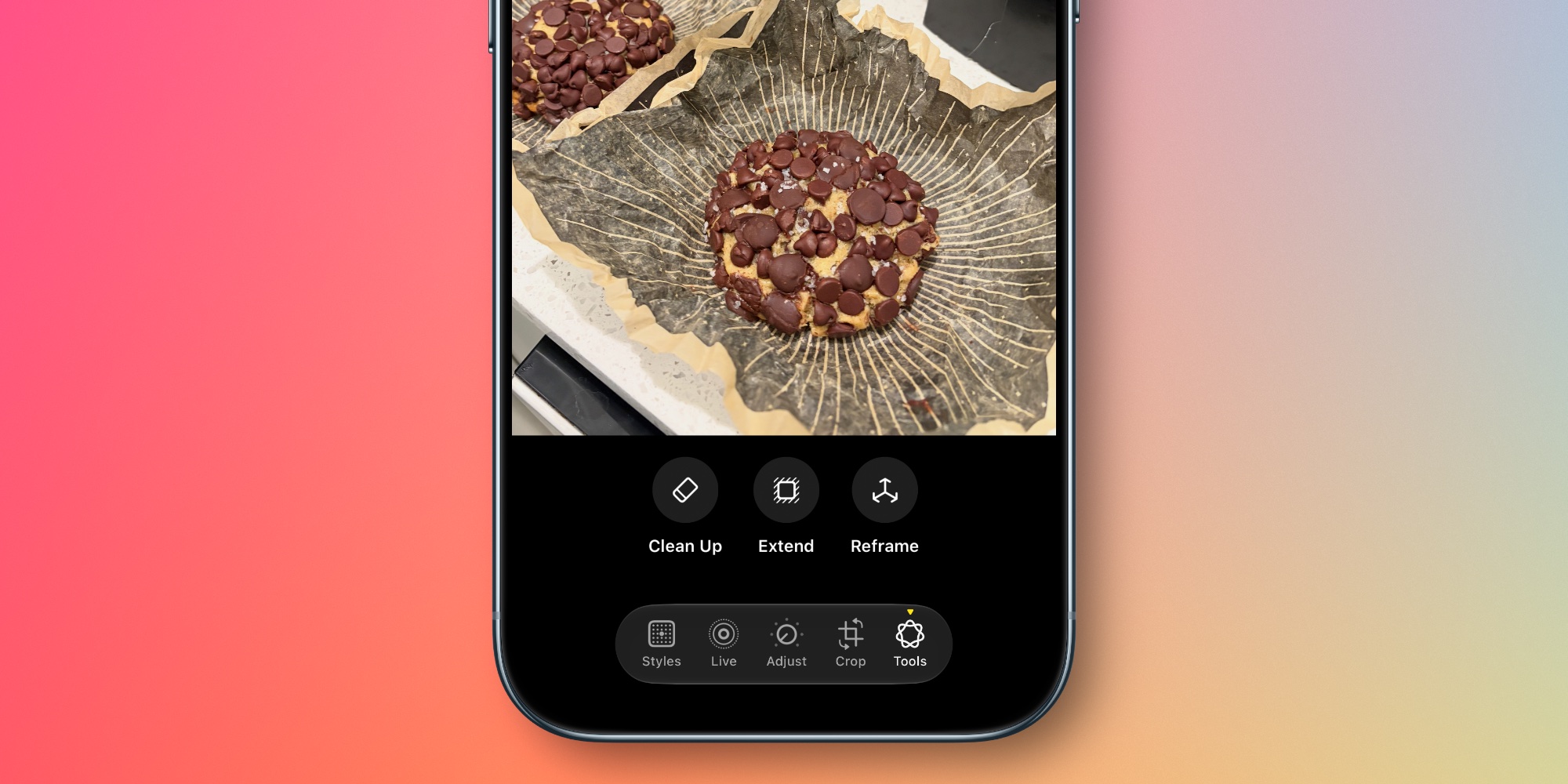

    Apple Intelligence powers a trio of editing tools in iOS 27’s Photos app: Extend, Reframe, and a much-improved Clean Up feature.

    Extend lets users “give their subjects more breathing room,” per Apple. For example, “they can straighten a crooked horizon without cropping out anything important, or adjust the aspect ratio, and Extend will fill in the missing pieces.”

    Reframe lets you adjust the framing of your image spatially. Here’s how Apple describes it:

    With Spatial Reframing, users can improve the composition of a photo after it’s been taken. Spatial Reframing builds on Apple’s deep understanding of spatial models thanks to Apple Vision Pro, so users can touch and drag a photo and preview in real time how the perspective shifts — as if they’d repositioned the camera in the original scene. Using powerful image models, Spatial Reframing will only generate new content where the perspective has been shifted, ensuring the reframed photo stays consistent with the original scene.

    And the Clean Up feature that debuted in iOS 18 “gets a major upgrade,” Apple says, “so users can remove distractions with better quality and more realistic infill, even when the scene is complex.”

    iCloud Shared Albums get their first major upgrades in years with iOS 27. The timing is likely no coincidence, with the feature perfect for Apple’s new HomeView product.

    Here’s an overview of what’s new, per Apple:

    • Full resolution photos and videos
    • Shared Albums with Windows and Android
    • React with any emoji
    • Easier to save photos
    • Expire your Shared Albums
    • Additional participant permissions

    New collections and organization tools


    iOS 27 adds two new collections to the Photos app, available under Utilities.

    Captured by Me exclusively contains photos taken by you. So it will filter out screenshots, photos you’ve saved from others, and so on.

    Identity Documents scans through your Photos library and surfaces images that contain important reference documents, like your driver’s license or passport.

    Apple says iOS 27 also adds “Album organization improvements,” but it doesn’t mention specifics.

    Another new organization tool in iOS 27 is that you can add keywords to photos. Captions are still available too, but if you scroll up on a photo, near the bottom you’ll find a new ‘Add Keywords’ option.

    Slideshow improvements


    Another upgrade perfect for HomeView involves slideshow improvements.

    Apple Photos has supported quick, easy slideshow creation for years. But if you wanted to customize the automatically generated slideshows, you were out of luck.

    Now in iOS 27, slideshows offer new tools for customization. You can change the transition type, set a custom length for the full slideshow and for each photo, and more.

    Another welcome addition is that Apple now lets you save any slideshow as a video with one tap.

    Apple Photos in iOS 27: wrap-up

    iOS 27 doesn’t contain any big changes to the design of the Photos app, so if you were hoping to go back to the pre-iOS 18 era, you’ll be disappointed. But the update does offer a variety of exciting new features that make iOS 27 a big release for Apple Photos.

    Which of iOS 27’s new Apple Photos features are your favorites? Let us know in the comments.

    Best iPhone accessories

    You’re reading 9to5Mac — experts who break news about Apple and its surrounding ecosystem, day after day. Be sure to check out our homepage for all the latest news, and follow 9to5Mac on Twitter, Facebook, and LinkedIn to stay in the loop. Don’t know where to start? Check out our exclusive stories, reviews, how-tos, and <a href="https://www.youtube.com/9to5mac” rel=”nofollow noopener” target=”_blank”>subscribe to our YouTube channel

    Apple getting keeps News Photos
    Follow on Google News Follow on Flipboard
    Share. Facebook Twitter Pinterest LinkedIn Tumblr Email Copy Link
    myappsplus
    • Website

    Related Posts

    Razer is getting back into wired earbuds with USB-C; yes, they have RGB

    November 5, 2026

    Anthropic rolls out Claude Personal Finance with spending analysis and bill tracking

    November 5, 2026

    iOS 27.3 changes the iPhone Duo keyboard, here’s how

    November 5, 2026
    Add A Comment
    Leave A Reply Cancel Reply

    Top Posts

    Cathay Pacific tests Google AI that dramatically cuts airplane contrails — tiny altitude shifts slash environmental impact by 40% in early trials

    September 8, 2026138 Views

    Apple is making Creator Studio an even better deal with new AI features and creative tools

    October 28, 202619 Views

    Keep running out of mobile data? This new unlimited plan gets you up to 80Mbps 5G speeds for just AU$50/m

    October 8, 202618 Views
    Latest Reviews

    Plug-in solar shone at IFA 2026 —here are the 5 best products we saw, from Anker to DJI and EcoFlow

    myappsplusSeptember 5, 2026

    I rode in a self-driving powered wheelchair that avoids obstacles and people, and can be summoned when you need it — it’s like Tesla’s Autopilot for personal mobility

    myappsplusSeptember 5, 2026

    What is the release date for The Paper season 2 on Peacock?

    myappsplusSeptember 5, 2026
    Stay In Touch
    • Facebook
    • YouTube
    • TikTok
    • WhatsApp
    • Twitter
    • Instagram

    Subscribe to Updates

    Get the latest tech news from FooBar about tech, design and biz.

    Most Popular

    Plug-in solar shone at IFA 2026 —here are the 5 best products we saw, from Anker to DJI and EcoFlow

    September 5, 20260 Views

    What is the release date for The Paper season 2 on Peacock?

    September 5, 20260 Views

    I just tried Ecovacs’ robot vacuum of the future — and as a pet owner, I’m beyond floored

    September 5, 20260 Views
    Our Picks

    Razer is getting back into wired earbuds with USB-C; yes, they have RGB

    November 5, 2026

    Huawei has designed probably the best-looking Wi-Fi router ever, one that doesn’t look like an 8-legged spider and costs less than $100

    November 5, 2026

    Alienware AW725H headset gets a solid $50 Amazon discount

    November 5, 2026

    Subscribe to Updates

    Subscribe to our newsletter and get the latest tech news, app updates, AI trends, smartphone reviews, and exclusive deals delivered straight to your inbox.

    Facebook X (Twitter) Instagram Pinterest
    • About Us
    • Get In Touch
    • Disclaimer
    • Privacy Policy
    • Terms & Conditions
    © 2026 MyAppsPlus. All Rights Reserved.

    Type above and press Enter to search. Press Esc to cancel.