Close Menu
MyAppsPlus

    Subscribe to Updates

    Get the latest creative news from FooBar about art, design and business.

    What's Hot

    Android Developer Salary: Your 2027 Guide

    November 22, 2026

    How to Install Claude Code on Android With Termux

    November 22, 2026

    Anthropic had the largest IPO ever. What does that mean for their future

    November 22, 2026
    Facebook X (Twitter) Instagram
    Facebook X (Twitter) Instagram
    MyAppsPlusMyAppsPlus
    Sunday, November 22
    • Home
    • Breaking Tech
    • Apps & Software
    • AI & Automation
    • Android
    • iPhone & iOS
    • More
      • Reviews
      • How-To Guides
      • Deals & Discounts
      • Shop
    MyAppsPlus
    Home»Breaking Tech»Want more control over your YouTube homepage? Try using custom feeds
    Breaking Tech

    Want more control over your YouTube homepage? Try using custom feeds

    myappsplusBy myappsplusNovember 22, 2026004 Mins Read
    Share Facebook Twitter Pinterest Copy Link LinkedIn Tumblr Email Telegram WhatsApp
    Follow Us
    Google News Flipboard
    Want more control over your YouTube homepage? Try using custom feeds
    Share
    Facebook Twitter LinkedIn Pinterest Email Copy Link

    This tool allows you to search for exactly the type of content you want to see.

    YouTube is a core hub of entertainment for millions of people. More than 20 million videos hit the platform every day, according to data from YouTube. That’s a lot of content to sort through when you’re trying to find something to watch. If you’re a regular watcher of YouTube, your homepage is probably already leaning into your interests, be they comedy specials, home improvement tutorials or music videos from the ’90s. But if you’re looking to exert some more control and specificity over what the algorithm suggests to you, YouTube has a way to do it by offloading your playlist curation to AI.

    As of October 2026, the platform introduced custom feeds. In short, custom feeds let you use natural language to set up feeds around the kind of content you want to see more of and keep it in a spot that’s easy to access. Here’s how to set up those feeds if you want to fine-tune your homepage.

    How to build custom feeds
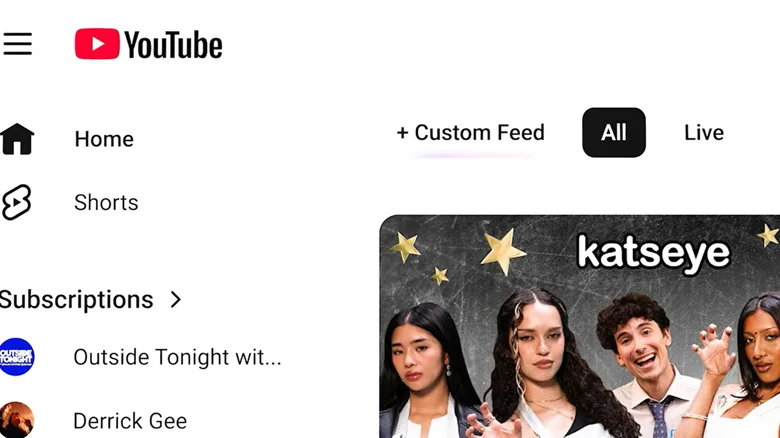
    Screenshot of YouTube page with plus sign and Custom feed displayed.

    If you want to tailor what you’re seeing on YouTube more to your tastes, you can start by building a custom feed using prompts. At the top of your homepage, tap the + sign (you may also see the words “Custom feed”). From there, you can type into the box whatever you are interested in seeing. For example, YouTube gives examples like “I want retro tech nostalgia: 80s commercials, vintage PCs, CRT glow.” Another example shows that you don’t even have to get that specific. You could ask for a feed along the lines of, “I want to explore something completely different beyond my usual feed.”

    Once you create a feed, you’ll find it at the top of the screen so you can access it when you want. YouTube noted that you can always use the prompt box at the top of a feed if you want to tweak what you’re seeing.

    If you like the idea of custom feeds, you can save up to three without a YouTube Premium account. If you do happen to have a YouTube Premium account, you can save up to eight. Regardless of your subscription, as long as you are signed into your account, the custom feeds you created will sync across mobile and desktop. It’s also important to remember that custom feeds will expire if you don’t use them for 30 days. If this happens, though, you can always create a new prompt. YouTube also pointed out that the feeds are subject to the platform’s community guidelines.

    So far, custom feeds are only available in English in the United States. You also need to have search history enabled to use the feature.

    Other updates to the homepage

    The rollout of custom feeds wasn’t the only change YouTube brought to the homepage. Specifically on the mobile app, you might have noticed a row of feeds across the top of the page with categories like Live or Music. Some of these feeds might depend on your subscription. For example, you won’t see the Movies & TV feed if you don’t have any Primetime Channel subscriptions. Additionally, YouTube mentioned that the Subs feed, as in your subscriptions, moved to the top bar. If you want to exit your feeds, you can always tap on the Home tab on the left and go back to what you’d normally see on your homepage.

    In its blogpost, YouTube said these changes are part of a series of updates to shape “a more seamless Home experience.” So, if you’re looking to create some feeds based on more specific interests that you can easily get to from the homepage, YouTube’s custom feeds feature might be worth a prompt.

    control More over Social Media want
    Follow on Google News Follow on Flipboard
    Share. Facebook Twitter Pinterest LinkedIn Tumblr Email Copy Link
    myappsplus
    • Website

    Related Posts

    Here’s when a Raspberry Pi 5 could be considered overkill

    November 22, 2026

    What the little clock icon at the top of your Samsung phone means

    November 22, 2026

    Why data centers are at the center of the Big Tech backlash

    November 22, 2026
    Add A Comment
    Leave A Reply Cancel Reply

    Top Posts

    The pros and cons of using your phone as a mobile hotspot

    November 16, 202647 Views

    UiPath Launches AI Coding Agent, Integrates Claude Code and Codex to Target Development Automation

    November 16, 202646 Views

    Save on your groceries, gas, and holiday shopping with this $15 BJ’s membership (Reg. $60) 

    November 4, 202633 Views
    Latest Reviews

    Grant-funded physics research uses AI to explore deep within the Earth

    myappsplusSeptember 11, 2026

    Anthropic caught scientists using Claude to further biological weapon research

    myappsplusSeptember 11, 2026

    September 10, 2026 – AirPods 5, iPhone price increases

    myappsplusSeptember 11, 2026
    Stay In Touch
    • Facebook
    • YouTube
    • TikTok
    • WhatsApp
    • Twitter
    • Instagram

    Subscribe to Updates

    Get the latest tech news from FooBar about tech, design and biz.

    Most Popular

    Anthropic blocks ‘malicious use’ of AI that could develop biological weapons

    September 11, 20260 Views

    Tired of watching the same old action movies? I’ve got 3 picks on Prime Video you probably haven’t seen

    September 11, 20260 Views

    Reduce inference cold starts on Amazon SageMaker HyperPod with model caching

    September 11, 20260 Views
    Our Picks

    Android Developer Salary: Your 2027 Guide

    November 22, 2026

    How to Install Claude Code on Android With Termux

    November 22, 2026

    Anthropic had the largest IPO ever. What does that mean for their future

    November 22, 2026

    Subscribe to Updates

    Subscribe to our newsletter and get the latest tech news, app updates, AI trends, smartphone reviews, and exclusive deals delivered straight to your inbox.

    Facebook X (Twitter) Instagram Pinterest
    • About Us
    • Get In Touch
    • Disclaimer
    • Privacy Policy
    • Terms & Conditions
    © 2026 MyAppsPlus. All Rights Reserved.

    Type above and press Enter to search. Press Esc to cancel.