

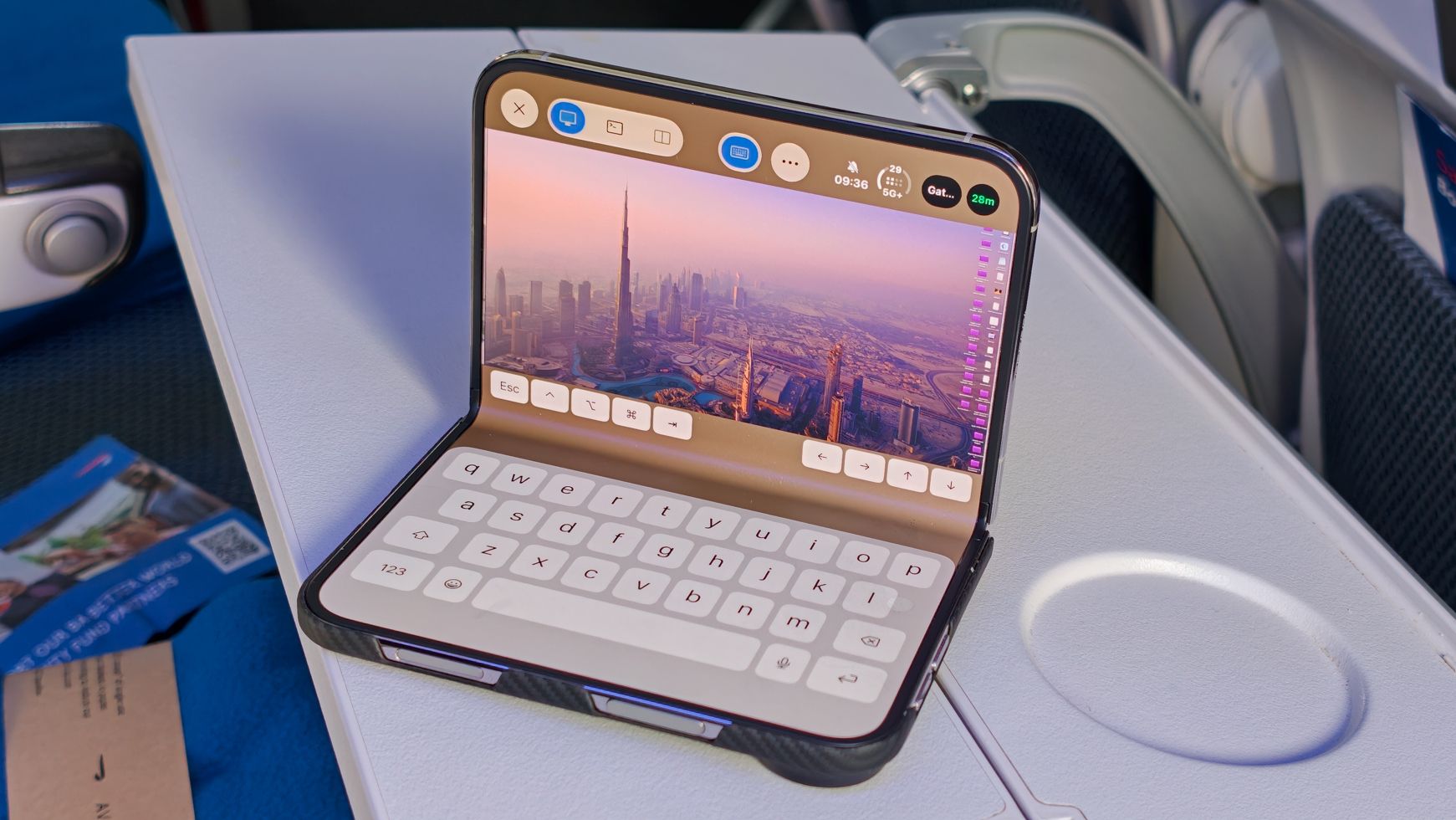
Last week, I was sitting on a plane, thousands of feet above the ground, making changes to a project running on my MacBook Pro at home. I wasn’t carrying my MacBook, and I wasn’t even using an iPad. Instead, I did everything from the iPhone Duo, and it made me realize how much Apple’s first foldable has transformed my workflow.
I’ve spent much of this year figuring out how to make remote development work for me. I wanted to leave my MacBook Pro running at home, access it from anywhere, and continue working on projects without carrying another computer. The solution was Astropad Workbench, a remote desktop app that lets me interact with my Mac wherever I am.
The only problem? It’s iOS-only, so I’ve been using it on the iPhone 18 Pro instead of on one of the best Android foldables. Whenever I’ve needed more screen real estate, my iPad Pro has been the natural companion, offering a more comfortable on-the-go desktop experience. That is, until the iPhone Duo arrived.
Apple’s first foldable finally brings together the two things I’ve wanted: an iPhone’s portability and the larger iOS screen I’ve relied on my iPad for. The result is the best balance of portability and screen size I’ve found for coding on the go. The Duo hasn’t fundamentally changed the type of work I’m doing, but it’s made the experience of working so much more convenient that I reach for my iPad far less often.
And thanks to a remarkable new feature in Astropad Workbench, it’s arguably become an even better way to interact with my development environment.
My Mac does the work, but the iPhone Duo puts it in my pocket
An important note: I’m not writing code directly on the iPhone Duo. Instead, I use Cursor, an AI-powered code editor, to make changes to my projects through its built-in chat interface. It’s a fundamental change I made to my workflow earlier this year, and one that’s crucial to maintaining and building three large platforms and four mobile apps simultaneously.
My MacBook Pro stays at home, running Cursor, the local development servers, and everything else my projects need. With Workbench, I can access that desktop remotely, ask Cursor to make changes, scroll through its summaries with two fingers, review the results, and check the running build in Cursor’s built-in browser.
On a Mac or iPad, Workbench feels like a fairly traditional desktop development experience. Its unified display mode resizes your Mac’s desktop to fit your remote device’s resolution and form factor, aiming to offer a more natural, single-app experience. However, switching between apps isn’t particularly straightforward, and navigating the interface can sometimes feel a little jittery.
On the Duo, I generally keep unified display mode disabled, which lets me pinch and zoom into different areas of the remote desktop. It’s a surprisingly effective way to navigate a full macOS interface on a smaller screen, particularly when I want to focus on Cursor’s chat or inspect a specific part of a project.
I can also open Chrome to check a locally running website, although I generally find it easier to do everything within Cursor when using the Duo. The workflow is essentially identical to what I was already doing on my iPad; the difference is that I now have access to it on a device that folds into my pocket.
That sounds like a small distinction, but in practice, it’s enormous.
The big unlock is being able to leave my Mac at home and check progress on any build, including previewing it, without needing to configure every device with my login credentials, SSH keys, or local codebase. Instead of waiting until I’m settled on a plane or pulling out my iPad Pro and Magic Keyboard, I simply unfold my iPhone Duo and keep coding.
The only problem? It’s so convenient that it’s taken up even more of my life.
Workbench’s new terminal is an absolute game-changer
If you’ve ever tried to use a conventional desktop terminal through a remote desktop app or on a touchscreen, you’ll know how frustrating it can be. Tiny text, awkward cursor placement, keyboard shortcuts, and interfaces designed for a mouse and keyboard can make even simple tasks unnecessarily difficult. Add in a Delete key that doesn’t always work — a common problem I’ve encountered across several apps — and text that fails to render properly due to input lag, and even the simplest tasks can quickly become incredibly frustrating.
That’s why a new feature recently introduced in Workbench’s Duo-optimized app has quickly become one of my favorite parts of this setup.
Workbench now offers a native terminal interface that lets me interact with the terminal on my Mac remotely, without navigating a traditional macOS Terminal window through the screen viewer. Better still, I can display the terminal alongside the remote desktop in a split-screen layout. It’s brilliant.
I can interact with the terminal using an interface optimized for foldables, but with a familiar Terminal design, and then glance across at Cursor or the running build without constantly switching views or changing apps on the remote Mac.
It’s a much more natural experience than trying to control a desktop terminal on a folding phone, and it addresses one of the biggest frustrations I’ve encountered with remote development.
What makes this particularly interesting is how Workbench has embraced the iPhone Duo itself. The team developed a series of experiences optimized for Apple’s new form factor, even without a retail sample of the phone to work with.
This is precisely the potential I highlighted in my iPhone Duo review on TechRadar’s sister site, Android Central. The hardware is compelling, but Apple’s developer ecosystem is the hidden superstar. Give talented developers a new canvas, and they’ll find ways to create experiences that simply weren’t possible before.
Astropad Workbench is already one of the best examples I’ve encountered. At $79.99 per year, it might be the best money I’ve ever spent on a software subscription.
The biggest change isn’t necessarily what I can do, but how often I can do it.
I originally set up Workbench earlier this year because I wanted to keep my development environment running at home while traveling, particularly when flying. Airplane Wi-Fi can be unpredictable, and trying to run development processes directly on a machine with an unreliable connection usually ends badly, especially when you’re dealing with code changes or migrations.
With my Mac running everything at home, I can use the connection to interact with my development environment instead of relying on it to keep the underlying processes running. Even if the connection drops, the Mac keeps working. Instead of needing a stable connection for minutes or hours, I only need to stay connected long enough to issue instructions or check progress. The actual work continues on my Mac, whether I’m connected or not.
Over the past week, I’ve used the Duo to move coding sprints forward, review changes, work through migrations, and have some fairly intense planning discussions with Cursor, including during that flight. I can make meaningful progress without having my actual development machine in front of me.
But the real revelation has been the moments when I’m not traveling.
I’ve used the Duo to check on projects while waiting for an Uber, make progress while standing outside, and interact with my Mac during the few minutes before walking into a shop. These aren’t situations where I’d ordinarily pull out an iPad, let alone a MacBook.
That’s what makes the Duo so much more useful than my iPad for this particular workflow. The iPad offers a larger screen and a more desktop-like experience, but I have to consciously decide to carry it. The Duo is already in my pocket.
Its folding design gives me useful screen real estate when I need it, and the versatile hinge makes it easy to prop up at different angles. The nano-texture folding display is also a pleasure to use, especially when reading through longer summaries or spending extended periods interacting with the remote desktop.
None of these things fundamentally changes how Cursor works or what my Mac can do. They simply remove the friction between having a few spare minutes and actually getting something done.
And that has completely changed how I approach my projects.
The best coding device might be the one that isn’t doing the coding
There are compromises, of course. The iPhone Duo doesn’t offer the same expansive workspace as an iPad or MacBook, and Apple’s multitasking features still aren’t as flexible as those on Android foldables like the Samsung Galaxy Z Fold 8. Sometimes, too, a larger screen and a proper keyboard are simply better tools for the job.
But I’m not trying to replace my MacBook Pro. I’m trying to make the most of the powerful machine I already own, without needing to sit in front of it every time I want to accomplish something.
My iPad made coding remotely possible. The iPhone Duo has made it effortless.
That’s why the combination of the iPhone Duo, Cursor, and Workbench has been so transformative. The Mac provides the processing power and persistent development environment, Cursor handles the code changes, and Workbench gives me a practical way to control everything from a device I always carry.
It’s also a compelling demonstration of why software optimization matters so much on foldables. The Duo’s hardware makes this workflow convenient, but Workbench’s thoughtful approach to the form factor, particularly its new native terminal, is what makes the experience genuinely powerful.
I’ve spent years using foldable phones, and I’ve always believed their potential extends far beyond simply offering a bigger screen. This is one of the clearest examples I’ve encountered of that potential becoming something genuinely useful in my everyday life.
My Mac hasn’t moved from my desk, and my coding workflow hasn’t fundamentally changed. But the iPhone Duo has made that workflow available in moments when I would’ve done nothing at all.
