

Affiliate links on Android Authority may earn us a commission. Learn more.
Vela Maps is the closest thing to Google Maps without Google — here’s how to install it
This open-han just a copy.
•
•
•
Andy Walker / Android Authority
Add Android Authority on Google:
Preferred SourceGoogle Discover
I’d argue that there are at least two apps on Android for every available niche; you just need to find them. This is true for most products, but the one that I’ve found most difficult to replace is Google Maps.
My favorite Google app by far, Maps is useful for commuters, explorers, tourists, and restaurateurs. It includes info beyond mere navigation and community input that adds further richness to the experience. It’s a hugely capable and unique app that provides an almost unrivaled experience. “Almost” is the key word here.
Would you consider replacing Google Maps with an open-
Recently, I discovered a new challenger to Google Maps that leverages its data while using OpenStreetMap as its base. It’s called Vela Maps, and it might just offer enough to be my permanent Google Maps replacement.
Vela Maps is Google Maps for those who can’t use it or don’t trust it
Andy Walker / Android Authority
Vela Maps solves a few problems presented by Google Maps, especially for those running de-Googled Android ROMs. Google Maps requires Google Mobile Services to run effectively, a component that ROMs intentionally disregard. This makes running the app on the likes of GrapheneOS practically impossible.
Vela Maps can run on de-Googled ROMs like GrapheneOS while delivering a Google Maps-like experience.
Its developer built the app with this in mind. The UI is deliberately crafted to mimic the functionality and layout of Google Maps for those who can’t install it on their devices. This, as they say, helps improve workflow and minimize distraction when navigating. Vela gives these users a Google Maps experience without any Google prerequisites.
In theory, this makes Vela a hugely beneficial app for the de-Google community and those who value privacy safeguards. In practice, it largely lives up to that promise.
How to install Vela Maps on Android
Given its intention to function without any Google tie-ins if need be, Vela Maps isn’t available on the Google Play Store. Like other third-party apps we’ve covered on Android Authority, this makes installing it and keeping it updated a little trickier than those found on Google’s store.
I’d suggest using third-party app updater Obtainium to install and update the app. It grabs APKs directly from the GitHub repository, and initiates periodic update checks, too. It’s the best way to ensure you always have the latest version of Vela Maps.
Obtainium is the best way to install Vela Maps and keep it updated.
- Visit Obtainium’s GitHub repository in your browser, then find and tap Releases.
- Tap the APK file under the Assets section to download the latest file. The latest version will be at the top of the list.
- Once the download is complete, open the file and tap Install to install it.
- Open Obtainium, then tap the + Add button.
- Under Search, input “vela maps” and check GitHub on the Select Source page.
- Select the entry titled PimpinPumpkin/Vela on the Pick page. Tap Pick.
- Tap the + button in App Source URL at the top of the page to add the app to Obtainium.
- Follow the installation prompts.
If you just want to try Vela Maps, follow steps 1-3 above but visit Vela Maps’ GitHub repository in your browser instead.
How does Vela Maps work?
Importantly, Vela Maps isn’t simply a de-Googled version of Google Maps. For all intents and purposes, it is its own invention, using OpenStreetMap as its base and overlaying any user-requested Google Maps data on top of it. The developer describes it as an “open-an just that
Opening Vela Maps, you’ll wonder how this isn’t just a Google Maps copy, but as I already mentioned, the UI similarities are deliberate.
When I use other mapping apps, like OsmAnd, Organic Maps, or Waze, I miss Google Maps’ familiar feel. It’s this muscle memory that Vela Maps tries to take advantage of, and it does a pretty good job. Granted, it can’t or doesn’t copy Maps’ UI element-for-element, but the changes it does make are sensible.
The Search bar includes a direct portal to Lists of favorite or frequented places. These can be imported from Google Maps tooe top of the screen is a huge improvement. The home screen also houses a P button that allows you to immediately save a parking spot for future reference by tapping on it. It’s quick and effective
Opening Vela Maps, you’ll wonder how this isn’t just a Google Maps copy, but the UI similarities are deliberate.
Vela Maps loses out on the bottom flyout menu that houses Local vibe data gleaned from user photos and reviews. This is perhaps the biggest miss for me, especially when I’m in a new town or suburb and working on evening restaurant plans or morning adventures.
It makes up for this somewhat by including search chips for specific points of interest, like Restaurants, Coffee, Gas, and Groceries. Tapping any of these produces the results that fit that description within the map area, and is arguably a little slicker than that of Google Maps. For one, there are no sponsored listings, and, second, photos and reviews only load once I give the go-ahead. This keeps the dialog cleaner and more focused on places you might actually want to visit.
The app also supports Google Street View peeks, but it’s not as fluid as the genuine Google Maps experience. Still, it’s a useful addition for those who cannot access Google’s app on their devices and might want to spy street-level layouts.
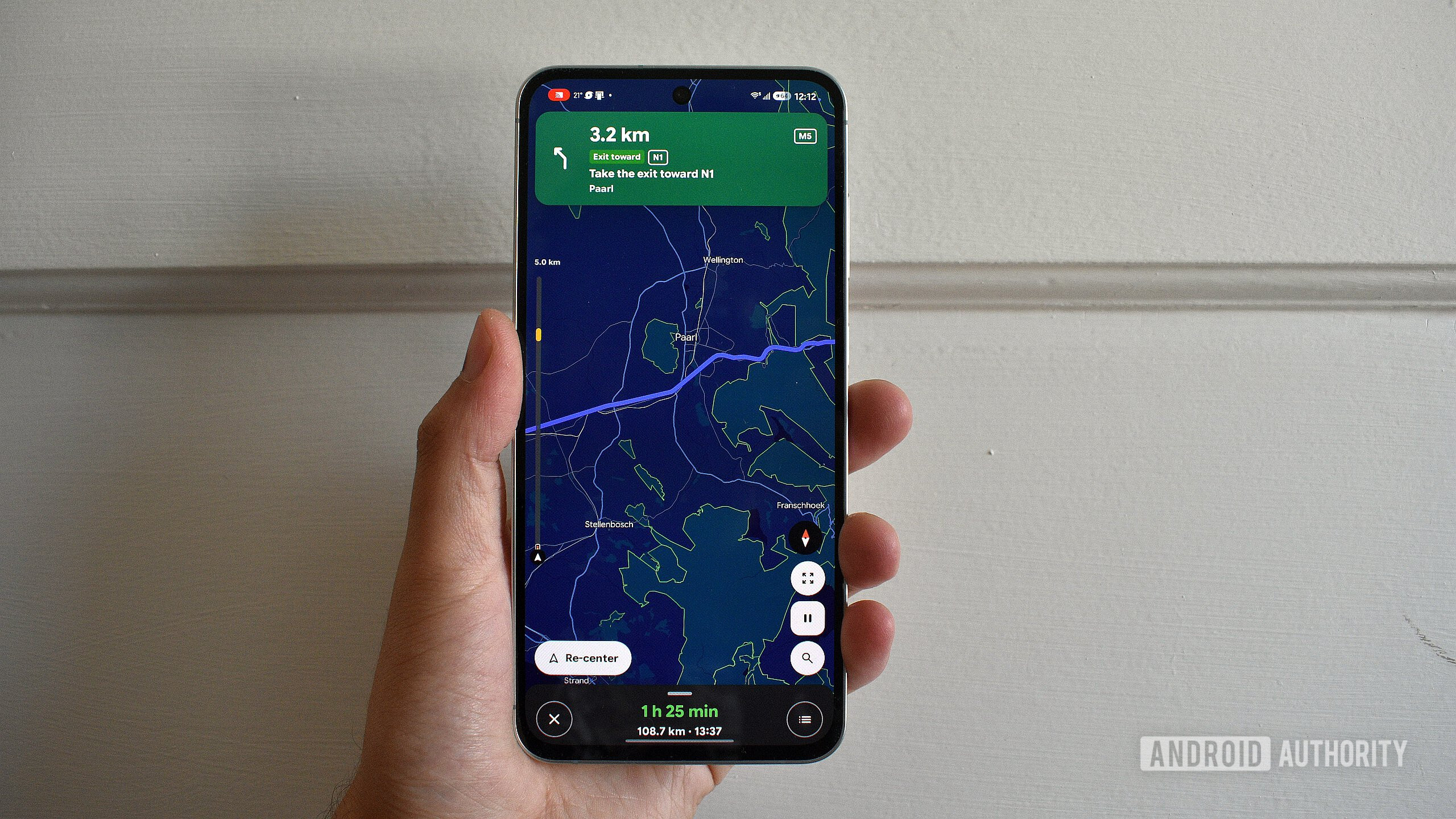
When it comes to navigation, I’d argue that Vela Maps also has Google Maps beat in some key areas. Vela does take a while to load routes, but it includes a useful vertical Road ahead bar that previews traffic and other key info along the route ahead. It’s useful for gaining a sense of where congestion is along a route that isn’t immediately within the navigation map view. It’s an addition that Google Maps could certainly benefit from.
Vela includes a useful vertical Road ahead bar that previews traffic and other key info along the route ahead.
Then there’s the speedometer, which shows the current speed and speed limit in a more legible red-on-white dialog than Google Maps. In fact, almost all elements in Vela are more legible thanks in part to its bold font (which users can edit) and its use of flat, contrasting elements. I’d argue that it’s a better implementer of Material 3 Expressive than Google Maps itself.
Beyond navigation, Vela Maps’s Settings page is an absolute joy to use. It packs a search bar to aid pulling up exact toggles without trawling through various pages, but even the latter isn’t exactly a chore. What’s immediately apparent too for Google Maps users is that Vela gives you far more control over various aspects of the experience.
Thanks to its integration with OpenStreetMap, you can download a full map of a given country and use it for offline navigation. Vela also offers the traditional Google Maps frame download, but this is a welcome addition for those traveling in spotty coverage zones. There are options to show house numbers, customization options for map appearance, colors, and buttons, options for icon sizes, performance tweaks, voice search options, and so much more.
Vela Maps also highlights what it requests from Google, and users have complete control over this particular facet. You can run Vela without ever reaching out to Google if need be, but if you do, the app keeps a running tab on the requests made, what those requests were, and restrict what Vela can load from Google.
Where Vela Maps falls a little short
Despite its overall polish, Vela Maps is by no means the finished article. The project, which is partially coded by AI, remains in beta for now. This means that not every feature works flawlessly, nor does it include every feature that Google Maps offers.
One of the glaring omissions at present is Android Auto support. Although there are workarounds, some of which I’ve tried, I simply couldn’t get Vela running on my car’s head unit. To use it while driving, you’ll need a phone holder.
Vela Maps doesn’t reliably support Android Auto just yet.
Vela also lacks the community aspect of Google Maps. You can’t upload any photos or reviewsditions or obstructions. This is likely because Google Maps pulls hazard and incident data directly from Waze, but this is a particularly problematic omission for long-distance drivers who need guidance on prevailing road conditions
Since it uses OpenStreetMap as its base, I also would’ve expected Vela to take advantage of its unique information gathered by its community. For one, I’d love an overlay that details road surfaces. I previously wrote about my gravel-driving experience with OsmAnd, and this is one feature that would make me drop Google Maps in an instant.
But, as I mentioned, Vela Maps is a work in progress, although a rather impressive one at that.
Should you drop Google Maps for Vela Maps?
As much as I love the concept of Vela Maps, the project isn’t quite ready to replace Google Maps on my phone, or, more importantly, in my car. I rely on Google Maps to find new, interesting places and restaurants that I haven’t visited yet, and to reliably get me there. These are the two processes where Vela leaves me feeling short-changed.
That said, there could be multiple reasons why you might want to adopt Vela Maps as your main navigation tool.
If you’re running GrapheneOS or another Google-free ROM, it’s the best one-to-one Google Maps alternative I’ve ever used. It offers a similar look and feel without relying on Google services. It’s more private and cognizant of your personal data than Google’s app, and offers some features and improvements that Maps simply doesn’t have. For the most part, it’s swifter and lighter than Google Maps without sacrificing too much core functionality.
Vela Maps isn’t quite ready to replace Google Maps on my phone, or, more importantly, in my car.
However, if you are running Googled Android, you may want to think twice before replacing Google Maps with Vela. Importantly, the project hasn’t yet offered a stable version, and that means regular bugs scuttling out of the woodwork are to be expected. It’s a work in progress whereas Google Maps is largely the finished article. You’ll also get a far more rounded experience running the Google-made product on a Google-developed OS.
Until Vela Maps releases a stable version and is more widely available on Android Auto, I’ll continue to lean on Google’s product for in-car navigation. But Vela Maps is certainly on the right track to becoming a viable alternative to Google Maps and perhaps, eventually, a better overall product.
Features
Android appsAndroid AutoGoogle Maps
