Close Menu
MyAppsPlus

    Subscribe to Updates

    Get the latest creative news from FooBar about art, design and business.

    What's Hot

    Nintendo Switch 2 update 23.5.0: software exploit reportedly blocked

    November 13, 2026

    Essentials for Advanced Android Users Offers 30+ Features Not Found in the Settings App, Free of Charge

    November 13, 2026

    How to Save Video Frame as Still Photo on iPhone & iPad

    November 13, 2026
    Facebook X (Twitter) Instagram
    Facebook X (Twitter) Instagram
    MyAppsPlusMyAppsPlus
    Friday, November 13
    • Home
    • Breaking Tech
    • Apps & Software
    • AI & Automation
    • Android
    • iPhone & iOS
    • More
      • Reviews
      • How-To Guides
      • Deals & Discounts
      • Shop
    MyAppsPlus
    Home»Android»Essentials for Advanced Android Users Offers 30+ Features Not Found in the Settings App, Free of Charge
    Android

    Essentials for Advanced Android Users Offers 30+ Features Not Found in the Settings App, Free of Charge

    myappsplusBy myappsplusNovember 13, 2026013 Mins Read
    Share Facebook Twitter Pinterest Copy Link LinkedIn Tumblr Email Telegram WhatsApp
    Follow Us
    Google News Flipboard
    Essentials for Advanced Android Users Offers 30+ Features Not Found in the Settings App, Free of Charge
    Share
    Facebook Twitter LinkedIn Pinterest Email Copy Link

    Add preferredhas been released. Developed by Sameera Wijerathna, it packs more than 30 customization features, including button remapping, app freezing, edge lighting, and App Lock. It is not distributed through the Google Play Store; instead, users sideload the APK from the official GitHub repository. It supports Android 8.0 and later, and some advanced features require root access or the installation of Shizuku

    Key Elements
    Essentials for Advanced Android Users Offers 30+ Features Not Found in the Settings App, Free of Charge

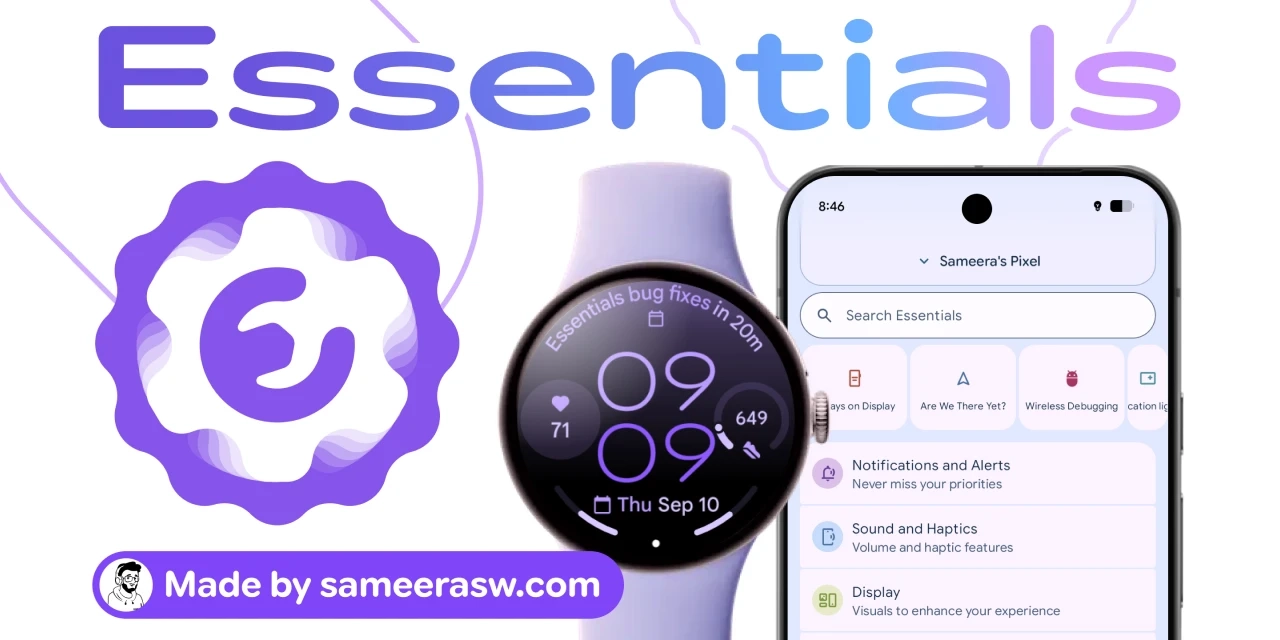
    For advanced users who find the standard Android “Settings” app and “Developer Options” insufficient, a third-party utility called Essentials has been released that adds more than 30 customization features. The free app, developed by Sameera Wijerathna, is not distributed through the Google Play Store; users install it by sideloading an APK file obtained from the official repository on GitHub.

    The features Essentials offers are wide-ranging. They include button remapping, app freezing, a battery-saving mode for Google Maps, sound and haptic feedback, wallpapers, widgets, status bar icon customization, edge lighting that makes the screen edges glow when a notification arrives, flashlight blinking, notification management, and an always-on display. It also includes “App Lock,” which requires a fingerprint, face authentication, or password when opening a specific app, and can be enabled from the Security and Privacy section.

    Item Details
    App name Essentials
    Developer Sameera Wijerathna
    Price Free
    How to obtain Sideload the APK from the official GitHub repository
    Supported versions Android 8.0 and later
    Number of features 30+
    Requirements for advanced features Rooting or installing Shizuku

    Note: The distribution store is not Google Play, and users must be mindful of Google’s changes to sideloading procedures.

    The barrier to installation is not low. First, sideloading outside the Google Play Store is required, and users must understand the latest sideloading procedures that Google has changed. In addition, some features, such as changing lock screen shortcuts, require enabling accessibility services; users must go from “Settings” to “Apps” to “See all apps” to “Essentials” and turn on “Allow restricted settings” from the menu, or Android’s permission system will limit the features.

    Another characteristic is that each time a feature is enabled, the user is asked to grant a new permission. However, the more permissions granted, the more features become available. Some permissions can only be granted with root access or with Shizuku, an open-source tool that grants system-level API and ADB (Android Debug Bridge) permissions to third-party apps without fully rooting the device. Shizuku is available from the Google Play Store, but starting the service requires enabling wireless debugging, meaning installation involves a detailed, lengthy procedure.

    Operating Essentials itself is simple: just open the app, find the desired feature, and turn it on. Under the Notifications and Alerts section, users can configure notification lighting, flashlight blinking, notification snoozing, and system notification snoozing. Notification lighting lets users select target apps individually, making it harder to miss messages from specific apps even when the phone is in silent mode.

    For users who want finer control over their Android devices, many of Essentials’ features are hard to find in other tools. On the other hand, the initial setup—sideloading, permission configuration, and preparing Shizuku—requires considerable effort and understanding. It can be described as an option for advanced users who can tolerate the security risks.

    This article is based on an article from overseas Ziff Davis, edited for a Japanese audience by 4X.

    Advanced Android Essentials offers users
    Follow on Google News Follow on Flipboard
    Share. Facebook Twitter Pinterest LinkedIn Tumblr Email Copy Link
    myappsplus
    • Website

    Related Posts

    Outlook, Teams, and other Microsoft 365 services are still down as exec expresses ‘regret’

    November 13, 2026

    The first batch of Android XR smartglasses made me rethink my stance on specs without displays

    November 13, 2026

    Some Pixel users say Google’s November update broke wireless charging

    November 13, 2026
    Add A Comment
    Leave A Reply Cancel Reply

    Top Posts

    Save on your groceries, gas, and holiday shopping with this $15 BJ’s membership (Reg. $60) 

    November 4, 202628 Views

    Apple is making Creator Studio an even better deal with new AI features and creative tools

    October 28, 202623 Views

    Google’s new AI shopping cart tracks deals across stores

    October 25, 202623 Views
    Latest Reviews

    Renault is building its €17,900 Dacia Spring EV in Europe to qualify for local subsidies

    myappsplusSeptember 8, 2026

    How to watch Champions League 2026/27: Free Streams & TV Channels for Matchday 1

    myappsplusSeptember 8, 2026

    How to watch ‘The Drop: A Snowfall Saga’ online — stream the crime drama spinoff from anywhere

    myappsplusSeptember 8, 2026
    Stay In Touch
    • Facebook
    • YouTube
    • TikTok
    • WhatsApp
    • Twitter
    • Instagram

    Subscribe to Updates

    Get the latest tech news from FooBar about tech, design and biz.

    Most Popular

    How to watch ‘The Drop: A Snowfall Saga’ online — stream the crime drama spinoff from anywhere

    September 8, 20260 Views

    Xiaomi 18 Fold hands-on: An attractive ‘mid-size’ foldable with powerful specs

    September 8, 20260 Views

    Dyson just revived its Corrale straightener — and by shrinking it down and adding an ingenious cooling attachment, it’s turned it into a tool I’m actually excited about

    September 8, 20260 Views
    Our Picks

    Nintendo Switch 2 update 23.5.0: software exploit reportedly blocked

    November 13, 2026

    Essentials for Advanced Android Users Offers 30+ Features Not Found in the Settings App, Free of Charge

    November 13, 2026

    How to Save Video Frame as Still Photo on iPhone & iPad

    November 13, 2026

    Subscribe to Updates

    Subscribe to our newsletter and get the latest tech news, app updates, AI trends, smartphone reviews, and exclusive deals delivered straight to your inbox.

    Facebook X (Twitter) Instagram Pinterest
    • About Us
    • Get In Touch
    • Disclaimer
    • Privacy Policy
    • Terms & Conditions
    © 2026 MyAppsPlus. All Rights Reserved.

    Type above and press Enter to search. Press Esc to cancel.