Close Menu
MyAppsPlus

    Subscribe to Updates

    Get the latest creative news from FooBar about art, design and business.

    What's Hot

    How to access the hidden developer menu on your Apple TV

    November 28, 2026

    I tried 20+ Android TV VPNs this year and these are the ones I’d save on this Black Friday — VPNs for beginners, 4K streaming, and good savings

    November 28, 2026

    5 Android Auto navigation apps you could be using instead of Google Maps

    November 28, 2026
    Facebook X (Twitter) Instagram
    Facebook X (Twitter) Instagram
    MyAppsPlusMyAppsPlus
    Saturday, November 28
    • Home
    • Breaking Tech
    • Apps & Software
    • AI & Automation
    • Android
    • iPhone & iOS
    • More
      • Reviews
      • How-To Guides
      • Deals & Discounts
      • Shop
    MyAppsPlus
    Home»Breaking Tech»How to find your Amazon ‘About You’ page (and how to edit it)
    Breaking Tech

    How to find your Amazon ‘About You’ page (and how to edit it)

    myappsplusBy myappsplusOctober 13, 20260123 Mins Read
    Share Facebook Twitter Pinterest Copy Link LinkedIn Tumblr Email Telegram WhatsApp
    Follow Us
    Google News Flipboard
    How to find your Amazon ‘About You’ page (and how to edit it)
    Share
    Facebook Twitter LinkedIn Pinterest Email Copy Link

    See if Amazon thinks you have “flat buttocks.”

    Online profiling isn’t new. And for that matter, neither is Amazon’s About You page, which was introduced back in May. (The personalization behind it has been around for much longer.) But the feature, which acts as a sort of dossier of details Amazon uses to personalize your shopping, has gotten a lot of attention lately.

    Part of the reason for the renewed interest is that About You’s notes can be, well, oddly specific. One Threads user posted a screenshot showing that it said she “has flat buttocks.” In a Reddit thread, one person said it described them as having “mismatched trash bins.” Another Redditor rattled off a triad of strange observations: “has a mother,” “owns a tiny funnel” and “receives boxes from Amazon.” (Small world!)

    Whether you find those details harmlessly amusing or a little creepy, it’s worth seeing what info Amazon thinks it knows about you.

    Finding your About You page
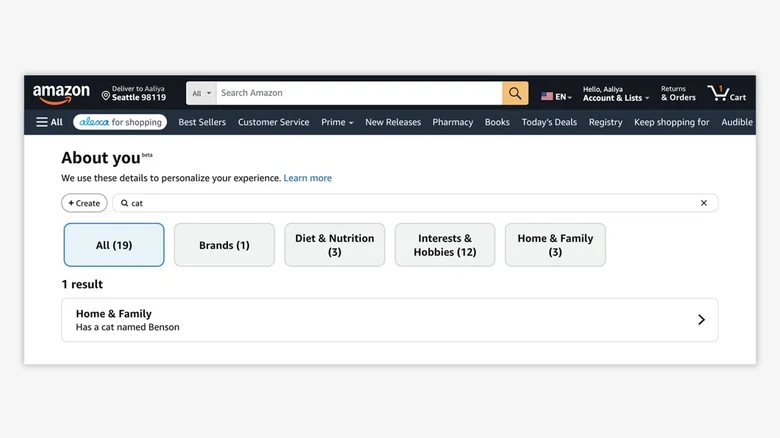
    Screenshot of an Amazon About You page, revealing that the user Aaliya "has a cat named Benson"

    The process for finding the page differs a bit between mobile and desktop. In the mobile app, open the Me tab (the person icon at the bottom), tap your name, then select About You. If you’re using the web, go to Account & Lists > Account, and choose About You, which is under the “Ordering and shopping preferences” section.

    You can also find itshould spit out a list of several preferences along with a link to the full About You page

    Editing or removing About You notes
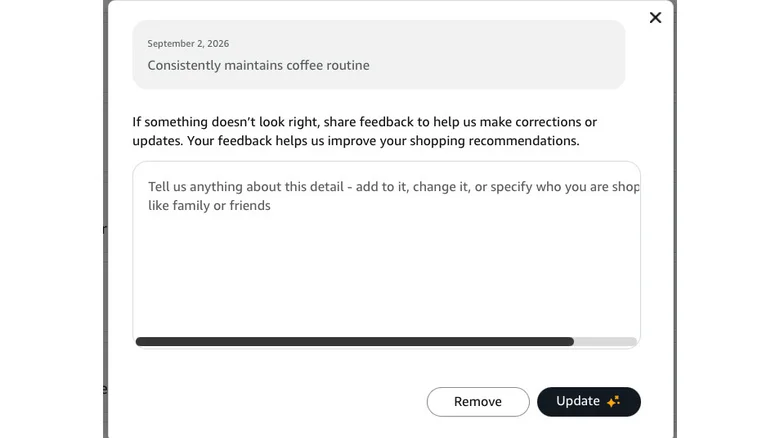
    Screenshot of an Amazon About You edit box for the preference "Consistently maintains coffee routine"

    Amazon / Will Shanklin for Engadget

    You can select any of the individual observations in your About You dossier. This will open a pop-up that allows you to remove or update the detail. There’s also a text box where you can provide feedback or additional information. If something looks off — or you’re just creeped out by the whole thing — this is the place to hack and slash Amazon’s observations.

    If you want to add details, you can do that, too. Click the + Create button at the top left of the page. “You can tell us anything about you — your style, hobbies, interests, or who you shop for, like family or pets,” Amazon advises. For those who want Big Tech to know even more about them, there’s even an option to import information from other AI assistants. This uses a copy-and-paste process rather than directly connecting the services.

    Keep in mind that editing or removing details doesn’t opt you out of personalized shopping. It just tells Amazon not to use that particular detail for personalization. Also, don’t assume it deletes the purchase, review, search query or conversation that led to the observation.

    About Amazon Find Page Your
    Follow on Google News Follow on Flipboard
    Share. Facebook Twitter Pinterest LinkedIn Tumblr Email Copy Link
    myappsplus
    • Website

    Related Posts

    How to access the hidden developer menu on your Apple TV

    November 28, 2026

    Using your phone to scan a barcode and identify products is surprisingly easy

    November 28, 2026

    How you can spot and avoid scam ads on social media

    November 28, 2026
    Add A Comment
    Leave A Reply Cancel Reply

    Top Posts

    The pros and cons of using your phone as a mobile hotspot

    November 16, 202651 Views

    UiPath Launches AI Coding Agent, Integrates Claude Code and Codex to Target Development Automation

    November 16, 202646 Views

    Announcing Artificial Analysis Intelligence Index v5

    October 28, 202639 Views
    Latest Reviews

    I’ve seen 2027’s new robot vacuums — here are 3 major trends set to level-up their cleaning, from drop-down suction boosters to… steam?

    myappsplusSeptember 13, 2026

    Rest your new AirPods 5 with wireless charging case on this sleek charger for $18 (Reg. $25)

    myappsplusSeptember 13, 2026

    69% K8s Spend Cut [2026]

    myappsplusSeptember 13, 2026
    Stay In Touch
    • Facebook
    • YouTube
    • TikTok
    • WhatsApp
    • Twitter
    • Instagram

    Subscribe to Updates

    Get the latest tech news from FooBar about tech, design and biz.

    Most Popular

    How to watch Great North Run 2026: Live stream online from anywhere for FREE

    September 13, 20260 Views

    The first images of Meta’s Project Phoenix mixed reality headset have leaked — and there’s a reason it’s so thin and light

    September 13, 20260 Views

    Why your Roku keeps randomly turning off (and how to fix it)

    September 13, 20260 Views
    Our Picks

    How to access the hidden developer menu on your Apple TV

    November 28, 2026

    I tried 20+ Android TV VPNs this year and these are the ones I’d save on this Black Friday — VPNs for beginners, 4K streaming, and good savings

    November 28, 2026

    5 Android Auto navigation apps you could be using instead of Google Maps

    November 28, 2026

    Subscribe to Updates

    Subscribe to our newsletter and get the latest tech news, app updates, AI trends, smartphone reviews, and exclusive deals delivered straight to your inbox.

    Facebook X (Twitter) Instagram Pinterest
    • About Us
    • Get In Touch
    • Disclaimer
    • Privacy Policy
    • Terms & Conditions
    © 2026 MyAppsPlus. All Rights Reserved.

    Type above and press Enter to search. Press Esc to cancel.