Close Menu
MyAppsPlus

    Subscribe to Updates

    Get the latest creative news from FooBar about art, design and business.

    What's Hot

    As an audio expert, I rate Nothing’s headphones for style and sound — and you can already save up to 48% ahead of Black Friday

    October 13, 2026

    2027 Rivian R2 review: The Goldilocks electric SUV

    October 13, 2026

    What’s the difference between alkaline and lithium-ion batteries?

    October 13, 2026
    Facebook X (Twitter) Instagram
    Facebook X (Twitter) Instagram
    MyAppsPlusMyAppsPlus
    Tuesday, October 13
    • Home
    • Breaking Tech
    • Apps & Software
    • AI & Automation
    • Android
    • iPhone & iOS
    • More
      • Reviews
      • How-To Guides
      • Deals & Discounts
      • Shop
    MyAppsPlus
    Home»Breaking Tech»How to find your Amazon ‘About You’ page (and how to edit it)
    Breaking Tech

    How to find your Amazon ‘About You’ page (and how to edit it)

    myappsplusBy myappsplusOctober 13, 2026003 Mins Read
    Share Facebook Twitter Pinterest Copy Link LinkedIn Tumblr Email Telegram WhatsApp
    Follow Us
    Google News Flipboard
    How to find your Amazon ‘About You’ page (and how to edit it)
    Share
    Facebook Twitter LinkedIn Pinterest Email Copy Link

    See if Amazon thinks you have “flat buttocks.”

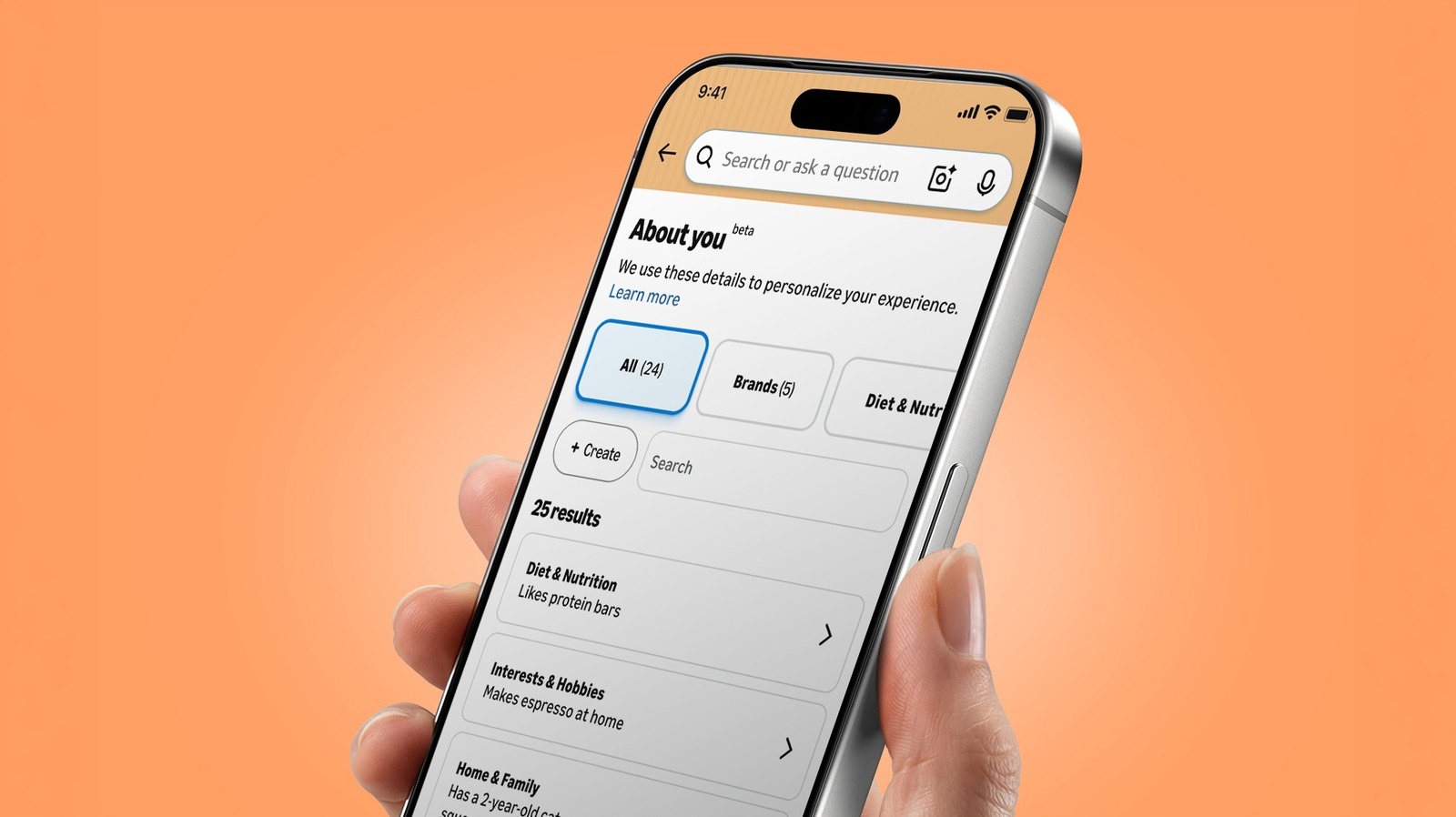
    Online profiling isn’t new. And for that matter, neither is Amazon’s About You page, which was introduced back in May. (The personalization behind it has been around for much longer.) But the feature, which acts as a sort of dossier of details Amazon uses to personalize your shopping, has gotten a lot of attention lately.

    Part of the reason for the renewed interest is that About You’s notes can be, well, oddly specific. One Threads user posted a screenshot showing that it said she “has flat buttocks.” In a Reddit thread, one person said it described them as having “mismatched trash bins.” Another Redditor rattled off a triad of strange observations: “has a mother,” “owns a tiny funnel” and “receives boxes from Amazon.” (Small world!)

    Whether you find those details harmlessly amusing or a little creepy, it’s worth seeing what info Amazon thinks it knows about you.

    Finding your About You page
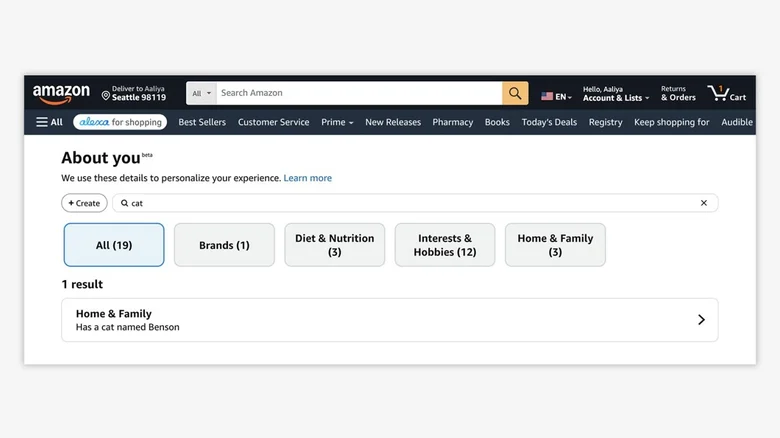
    Screenshot of an Amazon About You page, revealing that the user Aaliya "has a cat named Benson"

    The process for finding the page differs a bit between mobile and desktop. In the mobile app, open the Me tab (the person icon at the bottom), tap your name, then select About You. If you’re using the web, go to Account & Lists > Account, and choose About You, which is under the “Ordering and shopping preferences” section.

    You can also find itshould spit out a list of several preferences along with a link to the full About You page

    Editing or removing About You notes
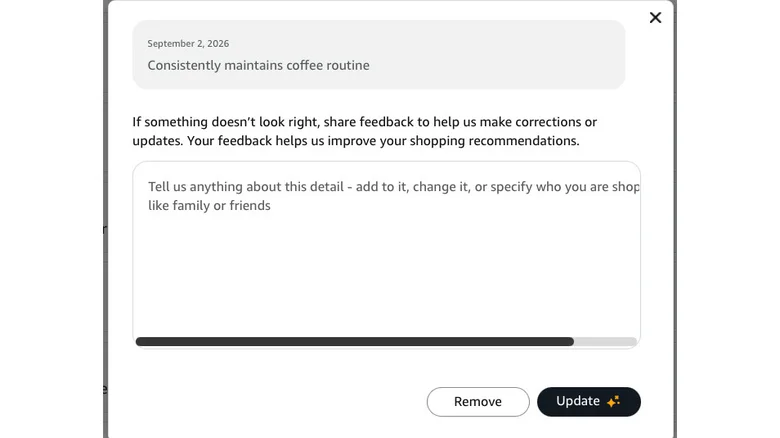
    Screenshot of an Amazon About You edit box for the preference "Consistently maintains coffee routine"

    Amazon / Will Shanklin for Engadget

    You can select any of the individual observations in your About You dossier. This will open a pop-up that allows you to remove or update the detail. There’s also a text box where you can provide feedback or additional information. If something looks off — or you’re just creeped out by the whole thing — this is the place to hack and slash Amazon’s observations.

    If you want to add details, you can do that, too. Click the + Create button at the top left of the page. “You can tell us anything about you — your style, hobbies, interests, or who you shop for, like family or pets,” Amazon advises. For those who want Big Tech to know even more about them, there’s even an option to import information from other AI assistants. This uses a copy-and-paste process rather than directly connecting the services.

    Keep in mind that editing or removing details doesn’t opt you out of personalized shopping. It just tells Amazon not to use that particular detail for personalization. Also, don’t assume it deletes the purchase, review, search query or conversation that led to the observation.

    About Amazon Find Page Your
    Follow on Google News Follow on Flipboard
    Share. Facebook Twitter Pinterest LinkedIn Tumblr Email Copy Link
    myappsplus
    • Website

    Related Posts

    2027 Rivian R2 review: The Goldilocks electric SUV

    October 13, 2026

    Disrupt 2026 starts tomorrow: Your final chance to save up to $100

    October 13, 2026

    5 Android Apps to Declutter & Secure Your Phone

    October 13, 2026
    Add A Comment
    Leave A Reply Cancel Reply

    Top Posts

    What was the PSX? The souped-up PS2 rarely sold outside of Japan

    September 14, 202610 Views

    Can reviews settle disputes that marked first two seasons?

    September 21, 20268 Views

    Experts call for leveraging AI, breaking key tech bottlenecks to propel advanced manufacturing

    September 19, 20268 Views
    Latest Reviews

    How to watch Indiana Fever vs Connecticut Sun: live stream WNBA game for free from anywhere

    myappsplusAugust 28, 2026

    Dyson’s Ball Animal 3 upright vacuum drops to $299 low in Labor Day Sale ($150 off), more from $300

    myappsplusAugust 28, 2026

    Futuri Introduces “Automate, Augment, Hold” Framework to Help Sales Leaders Avoid an AI Trust Deficit

    myappsplusAugust 28, 2026
    Stay In Touch
    • Facebook
    • YouTube
    • TikTok
    • WhatsApp
    • Twitter
    • Instagram

    Subscribe to Updates

    Get the latest tech news from FooBar about tech, design and biz.

    Most Popular

    How to watch Indiana Fever vs Connecticut Sun: live stream WNBA game for free from anywhere

    August 28, 20260 Views

    Dyson’s Ball Animal 3 upright vacuum drops to $299 low in Labor Day Sale ($150 off), more from $300

    August 28, 20260 Views

    Futuri Introduces “Automate, Augment, Hold” Framework to Help Sales Leaders Avoid an AI Trust Deficit

    August 28, 20260 Views
    Our Picks

    As an audio expert, I rate Nothing’s headphones for style and sound — and you can already save up to 48% ahead of Black Friday

    October 13, 2026

    2027 Rivian R2 review: The Goldilocks electric SUV

    October 13, 2026

    What’s the difference between alkaline and lithium-ion batteries?

    October 13, 2026

    Subscribe to Updates

    Subscribe to our newsletter and get the latest tech news, app updates, AI trends, smartphone reviews, and exclusive deals delivered straight to your inbox.

    Facebook X (Twitter) Instagram Pinterest
    • About Us
    • Get In Touch
    • Disclaimer
    • Privacy Policy
    • Terms & Conditions
    © 2026 MyAppsPlus. All Rights Reserved.

    Type above and press Enter to search. Press Esc to cancel.