Close Menu
MyAppsPlus

    Subscribe to Updates

    Get the latest creative news from FooBar about art, design and business.

    What's Hot

    NYT Strands hints and answers for Sunday, November 15 (game #987)

    November 15, 2026

    007 First Light composers reveal their inspirations for the game’s soundtrack — ‘Our mission we set ourselves was to give the franchise a gentle nudge into the modern day, without completely reinventing it’

    November 15, 2026

    This Sony patent would add a credit card reader to your PlayStation controller

    November 15, 2026
    Facebook X (Twitter) Instagram
    Facebook X (Twitter) Instagram
    MyAppsPlusMyAppsPlus
    Sunday, November 15
    • Home
    • Breaking Tech
    • Apps & Software
    • AI & Automation
    • Android
    • iPhone & iOS
    • More
      • Reviews
      • How-To Guides
      • Deals & Discounts
      • Shop
    MyAppsPlus
    Home»iPhone & iOS»iOS 27 makes a great change to Apple Pay on iPhone
    iPhone & iOS

    iOS 27 makes a great change to Apple Pay on iPhone

    myappsplusBy myappsplusSeptember 28, 2026022 Mins Read
    Share Facebook Twitter Pinterest Copy Link LinkedIn Tumblr Email Telegram WhatsApp
    Follow Us
    Google News Flipboard
    iOS 27 makes a great change to Apple Pay on iPhone
    Share
    Facebook Twitter LinkedIn Pinterest Email Copy Link

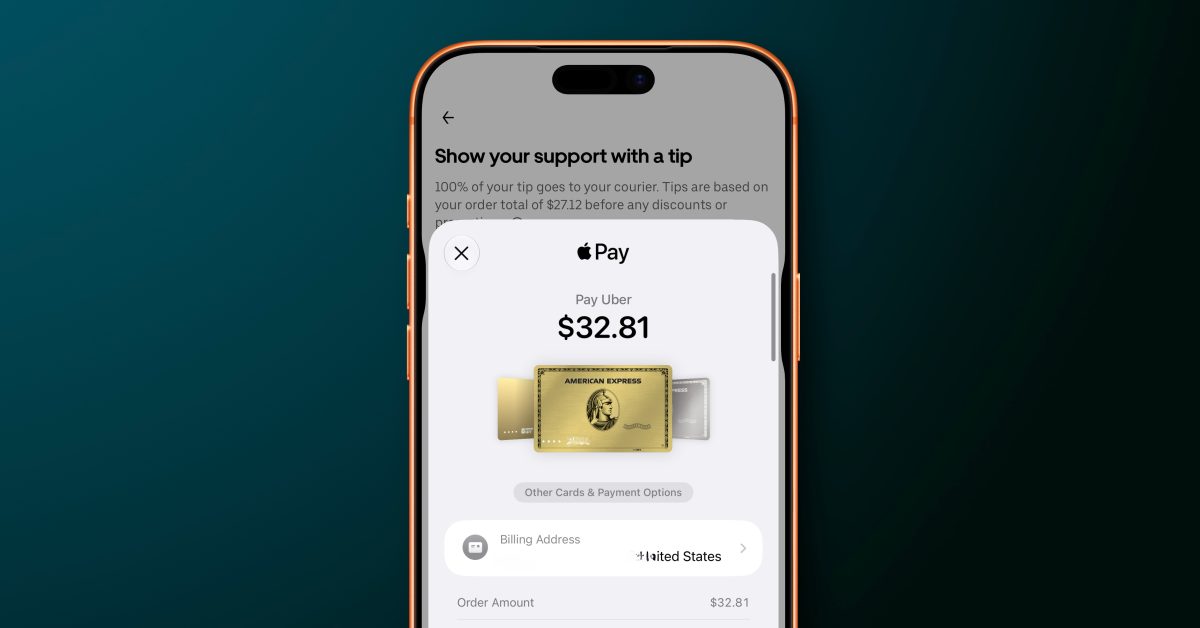
    Apple has redesigned the Apple Pay checkout flow in iOS 27 for apps and websites. The changes make it easier to switch between different payment cards and see key details about the order you’re placing.

    In iOS 27, you can now swipe between payment cards right on the main Apple Pay interface. You can also tap a card to view a grid-style interface that shows all your available Apple Pay cards in one place.

    Apple Pay is introducing an updated design for users when they check out on the web and in apps. The design allows them to seamlessly swipe to switch cards, conveniently surfacing important information about their eligible cards in Apple Wallet — including rewards, balances, debit account balance, pay later options, and more — so they can make more informed payment decisions.

    Merchants and developers have control over what appears on the Apple Pay payment sheet, depending on the exact information they need to complete your order.

    The iOS 26 version of the Apple Pay checkout flow has been criticized for being unintuitive. For instance, people often tapped the wrong thing when trying to switch between payment cards. The instinct is to tap the card itself, but in iOS 26, that would take you to the address-editing interface. You’d have to tap a separate button at the bottom to actually switch to a different card. iOS 27 streamlines all of this and makes it a lot clearer.

    What do you think of the new Apple Pay interface for apps and websites in iOS 27? Let us know down in the comments.

    Chance’s favorites: 

    Follow Chance: Threads, Bluesky, Instagram, and Mastodon.

    You’re reading 9to5Mac — experts who break news about Apple and its surrounding ecosystem, day after day. Be sure to check out our homepage for all the latest news, and follow 9to5Mac on Twitter, Facebook, and LinkedIn to stay in the loop. Don’t know where to start? Check out our exclusive stories, reviews, how-tos, and subscribe to our YouTube channel

    Apple change great makes News
    Follow on Google News Follow on Flipboard
    Share. Facebook Twitter Pinterest LinkedIn Tumblr Email Copy Link
    myappsplus
    • Website

    Related Posts

    Did you know your iPhone’s calculator has a history feature?

    November 15, 2026

    Premium gadgets that make unforgettable holiday presents without stretching your budget

    November 15, 2026

    Google Pixel rolls out new ‘Family Hub’ feature with useful controls [Gallery]

    November 15, 2026
    Add A Comment
    Leave A Reply Cancel Reply

    Top Posts

    Save on your groceries, gas, and holiday shopping with this $15 BJ’s membership (Reg. $60) 

    November 4, 202629 Views

    Google’s new AI shopping cart tracks deals across stores

    October 25, 202627 Views

    Apple is making Creator Studio an even better deal with new AI features and creative tools

    October 28, 202623 Views
    Latest Reviews

    Grab the compact Anker 13-in-1 Nano laptop dock for just $112

    myappsplusSeptember 8, 2026

    How to watch Porto vs Man City: Live Streams & TV Channels for Champions League 2026/27

    myappsplusSeptember 8, 2026

    Logitech Releases the Developer-Focused MX Keypad for AI Automation

    myappsplusSeptember 8, 2026
    Stay In Touch
    • Facebook
    • YouTube
    • TikTok
    • WhatsApp
    • Twitter
    • Instagram

    Subscribe to Updates

    Get the latest tech news from FooBar about tech, design and biz.

    Most Popular

    Eight Microsoft Office apps are yours for just $30 with this lifetime deal (Reg. $220)

    September 8, 20260 Views

    What is Roku’s secret menu and how do you unlock it?

    September 8, 20260 Views

    TrendForce: Apple produced 52 million iPhones in Q2

    September 8, 20260 Views
    Our Picks

    NYT Strands hints and answers for Sunday, November 15 (game #987)

    November 15, 2026

    007 First Light composers reveal their inspirations for the game’s soundtrack — ‘Our mission we set ourselves was to give the franchise a gentle nudge into the modern day, without completely reinventing it’

    November 15, 2026

    This Sony patent would add a credit card reader to your PlayStation controller

    November 15, 2026

    Subscribe to Updates

    Subscribe to our newsletter and get the latest tech news, app updates, AI trends, smartphone reviews, and exclusive deals delivered straight to your inbox.

    Facebook X (Twitter) Instagram Pinterest
    • About Us
    • Get In Touch
    • Disclaimer
    • Privacy Policy
    • Terms & Conditions
    © 2026 MyAppsPlus. All Rights Reserved.

    Type above and press Enter to search. Press Esc to cancel.