Close Menu
MyAppsPlus

    Subscribe to Updates

    Get the latest creative news from FooBar about art, design and business.

    What's Hot

    AI Boom Splits the Tech Industry: Nvidia and TSMC Corner a Hundred-Billion-Dollar Opportunity While Consumer Electronics Makers Sink into Decline

    September 26, 2026

    How to watch Slovenia vs Scotland: FREE streams, TV channels for Nations League clash

    September 26, 2026

    I tested an Android tablet that rivals the iPad mini — and its OLED display won me over

    September 26, 2026
    Facebook X (Twitter) Instagram
    Facebook X (Twitter) Instagram
    MyAppsPlusMyAppsPlus
    Saturday, September 26
    • Home
    • Breaking Tech
    • Apps & Software
    • AI & Automation
    • Android
    • iPhone & iOS
    • More
      • Reviews
      • How-To Guides
      • Deals & Discounts
      • Shop
    MyAppsPlus
    Home»How-To Guides»ChatGPT Voice can now use your apps, but approvals stay on screen
    How-To Guides

    ChatGPT Voice can now use your apps, but approvals stay on screen

    myappsplusBy myappsplusSeptember 26, 2026003 Mins Read
    Share Facebook Twitter Pinterest Copy Link LinkedIn Tumblr Email Telegram WhatsApp
    Follow Us
    Google News Flipboard
    ChatGPT Voice can now use your apps, but approvals stay on screen
    Share
    Facebook Twitter LinkedIn Pinterest Email Copy Link

    OpenAI added connected apps to ChatGPT’s voice mode on Wednesday. If you ask Live about your email, your calendar or a Slack thread, ChatGPT can now pull the answer from that service while you talk and show written responses in the chat. The feature works on the web, iOS and Android. Free and Go users get it too, limited to the plugins their plan supports. Voice also arrives in ChatGPT Work, the area for documents, presentations and spreadsheets, which requires both Voice and Work access.

    The update does not create new access. According to OpenAI, “Existing app connections, permissions, and usage limits apply.” If Gmail is already connected with permission to send, as ChatGPT has allowed for two Google accounts at once since August, voice mode can use those same rights.

    Approval happens on the display

    The main limit is spelled out in OpenAI’s Voice FAQ: “If an action needs your approval, Voice will prompt you to review it on screen. Use the on-screen controls to approve or decline; spoken approval is not supported.” Saying “yes, send it” after ChatGPT reads out a draft does not send the email. In the car or with the phone in a pocket, the task waits until you look at the screen.

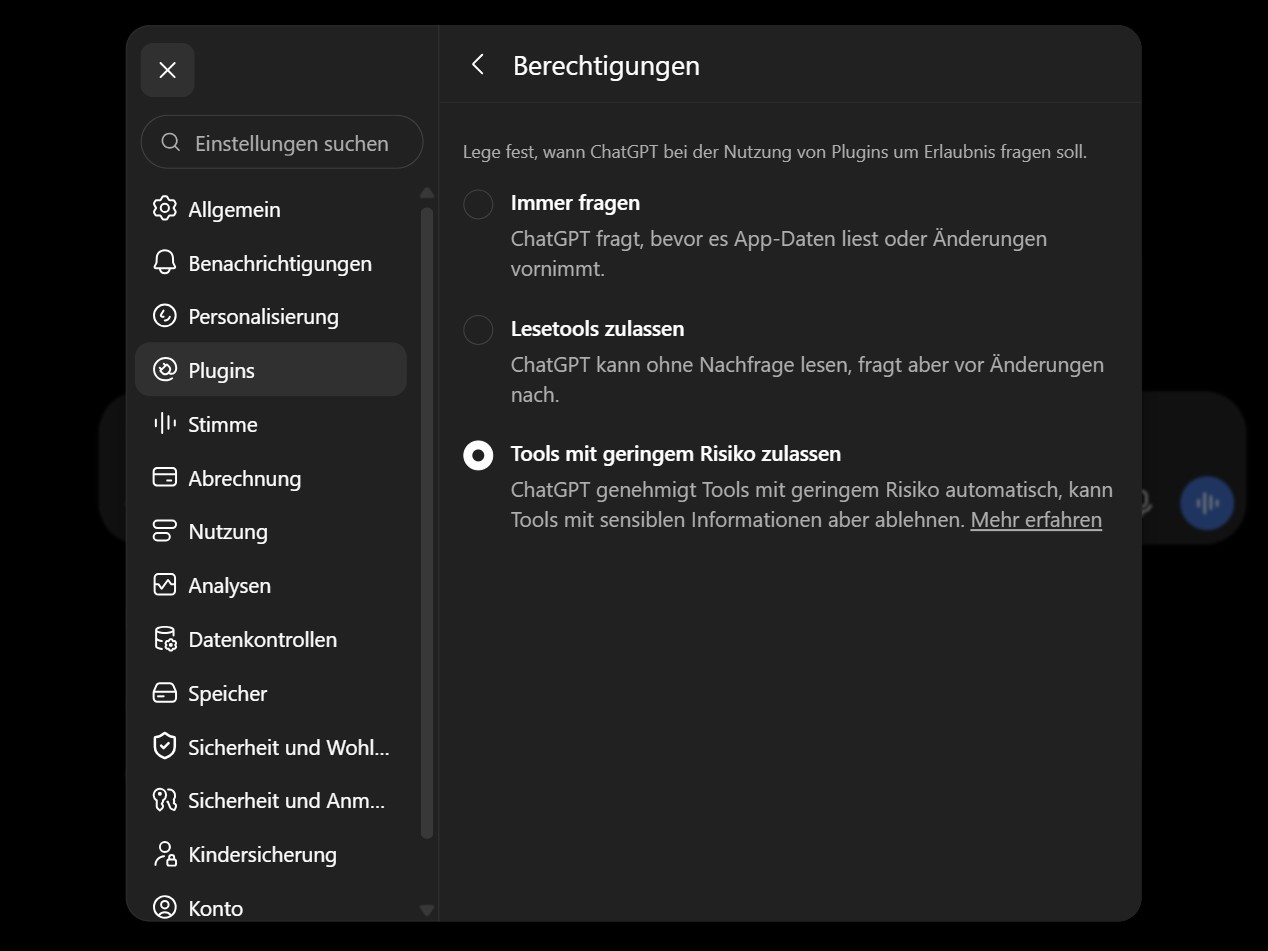
    When ChatGPT asks at all depends on a setting under Settings, Plugins, Permissions. With “Always ask,” ChatGPT asks before it reads app data or makes changes. “Allow read actions” reads without asking and asks before changes. “Allow low-risk actions” approves lower-risk items automatically and asks for the rest. That third option was selected in a personal German account we checked, which had never connected a plugin. OpenAI lists sending an email, message, comment or invitation as higher-risk, along with creating, editing or deleting files, changing security settings and financial transactions. The help page also describes “Allow all actions,” which skips approval prompts. It did not appear in the personal account we checked.

    How to disconnect an app

    For voice mode, read access matters more than sending. Under “Allow read actions,” a question like “What’s in my inbox today?” gets an answer from Gmail without a prompt, and the low-risk option will usually behave the same way. If you want a prompt every time, switch to “Always ask.” OpenAI points out that “Changing an app permission does not disconnect the app or revoke access already granted.” To cut access, open Settings, Plugins, select the app and disconnect the account there.

    The conversations leave records as well. OpenAI keeps audio clips from Live conversations for 30 days and deletes them with the chat unless it needs them for security or legal reasons. The new privacy center does not change defaults like these.

    OpenAI Help Center: ChatGPT release notes, plugins in Voice and Voice in Work, September 23, 2026

    OpenAI Help Center: ChatGPT Voice FAQ, on-screen approval and audio clip retention

    OpenAI Help Center: Managing app permissions in ChatGPT and disconnecting apps

    9to5Mac: OpenAI upgrades ChatGPT Voice with plugins for email, calendar and Slack

    <a href="https://techcrunch.com/2026/09/23/chatgpt-mobile-app-gets-voice-based-agentic-features/” rel=”nofollow noopener” target=”_blank”>TechCrunch: ChatGPT mobile app gets voice-based agentic features

    ⟨
    Previous article
    First hands-on photos of Casio’s limited-edition MRG-B2100HR showcase unique dual-nature finish
    > Expert reviews and news on laptops, smartphones and tech innovations > News > News Archive > Newsarchive 2026 09 > ChatGPT Voice can now use your apps, but approvals stay on screen
    Steffen Zahn, 2026-09-26 (Update: 2026-09-26)

    approvals apps ChatGPT voice Your
    Follow on Google News Follow on Flipboard
    Share. Facebook Twitter Pinterest LinkedIn Tumblr Email Copy Link
    myappsplus
    • Website

    Related Posts

    Your AI Agent May Be an Automation With a More Expensive Label

    September 26, 2026

    The AI bubble could burst without killing ChatGPT

    September 26, 2026

    Your Insurer’s App May Soon Judge Your Driving From Your Phone

    September 26, 2026
    Add A Comment
    Leave A Reply Cancel Reply

    Top Posts

    Can reviews settle disputes that marked first two seasons?

    September 21, 20264 Views

    Experts call for leveraging AI, breaking key tech bottlenecks to propel advanced manufacturing

    September 19, 20263 Views

    Top 10 Best React Native App Development Companies in 2026

    September 12, 20263 Views
    Latest Reviews

    Fujifilm X Half Review

    myappsplusAugust 23, 2026

    Two years after launch, Walmart’s Flipkart is closing in on India’s quick-commerce leaders

    myappsplusAugust 23, 2026

    We found record prices on TCL, Samsung, Fire TV

    myappsplusAugust 23, 2026
    Stay In Touch
    • Facebook
    • YouTube
    • TikTok
    • WhatsApp
    • Twitter
    • Instagram

    Subscribe to Updates

    Get the latest tech news from FooBar about tech, design and biz.

    Most Popular

    Fujifilm X Half Review

    August 23, 20260 Views

    Two years after launch, Walmart’s Flipkart is closing in on India’s quick-commerce leaders

    August 23, 20260 Views

    We found record prices on TCL, Samsung, Fire TV

    August 23, 20260 Views
    Our Picks

    AI Boom Splits the Tech Industry: Nvidia and TSMC Corner a Hundred-Billion-Dollar Opportunity While Consumer Electronics Makers Sink into Decline

    September 26, 2026

    How to watch Slovenia vs Scotland: FREE streams, TV channels for Nations League clash

    September 26, 2026

    I tested an Android tablet that rivals the iPad mini — and its OLED display won me over

    September 26, 2026

    Subscribe to Updates

    Subscribe to our newsletter and get the latest tech news, app updates, AI trends, smartphone reviews, and exclusive deals delivered straight to your inbox.

    Facebook X (Twitter) Instagram Pinterest
    • About Us
    • Get In Touch
    • Disclaimer
    • Privacy Policy
    • Terms & Conditions
    © 2026 MyAppsPlus. All Rights Reserved.

    Type above and press Enter to search. Press Esc to cancel.