

Gartner predicts that 33% of enterprise software applications will include Agentic AI by 2028, up from less than 1% in 2024. As agentic capabilities move beyond isolated AI experiments and into business-critical workflows, this shift also transforms the Agentic mobile app development paradigm. But even as artificial intelligence becomes mainstream, confidence in it is still not enough. App developers must account for reliability, responsiveness, <a href="https://myappsplus.com/108-security-fixes-for-desktop-new-release-for-android/” title=”108 security fixes for desktop, new release for Android”>security, and maintainability alongside model intelligence because AI Agents in mobile apps extend well beyond a conversational interface. (Gartner)
Depending on the use case, an AI Agent must maintain state across multiple steps, invoke tools, request approval, recover from failed actions, and keep operations governed and auditable. Managing these responsibilities consistently across all mobile platforms can introduce significant complexity, which is where Flutter’s shared application layer becomes valuable. However, Flutter alone doesn’t solve the architectural challenge; developers still need to design a structure that supports the agent’s full lifecycle as its role expands.
This article covers why building AI Agents in mobile apps is difficult, what makes Flutter the right choice for Agentic mobile app development, and common mistakes to avoid.
Why are AI Agents in Mobile Apps Hard to Build at Enterprise Scale?
Agentic mobile applications introduce engineering requirements that go beyond adding an AI model to a conventional application. The following complexities make Agentic mobile app development challenging.
1. Cross-Platform Agent Behavior Can Drift
Separate iOS, Android, and web implementations can cause prompt handling, context management, tool schemas, approval flows, and error logic to evolve differently. Even minor implementation gaps can change how an agent interprets requests or executes tasks. As capabilities expand, these inconsistencies become harder to detect and maintain, especially when agent behavior is duplicated across multiple client codebases.
2. Streaming Agent Responses Can Strain the UI
AI Agents in mobile apps do not always follow a simple request-response pattern. Their output may arrive incrementally while the model generates content, invokes tools, or waits for external systems. Therefore, the UI must absorb these updates without blocking interaction, rebuilding too much, or creating inconsistent state.
3. Multi-Step Workflows Create Complex State Dependencies
A single AI Agent task in mobile apps can span multiple turns, tool calls, approvals, retries, and failure states. The application must preserve conversation context, tool outputs, pending actions, and execution progress throughout that sequence. If state becomes distributed across widgets or loosely coordinated variables, recovery and debugging become difficult, increasing the risk of inconsistent or incomplete agent workflows.
4. Hybrid AI Execution Introduces Device and Runtime Variability
Enterprises may combine on-device inference for privacy, offline operation, or latency with cloud models for more demanding reasoning. But execution varies significantly across mobile hardware. Google’s 2026 AI Edge Portal
, for example, benchmarks AI workloads across more than 120 representative Android device types, highlighting the device-level variability developers must accommodate when designing hybrid AI workflows.
5. Autonomous Actions Increase Security and Governance Risk
AI Agents that update records, submit transactions, or trigger workflows require deterministic controls beyond model reasoning. IBM’s 2025 research found that 63% of breached organizations lacked AI governance policies, while 97% of organizations reporting AI-related security incidents lacked proper AI access controls. [
6. Platform-Specific Development Multiplies Engineering Overhead
Agentic complexity grows further when Android, iOS, and web teams implement the same streaming logic, state handling, tool integrations, and security controls independently. Additionally, duplicated client engineering adds another avoidable cost and maintenance burden.
Why Flutter is the Right Choice for Agentic Mobile App Development
The question, then, is how Flutter helps developers manage these interconnected challenges without adding complexity. The following capabilities show where its architecture provides a practical advantage for enterprise Agentic mobile development.
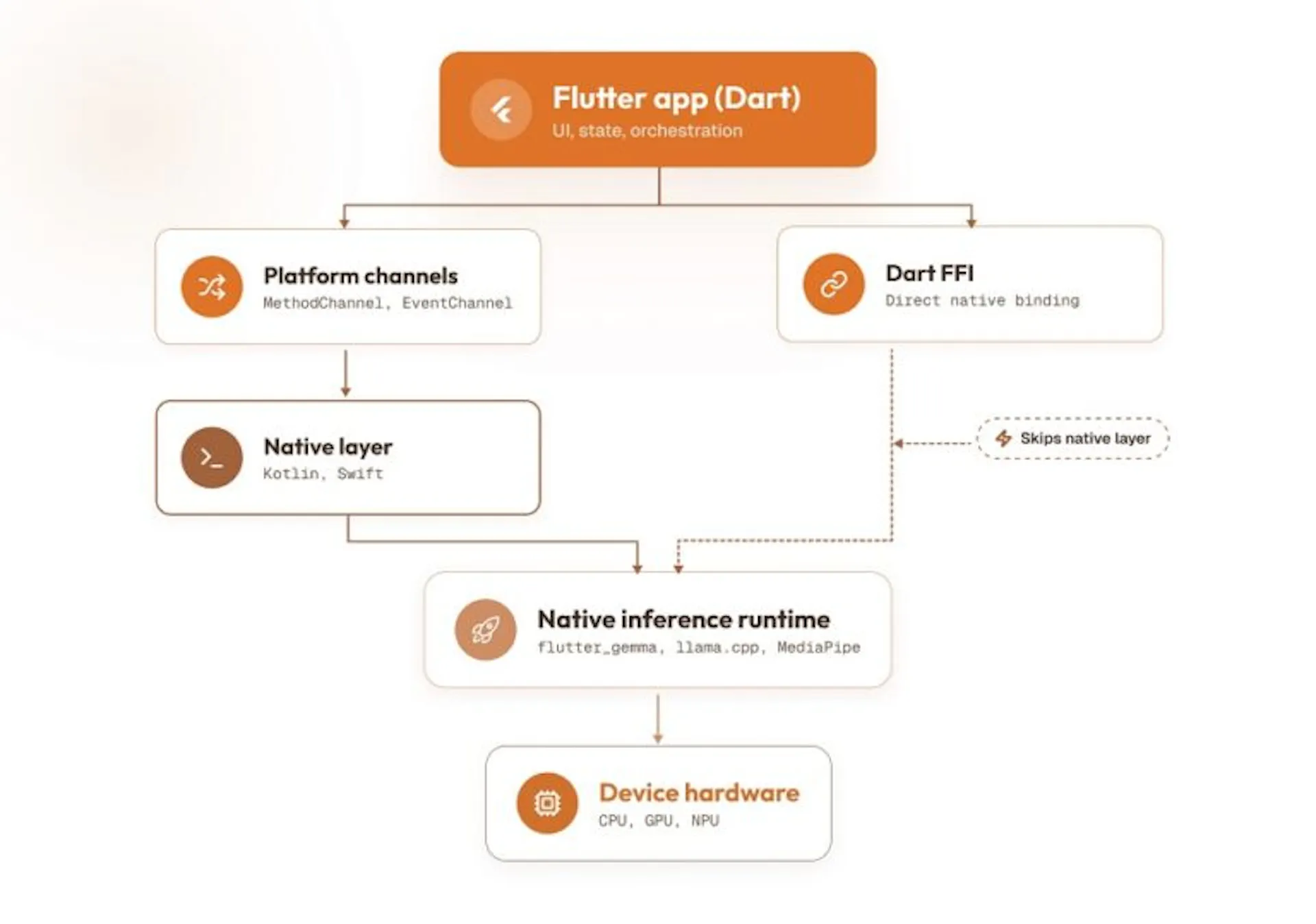
How Flutter handles AI Agent inference
1. Solves Cross-Platform Consistency with a Single Dart Codebase
When Android and iOS teams implement the same agent logic separately, prompt construction, context handling, tool schemas, and response parsing can gradually diverge. Flutter reduces this risk by keeping the agent-integration layer within one Dart codebase that supports both platforms without duplicating core agent behavior.
The same Dart codebase compiles to native ARM/x64 machine coder/Skia-based rendering engine, not each platform’s native UI toolkit. That means the agent-integration layer that constructs prompts, parses tool-call responses, and manages conversation context is compiled from one
2. Handling Streaming Agent Output with Dart Streams and Reactive State
Agent output arrives asynchronously as a sequence of tokens, partial tool-call arguments, and intermediate reasoning events. Flutter’s reactive model, built on Dart’s native Stream and async* generator support, is designed for this exact data shape. A typical implementation exposes the agent session as a Stream<AgentEvent>, often backed by a StreamController.broadcast() so multiple widgets can listen without re-triggering the underlying request. Then StreamBuilder rebuilds only the relevant widget subtree as events arrive:
StreamBuilder<AgentEvent>(
stream: agentSession. events, builder: (context, snapshot)
final event = snapshot. data;
return AgentResponseView(event: event); // updates as tokens/tool calls arrive
},
)
For production applications, however, raw stream events should pass through a structured state layer before reaching widgets. Riverpod, Bloc, or similar approaches can translate low-level events into states such as Thinking, StreamingResponse, AwaitingToolResult, and Error. A Cubit or Notifier can also buffer tokens and throttle rapid updates, keeping transport logic out of the widget tree.
3. Managing Multi-Turn Agent State with Isolates and a Dedicated State Layer
Long-running agentic interactions fail in two ways: the UI freezes during heavy processing, or the app loses track of what the AI Agent already did when a step errors out. Flutter has a distinct mechanism to address both.
For the freezing problem, Dart’s isolates provide true parallelism, each running on its own thread with its own memory heap and communicating only. Inference-heavy work, including tokenization, local embedding lookups, and on-device model calls, can run inside an isolate (or helper) so a multi-step agent task never blocks frame rendering
For the state-loss problem, the fix is at the architecture level. Model the agent session as an explicit state machine and persist it incrementally to a local store like Isar, Hive, or Drift/SQLite. Tracking executed tool-call IDs specifically enables idempotent retries. It means if step 6 of a 10-step task fails, the app can resume from step 6 without re-executing steps 1–5, which matters when those steps have real-world side effects.
4. Choosing On-Device or Cloud Inference Without Rewriting the App
Flutter’s AI tooling has matured to the point where on-device and cloud inference are both first-class options within the same ecosystem, rather than requiring separate SDKs. For on-device inference, flutter_gemma runs quantized Gemma models (typically int4/int8 formats) directly on iOS and Android.
For cloud-hosted reasoning, Firebase AI Logic provides typed Dart bindings to Gemini and other AI models, including support for streaming responses and structured/function-calling output without hand-rolling HTTP and JSON parsing. Google’s ML Kit rounds this out for common on-device vision and text tasks (OCR, entity extraction) that don’t need a full LLM call.
5. Enforcing Governance with Platform Channels and FFI
AI Agent governance becomes essential when the agent can submit forms, access protected data, trigger workflows, or perform other actions with real-world consequences. Flutter handles this by letting mobile app developers keep the shared Dart codebase for everything low-risk, while dropping into native code precisely where stricter control is required.
Platform channels, ideally generated with Pigeon for type safety, provide a structured bridge to native APIs for things like hardware-backed key storage (Android Keystore, iOS Secure Enclave) or native audit-logging frameworks. For lower-level needs, dart:ffi lets you call existing native C-ABI libraries directly, useful when an enterprise already has a vetted native security or compliance SDK that must be used as-is. The governance pattern sits above both; every tool call an agent wants to execute passes through a policy-check layer first.
Every challenge above compounds when each platform team has to solve it repeatedly. Flutter’s Agentic mobile app development capabilities let developers use a single CI/CD pipeline, one set of integration tests, and one agent-integration layer.
The second velocity gain comes as AI coding agents increasingly help write the Flutter/Dart code itself. Dart’s sound null safety and static type system catch structural errors at compile time or even at analysis time, before the code runs. That gives both human developers and AI coding agents (via tools like Antigravity or MCP-connected IDEs) a much tighter feedback loop for self-correction than a dynamically typed language would. Combined with code-generation tooling like build_runner, freezed, and json_serializable to eliminate repetitive boilerplate around agent event models, Flutter experts spend more time on actual agent behavior.
Common Mistakes When Building Agentic Apps in Flutter
Even with Flutter’s architectural advantages, teams can introduce avoidable complexity if they design agentic features like conventional mobile workflows. The most common mistakes usually appear around streaming, inference placement, state, governance, and AI-assisted development.
1. Designing Agent Responses as Static Payloads
Treating an agent response as a single API result creates problems once you introduce streaming, tool calls, or partial updates. Retrofitting these behaviors later often requires restructuring both state and UI layers. Instead, developers must model agent output as an event stream from the beginning, with distinct events for tokens, tool requests, status changes, failures, and completion. This keeps the rendering layer adaptable as agent behavior becomes more complex.
2. Delaying On-Device and Cloud Inference Decisions
Postponing inference placement until late development can force major architectural changes near release. Developers must evaluate each feature early for latency, privacy, connectivity, model capability, device constraints, and operating cost. They can then define whether it runs locally, in the cloud, or through a hybrid strategy.
3. Underestimating Multi-Turn State Requirements
A single-turn prototype can hide state problems that emerge once agents call tools, request approvals, retry failed steps, or resume interrupted workflows. The state layer should therefore model the full execution lifecycle before UI complexity grows. Track conversation context, active steps, tool-call identifiers, pending approvals, errors, and completed actions explicitly. Persisting critical state also supports recovery without repeating operations that may already have affected external systems.
4. Adding Permissioning and Auditability Too Late
Demo agents often execute actions directly because the workflow is easier to showcase that way. In production, this becomes a serious architectural weakness. Every privileged tool call should pass through deterministic authorization, parameter validation, business rules, and approval checks before execution. The system should also record who requested the action, what the agent proposed, what actually executed, and the outcome for later audit, recovery, and compliance review.
5. Trusting AI-Generated Dart Code Without Verification
AI coding assistants can accelerate scaffolding, serialization, test generation, and repetitive Flutter code, but generated output still requires engineering review. Plausible code may misuse asynchronous APIs, mishandle nullability, introduce race conditions, or weaken security boundaries. Developers should rely on Dart analysis, strict typing, tests, code review, and static checks before accepting generated changes, especially within state management, tool execution, authentication, or permission-sensitive components.
Final Thoughts
As Agentic capabilities become part of core enterprise workflows, Agentic mobile app development will increasingly depend on how well teams manage state, execution boundaries, inference choices, and governance. Flutter helps reduce that complexity by giving developers a shared application layer for streaming interactions, multi-turn workflows, native integrations, and hybrid AI execution.
The larger advantage, however, comes from architecture. Flutter works best when agent logic, state management, inference providers, policy checks, and platform-specific capabilities remain clearly separated behind stable interfaces. This lets teams evolve models, tools, and workflows without repeatedly restructuring the mobile application. For Flutter developers, the opportunity is therefore not simply to embed AI Agents into existing apps. It is to design mobile systems where agentic behavior remains consistent, observable, recoverable, and secure as autonomy increases. That architectural discipline will determine whether enterprise Agentic apps remain maintainable as their capabilities expand.
