

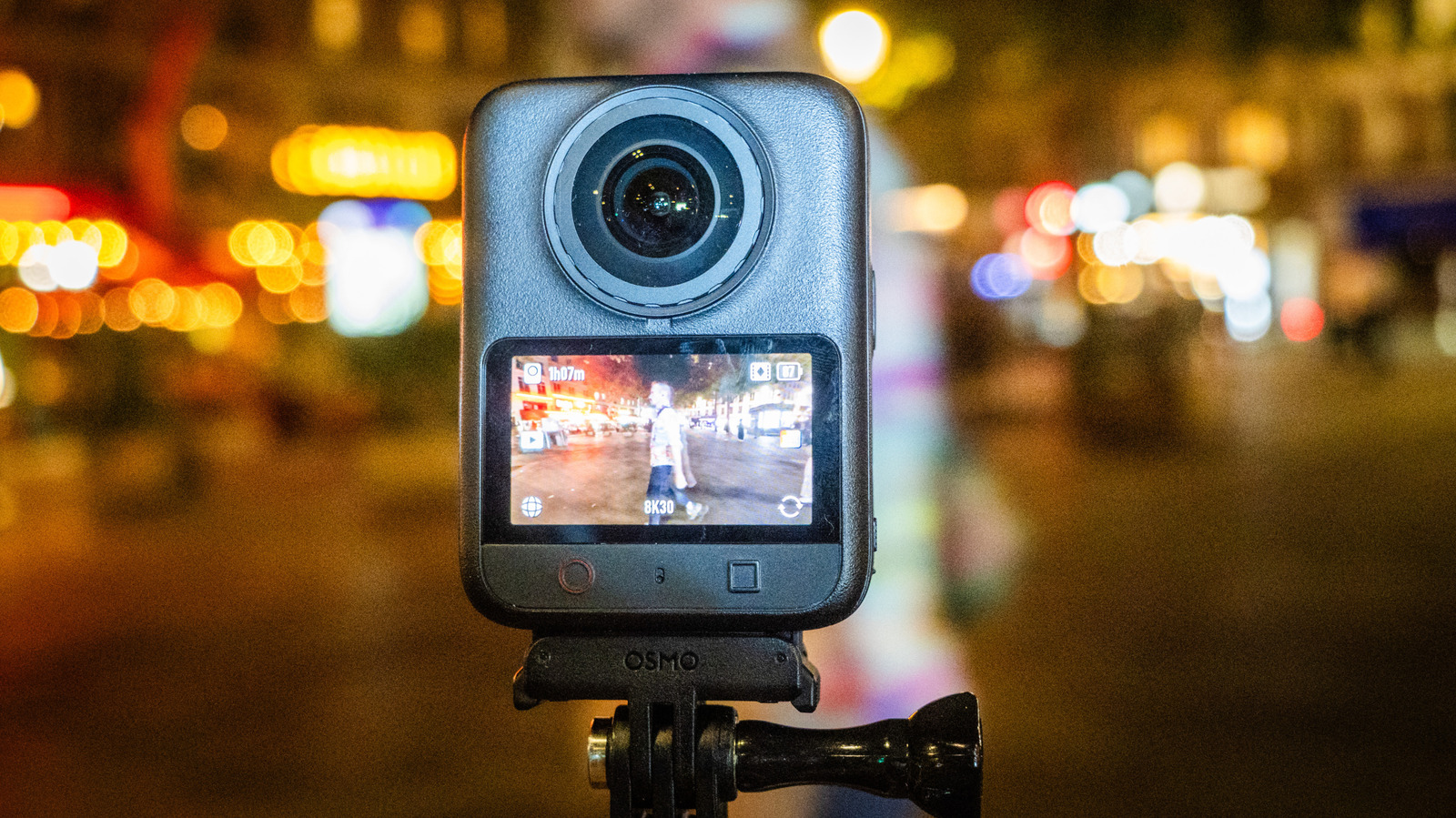
The 8K 60 fps frame rate is nice, but the replaceable lenses are the hot new feature for an action camera.
We may receive a commission on purchases made from links.
DJI’s Osmo 360 was a solid first try at a panoramic action cam, but just over a year later it already has a successor designed to compete with its main rival, the Insta360 X6. The new Osmo 360 II has some small but welcome improvements over the original, like higher frame rates, improved dynamic range and better low light capability. And unlike the original Osmo 360, it has lenses that can be replaced if you damage them while doing the punishing activities this camera was designed for.
As it did before, DJI priced this at €589 ($680), well below the Insta360 X6’s €699 sticker. The biggest problem is that unlike its primary rival, the Osmo 360 II isn’t available in the United States. That’s too bad, because the improvements in video quality are very noticeable when you’re shooting in bright sunlight or a city nightscape.
Design and features
The Osmo 360 II has an ultrawide lens and 1/1.1-inch 8K square sensor on both sides, so it can “see” everything around it. Each camera captures a 180-degree view, which is stitched together in-camera to create a 360-degree video. While editing, you can then choose any angle you want. During the export, footage is “de-warped” or flattened to create a square video at up to 4K resolution, or you can export 360-degree video. You can also capture 120-megapixel panoramic still photos.
The new model has the same design as its predecessor, with a squarish shape that’s thicker, wider and shorter than the Insta360 X6. There’s a bright 2-inch, 314 x 556 touch display at the back along with a camera view (forward or backwards) and record button below. On the right side is the power button and USB-C connector tucked into a waterproof compartment, and the right side has a compartment for the battery and a microSD card slot.
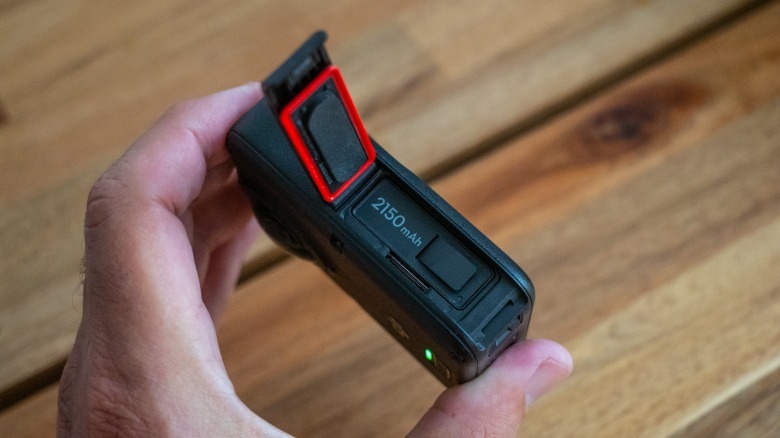
You won’t necessarily need a memory card, though. The Osmo 360 II is equipped with the same 105GB of internal storage as before, more than double the 47GB on the Insta360 X6. USB-C transfer speeds are the same at 600 MB/s, compared to 450 MB/s for the X6. With good cables and a fast external drive, I transferred 20GB of files (8.2 minutes of video) in about 32 seconds.
The Osmo 360 II comes with a new 2,150mAh battery, up from 1,950 mAh before, that’s compatible with DJI’s other action cams. Though it’s rated for 100 minutes of 8K 30p shooting, just like before, I was able to eke out 105 minutes or so. The camera also charges significantly quicker, from 0 to 100 percent in 39 minutes, compared to 91 minutes for the original. Both charging speeds and battery life are less than the Insta360 X6, which can go 140 minutes between charges at 8K 30 fps and fully charge in 35 minutes.
A key new feature is NFC tap-to-connect. DJI’s Mimo app sometimes fails to find the company’s action cams over Wi-Fi, but you can now tap your phone to the Osmo 360 II and that handshake will happen automatically. It worked seamlessly in my testing.
With the Osmo 360, a damaged lens meant you had to send the camera back to DJI. You could try to replace it yourself, but that’s a janky process. Now, swapping new ones in is easy and inexpensive. DJI sells replaceable lenses for €39 ($45) a pair in a kit that includes a tool to remove and install them, along with instructions, a blower to clean the sealing area, a suction cup to pull off the old lens and new gaskets. I tried it myself and was able to change one in under five minutes, so this camera’s repairability is now much better, and on par with the Insta360 X6.
Video and audio
A key feature of the Osmo 360 II carried from the first model is the 1/1.1-inch square sensor designed for panoramic shooting. It allows DJI to use 25 percent more of the sensor than some rival models, though Insta360’s X6 now uses the same-sized sensor. DJI also updated the Osmo 360 II’s processor to increase video speeds, improve low light capability and boost dynamic range.
With the update, the camera can now record 8K 360 video at up to 60 fps instead of 50 fps, and 4K at 120 fps, up from 100 fps. As before, it supports 10-bit D-LogM and HDR capture in HLG mode, but not Dolby Vision like the Insta360 X6. DJI says it boosted dynamic range from 13.5 to 14.5 stops as well. A new AI noise-reduction algorithm called SuperNight 2.0 is designed to allow higher ISO settings, and thus higher shutter speeds at night to reduce motion blur. It even has a dedicated setting under the “Stabilization Scenarios” menu setting called “Anti-motion Blur.”
To confirm those claims, I tested the Osmo 360 II in a couple of different scenarios. One was a bike ride on a sunny day to see if I could tease out more shadow and bright light detail. In another, I tested it on Paris streets at night, mounted directly to the bike’s handlebars to test RockSteady 3.0 stabilization with pavement vibration. I used both the regular video mode and SuperNight 2.0 (with and without Anti-motion Blur) to see the difference.
The results were impressive. In daylight, the extra dynamic range was noticeable, with more detail available in both shadows and highlights. That extra latitude allowed me to output vibrant, punchy video and do some creative color correction as well. DJI’s cameras have always produced color-accurate video, and that was also on display here with human subjects, vegetation and cityscapes.
At night, the SuperNight 2 setting did improve motion blur issues by boosting shutter speeds slightly, while also eliminating much of the “plastic” effect on people caused by the previous model’s aggressive AI noise reduction. I found the optimal balance between image quality and stabilization using SuperNight 2.0 with the Anti-Motion Blur scenario. While some artifacts were present at that setting, it wasn’t distracting and allowed for a bright exposure.
I also tried it at night in panoramic mode. I set exposure to “manual” with a high ISO setting, reasonably high 1/160th shutter speed and the “anti-flicker” setting enabled to reduce artificial light strobing. This worked best to eliminate motion blur caused by the stabilization, and allowed me to apply noise reduction later in post for good results, though footage was darker than when using SuperNight 2.0. Overall, the Osmo 360 II produced some of the best low-light video I’ve seen on any action cam.
As before, image quality suffers in one key area. Even with 8K 360 resolution, the Osmo 360 is clearly less sharp than DJI’s Action 6 Pro after conversion to 4K flat video. After testing it with resolution charts, I’d rate it as somewhere between 1080p and 4K in the center, and around 720p at the edges.
Stitching can still be a problem too, with some artifacts present at certain angles, but fewer than I’ve seen with the Insta360 X6. This confirms to me that the attraction of the Osmo 360 II is the ability to switch angles, and not the overall video quality.
The Osmo 360 II offers a few other features, including the new 16K Timelapse feature (up from 8K before) and subject tracking at up to 4K 30 fps. There’s also a “Vortex” mode that works at 8K 120fps, giving you a trippy (but not very useful) barrel roll effect.
The audio system is the same as before, with four internal mics to capture ambient sound and in-camera wind reduction that I found effective for bike rides. It can also connect automatically to DJI’s latest mics, including the Mic 3, Mic 2, Mic Mini 2S, Mic Mini 2 and Mic Mini. Those allow for clear, realistic voice audio and can also record internally to provide a backup. Both Insta360 and GoPro now offer their own wireless mic systems now, too.
Editing
Editing is still a pain point for the Osmo 360 II. DJI’s Studio app can handle simple jobs, letting you change and keyframe camera angles or do 360-specific camera moves. It also allows basic color correction and titles, then lets you output your final video in either flat or full panoramic formats.
However, it’s not very intuitive and lacks key features like detailed color correction, effects and advanced titles. DJI Studio is also behind its main rival, Insta 360 Studio. DJI did introduce a new plugin for DaVinci Resolve called DJI Reframe, though. To use it, you first export the native DJI OSV 360 files as MP4 panoramic files using the DJI Studio app. Then, you can import those into Resolve and apply the DJI Reframe plugin to adjust or keyframe the camera angle and change the projection to Dewarp, Ultrawide and other settings.
That gives you the power of Resolve for color correction and other chores, but the exporting process is still painful and reduces image quality. Ideally, Blackmagic Design and Adobe should work with DJI (along with Insta360 and GoPro) to support native OSV and other file formats and eliminate the export step.
Wrap-up
With its latest updates, DJI’s Osmo 360 II is a formidable rival to the Insta360 X6. Image quality is about as good as it can be given the limitations of 360 video. DJI has resolved my main complaint with the previous model: the excessive motion blur caused by stabilization in low light. The extra dynamic range also makes it easier to adjust shots in post.
Like other 360 models, the Osmo 360 II’s video still looks soft compared to regular action cameras, though quality is very similar to its main rival. Those cameras stack up very closely in other areas, but the Osmo 360 II has more storage, slightly higher 360 frame rates and a cheaper price, while the Insta360 X6 has better battery life.
If you live in the US, there’s no decision to be made, as the Insta360 X6 is available in the US and the Osmo 360 II is not. If you’re in Europe, Asia and elsewhere, though, it’s a great 360 camera pick, offering great picture quality and specs for its category. It’s now on sale for £509 in the UK or €589 ($680) in Europe, while the Adventure Combo with extra batteries, a charger and a case will run £639 and €739 in the EU.
