Close Menu
MyAppsPlus

    Subscribe to Updates

    Get the latest creative news from FooBar about art, design and business.

    What's Hot

    More AI Automations with Google Opal

    September 15, 2026

    How to watch Run Hide Fight: Infidels online from anywhere

    September 15, 2026

    Score Anker’s eufyCam C37 4K solar security camera at a $100 low or its 2K counterpart at a $70 low (Up to 30% off), more

    September 15, 2026
    Facebook X (Twitter) Instagram
    Facebook X (Twitter) Instagram
    MyAppsPlusMyAppsPlus
    Tuesday, September 15
    • Home
    • Breaking Tech
    • Apps & Software
    • AI & Automation
    • Android
    • iPhone & iOS
    • More
      • Reviews
      • How-To Guides
      • Deals & Discounts
      • Shop
    MyAppsPlus
    Home»iPhone & iOS»iOS 27 gives Apple’s Calendar app new feature I’ve wanted for years
    iPhone & iOS

    iOS 27 gives Apple’s Calendar app new feature I’ve wanted for years

    myappsplusBy myappsplusSeptember 15, 2026002 Mins Read
    Share Facebook Twitter Pinterest Copy Link LinkedIn Tumblr Email Telegram WhatsApp
    Follow Us
    Google News Flipboard
    iOS 27 gives Apple’s Calendar app new feature I’ve wanted for years
    Share
    Facebook Twitter LinkedIn Pinterest Email Copy Link

    iOS 27 is here, and it adds a new Apple Calendar feature I’ve wanted for years: natural language support when creating events.

    Natural language now supported for Apple Calendar event creation in iOS 27
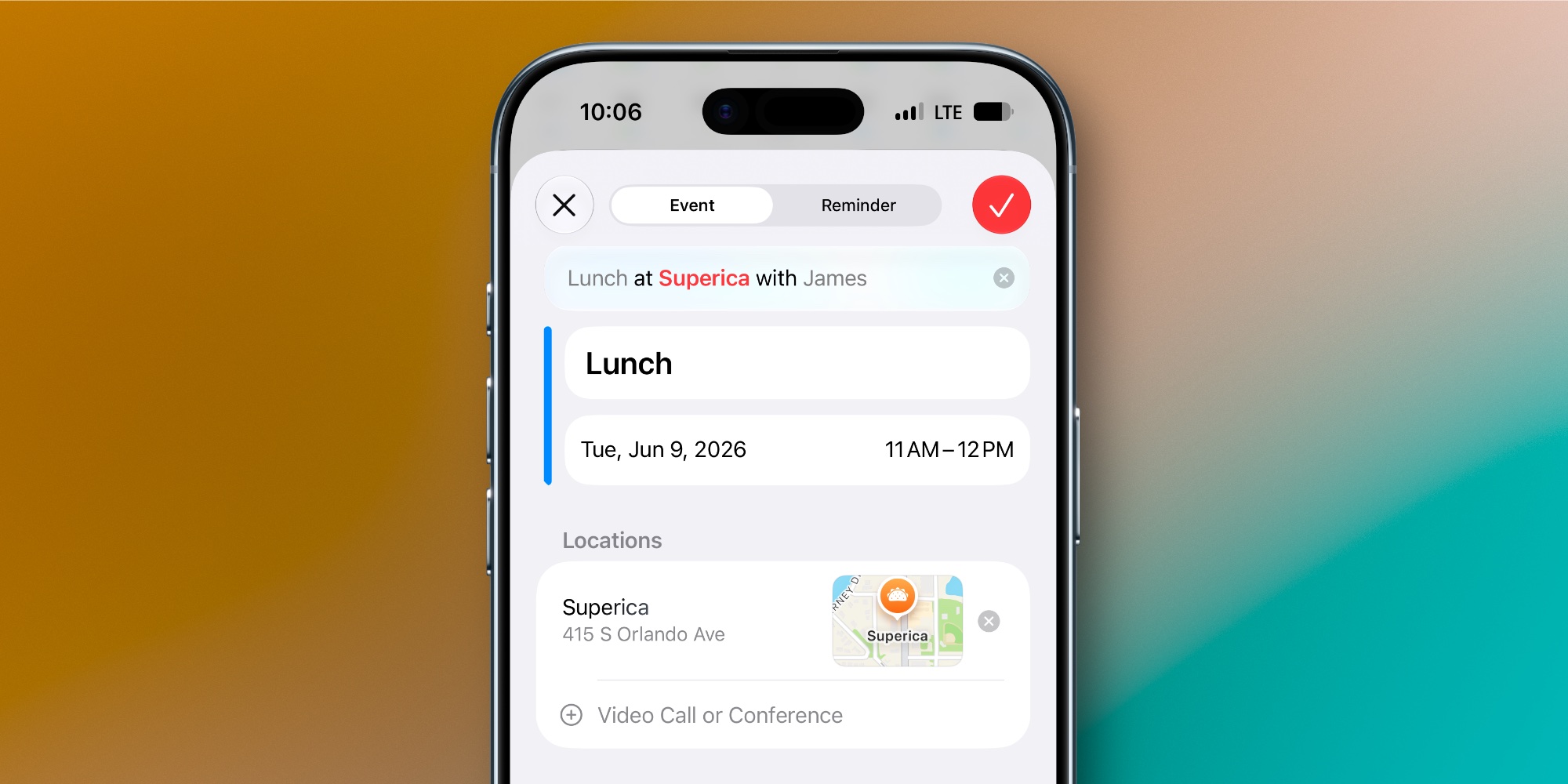

    I’ve used Apple’s Calendar app for years, but there’s one feature that’s been at the top of my wishlist for as long as I can remember: natural language support.

    The excellent third-party app Fantastical has had a robust natural language feature for years.

    Fantastical lets you type all the details about a new event in a single line, just the way you might talk. The app then imports key info like time, location, and invitees without you needing to manually add those separately.

    Now with iOS 27, Apple’s Calendar app has finally added a similar feature.

    Here are the details per Apple’s website:

    Describe an event, add to Calendar. Add and edit events on your calendar with just a description. Easily edit the description to change a lunch meeting to a coffee chat and the Calendar app adjusts the details.

    I’ve been using the new feature all summer in the iOS 27 beta, and it’s worked great for me.

    If you type in “Work meeting at 3pm,” the event will automatically change the event time to 3. And for other parameters that you may or may not want to add, you’ll see suggestions appear at the top of the keyboard.

    So if you write, “Coffee with Mark at Starbucks,” you can tap the suggestion to add the invitee and/or location to your event, or keep them in the event title instead.

    A nice bonus: since the Calendar app also lets you create new reminders, the natural language system extends to any reminders you make.

    How much does natural language input matter to you in your calendar app? Let us know in the comments.

    Best <a href="https://myappsplus.com/how-to-improve-the-audio-quality-on-your-iphone/” title=”How to improve the audio quality on your iPhone”>iPhone accessories

    You’re reading 9to5Mac — experts who break news about Apple and its surrounding ecosystem, day after day. Be sure to check out our homepage for all the latest news, and follow 9to5Mac on Twitter, Facebook, and LinkedIn to stay in the loop. Don’t know where to start? Check out our exclusive stories, reviews, how-tos, and subscribe to our YouTube channel

    Apples Calendar feature gives News
    Follow on Google News Follow on Flipboard
    Share. Facebook Twitter Pinterest LinkedIn Tumblr Email Copy Link
    myappsplus
    • Website

    Related Posts

    VIPs widget redesign, more Pixel Watch gestures

    September 15, 2026

    Samsung Gallery is adding Google Photos backup to replace OneDrive

    September 15, 2026

    All titles confirmed for Switch 2 GameCube library

    September 15, 2026
    Add A Comment
    Leave A Reply Cancel Reply

    Top Posts

    The 6 AI-free Linux distros I recommend most

    August 19, 20264 Views

    AI, automation, robot dogs ensure on-site nuclear safety

    September 7, 20262 Views

    This tiny AI box could save me from upgrading my perfectly good laptop

    September 6, 20262 Views
    Latest Reviews

    New iOS 26 and macOS Tahoe updates fix 30 security vulnerabilities: what you need to know

    myappsplusAugust 18, 2026

    ICE agents can’t wear Meta glasses while they work, official memo warns

    myappsplusAugust 18, 2026

    Ubiquiti sued by Ukrainian families over claims its tech powered Russian battlefield drones

    myappsplusAugust 18, 2026
    Stay In Touch
    • Facebook
    • YouTube
    • TikTok
    • WhatsApp
    • Twitter
    • Instagram

    Subscribe to Updates

    Get the latest tech news from FooBar about tech, design and biz.

    Most Popular

    New iOS 26 and macOS Tahoe updates fix 30 security vulnerabilities: what you need to know

    August 18, 20260 Views

    ICE agents can’t wear Meta glasses while they work, official memo warns

    August 18, 20260 Views

    Ubiquiti sued by Ukrainian families over claims its tech powered Russian battlefield drones

    August 18, 20260 Views
    Our Picks

    More AI Automations with Google Opal

    September 15, 2026

    How to watch Run Hide Fight: Infidels online from anywhere

    September 15, 2026

    Score Anker’s eufyCam C37 4K solar security camera at a $100 low or its 2K counterpart at a $70 low (Up to 30% off), more

    September 15, 2026

    Subscribe to Updates

    Subscribe to our newsletter and get the latest tech news, app updates, AI trends, smartphone reviews, and exclusive deals delivered straight to your inbox.

    Facebook X (Twitter) Instagram Pinterest
    • About Us
    • Get In Touch
    • Disclaimer
    • Privacy Policy
    • Terms & Conditions
    © 2026 MyAppsPlus. All Rights Reserved.

    Type above and press Enter to search. Press Esc to cancel.