Close Menu
MyAppsPlus

    Subscribe to Updates

    Get the latest creative news from FooBar about art, design and business.

    What's Hot

    Two iOS 27 Features Won’t Be Ready for Monday’s Launch

    September 12, 2026

    ‘Absolutely brilliant, providing 4K projection with solid edge-to-edge clarity’ — I was wowed by this Valerion 4K projector’s bold, contrasty picture but less premium-priced projectors are nipping at its heels

    September 12, 2026

    Salesforce introduces new AI agents to automate sales, support tasks

    September 12, 2026
    Facebook X (Twitter) Instagram
    Facebook X (Twitter) Instagram
    MyAppsPlusMyAppsPlus
    Saturday, September 12
    • Home
    • Breaking Tech
    • Apps & Software
    • AI & Automation
    • Android
    • iPhone & iOS
    • More
      • Reviews
      • How-To Guides
      • Deals & Discounts
      • Shop
    MyAppsPlus
    Home»Deals & Discounts»5 new features coming to Android — including improvements to Google Messages, Gemini Live, and Find Hub
    Deals & Discounts

    5 new features coming to Android — including improvements to Google Messages, Gemini Live, and Find Hub

    myappsplusBy myappsplusSeptember 3, 2026004 Mins Read
    Share Facebook Twitter Pinterest Copy Link LinkedIn Tumblr Email Telegram WhatsApp
    Follow Us
    Google News Flipboard
    5 new features coming to Android — including improvements to Google Messages, Gemini Live, and Find Hub
    Share
    Facebook Twitter LinkedIn Pinterest Email Copy Link
    • Google has announced five new Android features
    • These include updates to Google Messages, Gemini Live, and Find Hub, along with the launch of Motion Assist
    • All of these features should either be available now or rolling out soon

    Android is constantly evolving, and you don’t need to wait for major new releases to get new features. Indeed, following on from the launch of Android 17 in June, Google has now announced five new improvements coming to Android.

    These include updates to Google Messages, Gemini Live, and Find Hub, plus a whole new tool to help reduce motion sickness, so there’s quite a lot here.

    You’ll find full details of all five new features below — some of which should be available now, while others are coming soon.

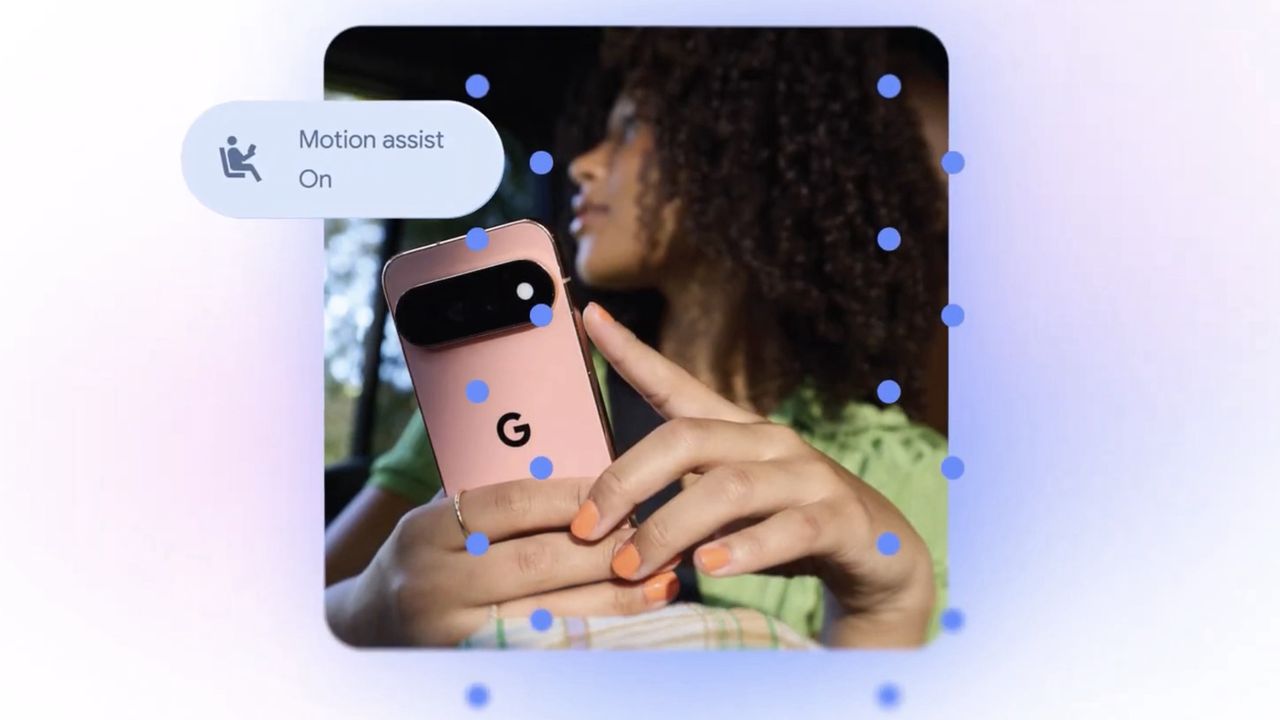
    1. Motion Assist

    We’ve known for a while that Google was working on a feature designed to combat motion sickness, and now it’s finally launching.

    Dubbed Motion Assist, this Android 17 feature places a “subtle bubble overlay” on your screen that’s designed to reduce motion sickness when you’re in a moving vehicle, by moving in time with the vehicle, allowing you to read, browse, and watch videos while in a car or on a bus, train or boat, all without feeling ill.

    You can set Motion Assist to turn on automatically or add it to Quick Settings, and you’re able to customize the shape, color, and opacity of the bubbles.

    It remains to be seen how well it will work, but Apple launched a similar tool called Motion Cues a couple of years ago, and that can make a real difference, so hopefully this will too.

    2. Chat themes in Google Messages

    Google Messages has finally got a feature it probably should have had years ago — customizable chat wallpapers and themes.

    This is actually slightly less new than the other things on this list, as Google already announced the feature and rolled it out a few days ago, but it’s highlighting it again as part of this latest Android announcement.

    With this upgrade, you’ll be able to add more personality to your chats and make them more aesthetically pleasing — but don’t worry, any customizations you add are only visible to you, not the people you’re talking to.

    3. Google Keep in Google Messages

    Google Keep is also being added to Google Messages, meaning you can share a note or a list in a chat and allow it to be updated by everyone in that chat.

    That could be useful if, for example, you want to build a grocery list together or brainstorm vacation or gift ideas. It should make for a handy combination of two existing Google apps, and it’s starting to roll out now.

    4. Remembered items in Find Hub

    Find Hub is soon getting an upgrade that will allow you to make a searchable inventory of your belongings, simply by telling Gemini where they’re stored. It will then remember where they are for you.

    For example, you could say “Hey Gemini, remember in Find Hub that I put my passport in the bottom drawer of my bedside table.” Then, when you need to find it in the future, you can simply ask Gemini where it is — or check the new ‘remembered items’ tab in Find Hub.

    This feature is rolling out soon to phones running Android 16 and above, in countries where Gemini and Find Hub are available.

    5. Guided vision in Gemini Live

    Finally, there’s a new visual assistant in Gemini Live that can deliver audio guidance about your surroundings by looking through your camera.

    The goal here is to “extend your ability to read and understand what’s around you,” so this could be useful for example to read fine print on a label, or read a menu in a low-lit restaurant.

    This feature is coming soon to phones running Android 9 and above, in countries where Gemini is available.

    Android Coming Features including phones
    Follow on Google News Follow on Flipboard
    Share. Facebook Twitter Pinterest LinkedIn Tumblr Email Copy Link
    myappsplus
    • Website

    Related Posts

    Two iOS 27 Features Won’t Be Ready for Monday’s Launch

    September 12, 2026

    ‘Absolutely brilliant, providing 4K projection with solid edge-to-edge clarity’ — I was wowed by this Valerion 4K projector’s bold, contrasty picture but less premium-priced projectors are nipping at its heels

    September 12, 2026

    Ukraine’s army is turning Humvees into remote-controlled vehicles connected by Starlink

    September 11, 2026
    Add A Comment
    Leave A Reply Cancel Reply

    Top Posts

    The 6 AI-free Linux distros I recommend most

    August 19, 20263 Views

    AI, automation, robot dogs ensure on-site nuclear safety

    September 7, 20262 Views

    This tiny AI box could save me from upgrading my perfectly good laptop

    September 6, 20262 Views
    Latest Reviews

    Reddit begins testing a new audio and video experience, similar to popular TikTok videos

    myappsplusAugust 17, 2026

    Stop guessing which AI tool is best — this app tests them all for a one-time $40 (MSRP $499)

    myappsplusAugust 17, 2026

    The $119 MacBook Neo deal going viral on TikTok is a scam, and I almost fell for it — here’s where you can actually find it on sale

    myappsplusAugust 17, 2026
    Stay In Touch
    • Facebook
    • YouTube
    • TikTok
    • WhatsApp
    • Twitter
    • Instagram

    Subscribe to Updates

    Get the latest tech news from FooBar about tech, design and biz.

    Most Popular

    Reddit begins testing a new audio and video experience, similar to popular TikTok videos

    August 17, 20260 Views

    Stop guessing which AI tool is best — this app tests them all for a one-time $40 (MSRP $499)

    August 17, 20260 Views

    The $119 MacBook Neo deal going viral on TikTok is a scam, and I almost fell for it — here’s where you can actually find it on sale

    August 17, 20260 Views
    Our Picks

    Two iOS 27 Features Won’t Be Ready for Monday’s Launch

    September 12, 2026

    ‘Absolutely brilliant, providing 4K projection with solid edge-to-edge clarity’ — I was wowed by this Valerion 4K projector’s bold, contrasty picture but less premium-priced projectors are nipping at its heels

    September 12, 2026

    Salesforce introduces new AI agents to automate sales, support tasks

    September 12, 2026

    Subscribe to Updates

    Subscribe to our newsletter and get the latest tech news, app updates, AI trends, smartphone reviews, and exclusive deals delivered straight to your inbox.

    Facebook X (Twitter) Instagram Pinterest
    • About Us
    • Get In Touch
    • Disclaimer
    • Privacy Policy
    • Terms & Conditions
    © 2026 MyAppsPlus. All Rights Reserved.

    Type above and press Enter to search. Press Esc to cancel.