Close Menu
MyAppsPlus

    Subscribe to Updates

    Get the latest creative news from FooBar about art, design and business.

    What's Hot

    Meta’s Muse has launched in the UK. I found it helpful but awkward

    November 24, 2026

    Baseus’ all-new Spacemate RD1 Mini 10-in-1 dock with smart display is already nearly 50% off for Black Friday Week

    November 24, 2026

    ‘Get the foundation right’: AWS CEO Matt Garman says AI safety can’t rely on an ’emergency brake’, calls for companies to be bold in their deployment

    November 24, 2026
    Facebook X (Twitter) Instagram
    Facebook X (Twitter) Instagram
    MyAppsPlusMyAppsPlus
    Tuesday, November 24
    • Home
    • Breaking Tech
    • Apps & Software
    • AI & Automation
    • Android
    • iPhone & iOS
    • More
      • Reviews
      • How-To Guides
      • Deals & Discounts
      • Shop
    MyAppsPlus
    Home»Apps & Software»2026.44.2 Official Tesla Release Notes
    Apps & Software

    2026.44.2 Official Tesla Release Notes

    myappsplusBy myappsplusNovember 24, 2026023 Mins Read
    Share Facebook Twitter Pinterest Copy Link LinkedIn Tumblr Email Telegram WhatsApp
    Follow Us
    Google News Flipboard
    2026.44.2 Official Tesla Release Notes
    Share
    Facebook Twitter LinkedIn Pinterest Email Copy Link

    Service Menu Redesign

    Available Worldwide
    Undocumented
    Models:
    S
    3
    X
    Y
    CT
    Undocumented

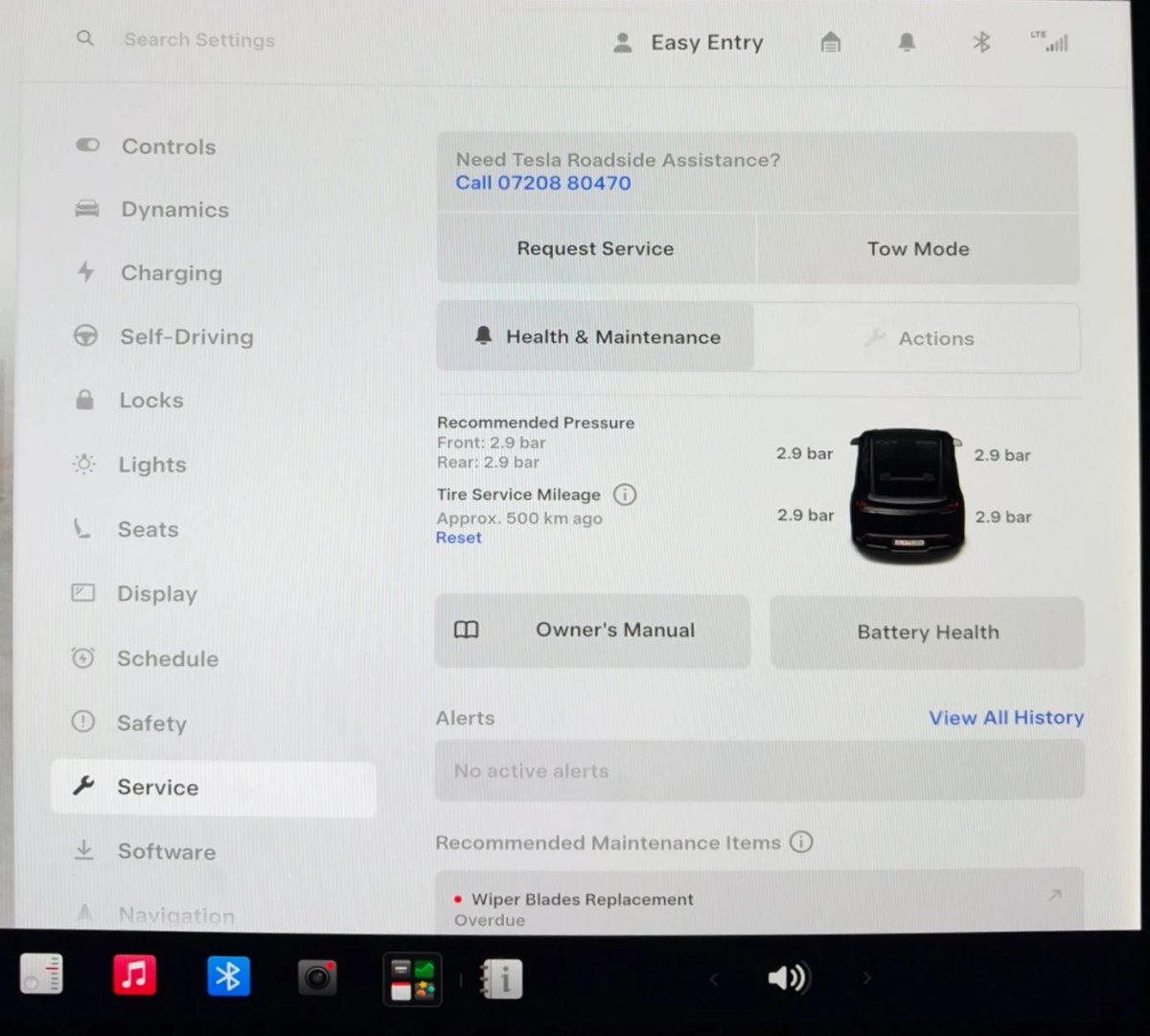
    The Controls > Service menu has received a fresh layout. The new layout brings the Request Service and Tow Mode buttons to the forefront, while organizing content into two sections, Health & Maintenance and Actions.

    Actions holds features such as Car Wash Mode, Wiper Service, Adjust Headlights, and other functions, while Health & Maintenance houses tire PSI, alerts, and recommended service.

    SI Computer
    Tesla SI Computer feature in update 2026.44.2

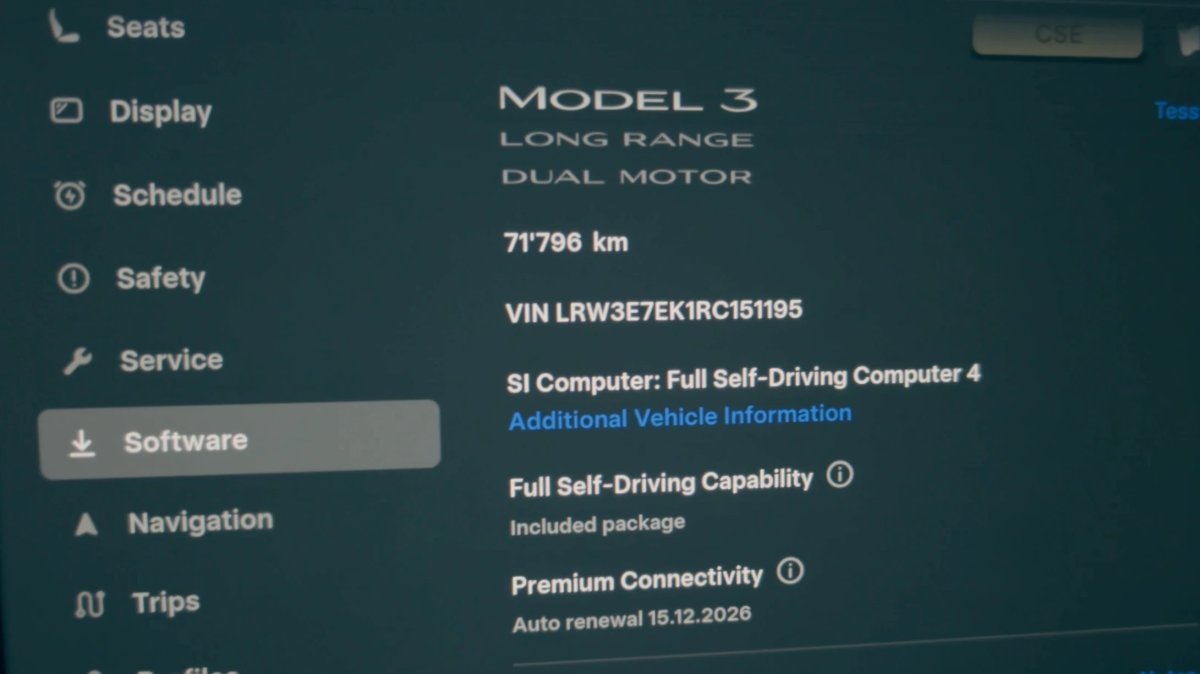
    Tesla has renamed the vehicle’s FSD computer from AI Computer to SI Computer. This shows up in the Controls > Software menu.

    Service Mode Improvements
    Tesla Service Mode Improvements feature in update 2026.44.2

    HV Battery Panel Update – Reset PCS Button

    A Reset Power Conversion System (PCS) button has been added to the HV

    Battery panel PCS popup. The button allows users to reset the PCS Electronic Control Unit (ECU) directly from Service Mode instead of searching for the task in Toolbox.

    Models:Model 3, Model Y, Model S (2021+), Model X (2021+), Cybertruck

    HV Battery and Charging Panel Update – PCS2 Labeling

    The HV Battery and Charging panels now correctly display the component label as Power Conversion System (PCS) 2 when a PCS2 bidirectional unit is installed. Previously, vehicles with PCS2 hardware were still labeled as PCS.

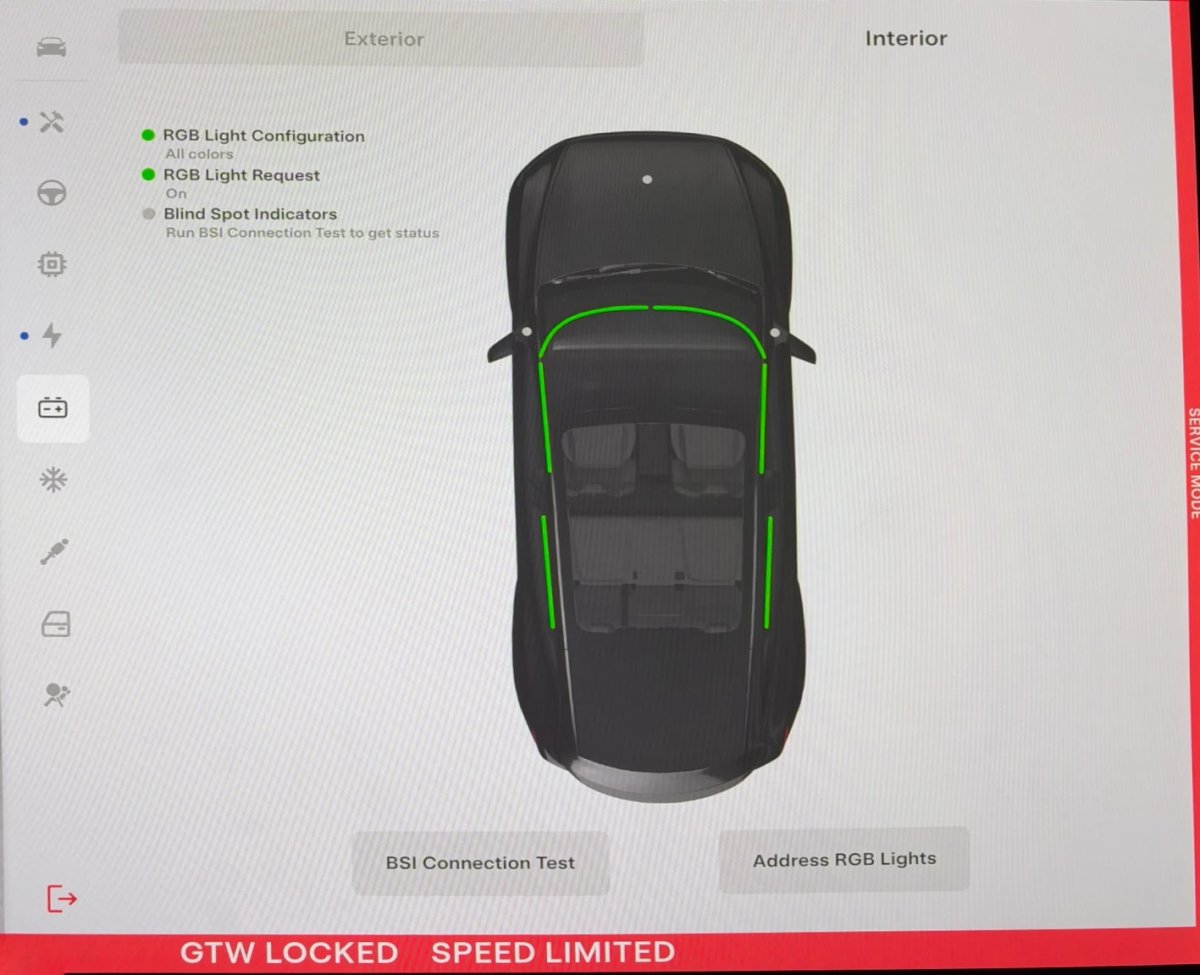
    Interior Lighting Panel Update – Frunk LED Health Indicator

    The Interior Lighting panel now includes a health indicator for the front trunk (or frunk) LED. When the frunk is open, the indicator shows the LED connection status: green for connected, red for disconnected. A disconnected frunk LED is detected LED connector has not been plugged back in after servicing the front area of the vehicle

    Models:Model 3, Model Y, Model S (2021+), Model X (2021+)

    Portuguese Language (Beta)

    Service Mode now supports Portuguese as a language option. Users can select Portuguese from the language drop-down list in Vehicle Info.

    Portuguese is currently in beta and may contain translation inaccuracies.

    Service Mode Update – Feedback Button (Service Mode Plus)

    The feedback feature has been updated with a new in-app experience, replacing the previous email and QR code. A Feedback button is now available in the navigation sidebar. Tapping it opens a form where users can select a category (Bug, Improvement, or Translation), enter a description, and optionally place an on-screen marker to highlight the area of concern.

    CAN Viewer Button Removed and Renamed to Signal Viewer (Service Mode Plus)

    The CAN Viewer button has been removed from the Vehicle Overview page and renamed to Signal Viewer. Signal Viewer is now only accessible from the Tools section in the navigation menu.

    More Features Coming Soon

    Tesla More Features Coming Soon feature in update 2026.44.2

    This update includes several hidden changes that hint at upcoming features.

    One change is receiving notifications if a Supercharger you’re navigating to suddenly becomes busier or less busy, and the price changes. Drivers will receive an in-vehicle alert saying the Supercharger price has decreased or increased.

    There are also upcoming Grok changes, with one suggesting that Grok’s wake word may be improved with an on-vehicle model.

    Vehicle navigation may soon also offer a new option to prefer major roads and avoid smaller or unpaved routes.

    2026442 Notes Official Release Tesla
    Follow on Google News Follow on Flipboard
    Share. Facebook Twitter Pinterest LinkedIn Tumblr Email Copy Link
    myappsplus
    • Website

    Related Posts

    AdExchanger

    November 24, 2026

    The reasons why you should never ignore your car’s software updates

    November 24, 2026

    YouTube appears to be quietly testing a new mute button in its video UI

    November 24, 2026
    Add A Comment
    Leave A Reply Cancel Reply

    Top Posts

    The pros and cons of using your phone as a mobile hotspot

    November 16, 202647 Views

    UiPath Launches AI Coding Agent, Integrates Claude Code and Codex to Target Development Automation

    November 16, 202646 Views

    Save on your groceries, gas, and holiday shopping with this $15 BJ’s membership (Reg. $60) 

    November 4, 202634 Views
    Latest Reviews

    iPhone price hike ‘better than feared,’ Duo to drive cycle demand

    myappsplusSeptember 11, 2026

    Fairbuds 2 leak gives us an early look at a very different design

    myappsplusSeptember 11, 2026

    Intel says it has already passed a million High-NA EUV wafers – more than the rest of the industry combined

    myappsplusSeptember 11, 2026
    Stay In Touch
    • Facebook
    • YouTube
    • TikTok
    • WhatsApp
    • Twitter
    • Instagram

    Subscribe to Updates

    Get the latest tech news from FooBar about tech, design and biz.

    Most Popular

    Ford CEO hits back at government ‘mistruths’ about China —as its $28K electric truck prepares to take on Slate and Chinese rivals

    September 12, 20260 Views

    Monitoring production agent lifecycle with AWS DevOps Agent and AgentCore Evaluations

    September 12, 20260 Views

    You can still shop these robot vacuums

    September 12, 20260 Views
    Our Picks

    Meta’s Muse has launched in the UK. I found it helpful but awkward

    November 24, 2026

    Baseus’ all-new Spacemate RD1 Mini 10-in-1 dock with smart display is already nearly 50% off for Black Friday Week

    November 24, 2026

    ‘Get the foundation right’: AWS CEO Matt Garman says AI safety can’t rely on an ’emergency brake’, calls for companies to be bold in their deployment

    November 24, 2026

    Subscribe to Updates

    Subscribe to our newsletter and get the latest tech news, app updates, AI trends, smartphone reviews, and exclusive deals delivered straight to your inbox.

    Facebook X (Twitter) Instagram Pinterest
    • About Us
    • Get In Touch
    • Disclaimer
    • Privacy Policy
    • Terms & Conditions
    © 2026 MyAppsPlus. All Rights Reserved.

    Type above and press Enter to search. Press Esc to cancel.