

Affiliate links on Android Authority may earn us a commission. Learn more.
Your Samsung Gallery app finally syncs with Google Photos — how to set it up right now
For better or worse, OneDrive’s gone.
By
•
•
•
Pankil Shah / Android Authority
Add Android Authority on Google:
Preferred SourceGoogle Discover
Samsung just changed how Galaxy users back up their photos through the Gallery app. After years of OneDrive integration, Samsung Gallery now syncs with Google Photos instead.
That’s great news for anyone who loves Samsung Gallery but keeps Google Photos installed for cloud backup. I’m one of those people, so I had to try this new setup and see exactly how it works, what you get, and — most importantly — what you lose compared to backing up directly through Google Photos.
Did you use the previous OneDrive integration in Samsung Gallery?
What’s changing with Samsung Gallery
Pankil Shah / Android Authority
For the longest time, Samsung Gallery has relied on OneDrive for cloud backups, which meant you didn’t need another app or manual backups to keep your photos safe. It also made Samsung Gallery a worthy alternative to Google Photos, especially for those who preferred Microsoft’s ecosystem.
But that’s changed now. Samsung officially ended Gallery’s OneDrive integration on September 30, 2026. That means you’ll no longer see the “Sync with OneDrive” option inside the Gallery app. This doesn’t affect anything you’ve already backed up, of course — those photos and videos are safe. In fact, you can continue backing up to OneDrive, but you’ll have to do it through the OneDrive app. It’s not as seamless as before, but the option is still there if you want it.
The bigger news, though, is that Samsung Gallery can now sync directly with Google Photos. That’s obviously great for people like me who already use Google Photos for cloud storage but prefer Samsung Gallery for managing photos.
How to enable Google Photos sync in Samsung Gallery
Setting up Google Photos sync in Samsung Gallery is pretty straightforward, although you can only use a personal Google account for backup. Workspace accounts aren’t supported, so if you have a work or school account, this won’t work with those. You’ll also need Gallery version 15.9.01.7 or later, so make sure the app is updated by heading to the Galaxy Store. Once you have everything ready, enabling Google account backup is as easy as it gets.
- Open the Samsung Gallery app
- Tap the Menu icon at the bottom and choose Settings.
- Go to Sync photos and videos.
- Select the Google account where you want to back up photos and videos.
- Tap Continue.
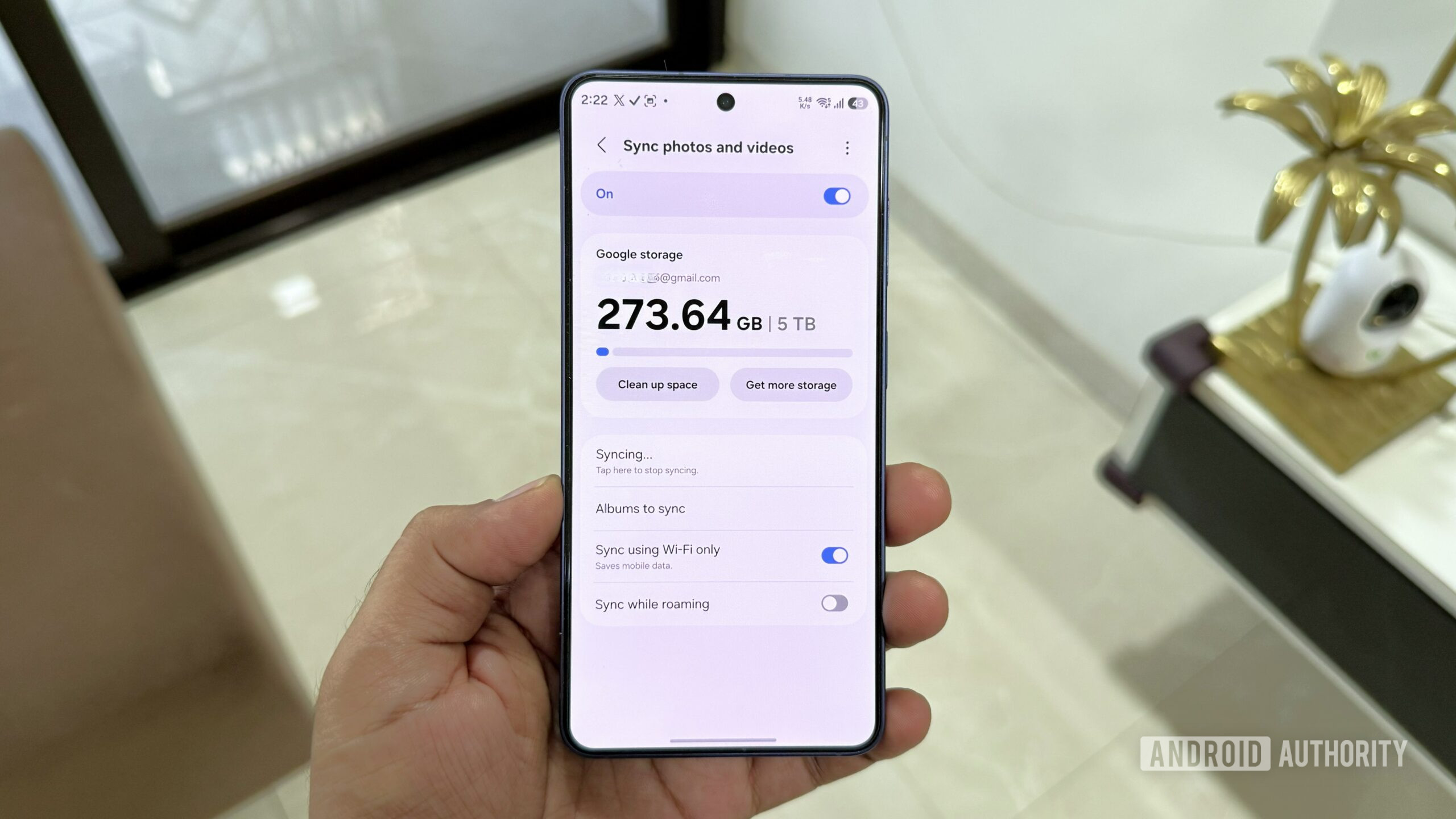
Samsung Gallery will now show your Google account’s storage status and start backing up your photos and videos. By default, it only backs up your camera roll, but you can change that by tapping Albums to sync. You can also allow Gallery to sync over mobile data or while roaming using the toggles in the same menu.
And that’s really the whole setup. You don’t need to do anything else here. As long as your Google account has enough free storage, the Gallery app will continue backing up your photos and videos. And if you’re running low on storage, Samsung Gallery shows options to free up space in Google Photos or upgrade your Google One plan in the same menu.
Once you’ve set everything up, your Samsung Gallery and Google Photos libraries will stay in sync. You can view your backed-up photos in the Google Photos app or on the web, and if you delete a photo from either app, it’ll be removed from the other app automatically.
Edits work slightly differently depending on where you make them. If you edit a photo in Samsung Gallery, the edited version is updated across all your Samsung devices, but it shows up as a new photo in Google Photos. If you edit a picture in Google Photos, it’s updated inside the Gallery app.
Samsung Gallery and Google Photos backups work slightly differently
Joe Maring / Android Authority
Google account sync inside Samsung Gallery is a pretty big deal, but that doesn’t make the Google Photos app redundant. There are still a few perks of backing up directly through Google Photos. The biggest difference is that photos backed upories, Highlights, Live Albums, or Search. If you want those features, you’ll need to back up your photos directly through the Google Photos app
Another major catch is that Samsung Gallery can only show photos and videos that are backed up via Gallery Cloud Sync. That means if you back up photos from another device using the Google Photos app, they won’t appear in Samsung Gallery. Also, unlike Google Photos, Samsung Gallery doesn’t offer a manual backup option to upload specific photos and videos. So yes, the Google Photos app still has its place. If you already use it as your main gallery app, there are still good reasons to stick with it.
Backing up through Samsung Gallery has its own advantages too. The biggest one is that you no longer need to keep Google Photos installed just for backups. The only catch is that these photos won’t get the full Google Photos experience. For example, when you use Google Photos on the web, you won’t be able to use the search tool to find anything backed up through Samsung Gallery Cloud Sync.
This is obviously a rough one for Microsoft 365 subscribers who are still paying for OneDrive storage. For them, backing up to OneDrive is slightly trickier now. But for those already in Google’s ecosystem, this is pretty much a straight upgrade.
So where do you land on this? Do you think this new change makes things easy or more complicated for you? Share your thoughts in the comments.
Features
CloudGoogleGoogle PhotosSamsungSamsung Galaxy
Follow
Thank you for being part of our community. Read our Comment Policy before posting.
