

VZMORE AX9 Max AI: 30-second review
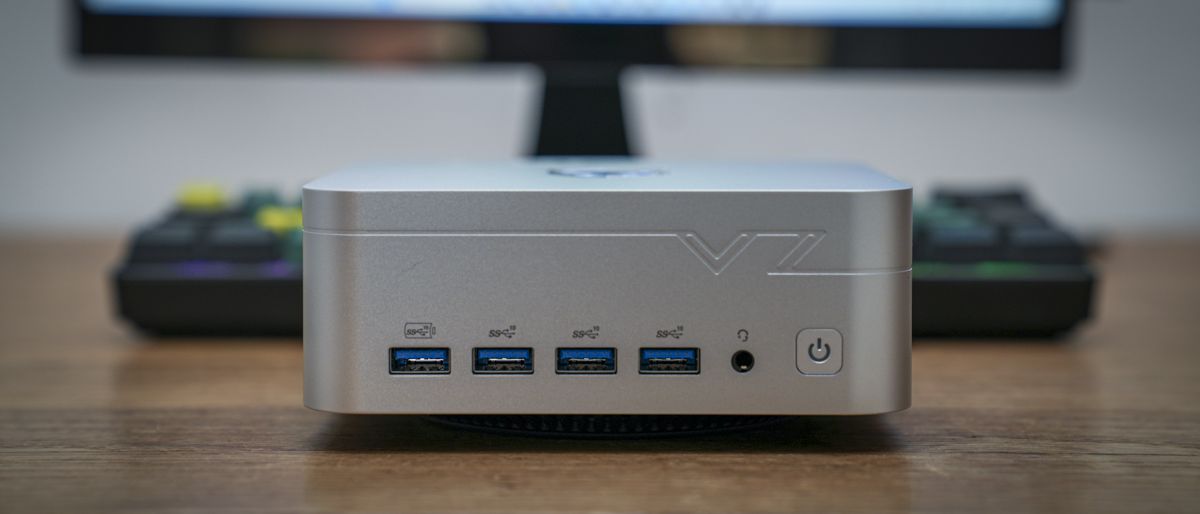
The AX9 Max instantly feels premium, with a full metal build and a huge array of ports on the front and back. However, as you look closely at the embossed detailing around the edges and a logo that seems to blend the old Cadillac and Ferrari logos, something about the aesthetics starts to looks a little less premium.
Aesthetics aside, the build quality is solid enough and well finished, with the most impressive aspect being the sheer volume of ports that have been fitted around the exterior. On the front, there’s a selection of USB Type-A ports and the usual headphone jack; around the back, there are even more connectivity options, including two USB4 ports.
To handle the potential power draw of the devices you can hook up to the box, it packs a powerful AMD Ryzen AI 9 HX 470 processor which is supplied with the 120W power supply. The processor is relatively new, launched at the start of 2026, so it has had a good amount of time to bed in and now has a proven track record. This is supported by an integrated GPU and a dedicated NPU for all those new AI workloads.
As the test progressed, the machine’s speed in Microsoft Office apps and the Adobe Creative Suite highlighted its potential. During video editing, the internal SSD kept pace with high-resolution edits without issue. However, a little more headroom on the 1TB capacity would have been beneficial.
Storage and RAM are the two interesting points of this machine. While both are modest in my review sample, maxing them out could turn this from a powerful mini PC into something that will hold great interest for anyone looking to run offline AI and larger LLMs, although that potential does come at a huge monetry cost.
Throughout the test, the creative applications and handling of video and image files were limited by the 32GB of RAM and 1TB SSD. However, with two USB4 ports, I could at least boost the storage capacity. For most HD and 4K edits, the machine handled rough cuts and transitions in Premiere Pro quickly and without issue, though more RAM would have helped.
The most interesting test was running LM Studio and a few local models; while general performance was good, especially for models that utilised the NPU, I could see where the 32GB RAM limit restricted what the machine could potentially do, limiting it as the best mini PC specifically for AI workloads.
For gaming, at mid settings in most games like Cyberpunk 2077 and Indiana Jones and the Great Circle, the machine was more than capable of supplying the power needed for the action. However, again, a little more RAM would have smoothed some of the minor slowdowns in gameplay, especially in Cyberpunk 2077 where quality settings had to be lowered.
This is a machine with potential, and while undoubtedly expensive for a mini PC with a 1TB SSD and 32GB RAM, that money is invested in that powerful CPU, GPU and NPU combo and the ability to expand the storage to a far greater degree than I have seen on the vast majority of other mini PCs of this size and type.
VZMORE AX9 Max AI: Price and availability
- How much does it cost?From $1,349
- When is it out?Available now
- Where can you get it?Directly from VZMore and online retailers.
At present, the UK price is £1,349 for the 32GB RAM and 1TB SSD configuration I’m looking at in this review.
At the time of review, the US site is down (maybe it’s just me?), however, it’s available on Amazon for $1,399.
VZMORE AX9 Max AI: Specs
Processor:AMD Ryzen AI 9 HX 470
Graphics:AMD Radeon 890M
NPU:AMD Ryzen AI, up to 55 TOPS
Memory:32GB DDR5
Storage:1TB PCIe 4.0 SSD
Operating System:Windows 11 Pro
Front ports:5 × USB 3.2 Gen 2 Type-A, 3.5mm Audio
Rear ports: 2 × USB4, USB 3.2 Gen 2 Type-A, USB 2.0 Type-A, 2 × HDMI 2.1, 2 × 2.5Gb Ethernet
Wireless:Wi-Fi 7, Bluetooth 5.4
Card Reader:SD 4.0
Power Modes: Silent 45W, Balanced 54W, Performance 65W
Dimensions:Approx. 134.9 × 131.8 × 57.7mm
Weight:777.5g
Power Adapter: 120W
VZMORE AX9 Max AI: Design
Unpacking the compact AX9 Max, the metal casing and detailed plastic base of this mini PC instantly reinforced its price point. Only after carefully checking the detailing and the large, shiny logo on top did I start to question whether this was a premium machine or just one trying to look premium.
Checking the specifications and that the price point was justified, but there’s still something about the design that feels a little over the top. The rest of the design is solid, and at 134.9 × 131.8 × 57.7mm and 777.5g, it’s a great size and weight for this style of machine.
Around the casing, there are four USB 3.2 Gen 2 Type-A ports and a 3.5mm stereo headphone jack. On the left side of the casing is an SD 4.0 memory card slot, while the back has two USB4 Type-C ports, a USB 2.0 port, two HDMI 2.1 ports, two 2.5Gb RJ45 sockets, a USB 3.2 Gen 2 Type-A port, and the DC-in port.
Despite the number of ports, they’re well laid out, and testing with multiple accessories, SSDs, and other card readers showed the port selection offered enough space to easily plug in and remove cables when needed.
You access the inner workings of the mini PC through the base, and while it’s designed to be upgraded, initial access proved tricky, but only because of the four small rubber plugs covering the screw holes.
Once these are removed, removing the base is easy, and thankfully there are no easily detachable wires to get in the way of speedy progress.
VZMORE AX9 Max AI: Features
The aesthetics of this machine are quite run-of-the-mill despite the premium metal build. However, as I checked the specifications, I found plenty that’s quite exciting. First, it features the AMD Ryzen AI 9 HX 470 with 12 cores and 24 threads, plus Radeon 890M integrated graphics. That’s a powerful combo, especially with the dedicated NPU rated at 55 TOPS.
To keep up with this processing power, the machine has a substantial cooling system; flip it over, and the base design suddenly makes sense, as it, along with the huge venting on the back, is designed to keep the machine cool.
VZMORE has its own cooling system called V-Cooling, which uses a vapour chamber and a 360º air intake on the base, and the company claims it provides 65W of sustained TDP output while keeping things quiet. In testing, this claim held up: the cooling seemed effective and quiet for the most part until it was put under heavy load and even then while the fans are audible they’re still well managed.
As mini PCs go, one of the first notable features is the sheer volume of ports across the body. This is far more than most, with wireless connection options including Wi-Fi 7 and Bluetooth 5.4.
There are also three selectable power modes, including 45W Silent mode, 54W Balanced and 65W Performance. Through this test, I turned it to Performance mode.
This machine is aimed at creatives, those looking to use AI and gamers- all high-demand applications. As I reviewed the specifications, a couple of points stood out. First, the internal SSD was limited to 1TB in the review sample, and given the machine’s price, I expected at least 2TB.
The other point is that the SSD is PCIe Gen 4 x4, which still provides plenty of speed, as I saw in the benchmarks, but I would have expected an upgrade to PCIe Gen 5. The other point is that there are two M.2 slots: one pre-installed with an M.2 2280 module and one M.2 2230, slot that can only take up to 1TB. That’s still 5TB in a relatively small box, but for this price, I would have expected a little more.
the main point here is that CPU, GPU and NPU combo is an expensive choice and that’s what you’re paying for here.
Then comes the real surprise, the RAM. This is 32GB of DDR5 SO-DIMM, split into dual-channel. That in itself isn’t unusual, but since AI is one of the machine’s key selling points, this 32GB can be upgraded to 256GB. However, at the time of writing, the most that I could find was 128GB in two 64GB modules for the cool price of £1,999. This could be possible, but would you really want it?
In this test, I’ve run Qwen3.6-35B-A3B and Gemma-4-26B-A4B through LM Studio.
VZMORE AX9 Max AI: Performance
CrystalDiskMark Read: 6047.65MB/s
CrystalDiskMark Write: 5058.87MB/s
Geekbench 6 CPU Multi: 15845
Geekbench 6 CPU Single: 2997
Geekbench 6 GPU: 44325
Geekbench 7 CPU Multi: 17377
Geekbench 7 CPU Single: 2723
Geekbench 7 GPU: 35288
PCMark Overall: 8910
Cinebench R23 CPU Multi (Threads): 21568
Cinebench R23 CPU Single (Threads): 2076
Cinebench 2026 CPU Multi (Threads): 5074
Cinebench 2026 CPU Single (Threads): 493
Fire Strike Overall: 9027
Fire Strike Graphics: 9842
Fire Strike Physics: 32446
Fire Strike Combined: 3340
Time Spy Overall: 4275
Time Spy Graphics: 3857
Time Spy CPU: 11109
Wild Life Overall: 24408
Steel Nomad Overall: 770
Windows Experience Overall: 8.2
Procyon: 1179
The machine arrives with Windows 11 Pro pre-installed and only needs the final steps of the installation to be completed. However, this takes a good 10–15 minutes, rejecting each of the many packages on offer. Once in, Windows 11 Pro runs smoothly, and the Microsoft Office suite is fast, as is interaction with Windows as a whole. Word, Excel, and PowerPoint are all well within its capabilities.
Moving on to Photoshop and Lightroom, the machine’s power is evident, but the limits of 32GB of RAM are quickly apparent. The applications load quickly, and photos load into Photoshop and Lightroom are easily adjusted. It’s only when I do batch updates in Lightroom or select files in Adobe Bridge that I started to notice the limitations. On a machine at this price, I really expected a little more performance, and checking the Device Monitor showed the RAM topping out.
Again, loading Premiere Pro and some HD and 4K video, the initial HD footage ran smoothly, with the AX9 Max handling the video files with ease. 4K video was handled just as well, but again, RAM limits meant that as the edit grew more complex, it was best to give the machine a few seconds to catch up with the renders. Still, a good 5-minute 4K edit is well within the limits, and again it’s the RAM that holds the machine back. Another point was that I needed to connect an external SSD to one of the USB4 ports because of limited storage.
Overall, the machine is exceptional for heavy office use and more than able to keep up with the demands. What stood out was how easy it was to connect multiple accessories and screens, thanks to the port support around the case.
For creative applications, the machine performed well and handled most task with relative ease, although I would definitely boost the RAM to 64GB for video work.
To really test the machine’s potential, I loaded Indiana Jones and the Great Circle and was pleased to see that, with settings at moderate, it was more than capable of delivering smooth gameplay and stunning graphics. However, when I switched to Cyberpunk 2077, the gameplay faltered, and I had to dig into the settings and dial everything back to near-base levels to get the smooth gameplay I prefer.
The final test was to run a few LLMs locally and run a series of tests on the machine. The results here were mixed as I switched between two models, Qwen3.6-35B-A3B and Gemma-4-26B-A4B. On the initial run, I noticed that as the five tests I ran, technical writing, programming, reasoning, image understanding, and review analysis, became more intensive, the machine slowed down and the available RAM maxed out.
Using the installed models in LM Studio provided decent performance, with the chat flowing easily and responses coming back relatively quickly, in 2 to 5 seconds. However, as complexity rose, so did processing times and machine noise.
First, with every request, RAM maxed out between 95% and 99%, leaving little, if any, headroom for the machine to do anything else. The first test, writing a short 200-word technical piece with the Qwen model, took 4.38 seconds to get the first response, at 19.1 tokens per second, requiring 5920 output tokens, for a total run time of 316.7 seconds. Far slower than online models, but still all done completely offline.
Less complex models completed this task far faster, with less finesse in the wording.
Running a Python coding task to read and organise a folder of image files, again using the Qwen model, maxed out the machine across the board, with the fans kicking in to keep things cool. Time to first token was just over 1 second, with 18.84 tokens per second; 7653 output tokens took 407.36 seconds to complete the task. This was more impressive as the folder contained 2,764 images. The Python script could then be run to create a CSV file containing the file information. This is base-level organisation.
As I started pushing more complex image-analysis models, the machine’s limits were hit, with processing times running in excess of ten minutes, mainly due to limited RAM.
However, the local LLMs available in LM Studio are surprisingly good, but they aren’t a replacement for online or higher-end models.
VZMORE AX9 Max AI: Final verdict
The VZMORE AX9 Max AI Mini PC is a powerful mini PC with plenty of potential and a premium build. The aesthetics and large logo on top feel a little out of place for a machine at this price and for its intended audience; I usually associate that type of styling with entry-level models.
It is undoubtedly a powerful machine with a CPU, GPU and NPU that make light work of most Copilot and app-initiated AI tasks, and even with 32GB of RAM, it handles all office and most creative tasks without issue. What surprised me was that it struggled with some AI processing through LM Studio, with longer-than-expected processing times because the 32GB limit pushed the RAM to near 100% for extended periods.
Likewise, while most games played back smoothly, Cyberpunk 2077 struggled with the graphics, and the quality options and resolution had to be dropped to get smooth gameplay. Other games, such as Indiana Jones and the Great Circle, played well.
Creative use was also mixed, again held back by that 32GB of RAM, which topped out in Premiere Pro, causing slight slowdowns when editing 4K Log footage. Editing standard 4K and HD was fast, though I still needed to attach an external SSD to expand storage.
The point is that the machine supports up to 256GB of RAM, far more than I’ve seen in any other mini PC. However, as I couldn’t find 128GB modules in the UK, and the maximum available at this time is 2 × 64GB, costing between £1,500 and £2,000, this value seems to be theoretical rather than a reality.
As it is, this is a powerful mini PC, but while it offers upgrade options and plenty of connectivity, it feels like it overpromises; to reach its full potential, you’ll need to invest more in upgrades. At present what makes this machine the price it is, is that CPU, and in order for you to see it’s full potential this machine needs far more investment.
Should I buy the VZMORE AX9 Max AI?
|
This mini PC sits at the top of the premium mini PC price range, and I would have expected more RAM and a larger-capacity SSD |
||
|
Initial impressions of the build and materials are good, but some of the styling is a little over the top. |
||
|
The feature set is impressive, but it feels like it supports potential rather than out-of-the-box performance. |
||
|
In general use, this small box packs in performance, but without a major investment, it’s still a long way from its full potential. |
||
|
A decent enough premium mini PC with plenty of potential if you’re willing to invest. |
Buy it if…
You need a compact PC with CPU performance.
The AMD CPU, GPU and NPU combine to offer impressive performance across the board.
You need high-speed external connectivity.
With dual USB4 and LAN, you get plenty of fast and standard connectivity options.
Don’t buy it if…
You need a dedicated GPU for demanding graphics or 3D workloads.
The USB4 port lets you connect to an eGPU, but if you need that processing contained in this small box, this won’t be the solution.
You need local AI performance.
To reach its potential, you’ll need to invest in additional RAM, which is incredibly expensive.
For more professional-grade desktops, we’ve tested thebest business computers.
