

Having recently spent time with MelGeek’s Made68 Ultra V2 keyboard, I came away declaring my love for its magnetic switches, slick styling and clean sound. With those things fresh in my mind, I approached the Centauri60 Evangelion ‘Asuka Edition’ expecting a familiar experience. What I found instead was a keyboard that carries over everything I liked about the Ultra V2 while improving the parts that matter most to me in everyday use.
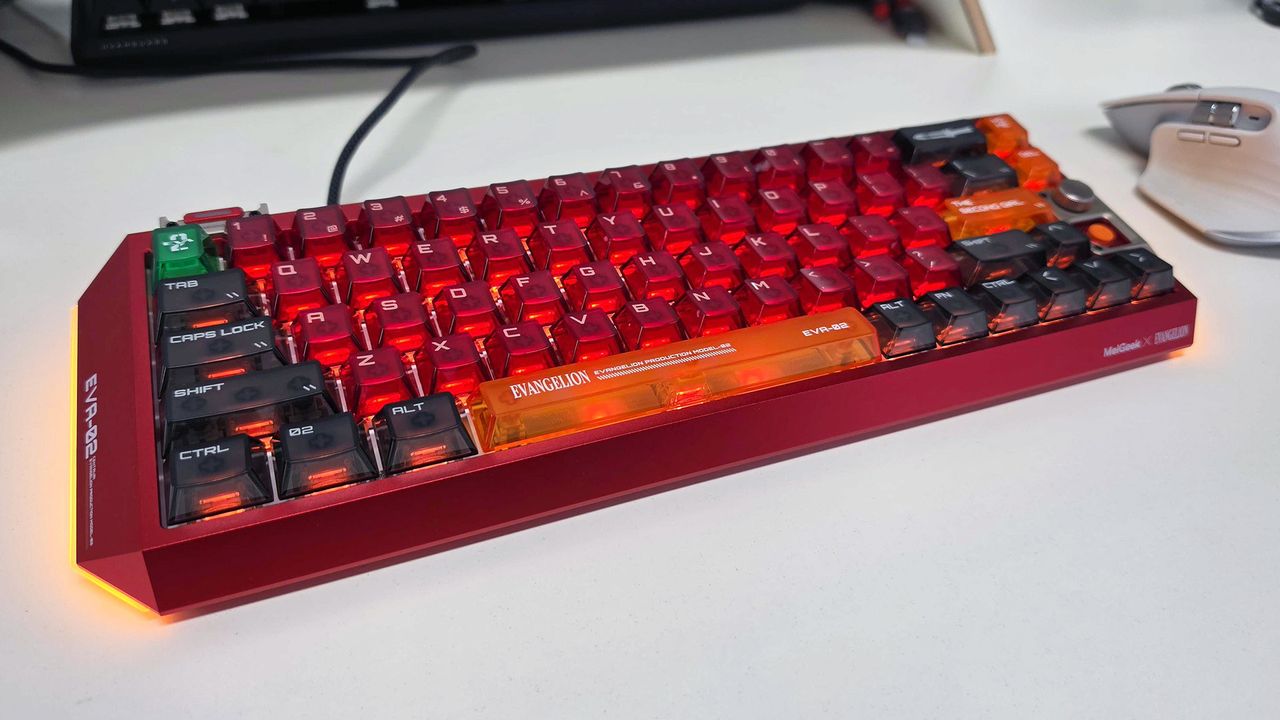
The Asuka Edition isn’t exactly subtle — it leans into its Evangelion theme and makes no effort to hide it. You get a ‘dominant’ red case, sharp angled edges, lighting strips on both sides, a hidden engraving of Asuka’s most iconic line, a Prog‑Knife motif, a metal nameplate built into the frame, and a laser‑etched EVA‑02 insignia. It’s unapologetically bold and openly geeky, far more so than the Made68 Ultra V2 I tested earlier, and that personality hits you straight away.
And yes, the volume knob is still one of those small touches that makes a big impact. On a 60% board, having a tactile media control feels like a luxury, and it’s one I’m thankful for given its absence from the Made 68 Ultra V2. Of course, there’s more to the Centauri60 than its theme — it’s a keyboard which so resoundingly nails its build, sound, feel, gaming features and typing experience, that it’s now become my daily driver at home — here’s why.
The acoustic profile is where the Centauri60 surprised me most. The Ultra V2 I tested sounded super clean, but it used KOM Lite switches which resulted in a brighter, snappier sound signature. The Centauri60, by contrast, comes installed with TTC Flip King magnetic switches, which I instantly preferred for their deeper, more muted tone.
Another major contributor has to be its CNC aluminium unibody, which weighs a hefty 1.32kg and provides a dense, vibration‑absorbing foundation. Compared to some of the more plastic-centric keyboards I’ve used in the past, this heavy-duty body noticeably suppresses higher‑frequency noise while letting lower tones develop more fully, giving the board a richer, more grounded sound.
The Centauri60 also uses a five‑layer acoustic dampening system — a combination of Poron foam, PET film, and a leaf‑spring gasket mount — designed to eliminate hollow cavities and absorb unwanted resonance. The result, in my estimation, is a keyboard that minimises harsh clacks for a smoother, more “creamy” signature
The magnetic switches certainly help with consistency, but the case design and acoustic layering are doing most of the heavy lifting, resulting in a sound profile that makes you want to keep typing simply because it sounds so great.
Easily the sturdiest keyboard I’ve ever tested
The build quality on the last MelGeek board I tested was already impressive, but the Centauri60 feels like a step up in every direction. Its machined aluminium chassis has that dense, rigid character you’d expect from a well‑cut block of metal, and there’s genuinely no flex anywhere in the frame. The tighter tolerances, cleaner seams, and more even weight distribution give it a more confident, premium feel — even compared to the already excellent Made68 Ultra V2.
Granted, I’ve only used two MelGeek keyboards to date, but it feels like there’s very little room for improvement when it comes to the Centauri60’s build quality. Compared to the Made68 Ultra V2, there’s a more deliberate weight to the board when you pick it up — 1.32kg (2.91 lbs) to be exact — so you know it won’t slide around your desk in the heat of online battle.
That weight distribution also contributes to a “single‑piece” feel in hand, something that really sells the mecha‑like character of the board. Nothing shifts, nothing creaks, and the chassis feels impeccably engineered in true Evangelion fashion. It’s so good, it could almost make Shinji’s father smile — if he were capable of such a thing.
Immaculate styling for Evangelion fans
As mentioned earlier, the Asuka Edition’s red colourway is easily its standout feature. It’s a saturated, confident red that really drives home its Evangelion inspiration. It’s unashamedly geeky, and its lighting helps amplify that personality: the south‑facing RGB shines cleanly through the keycaps. That bothered me somewhat on the Made68 Ultra V2, largely due to the dark purple text which made the keys hard to read. Here, the characters are white, making them far easier to make out at a glance.
Speaking of keycaps, the Asuka Edition employs a mix of red, orange and charcoal caps that mirror Asuka’s Unit‑02 palette, and the legends use Evangelion‑inspired typography that give the board a cool, futuristic vibe. The accent keys — particularly the green escape key and the darker modifiers — continues the anime‑driven look in a way that feels cohesive. Even the bottom of the case carries EVA‑specific detailing — the aforementioned “hidden” engraving — making the board feel like a collectible rather than just a themed variant.
The biggest downside of the entire keyboard sits right at the back: the USB‑C port. The port itself is recessed, but the real issue is the extra lip on MelGeek’s own USB‑C cable, which is designed to slot perfectly into that recess for a snug fit. Because of that proprietary lip, almost no third‑party cable can seat properly. So if you were hoping to pair the board with a coiled cable or any non‑MelGeek option, you’ll have to let that idea go or start thinking in terms of soldering irons. For a board that otherwise nails its visual identity, this restrictive setup feels out of place — and it’s the one styling choice that genuinely frustrated me.
Fully specced for modern gaming
The Centauri60’s magnetic switch system performs on par with any Hall‑effect board I’ve tested, delivering consistent, predictable keystrokes that can be tuned to impressively fine sensitivity. All the core features — rapid trigger, SOCD cleaning, adjustable actuation, analog‑style travel sensing, NKRO and zero‑dead‑zone behaviour — run smoothly and without any fuss.
Actuation can be adjusted from 0.1mm all the way to 3.4mm, giving you plenty of control whether you prefer hair‑trigger responsiveness or a more deliberate typing feel. Rapid Trigger is adjustable from 0.01mm to 2.5mm, resetting the moment a key starts to rise, which makes repeated inputs feel snappy and effortless. SOCD cleaning is handled in firmware and follows standard competitive rules, ensuring clean directional behaviour when opposite keys are pressed.
The switches also support full analog‑style travel sensing, with 0.01mm precision, allowing the board to read the exact depth of each keypress rather than just on/off states. In practice, this enables multi‑stage actions, variable movement speeds and pressure‑sensitive inputs in supported games. The keyboard runs at an 8,000Hz polling rate with a 0.125ms latency, and key response feels immediate whether you’re typing or gaming.
Man’s ultimate fighting machine
While I loved almost everything about MelGeek’s Made68 Ultra V2, the Centauri60 Evangelion ‘Asuka Edition’ improves on it in several of the areas which are most important to me. It’s got incredible styling that’s inspired by my favourite Evangelion character and EVA unit, its build quality feels strong enough to go into battle with Angels, its acoustics are deeper and thockier than that keyboard in a way that I find immensely satisfying, and its highly tunable Hall-effect switches give me all the high-end features I need in a competitive gaming keyboard.
As a noted fan of 75% layouts, I thought I’d be bothered by the Centauri60’s 60% layout, but it actually doesn’t feel too compact for me to use on a daily basis. And the fact that it still includes a small volume knob despite its condensed layout is a massive plus for me — especially since that was one of my biggest gripes with the Made68 Ultra V2.
The only real drawback is the USB‑C port, which is restrictive enough to be a genuine annoyance. That flaw aside, the Centauri60 becomes an easy recommendation for any Evangelion fan who wants a compact magnetic board with strong acoustics and a standout colourway.
- Here’s why you should only buy a magnetic keyboard for gaming
- The GravaStar Mercury V60 Pro is almost perfect except for three finicky details
- Corsair’s Vanguard Pro 96 keyboard has convinced me that magnetic switches aren’t just hype
