

Your phone’s most honest app doesn’t even have a home screen icon.
You probably don’t even know how much time you waste every day scrolling social media and fiddling with mobile games. Well, your Android phone has a tool for breaking your scrolling habit and it’s probably been sitting untouched in your settings since the day you unboxed your device. Digital Wellbeing, Google’s built-in usage-tracking app, has been installed over 10 billion times, yet most people never open it on purpose. It typically shows up without an icon on the home screen, buried in the Settings menu where only the curious ever find it.
That’s a shame, because Digital Wellbeing does more than count how many times you’ve unlocked your phone today. It offers a genuine behavioral snapshot about app usage patterns and notification volume, and gives you tools to help you set boundaries around your screen time. With 1.49 million reviews and a decent 4.1-star rating, the app’s core functionality holds up well against its intended purpose.
Here’s the thing, though, not every Android phone gets this exact app, some have their own alternatives. Samsung Galaxy phones, for instance, don’t come with Google’s Digital Wellbeing app, but they come with their own version. Google requires Android manufacturers to include a screen-time and parental-control tools at the top level of Settings, but allows them the freedom of using either Google’s app or their own equivalent. Samsung is not the only brand that’s decided to ship their phones with their own apps, of course, as Huawei has done the same. Generally, the apps will offer pretty much the same features, with brands peppering in extras of their own.
So what does Digital Wellbeing actually do and why is it a super useful tool to use? Let’s see why this built-in app is the sleeper tool you actually need in your life.
What is Digital Wellbeing?
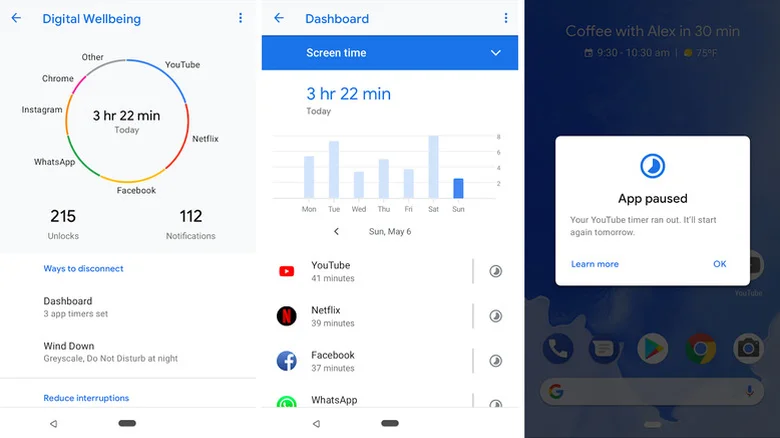
Digital Wellbeing is a free app developed by Google LLC, listed under the Tools category on the Google Play Store. You’ll find it pre-installed on many Android devices, usually accessible through Settings rather than the app menu. Once opened, it delivers a daily chart of your phone habits, covering screen time, how often you unlock your device, how many notifications you’ve received and which apps you’ve used most. From there, you can drill into specifics, tapping any app to see exactly how much time you’ve spent in it today.
Beyond tracking, the feature set extends into setting up app timers so you can cap daily usage for specific tools. Once the timer runs out, the app’s icon dims and it closes for the day, with timers resetting at midnight. You can even set timers for whole selections of apps, like social media.
Samsung takes things one step further and compares how much time you’ve spent playing games to how much time you’ve spent on social media and exactly how much time you’ve used on productivity and finance apps. Samsung’s Digital Wellbeing version can also keep track of how much time you use your phone while driving or walking.
Practical ways to use Digital Wellbeing
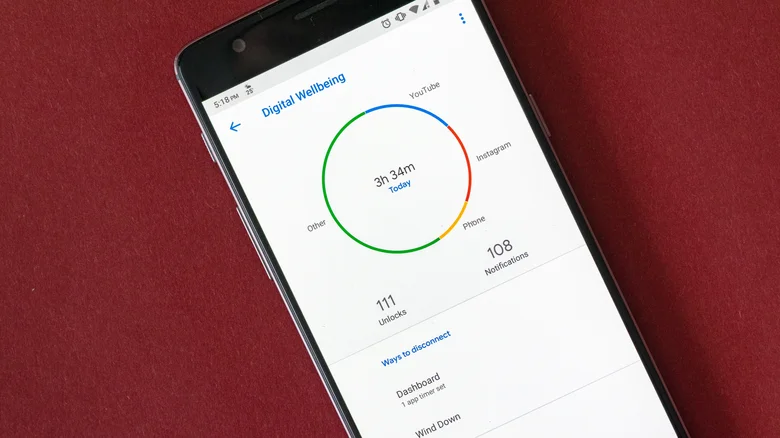
The Digital Wellbeing app has pretty useful features that can help you manage your screentime with a few taps. You can enable something called Bedtime mode where your screen fades to grayscale and Do Not Disturb is set on a schedule, designed to encourage you to put down the phone before bed. Focus mode, another tool found in this app, pauses distracting apps with one tap, blocking notifications from them.
Samsung peppers in some extra modes, letting you customize how you want the app to work in other situations. For instance, when Work mode is enabled (handled through Modes and Routines), the Digital Wellbeing app will set the phone to vibrate only and turn on power saving. When you customize it, you can choose to turn the mode on automatically, which can happen within a certain time period or when you open an app such as your company’s message tool. Since most of us launch those apps outside working hours, you can choose a time interval and on which week days. You can even choose to automatically trigger this mode when you’re at your office, but GPS will need to be turned on for that. It’s even possible to decide exactly what the phone does when Work mode is on.
There are other modes and routines you can enable, like what your phone should do when you’re at the theater, when you’re driving, exercising, relaxing or gaming, to name a few. You can even create your own.
Regardless of which version of this Android Digital Wellbeing tool you have, you should give it a try, evaluate how much time you spend on your phone, and see how the app can help you out.
