Close Menu
MyAppsPlus

    Subscribe to Updates

    Get the latest creative news from FooBar about art, design and business.

    What's Hot

    Apple’s 13-inch 24GB M5 MacBook Air just dropped back to Prime Day price at $200 off (All colors)

    October 24, 2026

    The Boox Palma 2 Pro finally got me to stop reading on my phone

    October 24, 2026

    Google Messages is getting a powerful new weapon against sneaky text scams

    October 24, 2026
    Facebook X (Twitter) Instagram
    Facebook X (Twitter) Instagram
    MyAppsPlusMyAppsPlus
    Saturday, October 24
    • Home
    • Breaking Tech
    • Apps & Software
    • AI & Automation
    • Android
    • iPhone & iOS
    • More
      • Reviews
      • How-To Guides
      • Deals & Discounts
      • Shop
    MyAppsPlus
    Home»iPhone & iOS»Retro game emulator Delta looks great on the iPhone Duo
    iPhone & iOS

    Retro game emulator Delta looks great on the iPhone Duo

    myappsplusBy myappsplusOctober 23, 2026002 Mins Read
    Share Facebook Twitter Pinterest Copy Link LinkedIn Tumblr Email Telegram WhatsApp
    Follow Us
    Google News Flipboard
    Retro game emulator Delta looks great on the iPhone Duo
    Share
    Facebook Twitter LinkedIn Pinterest Email Copy Link

    The popular retro game emulator Delta has today launched a big new 2.0 version, most notably featuring a refreshed Liquid Glass interface and support for the iPhone Duo.

    The app now has specially-designed controller skins that are optimized for all the different iPhone Duo poses, including some beautiful Nintendo DS layouts that use the full size of the inner display, and cleverly spans the crease when partially folded in book mode in portrait.

    The bigger screen of the iPhone Duo enables some immersive gaming experiences, but the Delta developers have also ensured that the app naturally reflows on the portrait closed outer screen too.

    Another little easter egg is that you can fold the Duo closed to automatically put the DS to sleep, emulating the physical behavior of a real DS console.

    Delta also has a special trick when using it in landscape split view alongside another app. You can see it in action in this screenshot, which depicts Delta running side by side with another iPhone Duo app that is playing a video.
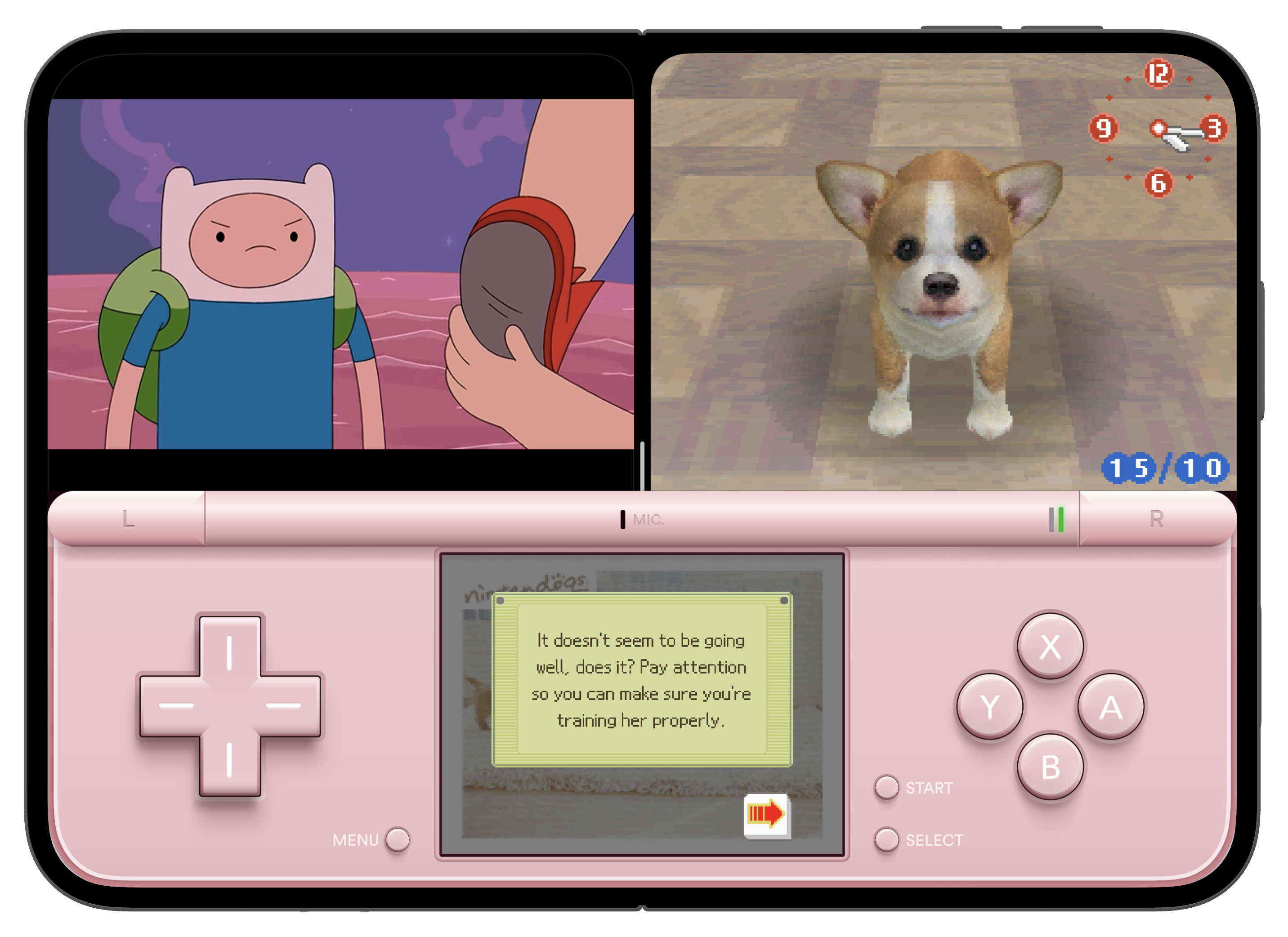

    Typically, the iPhone Duo Split View means each app is constrained to 50% of the screen space. But, as shown in this example, because the app exposes the bottom half of the virtual DS as a custom keyboard view, the system allows this ‘keyboard’ to stretch across the full width of the screen, overlapping the unrelated video player app on the other side of the split.

    Aside from iPhone Duo support, the new update also includes Sega Genesis ROM compatibility, improved library navigation, updated audio settings that allow game audio to mix alongside your currently playing music or podcast, and more.

    The premium version of Delta can be unlocked using an In-App Purchase subscription directly through the App Store, now available worldwide. In the US, EU, Brazil, and Japan, you can also support the app directly through Patreon.

    You’re reading 9to5Mac — experts who break news about Apple and its surrounding ecosystem, day after day. Be sure to check out our homepage for all the latest news, and follow 9to5Mac on Twitter, Facebook, and LinkedIn to stay in the loop. Don’t know where to start? Check out our exclusive stories, reviews, how-tos, and subscribe to our YouTube channel

    Delta Emulator game News retro
    Follow on Google News Follow on Flipboard
    Share. Facebook Twitter Pinterest LinkedIn Tumblr Email Copy Link
    myappsplus
    • Website

    Related Posts

    Apple Store Pickup System for iPhone Duo Just Went Live Again in U.S. and Canada

    October 24, 2026

    This clever USB-C cable doubles as a stand for your phone [Gallery]

    October 24, 2026

    Top Stories: Apple ‘Pro and Tell’ Debut, iPhone Duo Launch, and More

    October 24, 2026
    Add A Comment
    Leave A Reply Cancel Reply

    Top Posts

    Cathay Pacific tests Google AI that dramatically cuts airplane contrails — tiny altitude shifts slash environmental impact by 40% in early trials

    September 8, 2026137 Views

    Drone swarm tech valued by both defense and civilian sectors, industry platform says

    September 8, 202615 Views

    Keep running out of mobile data? This new unlimited plan gets you up to 80Mbps 5G speeds for just AU$50/m

    October 8, 202614 Views
    Latest Reviews

    WD’s 6TB Elements portable hard drive drops to $260 for simple plug-and-play backups

    myappsplusSeptember 1, 2026

    Job postings show early signs of AI automation impact

    myappsplusSeptember 1, 2026

    iPhone 18 Pro Colors Apparently Include Black, But Skip Silver

    myappsplusSeptember 1, 2026
    Stay In Touch
    • Facebook
    • YouTube
    • TikTok
    • WhatsApp
    • Twitter
    • Instagram

    Subscribe to Updates

    Get the latest tech news from FooBar about tech, design and biz.

    Most Popular

    WD’s 6TB Elements portable hard drive drops to $260 for simple plug-and-play backups

    September 1, 20260 Views

    iPhone 18 Pro Colors Apparently Include Black, But Skip Silver

    September 1, 20260 Views

    The new Amazfit Cheetah 2 Pro falls to $399.99 in its first Amazon discount

    September 1, 20260 Views
    Our Picks

    Apple’s 13-inch 24GB M5 MacBook Air just dropped back to Prime Day price at $200 off (All colors)

    October 24, 2026

    The Boox Palma 2 Pro finally got me to stop reading on my phone

    October 24, 2026

    Google Messages is getting a powerful new weapon against sneaky text scams

    October 24, 2026

    Subscribe to Updates

    Subscribe to our newsletter and get the latest tech news, app updates, AI trends, smartphone reviews, and exclusive deals delivered straight to your inbox.

    Facebook X (Twitter) Instagram Pinterest
    • About Us
    • Get In Touch
    • Disclaimer
    • Privacy Policy
    • Terms & Conditions
    © 2026 MyAppsPlus. All Rights Reserved.

    Type above and press Enter to search. Press Esc to cancel.