Close Menu
MyAppsPlus

    Subscribe to Updates

    Get the latest creative news from FooBar about art, design and business.

    What's Hot

    Dbrand’s MNML Pixel 11 Pro cases are simply good, and that’s the point [Gallery]

    September 12, 2026

    Apple @ Work: The three prongs of software updates in the AI era

    September 12, 2026

    Deepfakes are wrecking influencers’ credibility, one fake ad at a time

    September 12, 2026
    Facebook X (Twitter) Instagram
    Facebook X (Twitter) Instagram
    MyAppsPlusMyAppsPlus
    Saturday, September 12
    • Home
    • Breaking Tech
    • Apps & Software
    • AI & Automation
    • Android
    • iPhone & iOS
    • More
      • Reviews
      • How-To Guides
      • Deals & Discounts
      • Shop
    MyAppsPlus
    Home»Android»Pixel 11 lets you make any Camera Look default with this buried setting
    Android

    Pixel 11 lets you make any Camera Look default with this buried setting

    myappsplusBy myappsplusSeptember 5, 2026003 Mins Read
    Share Facebook Twitter Pinterest Copy Link LinkedIn Tumblr Email Telegram WhatsApp
    Follow Us
    Google News Flipboard
    Pixel 11 lets you make any Camera Look default with this buried setting
    Share
    Facebook Twitter LinkedIn Pinterest Email Copy Link

    The Pixel 11 series is out in the hands of plenty of (hopefully) happy users,and for the most part, I can count myself among them. This generation marks a massive shift for the camera in particular, as Google has finally loosened up its HDR-centric grip on processing. Really, the only big downsides with Camera Looks appeared to be how it saved your default look — and, as it turns out, there’s a setting to fix that, too.

    This tip-slash-correction comes via Google’s PR team, which reached out to me last night to let me know that, despite what I found during my hands-on time with Camera Looks, you actually aren’t limited to Google’s four “default” looks as, you know, your default. While Original, Natural, Shadows, and Vanilla are all available under a “Default Look” dropdown menu, if you prefer some of the Pixel 11’s more unique styles — Velvet, Classic, Digi, etc. — those can be saved as your standard preset option.
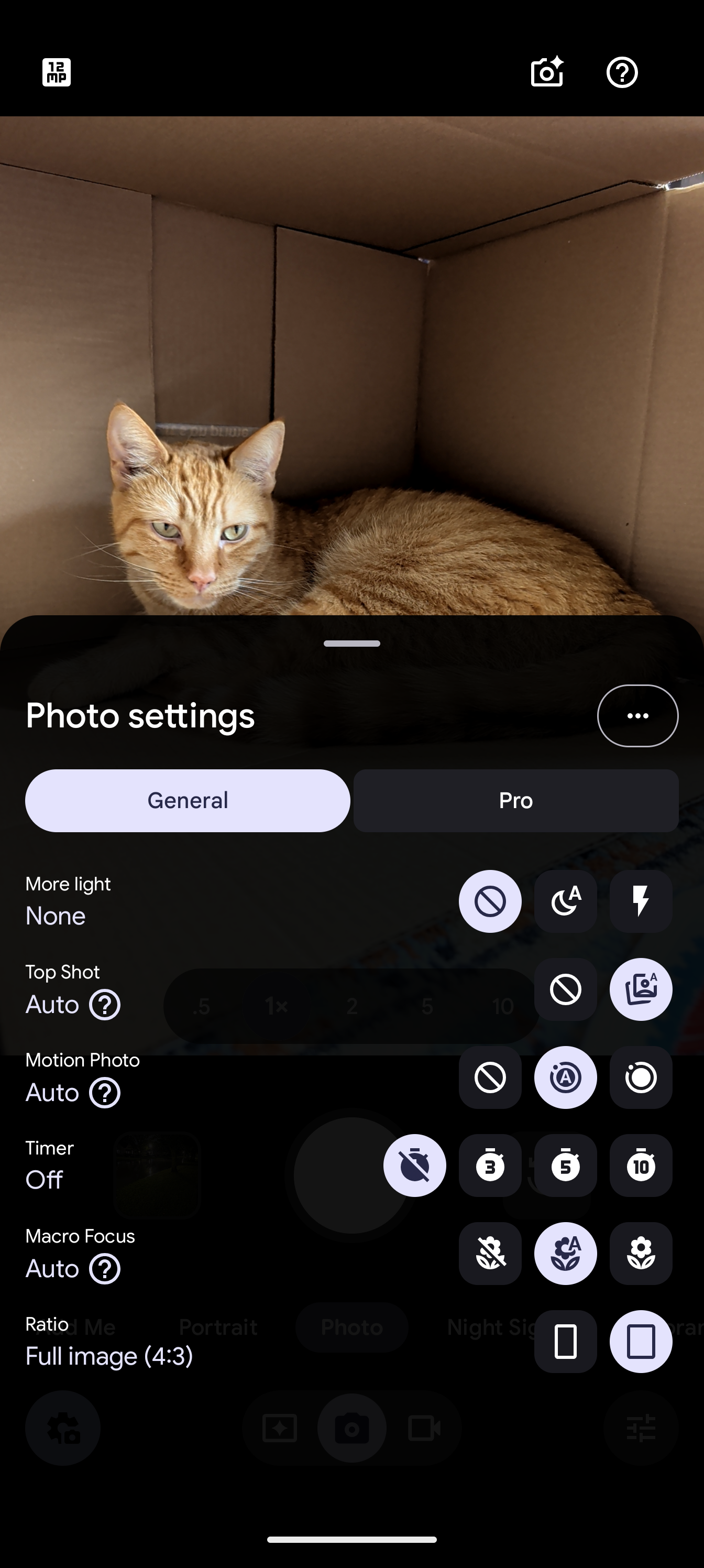
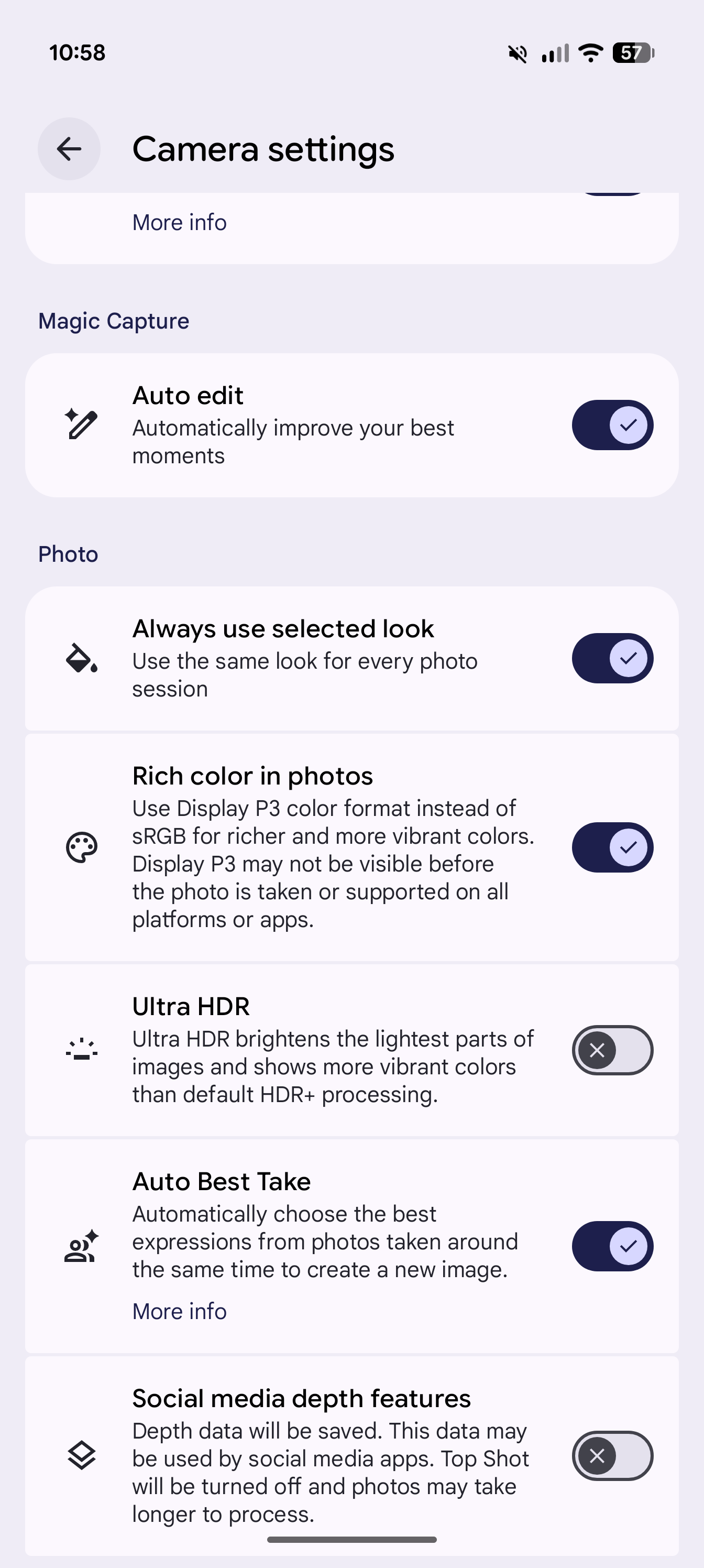

    If you’d rather have complete control over your default, grab your Pixel 11, tap the settings icon in the lower-left corner of the camera app, then tap the triple-dot overflow menu icon in the upper-right. Towards the bottom of the list, look for the Photo menu options, then toggle “Always use selected look” on.

    Now, if you return to the Looks menu, selecting any of Google’s non-default options will still be saved as your preference when you leave the app. Whenever one of these more stylized options is selected as your main shooting mode, you’ll see its name briefly appear in the lower-right corner when opening the app, along with a purple Looks icon that sticks around indefinitely. Unlike with one of Google’s four standard processing modes, that permanent Looks icon drops you directly into this menu; you’ll have to hit Back from here to return to other settings like exposure and white balance.
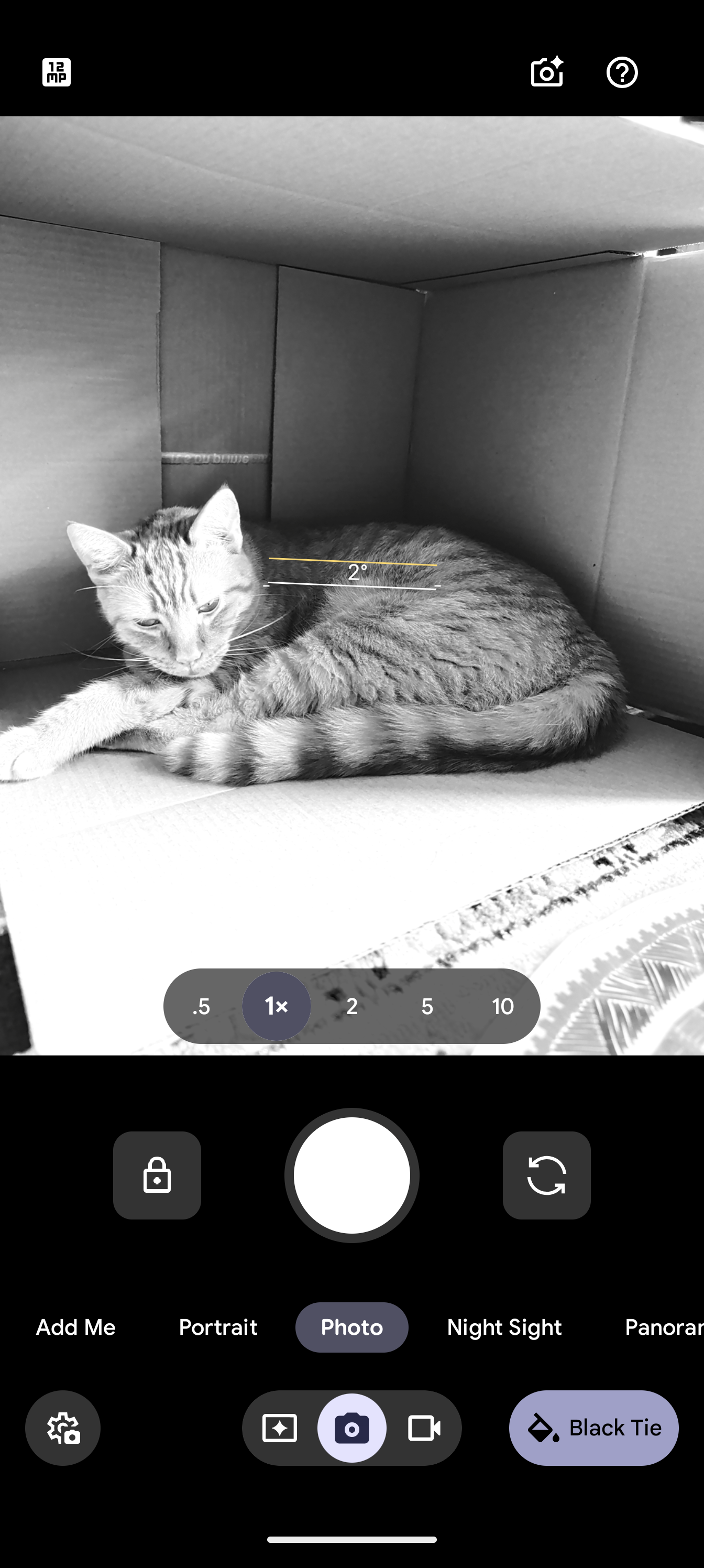
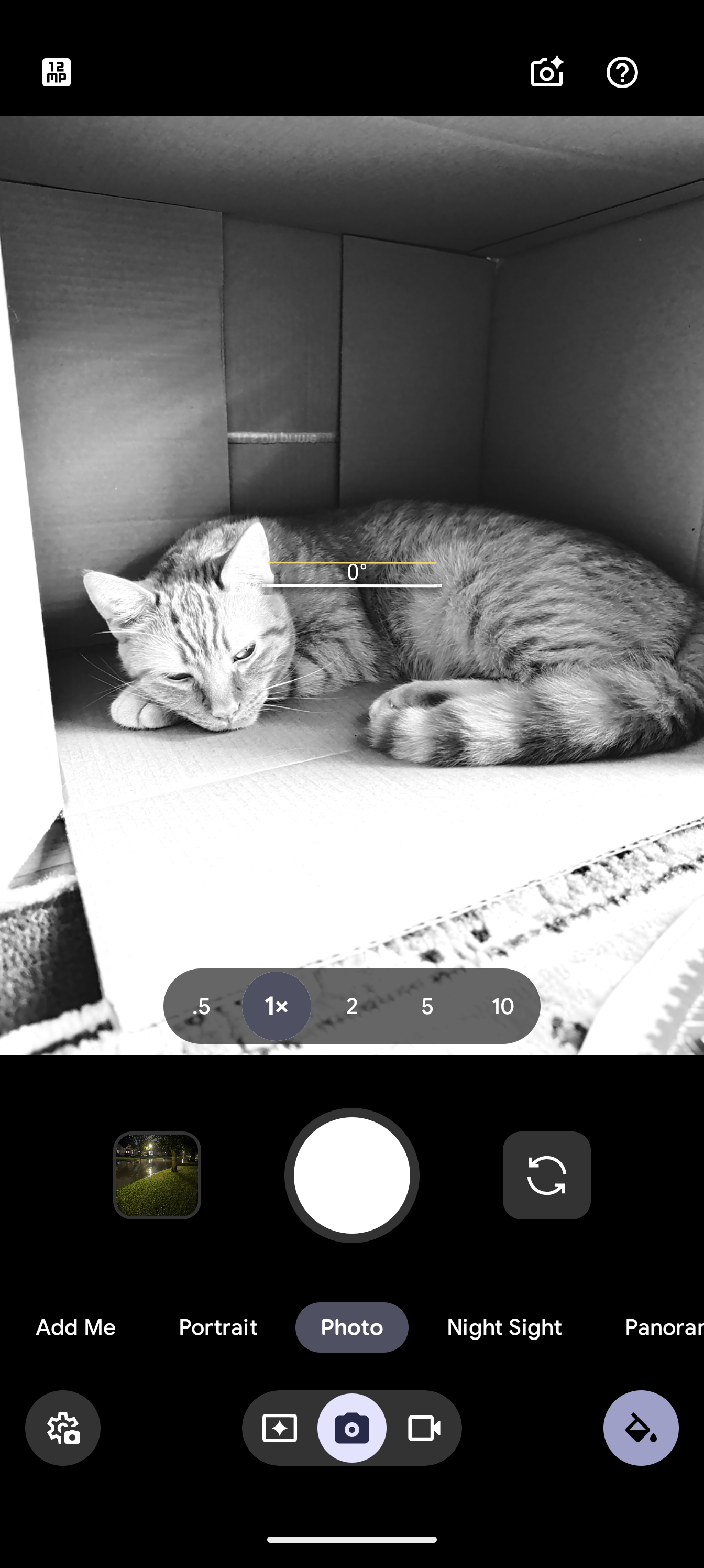

    It’s honestly great to see that Google does allow Pixel 11 users to save any of these shooting modes as what’s available immediately upon launching the camera, though I won’t pretend it’s not a bit convoluted to split default preferences into two completely different experiences. But hey, it’s early days for Camera Looks — maybe the Pixel 12 will launch with a more refined UX that unifies this into one slightly-more organized package.

    You’re reading 9to5Google — experts who break news about Google and its surrounding ecosystem, day after day. Be sure to check out our homepage for all the latest news, and follow 9to5Google on Twitter, Facebook, and LinkedIn to stay in the loop. Don’t know where to start? Check out our exclusive stories, reviews, how-tos, and subscribe to our YouTube channel

    Camera lets Make News Pixel
    Follow on Google News Follow on Flipboard
    Share. Facebook Twitter Pinterest LinkedIn Tumblr Email Copy Link
    myappsplus
    • Website

    Related Posts

    Dbrand’s MNML Pixel 11 Pro cases are simply good, and that’s the point [Gallery]

    September 12, 2026

    Apple @ Work: The three prongs of software updates in the AI era

    September 12, 2026

    Score the Zelda Ocarina of Time remake pre-order w/ Textured Foil Cover at $10 off while you still can

    September 12, 2026
    Add A Comment
    Leave A Reply Cancel Reply

    Top Posts

    The 6 AI-free Linux distros I recommend most

    August 19, 20263 Views

    AI, automation, robot dogs ensure on-site nuclear safety

    September 7, 20262 Views

    This tiny AI box could save me from upgrading my perfectly good laptop

    September 6, 20262 Views
    Latest Reviews

    Apple Wallet driver’s licenses are coming to North Carolina, but there’s a catch

    myappsplusAugust 18, 2026

    3 Japanese AI Stocks Turning Automation Spending Into Real Revenue

    myappsplusAugust 18, 2026

    Apple: DOJ’s latest challenge in antitrust case ‘fails at every level’

    myappsplusAugust 18, 2026
    Stay In Touch
    • Facebook
    • YouTube
    • TikTok
    • WhatsApp
    • Twitter
    • Instagram

    Subscribe to Updates

    Get the latest tech news from FooBar about tech, design and biz.

    Most Popular

    Apple Wallet driver’s licenses are coming to North Carolina, but there’s a catch

    August 18, 20260 Views

    3 Japanese AI Stocks Turning Automation Spending Into Real Revenue

    August 18, 20260 Views

    Apple: DOJ’s latest challenge in antitrust case ‘fails at every level’

    August 18, 20260 Views
    Our Picks

    Dbrand’s MNML Pixel 11 Pro cases are simply good, and that’s the point [Gallery]

    September 12, 2026

    Apple @ Work: The three prongs of software updates in the AI era

    September 12, 2026

    Deepfakes are wrecking influencers’ credibility, one fake ad at a time

    September 12, 2026

    Subscribe to Updates

    Subscribe to our newsletter and get the latest tech news, app updates, AI trends, smartphone reviews, and exclusive deals delivered straight to your inbox.

    Facebook X (Twitter) Instagram Pinterest
    • About Us
    • Get In Touch
    • Disclaimer
    • Privacy Policy
    • Terms & Conditions
    © 2026 MyAppsPlus. All Rights Reserved.

    Type above and press Enter to search. Press Esc to cancel.