Close Menu
MyAppsPlus

    Subscribe to Updates

    Get the latest creative news from FooBar about art, design and business.

    What's Hot

    How to turn off Gemini in Gmail, and what you lose when you do

    November 17, 2026

    Hello! Super rare $50 price drops hit MacBook Neo lineup today in early Black Friday sale

    November 17, 2026

    macOS 27.3 Warns Against Giving AI Apps Full Mac Control

    November 17, 2026
    Facebook X (Twitter) Instagram
    Facebook X (Twitter) Instagram
    MyAppsPlusMyAppsPlus
    Tuesday, November 17
    • Home
    • Breaking Tech
    • Apps & Software
    • AI & Automation
    • Android
    • iPhone & iOS
    • More
      • Reviews
      • How-To Guides
      • Deals & Discounts
      • Shop
    MyAppsPlus
    Home»iPhone & iOS»macOS 27.3 Warns Against Giving AI Apps Full Mac Control
    iPhone & iOS

    macOS 27.3 Warns Against Giving AI Apps Full Mac Control

    myappsplusBy myappsplusNovember 17, 2026002 Mins Read
    Share Facebook Twitter Pinterest Copy Link LinkedIn Tumblr Email Telegram WhatsApp
    Follow Us
    Google News Flipboard
    macOS 27.3 Warns Against Giving AI Apps Full Mac Control
    Share
    Facebook Twitter LinkedIn Pinterest Email Copy Link

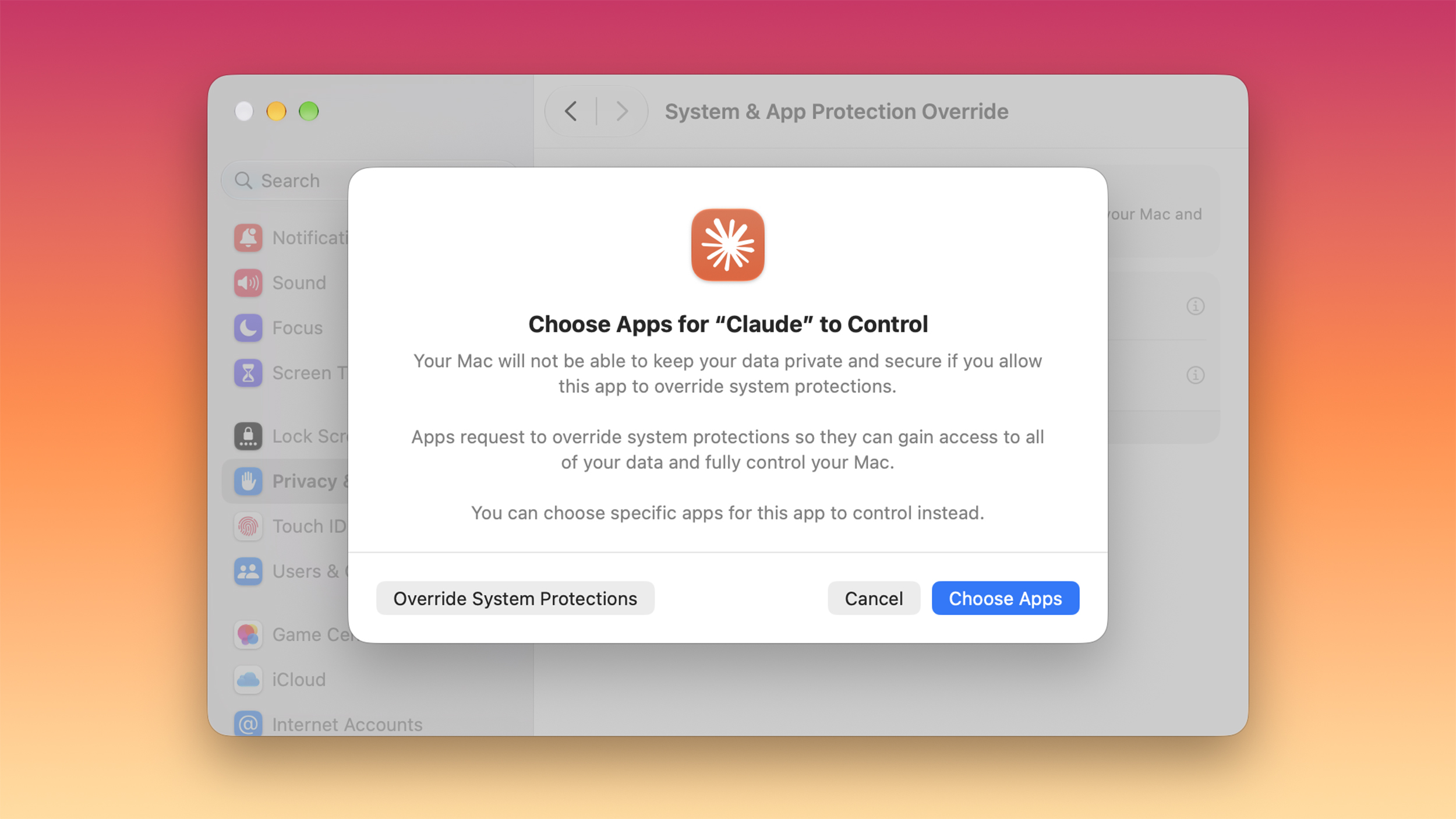
    With the latest macOS 27.3 beta, Apple is giving Mac users more control over the data they share and the access they give to apps, including apps that use AI agents. Apple today informed developers about upcoming changes to the Full Disk Access API and the Device Control and Data Access API.

    Here’s what Apple says is changing:

    • The current Device Control and Data Access setting will be split into two options that make it clearer to users what they’re permitting. The setting is becoming System & App Protection Override and Accessibility.
    • There will be a single method for granting permissions by selecting the app requesting access from a list.
    • Apple will encourage users to grant access to just the specific apps (in System & App Protection Override) or folders (for Full Disk Access) required for workflows.
    • Apple will better inform users about the data apps will receive access to or control over if full permissions are given.
    • Users will have an option to configure apps to ask each time for required access rather than granting an app unrestricted access.
    • There will be a transparency indicator when a requesting app is controlling another app with System & App Protection Override. The indicator will be displayed in the Mac menu bar.

    Apple says developers will need to adjust user onboarding and make sure apps can “gracefully handle” access to a limited set of folders or apps when using the APIs being overhauled.

    Apps that use Full Disk Access for disk backup or the new Accessibility settings for assistive technologies can request entitlements to offer the same experience for new installations that they offered before macOS 27.3.

    Right now, known apps keep their current experience without an entitlement, and app permissions granted by users prior to macOS 27.3 will remain in effect. Mac users will see these changes when approving new app permission requests, and entitlement details are coming soon.

    Last month, Apple said it would add “additional controls” for Full Disk Access on Macs because of the risks posed by AI agents. Apple warned that some developers are using Full Disk Access in ways that can put users at risk, exposing files, mail, messages, browsing history, and more.
    This article, “macOS 27.3 Warns Against Giving AI Apps Full Mac Control” first appeared on MacRumors.com

    Discuss this article in our forums

    against Featured Giving macOS warns
    Follow on Google News Follow on Flipboard
    Share. Facebook Twitter Pinterest LinkedIn Tumblr Email Copy Link
    myappsplus
    • Website

    Related Posts

    Nvidia warns chip buyers of legal risks tied to China AI access, CNBC reports

    November 17, 2026

    Sihoo’s ergonomic office chair gives all-year comfort at lowest price for holidays

    November 17, 2026

    Beta 2 of iOS 27.3 & MacOS 27.3 Available for Testing

    November 17, 2026
    Add A Comment
    Leave A Reply Cancel Reply

    Top Posts

    UiPath Launches AI Coding Agent, Integrates Claude Code and Codex to Target Development Automation

    November 16, 202636 Views

    Save on your groceries, gas, and holiday shopping with this $15 BJ’s membership (Reg. $60) 

    November 4, 202630 Views

    Google’s new AI shopping cart tracks deals across stores

    October 25, 202630 Views
    Latest Reviews

    Google to invest $15 billion in AI infrastructure in Finland, its largest single investment in Europe

    myappsplusSeptember 9, 2026

    The first and latest Star Wars films are coming to IMAX 70mm in 2027

    myappsplusSeptember 9, 2026

    AAPL Stock Has Mostly Struggled On iPhone Launch Days: Can John Ternus ‘Fold’ Apple Towards Better Days?

    myappsplusSeptember 9, 2026
    Stay In Touch
    • Facebook
    • YouTube
    • TikTok
    • WhatsApp
    • Twitter
    • Instagram

    Subscribe to Updates

    Get the latest tech news from FooBar about tech, design and biz.

    Most Popular

    Everything announced during Nintendo Direct

    September 9, 20260 Views

    Get it for $600 at Staples

    September 9, 20260 Views

    iPhone Duo is official — price, release date, specs, and everything you need to know

    September 9, 20260 Views
    Our Picks

    How to turn off Gemini in Gmail, and what you lose when you do

    November 17, 2026

    Hello! Super rare $50 price drops hit MacBook Neo lineup today in early Black Friday sale

    November 17, 2026

    macOS 27.3 Warns Against Giving AI Apps Full Mac Control

    November 17, 2026

    Subscribe to Updates

    Subscribe to our newsletter and get the latest tech news, app updates, AI trends, smartphone reviews, and exclusive deals delivered straight to your inbox.

    Facebook X (Twitter) Instagram Pinterest
    • About Us
    • Get In Touch
    • Disclaimer
    • Privacy Policy
    • Terms & Conditions
    © 2026 MyAppsPlus. All Rights Reserved.

    Type above and press Enter to search. Press Esc to cancel.